Python Classes and Objects Tutorial: Build a Student Model Step by Step
Build one Student class, create independent objects, and trace every value. The examples show how constructors, methods, and attribute lookup work in Python.
KnowledgeGate Team
Exam prep & CS education
Updated 15 Sep 20265 min read

Variables, lists, and functions may make sense separately, yet a class can still feel abstract and self can look like unexplained ceremony. One small Student model clears both up: it creates two independent objects, asha and ravi, and every value they hold can be traced by hand, from the constructor call to the moment asha.average() returns 81.0. The same model separates instance attributes from class attributes and exposes the four bugs that break most first attempts at a class.
Python classes, objects, attributes, and methods: one mental model
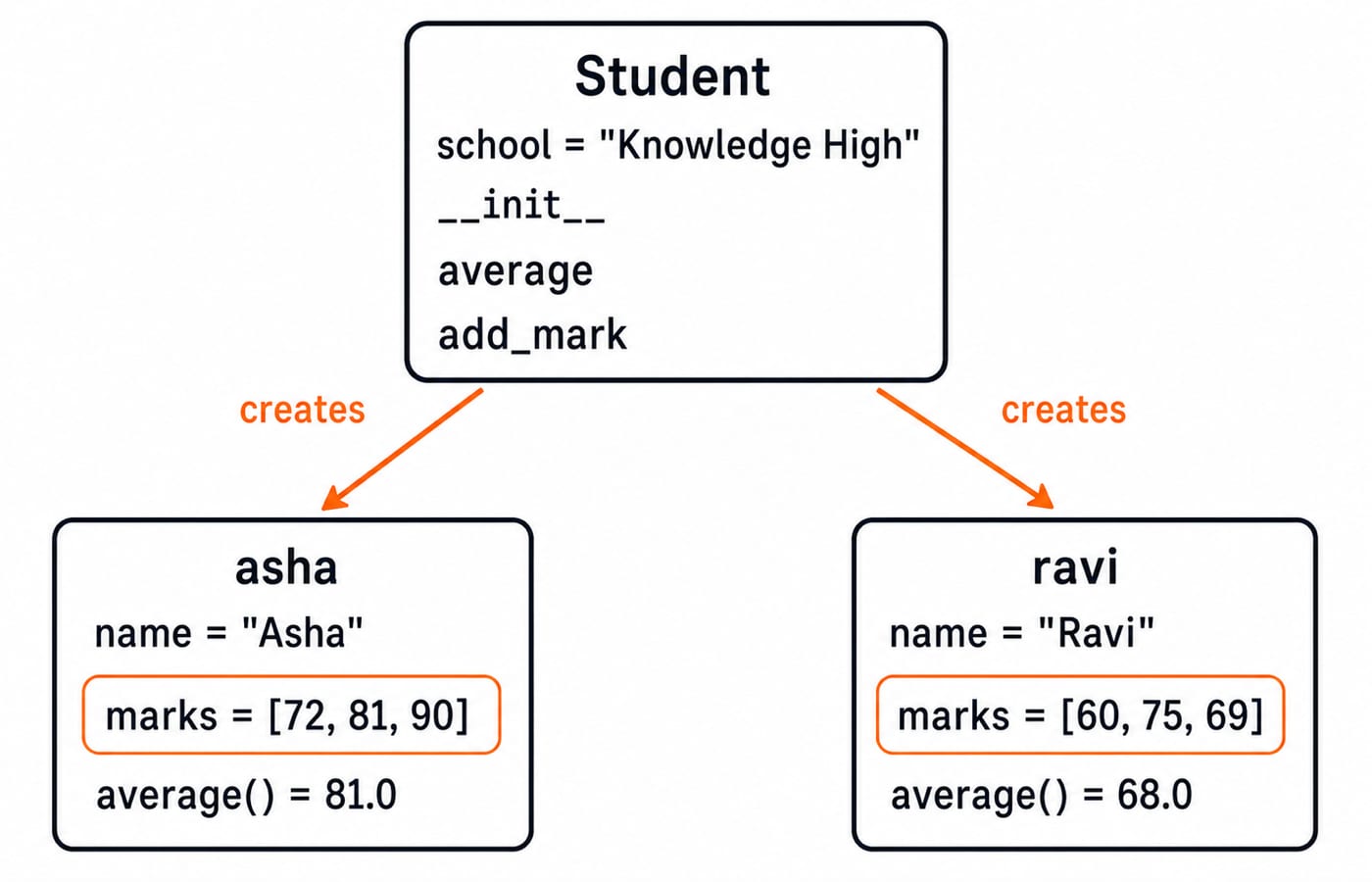
A class is like a blueprint, but the useful part is what the blueprint produces. Student is a class, while asha and ravi are objects created from it. Their name and marks values are attributes. Operations such as average() and add_mark() are methods.
The class describes shared structure and behaviour. Each object holds its own data. A dictionary such as {"name": "Asha", "marks": [72, 81, 90]} can store the same values, but an object keeps the data beside the operations that belong to it. Classes are not always better than dictionaries. They become useful when several values and behaviours form one repeated concept. The Coding & Skill Development Courses category shows more programming paths where this modelling idea becomes useful.
Define the Student class and create two objects
Run this complete example first:
class Student:
    school = "Knowledge High"

    def __init__(self, name, marks):
        self.name = name
        self.marks = list(marks)

    def average(self):
        return sum(self.marks) / len(self.marks)

    def add_mark(self, mark):
        self.marks.append(mark)
        return self.average()


asha = Student("Asha", [72, 81, 90])
ravi = Student("Ravi", [60, 75, 69])

print(asha.name, asha.average())
print(ravi.name, ravi.average())
school is a class attribute. __init__ initialises each new object, and self.name and self.marks are instance attributes. The other methods read or change those instance attributes.
For Asha, (72 + 81 + 90) / 3 = 243 / 3 = 81.0. For Ravi, (60 + 75 + 69) / 3 = 204 / 3 = 68.0. The output is:
Asha 81.0
Ravi 68.0
Using list(marks) makes a defensive copy, so the object owns its list even if the caller later changes the original list.
Trace what __init__ and self actually do
Follow asha = Student("Asha", [72, 81, 90]) in four micro-steps:
Python creates a new
Studentobject and passes that object to__init__asself.self.namereceives"Asha".self.marksreceives a new list containing72,81, and90.After initialisation finishes, the completed object is assigned to
asha.
__init__ initialises an already-created object. You do not manually return the object from it.
When you call asha.average(), Python binds asha to self. The method reads Asha's list and returns 243 / 3 = 81.0. Calling ravi.average() binds Ravi instead, so the calculation is 204 / 3 = 68.0. self is a conventional parameter name, not a Python keyword, but you should use it because every Python reader recognises the convention.
Change one object's state through a method
Now mutate Asha's object:
new_average = asha.add_mark(87)
print(new_average)
print(asha.marks)
print(ravi.marks)
print(ravi.average())
Asha's marks change from [72, 81, 90] to [72, 81, 90, 87]. The new total is 72 + 81 + 90 + 87 = 330, so 330 / 4 = 82.5. Ravi remains separate:
82.5
[72, 81, 90, 87]
[60, 75, 69]
68.0
The core lesson is simple: a method can change the object bound to self without changing other instances. As an optional improvement, guard the method before appending:
if not 0 <= mark <= 100:
    raise ValueError("mark must be between 0 and 100")
With that guard at the start of add_mark(), asha.add_mark(105) raises ValueError: mark must be between 0 and 100 instead of corrupting the model.
Class attributes and instance attributes are not the same
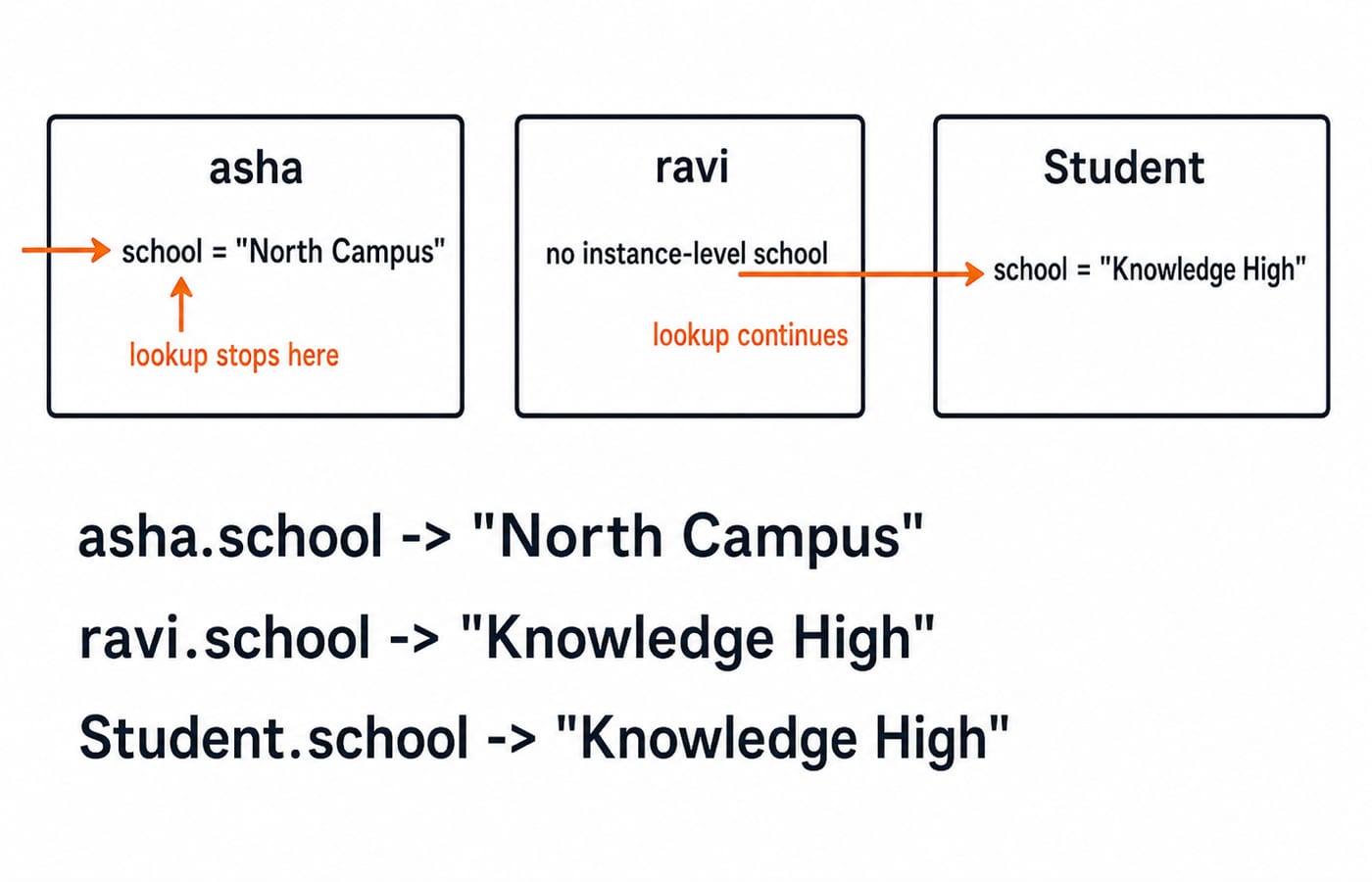
Initially, Student.school, asha.school, and ravi.school all produce "Knowledge High". Neither object has its own school value, so Python finds the class attribute.
After asha.school = "North Campus", asha.school produces "North Campus", while ravi.school and Student.school still produce "Knowledge High". Python checks the instance first and then the class. The assignment creates an instance attribute that shadows the class value only for Asha.
Four common Python class and object mistakes
Mistake | Symptom | Repair |
|---|---|---|
Write |
| Write |
Write | The local assignment disappears, and the object has no | Store |
Call | No instance is available for the required | Call |
Put a mutable | Every student can resolve to the same shared list | Create |
The shared-list bug is easy to prove. If both objects use the class-level marks = [], then asha.marks.append(90) also makes ravi.marks show [90]. With a fresh self.marks = [] in __init__, appending 90 to Asha leaves Ravi's list as [].
A practical debugging habit is to inspect asha.__dict__. At this point it should be {'name': 'Asha', 'marks': [72, 81, 90, 87], 'school': 'North Campus'}. The original class-level school value does not appear in this instance dictionary.
How coding tests and interviews turn the idea into questions
Common practice formats ask you to trace two instances, repair a missing-self or shared-list bug, or design a small class from requirements. For example, if Counter sets self.value = 0 in __init__, calling c1.increment() twice and c2.increment() once must print 2 1, not 3 3. Each object needs its own value.
Try these exercises, and predict each output before running the code:
Implement
Rectangle(8, 5)soarea()returns8 * 5 = 40andperimeter()returns2 * (8 + 5) = 26.Add
highest_mark()toStudent. It should return90for Asha and75for Ravi.Create
Book("Python Basics", 240)withreading_hours(30). At 30 pages per hour, it should return240 / 30 = 8.0.
When these work, apply object modelling to structures through the binary tree MCQs and graph MCQs. Both pages pose standalone practice questions, so sketch Node or Graph classes there only after the current exercises run correctly.
The short version and the next step
A class defines a reusable model.
An object is one instance of that model.
__init__gives the object its initial state.selfselects the current object.Instance attributes keep state separate, while class attributes provide shared defaults.
That is why asha.average() is 82.5 after adding 87, while ravi.average() remains 68.0. Retype the Student class without copying, add highest_mark(), and then create meera = Student("Meera", [88, 91, 84]). Her total is 88 + 91 + 84 = 263, so 263 / 3 = 87.666...; round(meera.average(), 2) displays 87.67.
Use the Python Programming course for structured language practice. For the next layer of the object model, inheritance, super(), and dunder methods, read OOP in Python: MRO, super() and dunder methods. When you are comfortable building and testing small classes, continue with the DSA Using Python course to apply the same ideas to data structures.
Keep learning

Pandas Basics in Python: Build, Clean and Analyse a DataFrame Step by Step
Follow one student dataset from its first DataFrame to a clean city summary, while learning how selection, missing values and vectorised calculations really work.
Updated 24 Sep 20265 min readPython
Python Operators and Expressions: Precedence, Types and Worked Output Traces
Trace Python expressions without guessing. This guide connects operator families, precedence, types, short-circuiting and exact output through worked examples.
Updated 23 Sep 20266 min readPython
CSV Files Explained: Parsing Rules, Worked Records and Exam Traps
Learn why commas and newlines are not always boundaries, trace a quote-aware parser, validate text fields with a schema, and calculate processing costs.
Updated 22 Sep 20265 min readPython
Polymorphism and Dunder Methods in Python: Runnable Examples and Exercises
See how one Python operation supports different types, then build a Vector2D class with readable output, addition, magnitude and equality. Includes runnable code, protocol failures and exercises.
Updated 21 Sep 20265 min readPython