SSC CGL Computer Knowledge Syllabus: A Topic-by-Topic Depth Map
Learn what to recall, practise and skip across six Computer Knowledge zones, then revise them through a focused 14-day plan.
KnowledgeGate Team
Exam prep & CS education
Updated 9 Aug 20265 min read50 views
Computer Knowledge can look so basic that you postpone it or so broad that you start studying a computer science degree. Both approaches waste time. The module is six zones wide, and each zone carries one line to recall, one task you must be able to do, and a point past which more study earns nothing. Where the module sits in Tier 2 and what its full topic list contains are covered in the Tier 2 Computer Knowledge module guide; the current SSC notice at ssc.gov.in is the authority for the official scheme.
First fix the boundary: functional literacy, not engineering depth
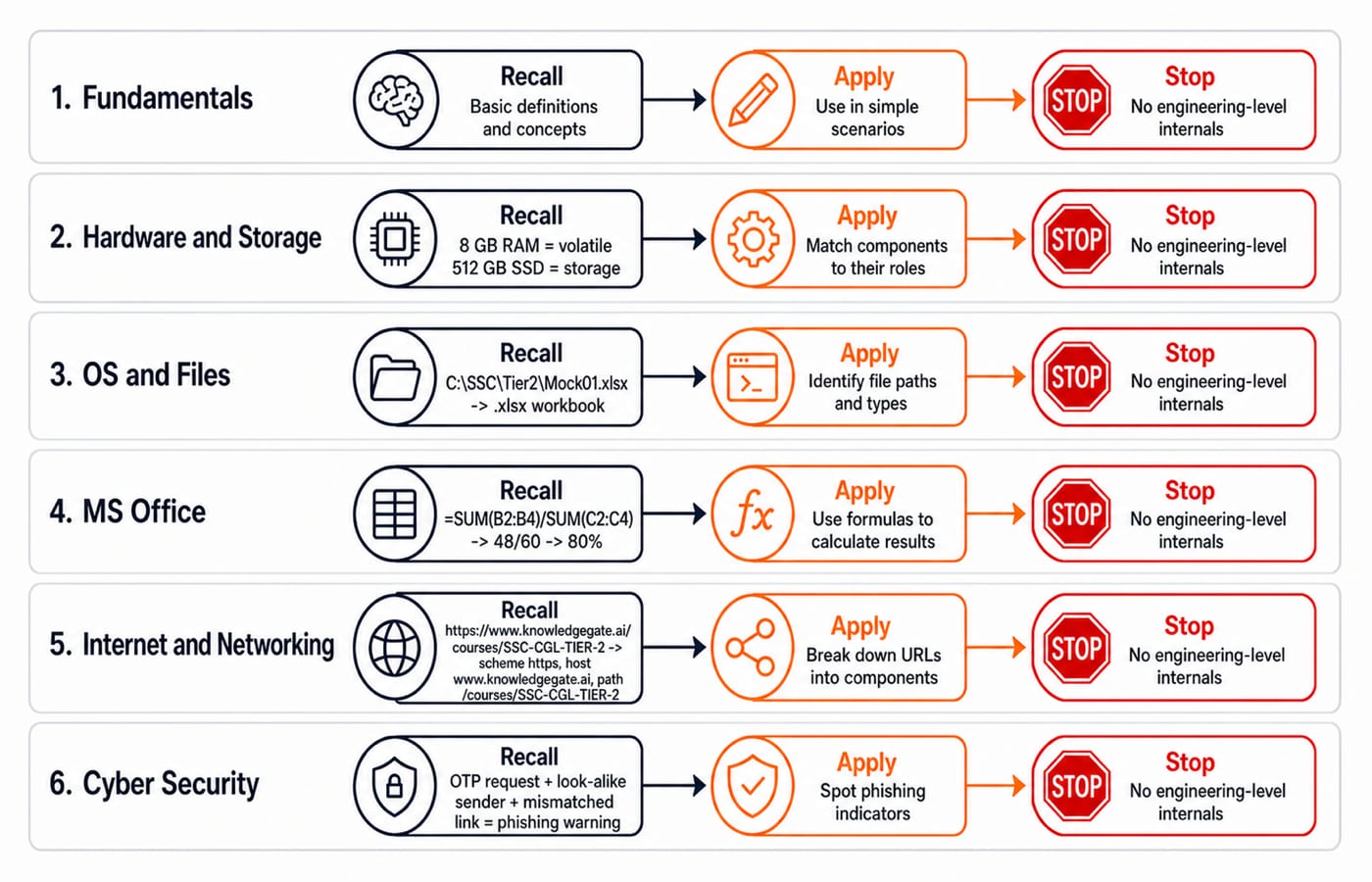
Prepare for four actions: identify a term, state its function, distinguish it from a close alternative, and apply one common operation. Know that 8 GB RAM is volatile working memory while a 512 GB SSD is non-volatile storage. Do not study transistor-level RAM cells or SSD controller algorithms.
That boundary holds in every zone. If a question can be settled by naming a thing, saying what it does, telling it apart from its nearest neighbour, or doing one everyday operation, it is inside your preparation. If it needs a circuit, a scheduling algorithm or a proof, it is outside. The rest of Tier 2, and the four areas Tier 1 asks before it, are mapped in the SSC CGL syllabus areas guide.
Build the six-zone syllabus and stop line
Zone | Recall | Practise | Stop before |
|---|---|---|---|
Computer fundamentals |
| Classify inputs, outputs, software and files | Processor architecture |
Hardware, memory and storage |
| Volatile versus non-volatile | Electronic internals |
Operating systems and files | OS role and file extensions | Parse | Kernel design |
MS Office | Word, Excel and PowerPoint | Select a tool; use a formula | Macros and automation |
Internet and networking |
| Parse a URL; distinguish devices | Protocol and routing algorithms |
Cyber security | Phishing, malware, firewall, OTP | Spot warnings and follow safe hygiene | Cryptographic internals |
Learn fundamentals through classification, not loose definitions
Classify this mixed set: CPU is a processor, keyboard an input device, monitor an output device, 8 GB RAM volatile primary memory, and 512 GB SSD non-volatile storage. Windows 11 is system software, MS Excel is application software, and Mock01.xlsx is a data file. Excel runs operations; an Excel workbook stores data.
For units, remember 1 byte = 8 bits. A 2 MB document is much smaller than a 700 MB video. Use any given conversion rule instead of starting a binary-versus-decimal convention debate. Two traps matter: RAM is not permanent storage, and an operating system is not an office application.
Turn file handling and MS Office into small, testable tasks
In C:\SSC\Tier2\Mock01.xlsx, C: is the drive, SSC and Tier2 are folders, Mock01 is the filename, and .xlsx is the extension. A .docx serves a Word document, .xlsx a workbook, .pptx a presentation, .pdf fixed layout, and .txt plain text. Copy creates another item; move changes its location. Save updates the file; Save As can create Mock01-reviewed.xlsx.
Build this mini-sheet:
Topic | Correct | Attempted | Accuracy |
|---|---|---|---|
Fundamentals | 18 | 20 | 90% |
Office | 14 | 20 | 70% |
Networking | 16 | 20 | 80% |
In D2, =B2/C2 gives 90%. Copying it down uses relative references and gives 70% and 80%. Overall, =SUM(B2:B4)/SUM(C2:C4) gives 48/60 = 80%. Choose Word for a two-page letter with Find and Replace, Excel for this score sheet, and PowerPoint for a six-slide briefing.
Treat internet, networking and security as one connected workflow
Parse https://www.knowledgegate.ai/courses/SSC-CGL-TIER-2 as scheme https, host www.knowledgegate.ai, and path /courses/SSC-CGL-TIER-2. Conceptually, DNS maps a name to an address. Packet formats, routing algorithms and subnet calculations cross the stop line.
A lab with 20 locally connected computers is a LAN. Offices in Delhi and Mumbai connected across distance form a WAN. A switch connects devices within a local network; a router connects networks.
Now run that same URL reading against a threat. Suppose support-ssc@gov-help.example asks you to confirm an OTP at ssc-login.example. Read the hosts first: neither gov-help.example nor ssc-login.example is ssc.gov.in, the sender only looks official, and a genuine login never asks you to send your OTP back to it. Do not click or reply; open the official site independently. Malware is harmful software, antivirus detects or blocks threats, a firewall filters traffic, a backup preserves a recovery copy, and strong unique passwords protect accounts.
Mixed questions: four checks that expose shallow learning
Which loses its contents when power is removed,
RAMorSSD? RAM, because it is volatile; the SSD retains data.Which formula calculates accuracy for
48correct out of60attempts? =48/60, displayed as80%, because accuracy is correct divided by attempted.Which device joins a LAN to another network, switch or router? Router, because a switch connects devices inside the LAN.
Is an unsolicited OTP request a normal login step or a warning sign? Warning sign, because an OTP should not be shared in response to a message.
Remember: .xlsx identifies a workbook format, not the Excel application. https indicates an encrypted web connection, not that every claim on a page is trustworthy. When you practise with these Computer Knowledge questions with answers, say in one line why each wrong choice is wrong. Our practice bank runs past 900 questions on computer terms, MS Office and everyday technology, though not every one is set for SSC CGL.
Use a 14-day plan that revisits every zone
Follow this sequence: days 1-2 fundamentals and units; 3-4 hardware, memory and storage; 5-6 OS and files; 7-9 Word, Excel and PowerPoint; 10-11 internet and email; 12 basic networking; 13 cyber security; and 14 one 40-question mixed check followed by error review.
Each day, spend 20 minutes on recall, 15 minutes on worked tasks and 10 minutes on questions. On day 14, label misses "term unknown", "pair confused" or "operation not practised". If you miss a day, merge only its 10-minute question block into the next day and move the concept block forward. Do not double the full session.
The short version and the next action
Learn names, functions, distinctions and ordinary operations, then stop before engineering internals. Retake the four checks above, begin with your weakest zone, and verify every official pattern detail in the current SSC notice. The SSC CGL exam preparation courses cover Computer Knowledge alongside the rest of Tier 2, if you would rather have this taught than assembled from a revision list.
Keep learning
SSC MTS Eligibility and Selection Process: Age, Qualification and Stages
Check your qualification date and birth-date window before planning preparation. This dated SSC MTS example explains age relaxation, the two CBE sessions and Havaldar's additional physical tests.
Updated 5 Oct 20264 min readSSC CGL
SSC CHSL Cutoff Trends: Compare Results and Set a Target Score
Compare the right CHSL result rows before choosing a practice target. Work through a historical benchmark, a personal buffer and two mock-test blocks to decide what to improve next.
Updated 30 Sep 20264 min readSSC CGL
SSC CGL Cutoffs Explained: Compare Tiers, Posts and Categories
A practical test for deciding whether two SSC CGL cutoff figures are genuinely comparable, with completed-result examples and a worksheet for rejecting mismatched rows.
Updated 19 Aug 20265 min readSSC CGL
SSC CGL Mock Analysis: Build an Error Ledger That Guides Every Revision
Turn each useful mock error or delay into evidence, a focused drill, a retest date, and a clear decision to close or reopen the row.
Updated 17 Aug 20265 min readSSC CGL