React Forms: Controlled vs Uncontrolled Components, Validation and the Interview Questions
Follow the value through a state-driven form and a ref-driven form, then choose the right model for live validation, simple inputs and file uploads.
KnowledgeGate Team
Exam prep & CS education
Updated 13 Aug 20265 min read
"Controlled or uncontrolled?" is the React forms question candidates often answer as if it were a choice between two coding styles. The real distinction is ownership: does React state hold the current input value, or does the DOM node hold it?
Once you name the owner, value versus defaultValue, live validation and the read-only input warning all follow.
The one distinction that matters
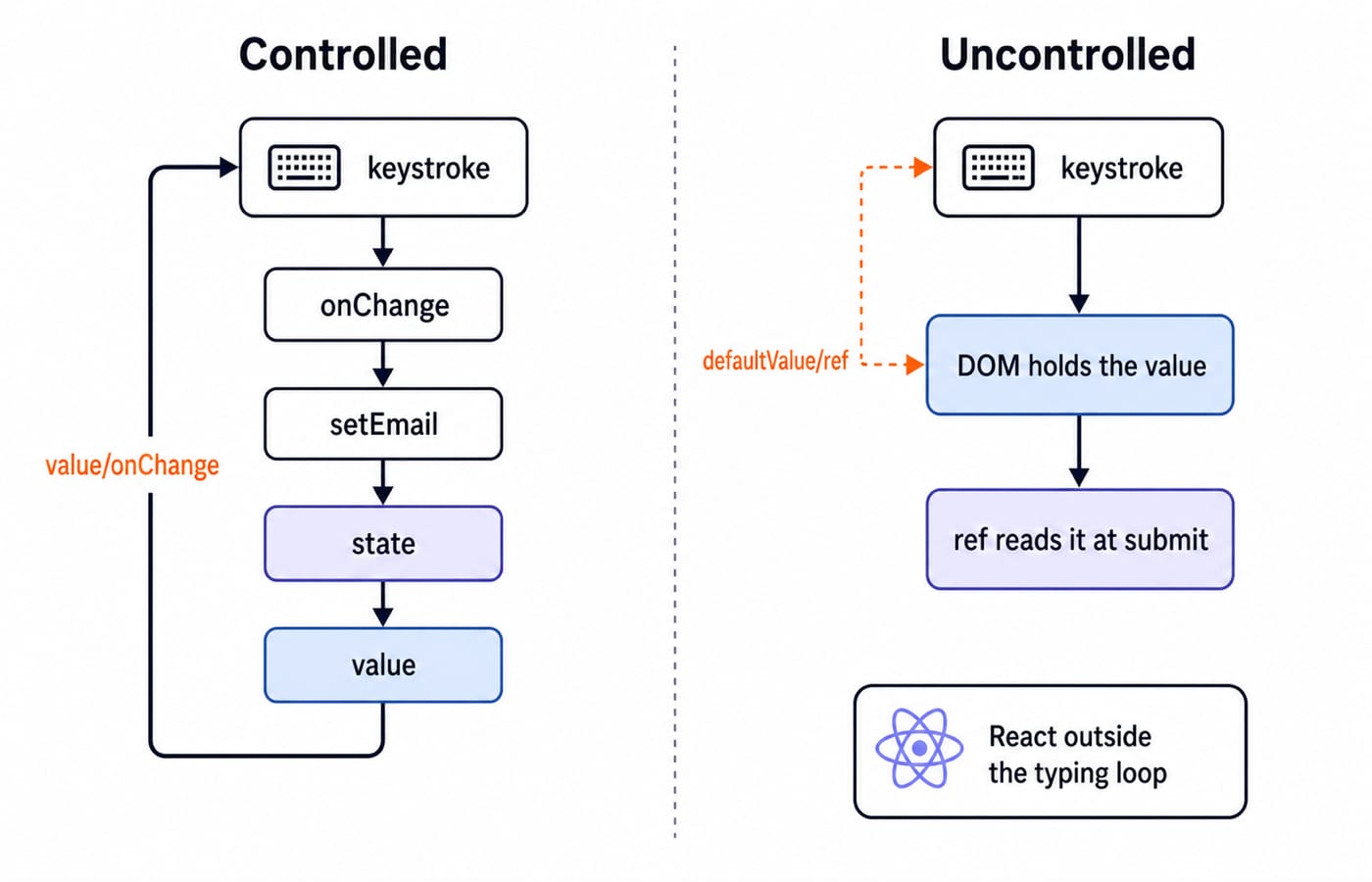
A controlled input gets its displayed value from React state. Its change handler updates that state, so React remains the source of truth throughout typing.
An uncontrolled input lets the DOM store its current value. React can seed an initial value, then read the live value through a ref when needed.
Question | Controlled | Uncontrolled |
|---|---|---|
Who owns the current value? | React state | DOM node |
Main props |
|
|
Read current value | From state | From |
Render on each keystroke | Normally yes | Not for value storage alone |
Live validation | Direct | More awkward |
Neither model is automatically better. The correct one follows from what the form must do while the user types.
A controlled input, worked
Here is a minimal controlled email field:
import { useState } from "react";

function ControlledForm() {
  const [email, setEmail] = useState("");

  return (
    <input
      value={email}
      onChange={e => setEmail(e.target.value)}
    />
  );
}
Trace one keystroke. Suppose email is "a" and the user types b.
The browser reports the input's next text,
"ab", in the change event.onChangecallssetEmail("ab").React renders again with
email === "ab".The
valueprop tells the input to display"ab".
The state and the displayed value stay in one loop. Code can use email immediately for validation, formatting, conditional messages or disabling the submit button.
This is also why useState("") is the safe initial value. The field is controlled from its first render instead of beginning with an absent value.
The React hooks deep dive explains the state and ref tools that power both form styles.
An uncontrolled input, worked
An uncontrolled form does not copy every typed character into React state:
import { useRef } from "react";

function UncontrolledForm() {
  const emailRef = useRef(null);

  const handleSubmit = e => {
    e.preventDefault();
    console.log(emailRef.current.value);
  };

  return (
    <form onSubmit={handleSubmit}>
      <input defaultValue="" ref={emailRef} />
      <button type="submit">Submit</button>
    </form>
  );
}
defaultValue supplies the starting value. After mounting, the DOM node owns subsequent edits. Typing alone does not request a React render to store the value. On submit, the ref gives direct access to the current DOM value.
Trace the same keystroke. The input already shows "a", the user types b, and the DOM node now holds "ab". React renders nothing, because no state changed. At submit, emailRef.current.value reads "ab" straight from that node.
This model suits small forms that need values only at submission, integration with non-React widgets and file inputs. A file input's value is user-controlled by the browser, so React code reads the selected files rather than trying to set the field's value.
Form validation both ways
A controlled form can validate whenever state changes or only on submit. This submit-time check is simple:
const [email, setEmail] = useState("");
const [error, setError] = useState("");

const handleSubmit = e => {
  e.preventDefault();

  if (!email.includes("@")) {
    setError("Enter a valid email");
  } else {
    setError("");
  }
};
Render the result with {error && <span>{error}</span>}. Since React always has email, the same check can run in onChange for live feedback. A production check needs your application's real email rules, and includes("@") only stands in for them. The flow is what carries over: the value is state, the check reads state, and the error message is state too.
For an uncontrolled field, the submit handler reads first and validates second:
const value = emailRef.current.value;
if (!value.includes("@")) {
  setError("Enter a valid email");
} else {
  setError("");
}
Submit-time validation is straightforward. Per-keystroke validation is less natural because React is outside the typing loop. You can add listeners or state, but doing so may remove the simplicity that motivated the uncontrolled design.
The warnings React is trying to explain
This field is effectively read-only:
<input value={email} />React tells the DOM to display email, but no onChange updates email when the user types. Add an onChange handler to make it controlled, or use defaultValue if the DOM should own later edits. Use readOnly only when a fixed value is intentional.
Another warning appears when a field changes ownership during its lifetime:
const [email, setEmail] = useState(undefined);An input with value={undefined} begins uncontrolled. If email later becomes a string, it switches to controlled. Seed text state with "" so ownership is stable from the first render.
The reverse switch is also a bug. A controlled string value should not become undefined or null after an asynchronous update.
When to choose each, and the interview angle
Choose controlled inputs when the UI needs live validation, conditional disabling, input masks, calculated previews or coordinated fields. The current value is already in React, which makes these behaviours direct and testable.
Choose uncontrolled inputs for simple submit-and-read forms, file inputs, and integrations that expect direct DOM ownership. Form libraries can also use refs and uncontrolled techniques to reduce render work while still offering a structured API.
Interviewers ask for the ownership definition, then probe consequences. Why is an input with only a value prop read-only? Because nothing writes the typed text back into state. Convert this form to controlled: add a state variable, pass it as value, and set it from e.target.value inside onChange.
Which prop seeds an uncontrolled field? defaultValue. Why is a file input special? The browser owns its value, so React reads the selected files instead of assigning them. The React interview questions for freshers list carries the wider set of first-round questions.
KnowledgeGate's MERN Stack question set carries over 600 practice questions spanning HTML, CSS, JavaScript, React, Node and MongoDB, including controlled-component items on exactly this topic.
The short version and next step
Controlled means React state owns the value through value and onChange, which makes live validation easy. Uncontrolled means the DOM owns it after defaultValue, and a ref reads it when needed. A value without an updating onChange creates the read-only bug.
Use the Complete React and Redux course to build these form patterns inside a full React and Redux project, and the MERN Stack and DSA bundle for the front-to-back application path. The Coding and DSA courses for placements page sits these React skills next to the rest of your interview preparation.
Keep learning

JavaScript Event Delegation: Bubbling, target and currentTarget with Runnable Examples
Learn how browser events travel through the DOM, then build one delegated listener that handles nested controls and rows added later.
Updated 6 Oct 20265 min readWeb Development

JavaScript Operators: Types, Precedence and Runnable Examples
Learn how JavaScript arithmetic, assignment, comparison, logical and modern operators behave by tracing one score program from inputs to final output.
Updated 2 Oct 20266 min readWeb Development

JavaScript Data Types and Coercion: Beginner Tutorial with Runnable Examples
Learn how JavaScript stores values, copies primitives and objects, converts input, compares values and produces surprising output. Trace each rule in the console.
Updated 27 Sep 20265 min readWeb Development

JavaScript Conditionals and Loops: Beginner Tutorial with Runnable Examples
Learn how JavaScript chooses a branch and repeats work. Build from small syntax examples to a complete score classifier with a traced average.
Updated 25 Sep 20265 min readWeb Development