

React Router Tutorial: Build Nested and Dynamic Routes in React
Build one Course Explorer from two static pages into dynamic courses, nested lessons, active navigation, a simulated protected dashboard and useful fallbacks.
KnowledgeGate Team
Exam prep & CS education
Updated 2 Nov 20266 min read

A React app can swap components with a condition, but that alone does not make the open screen visible in the URL. The back button, bookmarks and direct links remain disconnected. React Router connects paths to UI, so /courses/react-101 can be copied and revisited without a document reload. The Course Explorer connects each route to its corresponding screen, including nested and dynamic paths.
1. What React Router changes in a single-page React app
With /courses/react-101 in the address bar, the router compares route patterns, chooses the matching branch, and React renders React Foundations. React still renders components; the router decides which branch belongs to the location, as the official React Router installation guide explains.
showCourses ? <Courses /> : <Home /> changes UI, but it does not create bookmarkable /courses and / locations. <Route path="courses" element={<CourseLayout />} /> does. The routing setup uses current Declarative Mode with BrowserRouter, Routes and Route, not framework loaders or server APIs. The React learning path sequences JSX, state, hooks, routing, forms and Redux. The Course Explorer focuses on route matching, nesting and navigation.
2. Install the router and make the first two routes
In an existing React app, run npm i react-router. Wrap the app once in src/main.jsx:
import React from "react";
import ReactDOM from "react-dom/client";
import { BrowserRouter } from "react-router";
import App from "./App.jsx";

ReactDOM.createRoot(document.getElementById("root")).render(
  <React.StrictMode><BrowserRouter><App /></BrowserRouter></React.StrictMode>,
);
Start src/App.jsx with two routes:
import { Route, Routes } from "react-router";

function Home() { return <h2>Course Explorer Home</h2>; }
function Courses() { return <h2>Choose a course</h2>; }

export default function App() {
  return <main>
    <h1>KnowledgeGate Course Explorer</h1>
    <Routes>
      <Route path="/" element={<Home />} />
      <Route path="courses" element={<Courses />} />
    </Routes>
  </main>;
}
At /, the H1 is followed by Course Explorer Home. At /courses, it stays and the second line becomes Choose a course. path="courses" resolves to /courses in the root context. Use the React and Redux Course for focused React practice.
3. Navigate with Link and show active state with NavLink
React Router's navigation guide defines Link and NavLink as router-aware APIs; NavLink also exposes active state. Add NavLink to the import and place this above <Routes>:
function SiteNav() {
  return <nav>
    <NavLink to="/" end className={({ isActive }) => isActive ? "active" : ""}>Home</NavLink>{" "}
    <NavLink to="/courses" className={({ isActive }) => isActive ? "active" : ""}>Courses</NavLink>
  </nav>;
}
Render <SiteNav /> above <Routes> and add .active { font-weight: 700; color: #2563eb; }. At /, only Home is active. At /courses, Courses is active. At /courses/react-101, Courses remains active because its URL is a prefix, while end prevents Home from staying active. Keep Link for ordinary clicks; useNavigate fits the successful sign-in action because navigation follows a completed event.
4. Work a dynamic route with useParams and real values
Add Link and useParams to the import, then use exact course data:
const courses = {
  "react-101": { title: "React Foundations", level: "Beginner", lessons: [
    { id: "router-basics", title: "Router Basics", minutes: 18 },
    { id: "nested-routes", title: "Nested Routes", minutes: 24 },
  ]},
  "js-201": { title: "Modern JavaScript", level: "Intermediate", lessons: [
    { id: "closures", title: "Closures", minutes: 21 },
    { id: "promises", title: "Promises", minutes: 27 },
  ]},
};
CourseIndex returns <Link to="react-101">React Foundations</Link> and <Link to="js-201">Modern JavaScript</Link>. At /courses, the relative to="react-101" becomes /courses/react-101. React Router documents the colon field as a dynamic segment. Map it with <Route path=":courseId" element={<CourseDetail />} />:
function CourseDetail() {
  const { courseId } = useParams();
  const course = courses[courseId];
  if (!course) return <p>Course not found</p>;
  return <><h2>{course.title}</h2><p>Level: {course.level}</p>
    <p>{course.lessons.length} lessons</p></>;
}
For /courses/react-101, courseId === "react-101", so the result is React Foundations, Level: Beginner, 2 lessons. /courses/js-201 gives Modern JavaScript, Level: Intermediate, 2 lessons. /courses/css-999 has no matching object, so it displays Course not found.
5. Nest lesson routes and render them through Outlet
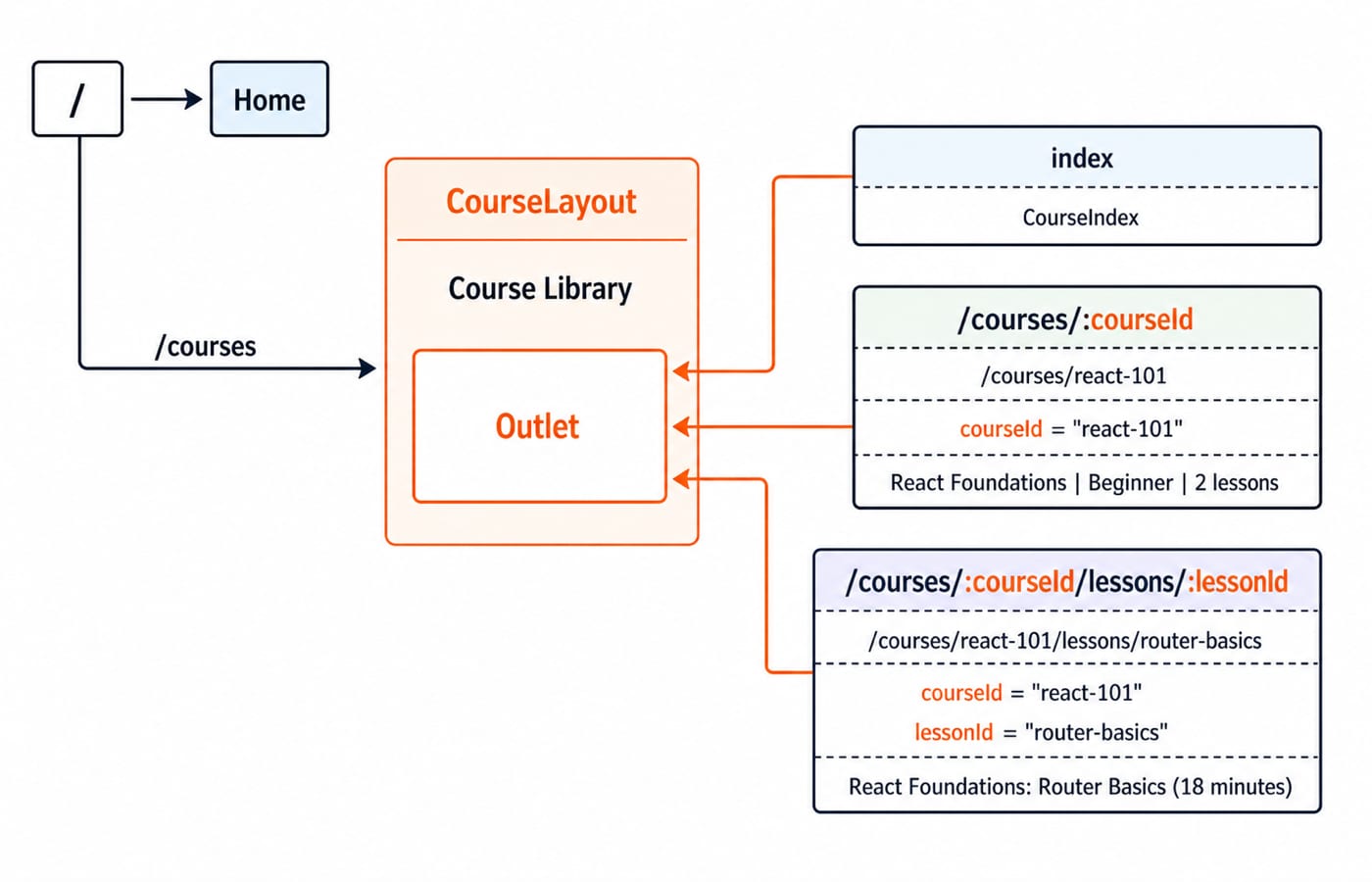
Add Outlet to the router import and refactor the branch. Child paths have no leading slash because they are relative to courses:
<Route path="courses" element={<CourseLayout />}>
  <Route index element={<CourseIndex />} />
  <Route path=":courseId" element={<CourseDetail />} />
  <Route path=":courseId/lessons/:lessonId" element={<LessonDetail />} />
</Route>
CourseLayout returns <section><h2>Course Library</h2><Outlet /></section>. The heading remains while the matched child fills Outlet. In the React course detail, <Link to="lessons/router-basics">Open Router Basics</Link> resolves relative to the current course.
LessonDetail reads both parameters, finds courses[courseId], then uses course?.lessons.find((item) => item.id === lessonId). If either lookup fails, it returns Lesson not found. Otherwise it renders {course.title}: {lesson.title} ({lesson.minutes} minutes).
At /courses/react-101/lessons/router-basics, the parameters are react-101 and router-basics; the output is React Foundations: Router Basics (18 minutes). At /courses/js-201/lessons/promises, they select Modern JavaScript: Promises (27 minutes).
6. Redirect after login, protect one route and catch unknown URLs
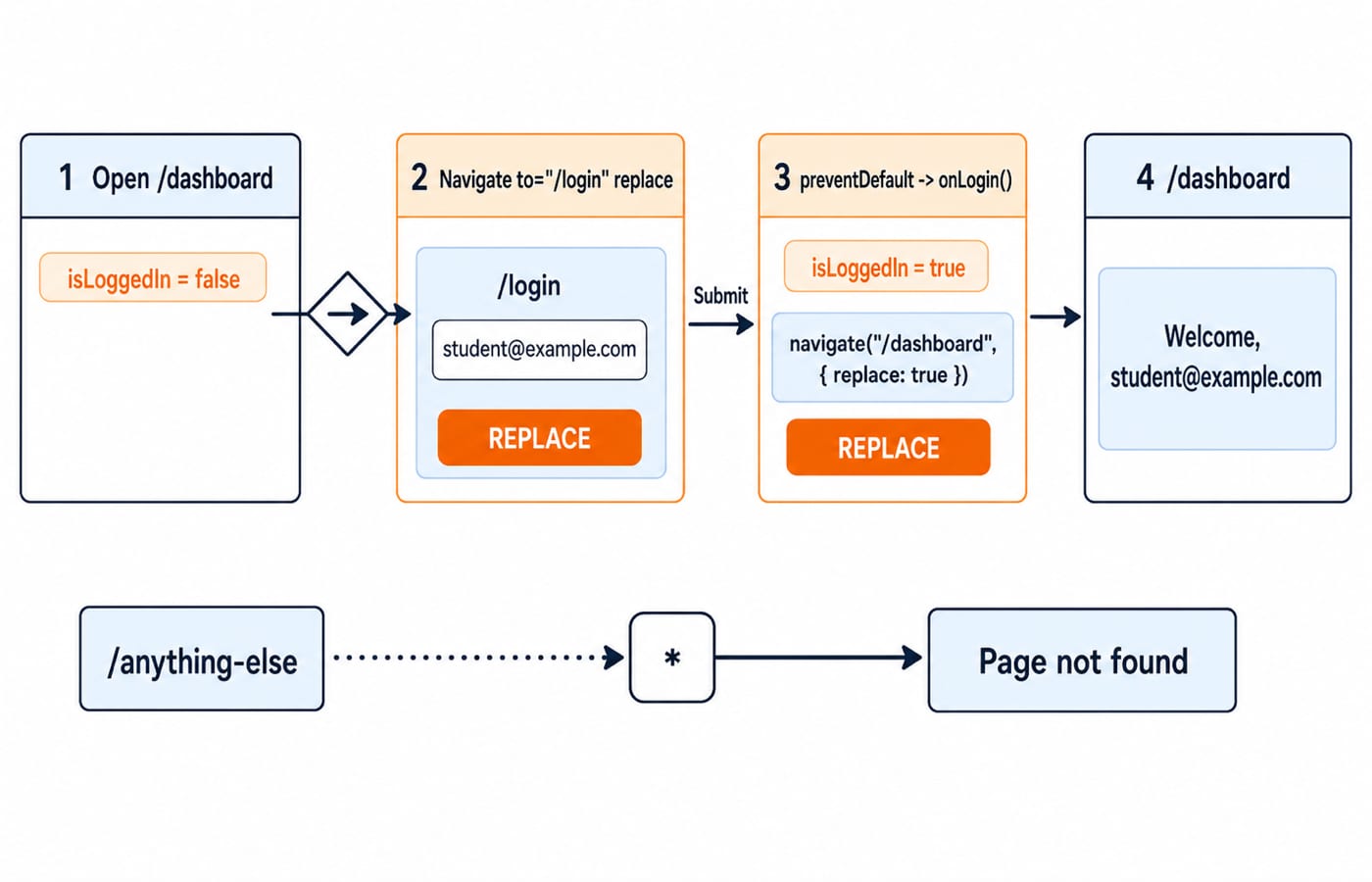
This is an in-memory simulation, not production authentication. Import useState from React and Navigate plus useNavigate from react-router. In App, set const [isLoggedIn, setIsLoggedIn] = useState(false);, then put these routes before the catch-all:
<Route path="login" element={<Login onLogin={() => setIsLoggedIn(true)} />} />
<Route path="dashboard" element={
  isLoggedIn ? <Dashboard /> : <Navigate to="/login" replace />
} />
<Route path="*" element={<NotFound />} />
Dashboard returns <h2>Welcome, student@example.com</h2>. NotFound shows Page not found and <Link to="/">Return home</Link>. In Login, create const navigate = useNavigate() and a form with an email input whose defaultValue is student@example.com. Its Sign in submit handler calls event.preventDefault(), onLogin(), then navigate("/dashboard", { replace: true }).
Opening /dashboard while logged out replaces it with /login. Submitting changes state to true, replaces Login with /dashboard, and shows Welcome, student@example.com. /anything-else matches *. Refreshing resets the demo state.
7. Diagnose six common React Router mistakes
Hooks fail outside router context: wrap
Apponce inBrowserRouter.A link displays
/courses/:courseId: use the concrete/courses/react-101; keep:courseIdonly in a route pattern.The child URL changes but no child appears: render
OutletinCourseLayout.An internal click reloads the document: replace
<a href="/courses">with<Link to="/courses">.Unknown paths show a blank area: add the
*route after specific routes.A direct refresh gives a host 404: configure the host's documented SPA fallback.
<Routes>cannot repair a server response.
Debug by copying the failing URL, checking the console, confirming BrowserRouter, comparing the concrete URL with route patterns, inspecting useParams(), checking parent layouts for Outlet, then testing a fresh load separately from a client-side click.
8. Prove the router works, then choose the next step
Predict
/courses/js-201/lessons/closures:courseId = "js-201",lessonId = "closures", so the exact line isModern JavaScript: Closures (21 minutes).Add
{ id: "route-errors", title: "Route Errors", minutes: 16 }toreact-101./courses/react-101/lessons/route-errorsmust showReact Foundations: Route Errors (16 minutes). The React lesson count changes from2to3; JavaScript stays at2.At
/courses/react-101, Courses is active and Home is not because Home usesend. Visit/missing-page, confirmPage not found, selectReturn home, and confirm Home becomes active.
Also explain why Link fits ordinary internal clicks while useNavigate fits a successful form submission, and why a nested route can match yet display nothing without Outlet.
BrowserRoutersupplies routing context.Routesselects a branch, andRoutemaps patterns to elements.NavLinkexposes active state.useParamsturnsreact-101androuter-basicsinto the 18-minute result.Outletplaces the nested screen.Navigateand*handle redirects and unknown paths.
Rebuild the route tree from the diagram without copying, then pass all three exercises. Continue with the React and Redux course for focused React learning, choose the MERN Stack Course when moving towards a full-stack project, or browse Coding & Skills for another topic.
Keep learning

MongoDB Aggregation Pipeline: `$match` to `$group` with a Worked Example
Build one MongoDB aggregation pipeline step by step. Follow five fictional orders through filtering, array expansion, grouping, projection, and deterministic sorting.
Updated 17 Nov 20266 min readWeb Development

Future Internet Explained: Architecture, a Worked IoT Example and Exam Traps
Learn how device, edge, network, cloud and application layers cooperate, then solve a smart-campus example for data reduction and control-loop latency.
Updated 16 Nov 20266 min readWeb Development

Testing React Components: A Runnable Vitest and Testing Library Tutorial
Build and test a small React progress component from its initial render through completion. The examples use accessible queries, awaited actions, and an exact mock assertion.
Updated 15 Nov 20266 min readWeb Development

React Performance Optimization Tutorial: Profiler, memo, useMemo, and useCallback Examples
Build one React lab, measure its render and calculation counts, then remove avoidable work while keeping typing responsive.
Updated 14 Nov 20266 min readWeb Development