

Error Boundaries in React: Tutorial with a Retryable Fallback
Build a class Error Boundary around a crashing ProductCard, preserve the rest of the dashboard, log useful context, and reset the failure safely with Retry.
KnowledgeGate Team
Exam prep & CS education
Updated 1 Nov 20266 min read
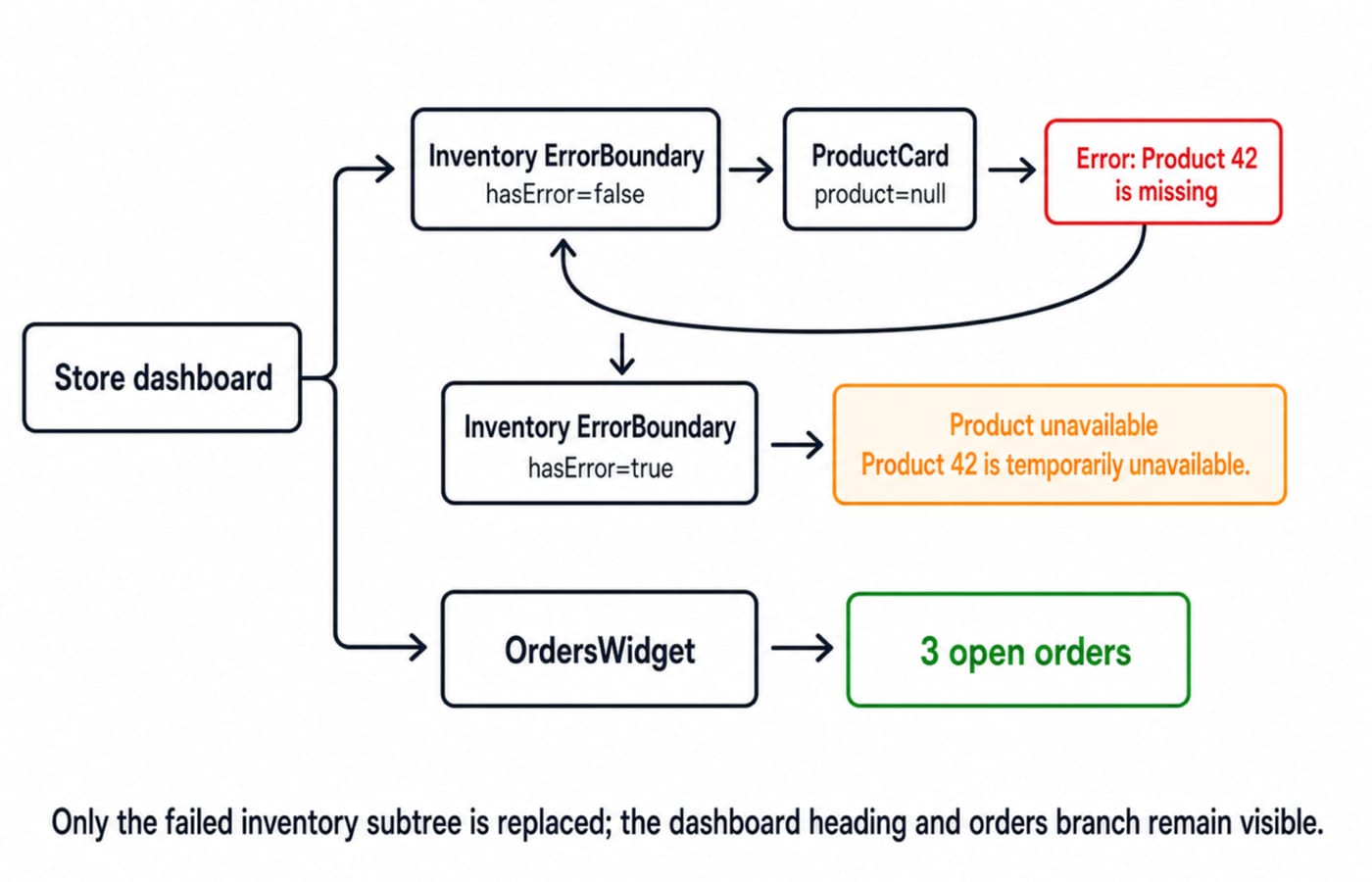
One malformed value inside a small React widget can remove a much larger part of the rendered interface. A try...catch around returned JSX is not the same as a React Error Boundary because React invokes the child later, during its own render work. When Product 42 crashes during render, the inventory subtree becomes a safe fallback while the orders panel remains visible; after the data is repaired, a new boundary key restores the card.
1. What an Error Boundary catches, in one mental model
An Error Boundary is a component above a subtree that replaces a crashed descendant's UI with a fallback. In ErrorBoundary -> ProductCard, a failure while React renders ProductCard travels upward to ErrorBoundary. The boundary does not protect its parent or itself. The current React Component reference documents these behaviours and exclusions.
For delayed modules, the React.lazy Code Splitting Tutorial with Suspense Examples owns pending modules via Suspense; Error Boundaries own thrown render failures and retry.
The Node.js Error Handling Tutorial owns HTTP request failures; Product 42 here demonstrates React subtree recovery.
Caught by this boundary | Not caught here |
|---|---|
|
|
A more deeply nested child throws while rendering |
|
Server-side rendering | |
An error thrown by |
Ordinary async code is excluded, although the current docs identify an error thrown inside a transition function passed to the startTransition function returned by useTransition as an exception. static getDerivedStateFromError changes state for the next fallback render. Optional componentDidCatch(error, info) records the error and info.componentStack. Skill Development Courses are available for broader study.
2. Build the smallest useful boundary class
Create ErrorBoundary.jsx:
import { Component } from "react";

export default class ErrorBoundary extends Component {
  state = { hasError: false };

  static getDerivedStateFromError() {
    return { hasError: true };
  }

  componentDidCatch(error, info) {
    console.error("inventory-boundary", {
      message: error instanceof Error ? error.message : String(error),
      componentStack: info.componentStack
    });
  }

  render() {
    if (this.state.hasError) {
      return this.props.fallback;
    }

    return this.props.children;
  }
}
The boolean remains correct even if JavaScript throws a non-Error value such as null. The boundary is a class, but its children may be function components. The current React reference says there is no direct way to define an Error Boundary as a function component, although a library can provide an abstraction.
In production, never render raw stack traces or unknown thrown values in the fallback. Keep them in approved diagnostics. Also, do not call setState from componentDidCatch to choose the fallback. React directs that state change to getDerivedStateFromError. Development tooling may still show the caught error in an overlay or console, which does not mean the fallback failed.
3. Fully worked example: crash Product 42 without losing the page
Keep ordinary loading separate from failure. A real app should use undefined or an explicit loading flag for loading. Here, null deliberately represents an invalid result.
import { useState } from "react";
import ErrorBoundary from "./ErrorBoundary";

function ProductCard({ product }) {
  if (product === null) {
    throw new Error("Product 42 is missing");
  }

  return <><h2>{product.name}</h2><p>{product.stock} in stock</p></>;
}

function OrdersWidget() {
  return <section><h2>Orders</h2><p>3 open orders</p></section>;
}

export default function App() {
  const [product] = useState(null);

  return (
    <main>
      <h1>Store dashboard</h1>
      <ErrorBoundary fallback={
        <section role="alert">
          <h2>Product unavailable</h2>
          <p>Product 42 is temporarily unavailable.</p>
        </section>
      }>
        <ProductCard product={product} />
      </ErrorBoundary>
      <OrdersWidget />
    </main>
  );
}
ProductCard receives null and throws Product 42 is missing. The inventory boundary changes from { hasError: false } to { hasError: true }. The user sees Product 42 is temporarily unavailable, while OrdersWidget still shows 3 open orders. The console entry contains the inventory-boundary label, message and component stack. Development behaviour can produce more than one diagnostic call, so do not depend on an exact call count.
4. Make Retry perform a real reset
The boundary keeps its failure state, so changing child data alone does not clear it. Keep both the product and reset key above the boundary, then update both:
export default function App() {
  const [product, setProduct] = useState(null);
  const [boundaryKey, setBoundaryKey] = useState(0);

  const retry = () => {
    setProduct({ id: 42, name: "Mechanical Keyboard", stock: 7 });
    setBoundaryKey(value => value + 1);
  };

  return (
    <main>
      <h1>Store dashboard</h1>
      <ErrorBoundary
        key={boundaryKey}
        fallback={
          <section role="alert">
            <h2>Product unavailable</h2>
            <p>Product 42 is temporarily unavailable.</p>
            <button type="button" onClick={retry}>Retry</button>
          </section>
        }
      >
        <ProductCard product={product} />
      </ErrorBoundary>
      <OrdersWidget />
    </main>
  );
}
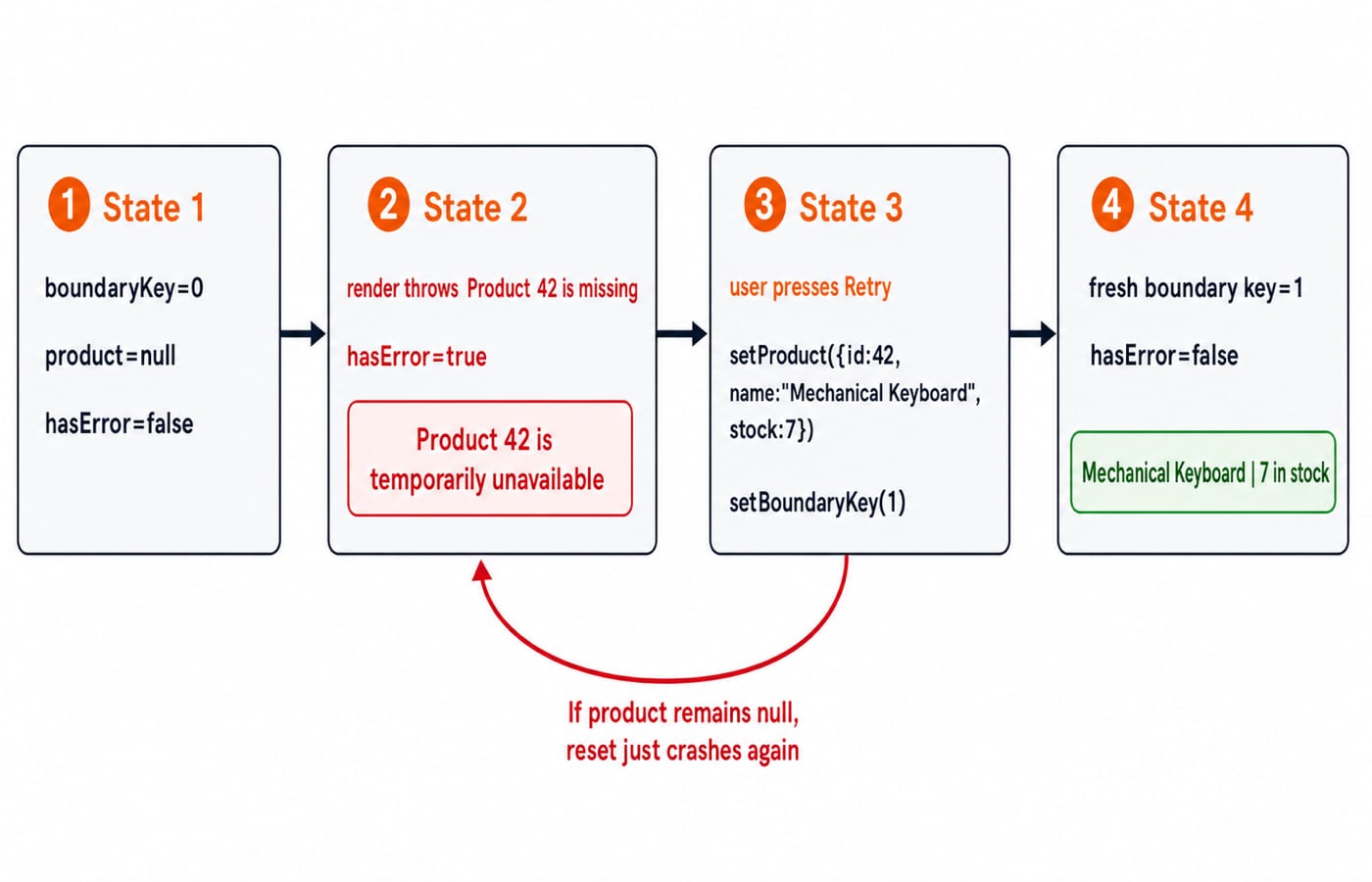
Before the click, the boundary with key 0 is stuck at { hasError: true }. Retry supplies valid Product 42 data and increments the key from 0 to 1. React mounts a fresh boundary at { hasError: false }, and the child renders Mechanical Keyboard with 7 in stock.
Remounting by key resets the boundary. In a data-fetching app, Retry must refetch or repair the input before resetting. A new boundary receiving the same null would throw immediately.
5. Place boundaries by failure domain, not around every component
One boundary around the entire app would replace the heading, inventory and 3 open orders together. A boundary around the inventory panel preserves independent work. A boundary around every <span> creates noise and awkward fallback fragments. The current React guidance recommends placing boundaries where a meaningful error message can be shown, not around every component.
Separate widgets that can fail and recover independently. Keep each boundary outside the component that may throw, and give route-level or feature-level fallbacks a useful recovery action. A boundary contains damage; it does not replace prop validation, loading and empty states, or a real defect fix.
Use Product 42 as the test. If inventory fails while orders remain actionable, they belong to different failure domains. If every store action depends on one failed boot payload, a higher boundary may be more honest.
6. Common Error Boundary mistakes and the correct fix
Wrapping returned JSX in
try...catch.try { return <ProductCard product={null} />; } catch { ... }only creates an element. It does not run the child's later React render. Put a boundary aboveProductCard.Expecting event-handler coverage. A boundary does not catch
onClick={() => { throw new Error("Checkout failed"); }}. Catch the failure in the handler, report it and set a safe inline message such asCheckout could not be completed.Expecting ordinary async coverage. A boundary does not catch
setTimeout(() => { throw new Error("Polling failed"); }, 500). Handle the callback or promise error where it occurs, then move the UI into an explicit error state. Remember the documented transition-function exception from section 1.Putting the boundary inside
ProductCard. A boundary cannot catch itself, which also means a throwing fallback is not protected by that same boundary. Move it above the failing subtree and keep fallback rendering simple.Exposing diagnostic detail. Do not display
error.message, unknown thrown values orcomponentStackon the page. Show the safe Product 42 fallback and send technical context only to approved diagnostics.
7. How interviews and coding exercises test the concept
Treat these as practical assessment patterns, not claims about any company's current interview process. A conceptual prompt tests the catch matrix and propagation direction. Code reading tests why parent try...catch is not a boundary. Design questions test granularity and recovery.
Exercise A: Move
OrdersWidgetinside the inventory boundary and setproduct=null. Its3 open ordersoutput disappears because it is inside the replaced subtree.Exercise B: Keep Product 42 valid but throw
Checkout failedfrom a button event. The boundary does not catch it; the handler needs its own error path.Exercise C: Press Retry but increment only
boundaryKeywhileproduct=null. The fresh boundary renders the child, receivesProduct 42 is missing, and returns to the fallback.
For each exercise, identify the throwing phase, name the nearest ancestor boundary, state exactly which UI remains, and name the recovery state that must change. React-specific behaviour follows the official reference.
8. Short version and next step
Throw only for exceptional render failures. Catch them above the failing subtree, use getDerivedStateFromError for fallback state, use componentDidCatch for diagnostics, place boundaries at meaningful failure domains, and repair the cause before resetting. Event handlers, ordinary async callbacks, server rendering and a boundary's own failures need other handling. Practise the component model in the React and Redux Course, then place the same resilient UI in a larger full-stack project with the MERN Stack Course.
Keep learning

MongoDB Aggregation Pipeline: `$match` to `$group` with a Worked Example
Build one MongoDB aggregation pipeline step by step. Follow five fictional orders through filtering, array expansion, grouping, projection, and deterministic sorting.
Updated 17 Nov 20266 min readWeb Development

Future Internet Explained: Architecture, a Worked IoT Example and Exam Traps
Learn how device, edge, network, cloud and application layers cooperate, then solve a smart-campus example for data reduction and control-loop latency.
Updated 16 Nov 20266 min readWeb Development

Testing React Components: A Runnable Vitest and Testing Library Tutorial
Build and test a small React progress component from its initial render through completion. The examples use accessible queries, awaited actions, and an exact mock assertion.
Updated 15 Nov 20266 min readWeb Development
React Performance Optimization Tutorial: Profiler, memo, useMemo, and useCallback Examples
Build one React lab, measure its render and calculation counts, then remove avoidable work while keeping typing responsive.
Updated 14 Nov 20266 min readWeb Development