Raster vs Random Scan MCQs and Descriptive Problems: Solved Questions with Explanations
Attempt seven option-based questions and four descriptive problems on raster and random scan systems, then check each answer with a compact explanation.
KnowledgeGate Team
Exam prep & CS education
Updated 23 Sep 20267 min read
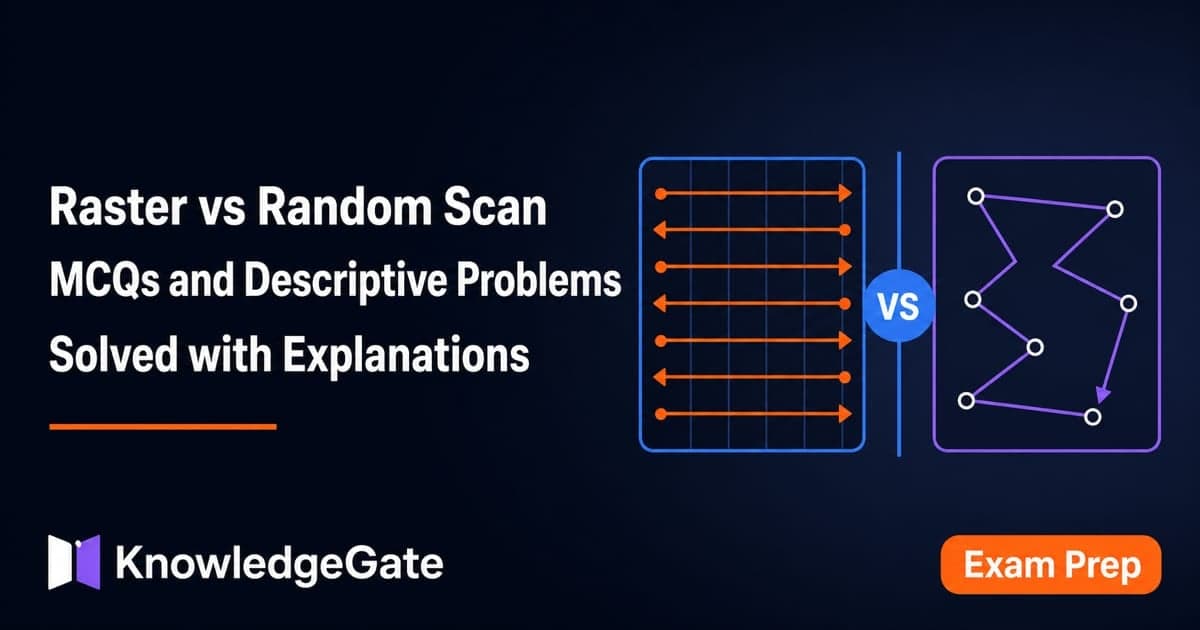
Students often remember that raster means pixels and random scan means vectors, then lose marks when a question turns to coordinate validity, display-processor roles, frame-buffer size, or refresh arithmetic. Attempt each question before reading its answer. Use CS Fundamentals for Exams and Placements when you need to place these display concepts inside the wider subject. For further practice, use the linked question pages and the Raster Scan and Random Scan lesson.
Raster-grid coordinates: validate the point before calculating an address
Q1 · UGC NET 2016 (August)
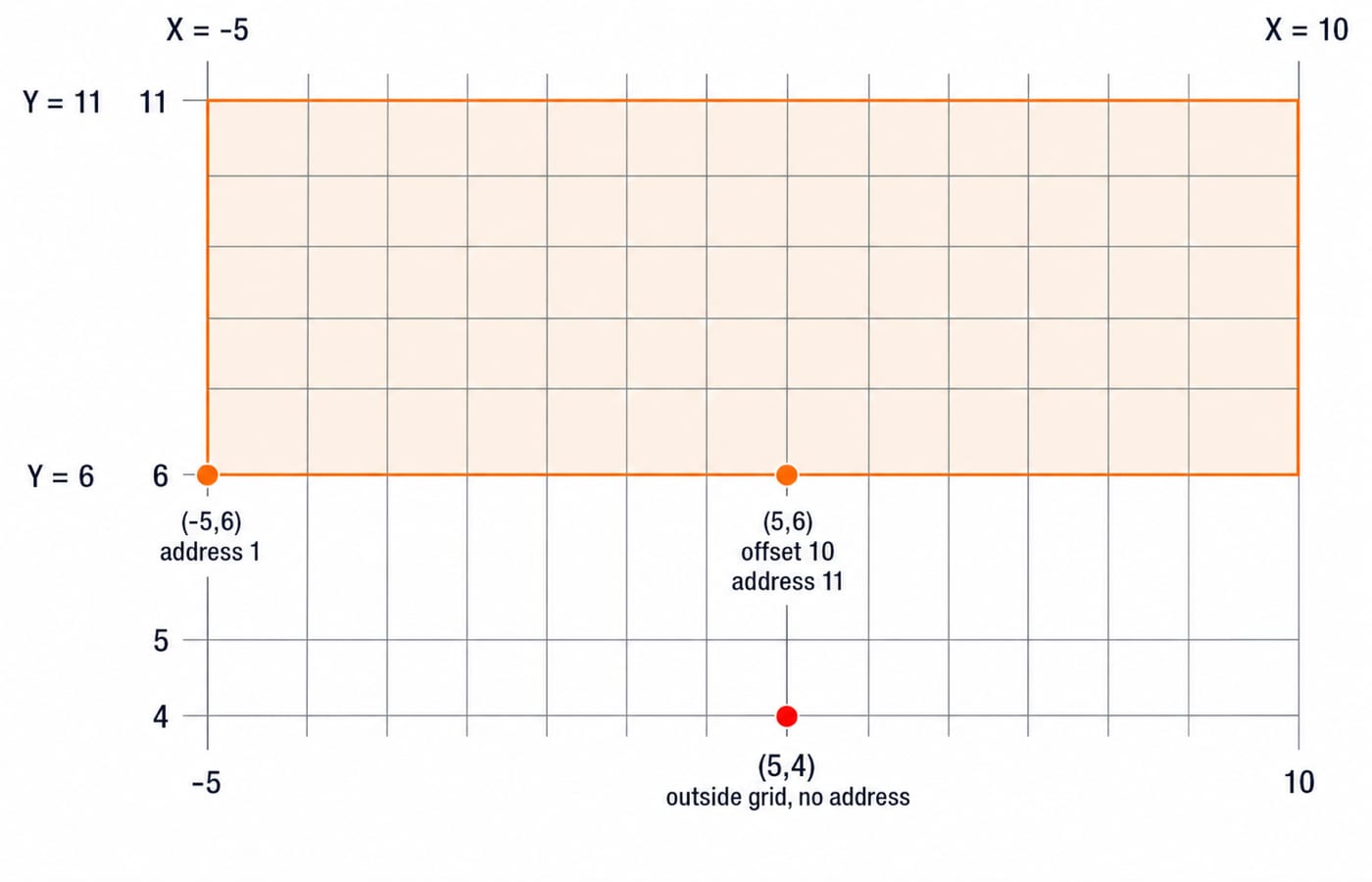
Consider a raster grid having XY-axes in positive X-direction and positive upward Y-direction with Xmax = 10, Xmin = -5, Ymax = 11, and Ymin = 6. What is the address of memory pixel with location (5,4) in raster grid assuming base address 1 (one) ?

A. 150
B. 151
C. No valid address
D. Runtime error due to an invalid coordinate
Answer: C. No valid address. The bounds are -5 <= X <= 10 and 6 <= Y <= 11. Although X = 5 is valid, Y = 4 lies below Ymin = 6, so (5,4) is not a pixel in this raster and has no address. The run-time-error choice describes possible program behaviour, not an address in the defined grid.
For comparison, the inclusive row width is 10 - (-5) + 1 = 16 pixels. If the point were (5,6), its row-major offset from (-5,6) would be (6 - 6) x 16 + (5 - (-5)) = 0 + 10 = 10; with base address 1, the address would be 1 + 10 = 11.
Display processor and frame-buffer MCQs: separate computation from stored pixels
Q2
Display processor is also called a?

A. graphics controller
B. display coprocessor
C. both a and b
D. output device for graphics
Answer: C. both a and b. A display processor is also known as a graphics controller or display coprocessor because it performs display-oriented work alongside the CPU. It is processing hardware, not the final output device.
Q3
The purpose of a display processor is to free which component from graphics-routine tasks?

A. the CPU
B. secondary memory
C. main memory
D. both the CPU and main memory
Answer: A. to free the CPU. The display processor takes over graphics operations and display-list handling that would otherwise occupy the CPU. Its purpose is not to eliminate main memory or secondary memory.
Q4 · Navodaya Vidyalaya Samiti 2017
The part of RAM in a computer to hold the graphics information for one frame, consisting of colour values for every pixel on the screen is known as.

A. Pixel buffer
B. Image buffer
C. Frame buffer
D. Video buffer
Answer: C. Frame buffer. It stores the colour or intensity value for every screen pixel in one frame. “Pixel buffer” is not the standard name for the complete screen image.
Q5 · DSSSB 2021
Memory buffer which stores the image definition is known as _____.

A. Pixel Buffer
B. Frame Buffer
C. Graphic Buffer
D. Picture Buffer
Answer: B. Frame Buffer. In a raster system, the image definition is an array of per-pixel values read during refresh. Both questions use different wording for the same frame-buffer definition.
Random scan and vector graphics MCQs: know what remains a display list
Q6
Random-scan monitors typically offer which range of colour choices?

A. only a few
B. a wide range
C. just one or two
D. a moderate range
Answer: A. Only a few. Traditional random-scan systems draw selected line segments directly and are optimised for smooth line work, not dense per-pixel colour images. Their colour capability is typically limited compared with raster displays.
Q7 · Bihar STET 2025
The quality of ______ remains unchanged even if the size is increased or decreased.

A. Vector graphics
B. Illustrations
C. Photographs
D. Line images
Answer: A. Vector graphics. Vectors store geometric descriptions such as points, lines, and curves, so scaling recomputes geometry at the new size. A raster photograph stores a fixed pixel grid and can show pixelation when enlarged.
Feature | Raster scan | Random scan |
|---|---|---|
Representation | Pixel array | Display list of line primitives |
Memory | Frame buffer | Display list |
Best fit | Filled, shaded, and colour-rich images | Line drawings |
Scaling | Pixel-dependent | Geometry-based |
Typical colour choice | Broad | Few in the traditional systems described in Q6 |
Computer Fundamentals for CS Teaching Exams places this display terminology inside the broader fundamentals syllabus.
Frame-buffer numerical: solve 1024 x 768 at 8 bits per pixel and 60 Hz
Q8 · Descriptive problem
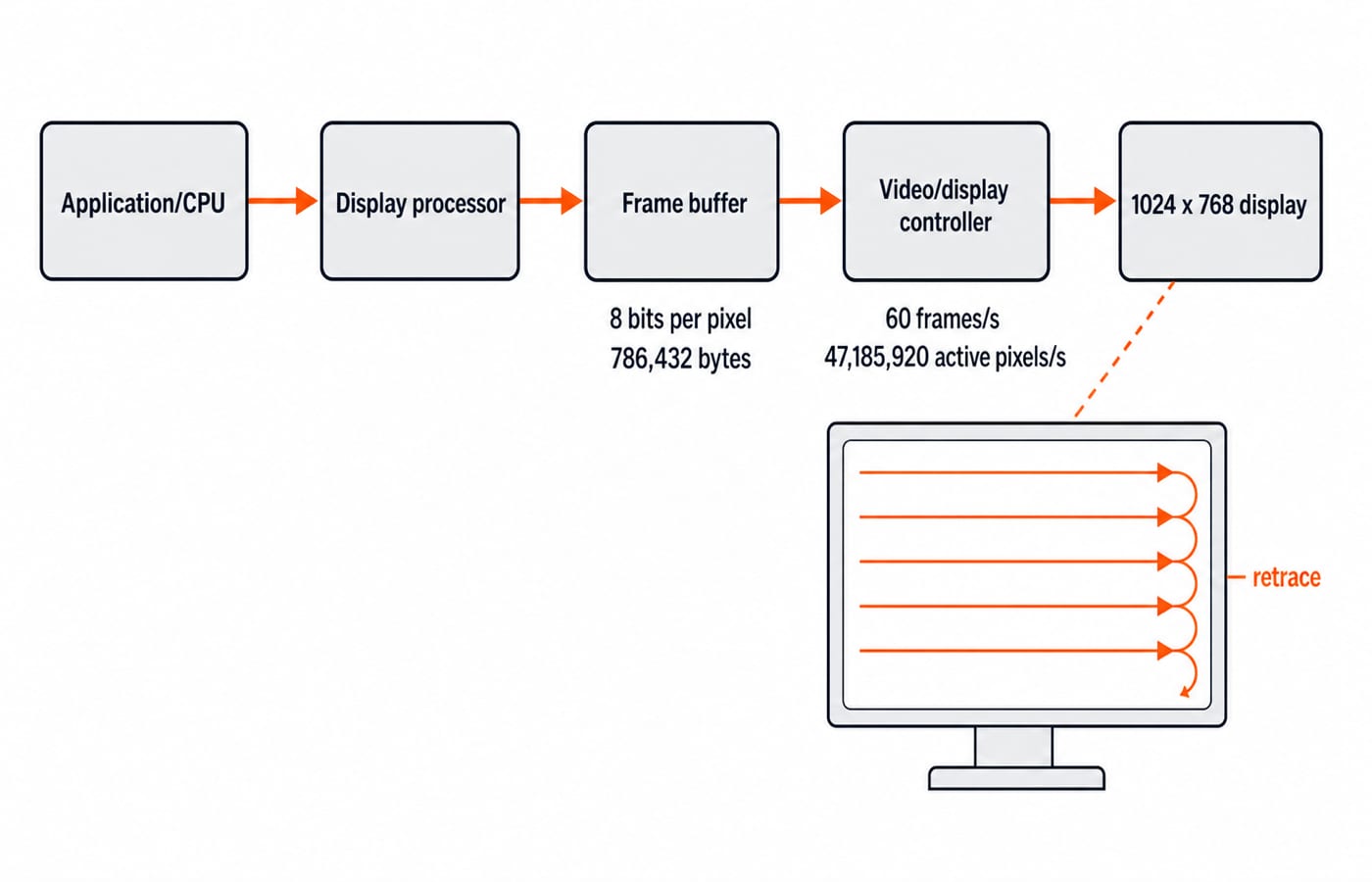
Consider a raster-scan system with a resolution of 1024 x 768. Calculate the frame-buffer size in bytes if each pixel stores 8 bits of colour information. If the refresh rate is 60 Hz, calculate the time taken to scan one active pixel.First find the pixels per frame: 1024 x 768 = 786,432. The buffer therefore holds 786,432 x 8 = 6,291,456 bits, or 6,291,456 / 8 = 786,432 bytes = 768 KiB.
At 60 Hz, the ideal active-pixel rate is 786,432 x 60 = 47,185,920 pixels/s. The scan time for one active pixel is 1 / 47,185,920 s = 2.119... x 10^-8 s, approximately 21.19 ns. Real display timing includes horizontal and vertical blanking, but the problem gives only resolution and refresh rate, so this intended result assumes active pixels are evenly scanned across each 1/60 s frame.
Interlaced versus progressive scanning: compare the mechanisms first
Q9 · Descriptive problem
Explain the mechanism of the Interlaced Refresh Procedure in display systems. How does it differ from Progressive Scanning, and what are the specific advantages and disadvantages of using this technique?Interlacing divides one frame into two fields. For an illustrative six-line frame, field 1 scans lines 1, 3, 5, then field 2 fills lines 2, 4, 6; progressive scanning draws 1, 2, 3, 4, 5, 6 in one sequential pass. In legacy systems, interlacing lowers transmission bandwidth for a perceived refresh level and reduces large-area flicker compared with complete frames sent at the same field rate. Its costs are combing during motion, interline twitter or flicker on fine detail, more complex processing, and the need to deinterlace for a progressive display.
Raster scan architecture: trace one frame from the CPU to the display
Q10 · Descriptive problem
Explain the Architecture of a Raster Scan System with the help of a block diagram. Describe the functions of its main components.The application or CPU issues graphics commands. A display processor converts primitives into pixel values, and the frame buffer stores colour or intensity for every pixel. The video or display controller reads that buffer in raster order, while timing and deflection logic moves left to right across each row and top to bottom through the frame. The display turns this stream into the visible image, and a frame-buffer update appears in later refresh cycles. In the numerical system above, the buffer is 1024 x 768 x 8 bpp = 786,432 bytes; at 60 frames/s, the ideal active-pixel rate is 47,185,920 pixels/s.
Random scan architecture versus raster scan: finish the system comparison
Q11 · Descriptive problem
What is a Random Scan System? Explain its working mechanism and architecture with key components. Also, compare it with the Raster Scan System and list its main advantages and disadvantages.A random-scan, vector, or calligraphic display stores line-drawing commands in a display list rather than storing every screen pixel. The CPU or application supplies commands, the display processor repeatedly reads display-list memory, and the vector generator or deflection circuitry drives the beam only along the named line segments before the display shows them. This gives smooth high-resolution line drawings, geometry-based scaling, and no need to scan every unused screen position. It is a poor fit for filled regions, shading, and realistic images, traditional systems offer limited colour choices, and refresh work grows as the display list becomes more complex. Raster refresh cost follows the pixel grid, while random-scan refresh work follows the number and complexity of primitives.
Raster vs random scan exam checklist and the next practice step
Before submitting an answer, check these points:
Validate coordinate bounds before address arithmetic.
Distinguish a display processor from an output device.
Define a frame buffer as per-pixel image memory.
Connect random scan with vectors and display lists.
Convert bits to bytes before reporting memory.
State the no-blanking assumption in refresh numericals.
Use ICT for Teaching Exams: Fundamentals Explained for neighbouring display-and-technology vocabulary. If you need the complete Computer Graphics sequence, ZERO TO HERO, Complete CS Course is the structured route; if this is the only gap, the shared lesson linked in the opening remains the focused alternative.
Keep learning

Browsers and Search Engines MCQs: 9 Solved Questions with Explanations
Solve nine published browser and search engine questions, check each answer, and rebuild the browser, cache, crawler and indexing distinctions that exam distractors blur.
Updated 6 Oct 20267 min readTeaching Recruitment (Computer Science)

IT Act, 2000 Explained: Key Sections, Digital Signatures and Worked Exam Examples
Build an exam-ready map of the IT Act, then apply it to an exact digital-signature walkthrough and a section 43, 66, 66C and 66D caselet.
Updated 2 Oct 20266 min readTeaching Recruitment (Computer Science)

Emerging Trends Introduction MCQs: 12 Solved Questions with Explanations
Solve 12 Emerging Trends Introduction questions with clear answer logic, exam-year labels and a compact trap check for focused revision.
Updated 27 Sep 20268 min readTeaching Recruitment (Computer Science)

MS Word Basics MCQs with Answers: 12 Solved Questions Explained
Work through 12 MS Word questions covering everyday commands, page layout, formatting, links, file features and mail merge. Each answer explains the decisive clue and the closest distractor.
Updated 25 Sep 20267 min readTeaching Recruitment (Computer Science)