ICT for teaching exams: computer fundamentals, internet and e-learning
ICT for teaching exams explained: hardware and software basics, input and output devices, the internet and e-mail, and e-learning tools tested in DSSSB, KVS.
KnowledgeGate Team
Exam prep & CS education
Updated 26 Jul 20266 min read
Knowledge of Information and Communication Technology, ICT, is a subject that teaching recruitment papers test but the GATE syllabus never touches. If you are preparing for a Computer Science teaching post through DSSSB, KVS, NVS, or a state TGT or PGT exam, ICT is a section you cannot skip, and it rewards clear fundamentals over cramming. Our question bank carries over 950 ICT questions, and they cluster around a small, learnable set of ideas.
Four of those ideas carry almost the whole section: what a computer is made of, how input and output devices differ, how the internet and e-mail move information, and what a modern teacher's e-learning tools actually do. Learn those four cold and ICT becomes reliable marks.
What ICT means in a teaching exam
ICT is the use of computers, networks, and digital tools to store, process, and communicate information, and in a teaching context, to support learning. A teaching paper does not ask you to build systems. It asks whether you understand the tools well enough to use them in a classroom and explain them to students, so the depth is foundational and conceptual, not the algorithmic depth GATE demands. ICT is tested at the level of "what is it, what does it do, and how would a teacher use it", not "derive or optimise it". Which of these exams to target is its own question, and the teaching Computer Science exams comparison sets the options side by side.
Computer fundamentals: hardware and software
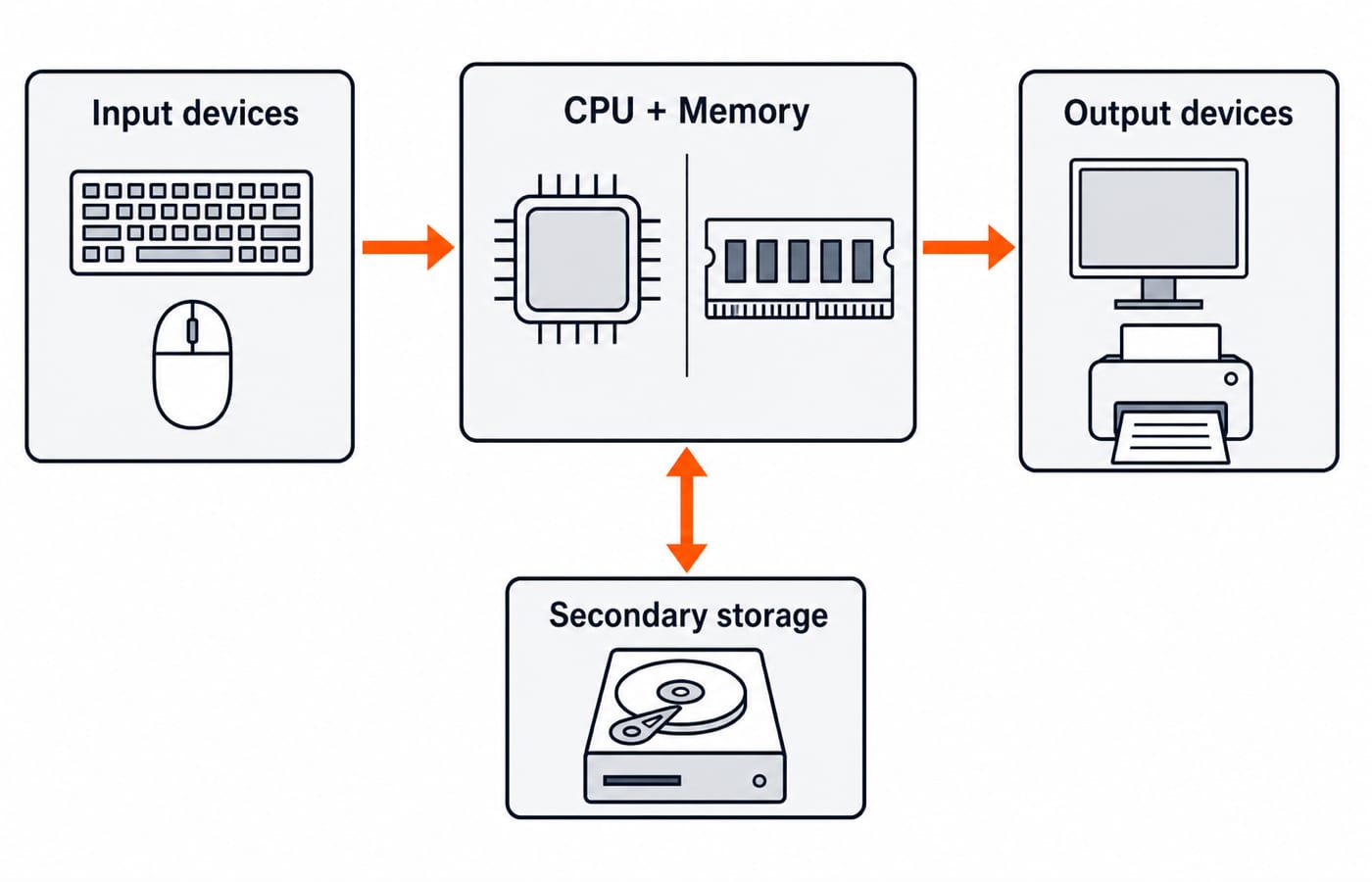
A computer is an electronic device that takes input, processes it, produces output, and can store data. Those four functions map to the parts you must know.
Hardware is the physical machinery. Its core is the CPU (Central Processing Unit), made of the ALU (Arithmetic Logic Unit) that does calculations and comparisons, the control unit that directs operations, and registers for tiny fast storage. Around it sits memory, split into primary memory (RAM, which is volatile and lost on power-off, and ROM, which is permanent) and secondary storage (hard disks, SSDs, pen drives, which keep data without power).
Software is the set of instructions that tells the hardware what to do. It divides into:
System software, above all the operating system (Windows, Linux, Android), which manages hardware and runs other programs.
Application software, the programs a user works with directly, such as a word processor, a spreadsheet, or a browser.
Utility software, small helpers like antivirus tools and file compressors.
A clean exam line to remember: hardware you can touch, software you cannot; the operating system is the bridge that lets applications use the hardware.
Input and output devices
One of the most common ICT question types asks you to classify a device. An input device feeds data into the computer; an output device presents results to the user. Some devices do both.
Type | Examples | Job |
|---|---|---|
Input | Keyboard, mouse, scanner, microphone, webcam | Send data and commands into the computer |
Output | Monitor, printer, speaker, projector | Present processed results to the user |
Both (I/O) | Touchscreen, headset, modem | Carry data in and out |
A worked classification
Suppose the paper lists: scanner, printer, touchscreen, speaker, keyboard and asks how many are pure input devices. Work through it one at a time:
Scanner, sends an image in, input.
Printer, puts results out on paper, output.
Touchscreen, displays output and accepts touch input, both.
Speaker, produces sound out, output.
Keyboard, sends keystrokes in, input.
Pure input devices: scanner and keyboard, so the answer is two. The touchscreen is the trap; it is not "pure" anything. Do the classification device by device and these questions become free marks.
The internet and e-mail
The internet is a global network of interconnected networks that lets computers anywhere exchange data. The World Wide Web is not the same thing; it is the collection of linked web pages that runs on the internet. A teaching paper loves that distinction: the internet is the infrastructure, the web is one service on it.
You should recognise the everyday pieces:
A web browser (Chrome, Firefox) displays web pages.
A URL is the address of a page, and a search engine helps you find pages.
An IP address identifies a device on the network, and DNS turns a name like knowledgegate.ai into that address.
E-mail is electronic mail sent between users over the internet. An address has two parts around the @ symbol: the username and the domain, as in teacher@school.edu. Know the common fields too: To, Cc (carbon copy, visible to all), and Bcc (blind carbon copy, hidden from other recipients), plus attachments for files.
A worked e-mail trace
When a teacher e-mails a worksheet to a class:
The teacher composes the mail, attaches the file, and clicks send.
The message goes to the sender's mail server, which reads the domain after the @ to find where to deliver it.
That server passes the mail across the internet to the recipient's mail server.
Each student's mail client collects it from their server, and the attachment downloads on open.
That sender-server to recipient-server to client path is exactly the level of "how e-mail works" a teaching exam expects, no protocol internals required.
E-learning and educational technology
Modern teaching posts expect familiarity with e-learning, the delivery of education through digital tools. The terms you must be able to define:
LMS (Learning Management System), a platform like Moodle or Google Classroom that hosts courses, assignments, and grades.
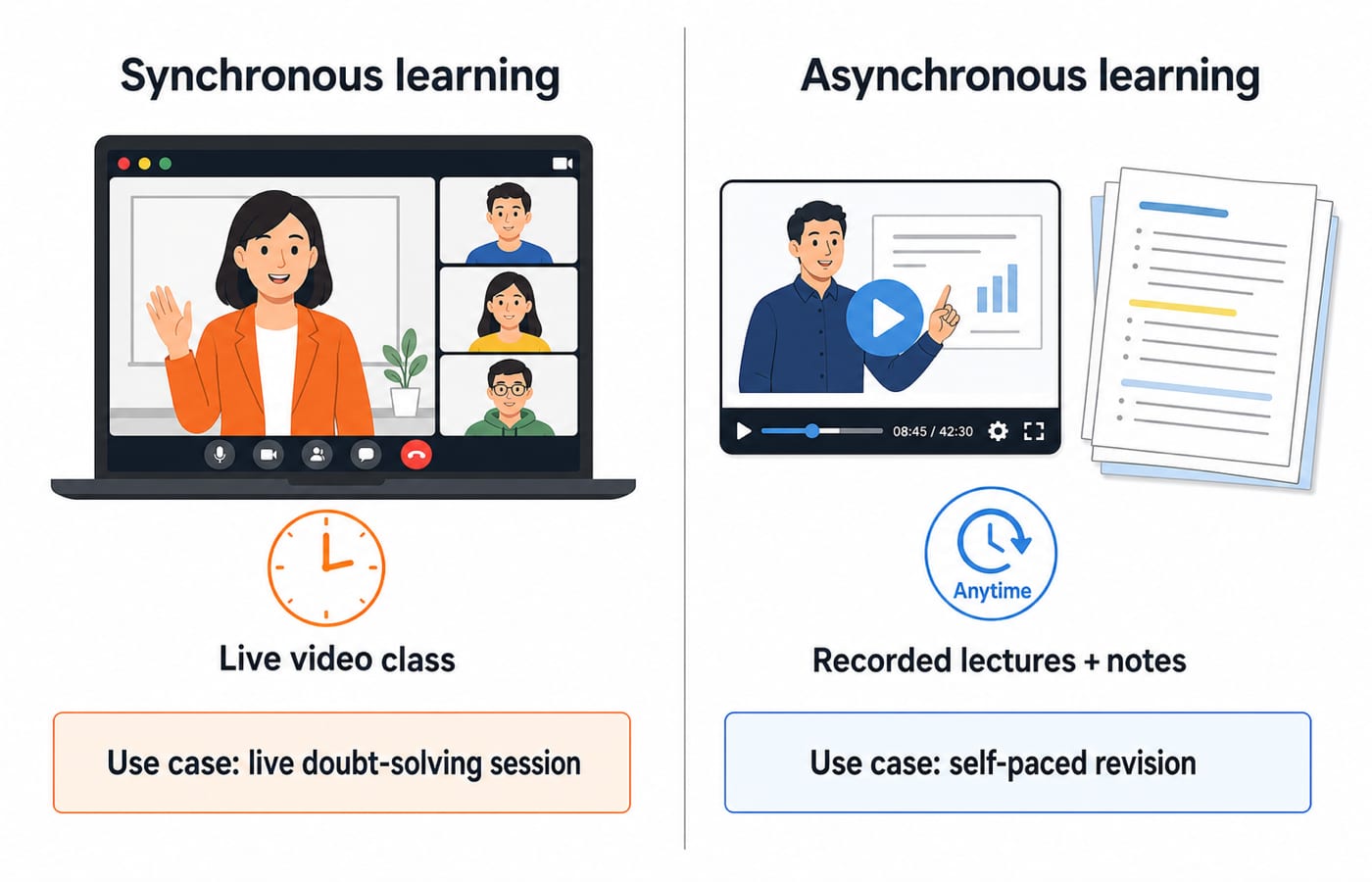
Synchronous vs asynchronous learning, live sessions (a video class) versus self-paced material (recorded lectures, readings) the learner accesses anytime.
MOOCs (Massive Open Online Courses), large open courses delivered online, such as those on SWAYAM.
Multimedia, the mix of text, image, audio, and video that makes digital content richer than a textbook.
The teaching angle matters: an exam may ask which tool suits a given classroom need, for example that an LMS is the right choice for distributing and grading assignments. Answer from the purpose of the tool, not brand names.
How ICT is tested in teaching exams
Teaching CS papers examine ICT as recall and application at a foundational level:
Definitions and classification. Name the parts of a CPU, sort devices into input and output, tell RAM from ROM, distinguish the internet from the web.
Everyday-use judgement. Which e-mail field hides recipients, which storage keeps data without power, which tool fits a classroom task.
E-learning awareness. What an LMS does, synchronous versus asynchronous, what a MOOC is.
Every official specific, the exact number of ICT questions, the marks per question, the sectional split, belongs to the recruiting body's own notification and changes between DSSSB, KVS, NVS, and state cycles, so confirm it there; for the Delhi papers that is dsssb.delhi.gov.in. If Delhi is your target, the DSSSB TGT Computer Science bundle is built around that paper. The concepts themselves are stable across bodies and cycles, which is why they are the part worth learning first.
The short version
ICT for teaching exams is computer fundamentals plus internet and e-learning literacy, tested at a foundational, classroom-ready depth, not GATE depth. Fix the four computer functions, classify devices one at a time, keep the internet-versus-web and RAM-versus-ROM pairs straight, and be able to say what an LMS or a MOOC is for.
If you want this section already sequenced with the rest of your syllabus, the Teaching Recruitment Exams bundle covers ICT alongside the CS core. Once the fundamentals are solid, move to the programming side with C programming for teaching CS exams, or browse the government teaching jobs category for the wider spread of posts. Learn the fundamentals cold, and ICT stops being a soft section and becomes marks you count on.
Keep learning
MS Word Basics: Editing, Formatting, a Worked Document and Exam Traps
Learn how Word applies commands to characters, paragraphs, pages and files. Build an ICT revision plan, audit every state change and avoid common exam traps.
Updated 23 Oct 20266 min readTeaching Recruitment (Computer Science)
Excel Functions and Charts Explained: Formulas, a Worked Sheet and Exam Traps
Learn how Excel formulas, references and charts work by building one mock-test worksheet from scratch. Every output is calculated and every common trap has a fix.
Updated 19 Oct 20265 min readTeaching Recruitment (Computer Science)
Digital Society Explained: Core Concepts, a Worked Inclusion Audit and Exam Patterns
Learn to separate access, skills and outcomes, audit digital inclusion with a worked funnel, apply data minimisation and solve common exam cases.
Updated 15 Oct 20266 min readTeaching Recruitment (Computer Science)
Common Editing Ctrl Keys Explained: Copy, Cut, Paste, Undo and Redo with Worked Examples
Learn what each common Ctrl key does, then trace the document, clipboard, cursor and edit history through precise examples without confusing Copy, Cut or Undo.
Updated 11 Oct 20266 min readTeaching Recruitment (Computer Science)