Computer fundamentals for teaching exams: generations, hardware and software
A survey of computer fundamentals for TGT and PGT computer science: the generations of computers, CPU and memory organization, number systems basics, and software categories, with how each is examined.
KnowledgeGate Team
Exam prep & CS education
Updated 25 Jul 20265 min read113 views
Computer fundamentals is the subject every computer science teaching paper opens with and almost every candidate underrates. It looks easy, so it gets skimmed, and then a handful of one-mark questions on generations, memory types, or number systems slip away. For TGT and PGT computer science, these are the cheapest marks on the paper, and they are yours if you learn the basics cleanly.
The foundation is four small bodies of fact, and the paper draws on all four: the generations of computers and the technology that marks each one, how the CPU and memory are organised, the number systems you must be able to convert, and the categories of software. None of them is large. That is exactly why leaving them half-learnt is expensive.
Computer generations: five eras by technology
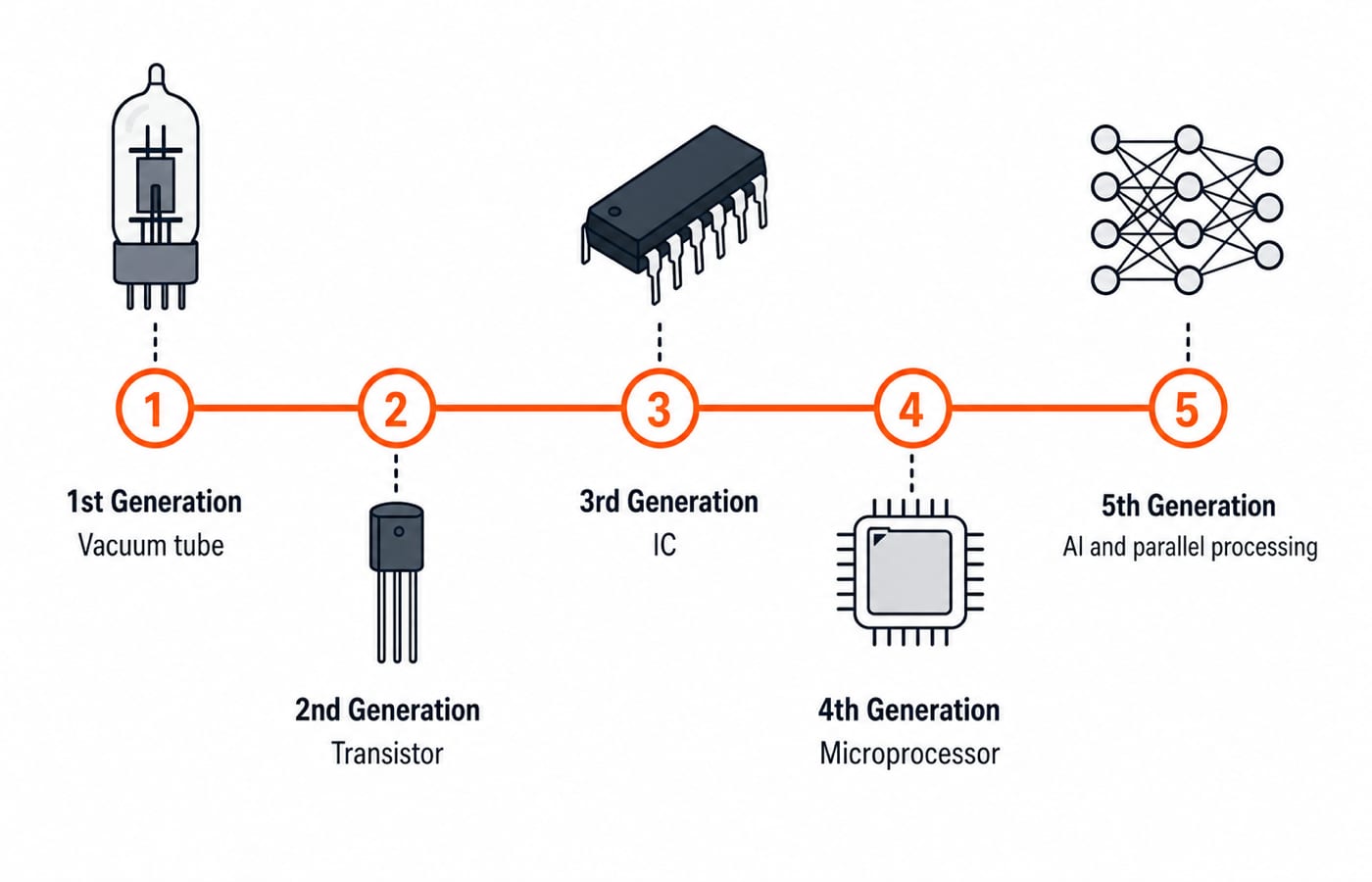
Computers are grouped into generations defined by their core switching technology. Learn the marker technology for each, because that is what the question hangs on.
First generation. Vacuum tubes. Bulky, power-hungry, and slow, programmed largely in machine language.
Second generation. Transistors. Smaller, faster, and more reliable than tubes; assembly and early high-level languages appear.
Third generation. Integrated circuits (ICs). Many transistors on one chip, bringing a big jump in speed and a drop in size and cost.
Fourth generation. Microprocessors, that is, very-large-scale integration (VLSI) putting a whole CPU on a single chip. The personal computer belongs here.
Fifth generation. The current and emerging era, associated with parallel processing and artificial intelligence.
The trap to avoid: questions pair a generation with its technology, not a precise year. Anchor on the technology and you will not be caught out.
CPU and memory: how a computer is organised
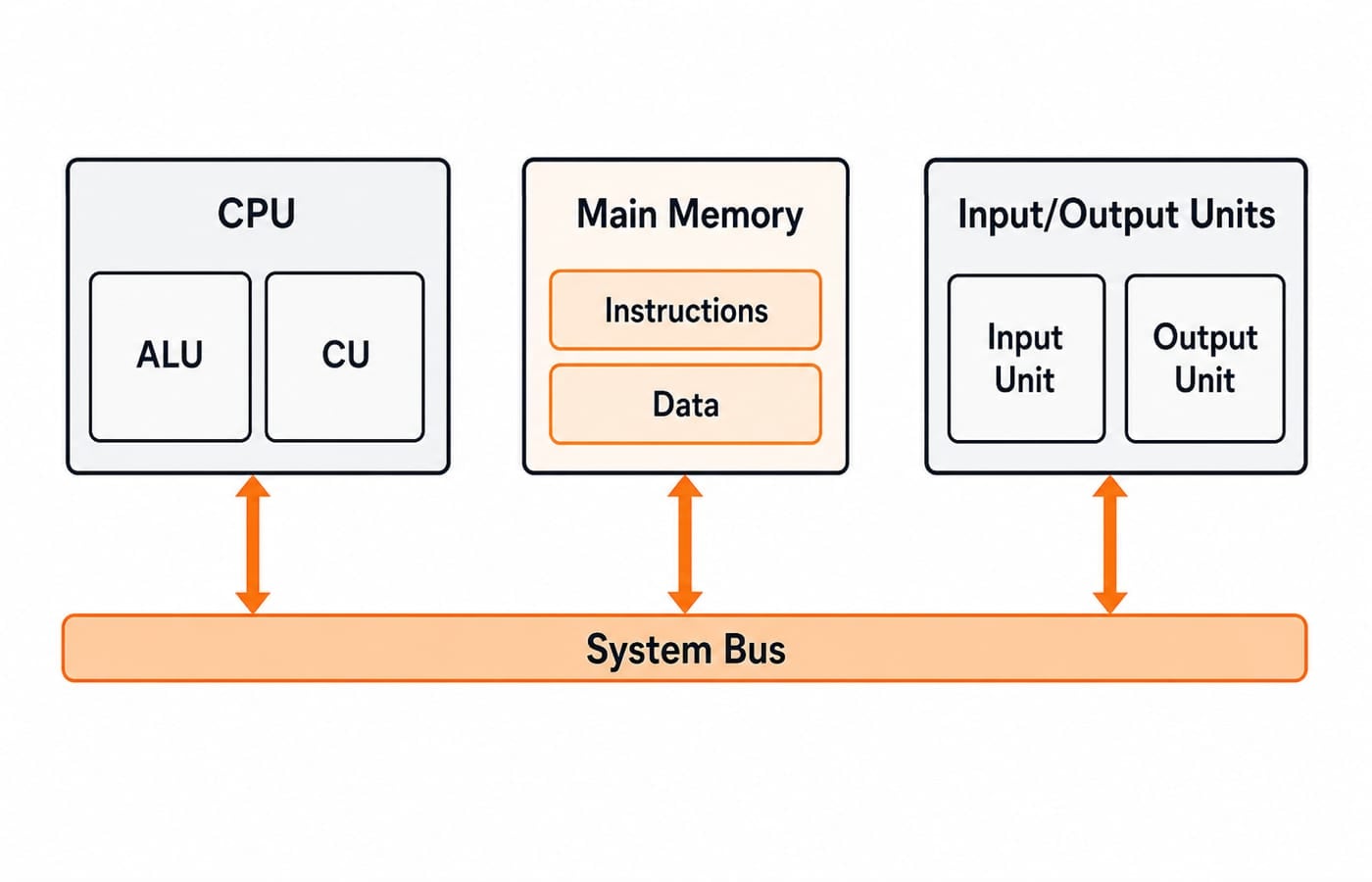
A computer follows the stored-program idea: instructions and data both live in memory, and the processor fetches and executes them. Three parts do the work.
The CPU has two main units. The arithmetic and logic unit (ALU) performs calculations and comparisons. The control unit (CU) fetches instructions and directs the other parts. Small, very fast storage locations inside the CPU are called registers.
Memory is arranged as a hierarchy, fastest and smallest at the top, slowest and largest at the bottom: registers, then cache, then main memory (RAM), then secondary storage (disk). Primary memory is directly accessible by the CPU; secondary memory is not, but it retains data when power is off.
Input and output devices move data in and out, connected to the CPU and memory over shared pathways called buses.
Two distinctions the paper tests often: RAM is volatile (it loses its contents without power) while ROM is non-volatile, and cache sits between the CPU and main memory to speed up access to frequently used data.
Number systems: the basics you must convert
Digital computers work in binary, so number systems are a standing question source. Four bases matter, and in a teaching paper the ask is small: recognise the base from its digit set, and carry out one short conversion without a calculator.
Decimal is base 10 (digits 0 to 9), the everyday system.
Binary is base 2 (digits 0 and 1), the language of the machine.
Octal is base 8 and hexadecimal is base 16 (0 to 9 then A to F), both used as compact shorthand for long binary strings.
The one conversion to be fluent in is decimal to binary and back. For example, decimal 13 is 1101 in binary: 8 + 4 + 0 + 1. Read it the other way, 1101 is (1x8) + (1x4) + (0x2) + (1x1) = 13. Hexadecimal and octal are easier than they look, because one hex digit is exactly four binary digits and one octal digit is exactly three. Take 11011010: in fours it is 1101 and 1010, that is D and A, so DA in hex; in threes (011, 011, 010) it reads 332 in octal. All three write the same value, 218. Practise a few of these by hand and the exam versions become routine.
Software categories: system vs application
Software is divided by what it serves.
System software runs and manages the computer itself. The operating system is the central example; utilities (antivirus, disk tools) and language translators (compiler, interpreter, assembler) also belong here.
Application software does work for the user: word processors, spreadsheets, browsers, and the like.
Know the translator trio: a compiler translates a whole program at once, an interpreter translates and runs it line by line, and an assembler converts assembly language into machine code. That triad alone answers a recurring question.
How computer fundamentals is tested in teaching exams
In DSSSB, KVS, and state TGT and PGT computer science papers, computer fundamentals supplies a block of quick, factual, one-mark questions, usually early in the paper. The dependable patterns: match a generation to its technology, name a memory type or its property (volatile vs non-volatile, primary vs secondary), pick the odd one out among software categories, and do one small number-system conversion. There is no numerical heavy lifting, so accuracy and speed are everything. The precise count of such questions and any weightage differ by notification, so verify them on the official document for your exam.
For practice on exactly these patterns, our published question bank carries over 1,000 questions across the Knowledge of ICT syllabus area and about 1,500 more in digital electronics.
Your next step
Treat computer fundamentals as guaranteed marks and lock them down early. To prepare the full computer science teaching syllabus in sequence, the Teaching Recruitment Exams bundle covers the CS core across the major teaching posts, and the DSSSB Section A course prepares the general-subjects paper that sits beside it. Browse the wider set from the government teaching jobs category.
The productivity-tool side of the same foundation sits in MS Office and digital classroom tools for CS teaching exams, and computer science pedagogy for teacher exams takes up how the subject is taught and questioned.
Learn the generations by their technology, keep the memory hierarchy and the software categories clear, and practise one number-system conversion until it is automatic. That is the whole of computer fundamentals, and it is the easiest section to get right.
Keep learning
Office Mixed Concepts Explained: Access, Clipboard, File Formats and Exam Traps
Learn how Word, Excel, PowerPoint and Access differ, then trace six learner records through a query, an export, a linked chart and a static picture.
Updated 25 Oct 20265 min readTeaching Recruitment (Computer Science)
MS Word Basics: Editing, Formatting, a Worked Document and Exam Traps
Learn how Word applies commands to characters, paragraphs, pages and files. Build an ICT revision plan, audit every state change and avoid common exam traps.
Updated 23 Oct 20266 min readTeaching Recruitment (Computer Science)
Excel Functions and Charts Explained: Formulas, a Worked Sheet and Exam Traps
Learn how Excel formulas, references and charts work by building one mock-test worksheet from scratch. Every output is calculated and every common trap has a fix.
Updated 19 Oct 20265 min readTeaching Recruitment (Computer Science)
Digital Society Explained: Core Concepts, a Worked Inclusion Audit and Exam Patterns
Learn to separate access, skills and outcomes, audit digital inclusion with a worked funnel, apply data minimisation and solve common exam cases.
Updated 15 Oct 20266 min readTeaching Recruitment (Computer Science)