CSV Files Explained: Parsing Rules, Worked Records and Exam Traps
Learn why commas and newlines are not always boundaries, trace a quote-aware parser, validate text fields with a schema, and calculate processing costs.
KnowledgeGate Team
Exam prep & CS education
Updated 22 Sep 20265 min read
A CSV file looks like rows separated by newlines and fields separated by commas. That shortcut fails when a value itself contains a comma, quote or newline. For an aspirant working through GATE CS Exam Preparation, the useful lesson is not CSV trivia but the underlying ideas: state-based parsing, records, schemas and access cost.
CSV file structure: records, fields and delimiters
CSV is plain text arranged into logical records. A delimiter separates fields, and the first record may be a header. The record 101,Asha,Pune,84.5,Pass has five fields and four separator commas. With the header student_id,name,city,score,remark, position one maps to student_id, position two to name, and so on.
The .csv extension does not provide spreadsheet formulas, database constraints, indexes or data types. It does not even settle every parsing detail. A producer and consumer need an agreed dialect, including the delimiter, quote character, line ending and character encoding. Common choices are a comma, a double quote, and LF or CRLF.
Keep this vocabulary precise:
A physical line is text between line endings.
A logical record is one complete CSV row after quote rules are applied.
A field is one value; a schema later gives that position a name and meaning.
CSV quoting rules: commas, quotes and embedded newlines
An unquoted field ends at a delimiter or record boundary. A quoted field may contain commas and line breaks. Inside it, two consecutive double quotes represent one literal double quote. The parser must recognise the closing quote before accepting the following delimiter or record boundary.
These inputs show the rule:
CSV input | Parsed field |
|---|---|
|
|
|
|
|
|
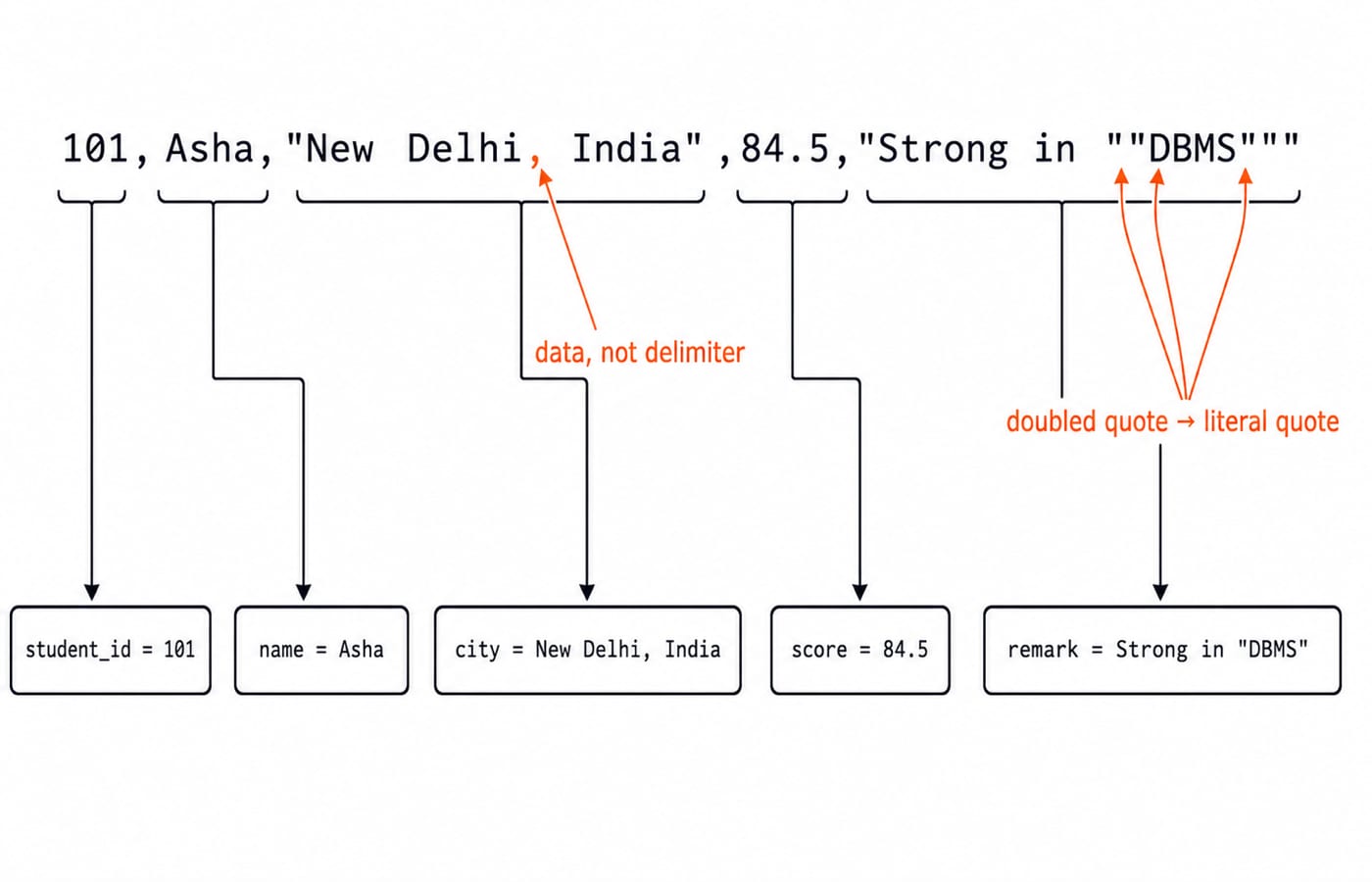
That is why line.split(",") is not a CSV parser. In 101,Asha,"New Delhi, India",84.5,"Strong in ""DBMS""", five comma characters appear, but the comma inside the quoted city is data. Naive splitting produces six chunks; a quote-aware parser produces five fields.
CSV worked example: parse a difficult record character by character
Use four states: START_FIELD, UNQUOTED, QUOTED and AFTER_QUOTE. The table groups consecutive ordinary characters, but the action is applied to each character from left to right.
Input fragment | Parser state | Action | Current field |
|---|---|---|---|
|
| Append text |
|
|
| Emit field 1; start next | empty |
|
| Append text |
|
|
| Emit field 2; start next | empty |
|
| Open quoted field | empty |
|
| Append text |
|
|
| Append comma as data |
|
|
| Append text |
|
|
| Close quote; comma emits field 3 | empty |
|
| Append text; comma emits field 4 | empty |
|
| Open quote; append text |
|
|
| Append one literal quote |
|
|
| Append text |
|
|
| Append one literal quote; final quote closes field |
|
end |
| Emit field 5 and end record | empty |
The parsed vector is 101, Asha, New Delhi, India, 84.5, Strong in "DBMS". Only a comma outside quotes ended a field. A header can later supply names, but CSV syntax itself produced five text fields.
CSV logical records: one record can span two physical lines
Consider this exact file:
student_id,name,city,score,remark
101,Asha,"New Delhi, India",84.5,"Strong in ""DBMS"""
102,Ravi,,71,"Needs
revision"
103,"Mira Jain",Pune,NA,""
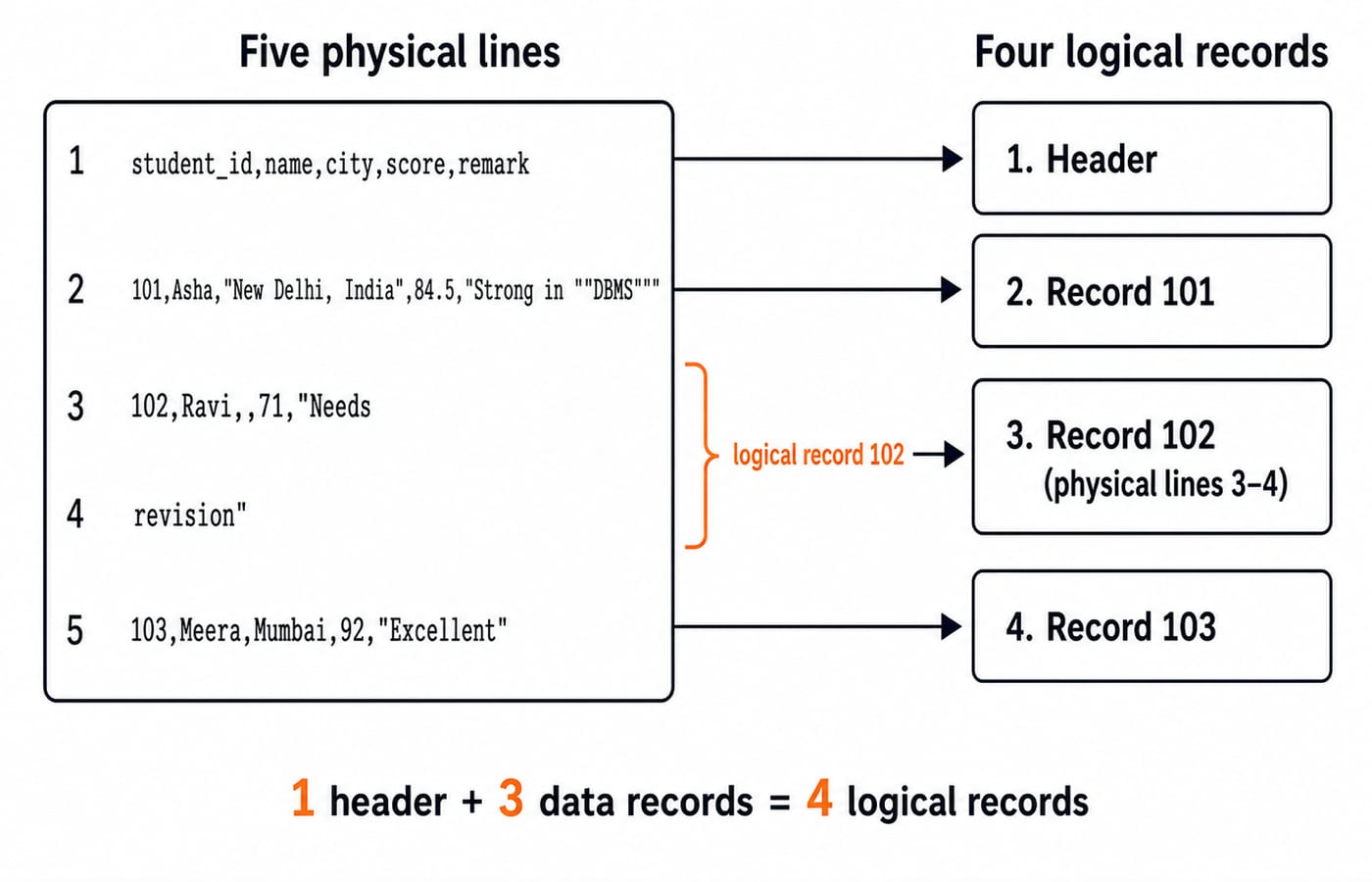
It has five physical lines but four logical records: one header and three data records. Record 102 spans physical lines 3 and 4 because the newline occurs in a quoted field. Its remark is the two-line text Needs\nrevision. Reading one physical line as one record would truncate it. A correct reader continues until it finds a record boundary outside quotes.
CSV schema and validation: every parsed field starts as text
Parsing establishes syntax. Conversion applies meaning. Suppose the schema is student_id: required integer, name: required non-empty text, city: optional text, score: decimal from 0 to 100 or token NA, and remark: optional text.
All three data records are valid. Record 101 converts its score to 84.5. Record 102 has an empty city and score 71. Record 103 has the allowed score token NA and an empty quoted remark. If the alternative rule required a numeric score, only records 101 and 102 would be accepted, while 103 would be rejected.
CSV has no universal null value. The unquoted empty city, quoted empty remark and literal NA can have different meanings only because the importer defines a policy. Duplicate headers, inconsistent field counts, unexpected encodings and stray spaces require separate validation too.
CSV processing cost: scan, search and sort with actual numbers
Let n = 1,000,000 data records, averaging 64 bytes each including the line ending. A full pass reads:
1,000,000 × 64 = 64,000,000 bytes = 64 MB, using decimal MB.
In binary units, 64,000,000 / 1,048,576 = 61.035... MiB, or about 61.0 MiB.
Without an index or precomputed byte offsets, a search for a uniformly positioned student_id is linear. The worst case examines 1,000,000 records. The average successful search examines (1,000,000 + 1) / 2 = 500,000.5 records. Variable-length quoted records prevent direct access to record k by multiplying k by one fixed record size.
For a comparison sort, the benchmark term is:
n log2 n = 1,000,000 × log2(1,000,000) ≈ 19,931,569 comparison-units.
This is an asymptotic benchmark, not an exact comparison promise for every implementation. A database may maintain an index for faster lookups; CSV itself cannot enforce or maintain one.
CSV exam relevance: test the underlying CS concept, not trivia
CSV need not be a named syllabus topic for a question to use it as context. The tested idea may be programming file I/O, finite-state string parsing, records and fields, schema validation, sequential-search complexity, or the boundary between an external file and a DBMS relation.
Three useful question patterns are: derive the five fields in the worked record; explain why the quoted two-line value forms one logical record; and compute O(n) scan and O(n log n) sort terms. Common distractors say every comma is a separator, every newline ends a record, or NA automatically means null.
The boundary becomes clearer beside SQL Queries and Joins in DBMS: Worked Join and GROUP BY: relational querying depends on a DBMS, not on CSV syntax. For an end-to-end Python pipeline from DictReader validation to aggregates and report files, continue with Python File Handling and Data Analysis: A Complete Worked Guide. CSV grammar, logical records, schema policy and access costs remain the foundations for that code.
CSV files: the short version and next step
Track whether the parser is inside quotes.
Separate delimiter commas from commas stored as data.
Separate physical lines from logical records.
Apply an explicit schema only after parsing.
Calculate cost from the actual access method.
If you need the wider CS sequence, GATE Guidance by Sanchit Sir provides a structured next step. If you are already revising and want to test these distinctions, use GATE Test Series: Mocks & Topic-wise Tests.
Keep learning

Pandas Basics in Python: Build, Clean and Analyse a DataFrame Step by Step
Follow one student dataset from its first DataFrame to a clean city summary, while learning how selection, missing values and vectorised calculations really work.
Updated 24 Sep 20265 min readPython
Python Operators and Expressions: Precedence, Types and Worked Output Traces
Trace Python expressions without guessing. This guide connects operator families, precedence, types, short-circuiting and exact output through worked examples.
Updated 23 Sep 20266 min readPython
Polymorphism and Dunder Methods in Python: Runnable Examples and Exercises
See how one Python operation supports different types, then build a Vector2D class with readable output, addition, magnitude and equality. Includes runnable code, protocol failures and exercises.
Updated 21 Sep 20265 min readPython

Inheritance in Python: A Practical Tutorial with Examples
Learn how Python classes inherit state and behaviour through runnable examples. Trace super(), overrides, MRO, common mistakes, and three focused exercises.
Updated 19 Sep 20265 min readPython