

Type Hints in Python: Functions, Collections and Checked Examples
Learn what Python type hints do, how to annotate common data shapes, and how a checker catches mistakes through exact, runnable examples.
KnowledgeGate Team
Exam prep & CS education
Updated 5 Nov 20266 min read

A Python function may accept the wrong kind of value, run several lines, and fail far from the call that caused the mistake. Type hints make the intended contract visible to the reader, editor, and static checker, but they are not runtime validation. Python type hints make variables and function signatures explicit, describe containers, unions, and structured records, and support a checker workflow. The examples use [72, 85, 91, 68] with bonus 2, total 324, and average 81.0.
Type hints in Python describe a contract, not a runtime gate
A type hint states the intended type of a variable, parameter, or return value.
def double(value: int) -> int:
    return value * 2

print(double(21))
print(double("KG"))
The outputs are 42 and KGKG. The second call violates the annotation, yet Python performs string repetition. An annotation alone neither converts nor validates data.
The interpreter runs the program, an editor displays hints, and a static checker such as mypy analyses calls without running them. It can flag double("KG") because str was supplied where int was declared. Frameworks may inspect annotations; annotations alone are not runtime gates.
Python type hint syntax for variables, parameters and return values
student_name: str = "Asha"
attempts: int = 3
accuracy: float = 82.5
is_ready: bool = True

def adjusted_score(score: int, bonus: int = 2) -> int:
    return score + bonus

print(adjusted_score(78))
The colon attaches a type to a name. Parameters are annotated separately, 2 is the bonus default, and -> int declares the return type. The call prints 80.
In def show_result(name: str, score: int) -> None:, -> None means no useful value should return. A missing annotation leaves a gap; explicit Any deliberately permits arbitrary operations. They are different choices.
For call semantics, defaults, return values and scope, see Functions in Python: Parameters, Return Values, Scope and Examples. Type annotations add a separate static contract at those function boundaries.
Built-in list[int] requires Python 3.9 or later; int | None requires Python 3.10 or later. Older code can import List[int] and Optional[int] from typing.
Type hints for Python lists, dictionaries and tuples
Value shape | Annotation | Exact example |
|---|---|---|
Integer list |
|
|
Named integer values |
|
|
Unique strings |
|
|
Fixed pair |
|
|
Variable-length integer tuple |
|
|
For the dictionary, 84 + 76 + 90 = 250, then 250 / 3 = 83.333..., displayed as 83.33. If repeated, name the unchanged shape ScoreMap = dict[str, int].
Read nested types left to right: attempts: dict[str, list[int]] = {"Asha": [72, 81, 88], "Ravi": [65, 79]} maps str names to inner lists of int values.
Fully worked Python type hint example: summarise four scores
Introduction to Python: Core Concepts, Worked Trace and Exam Patterns traces loops and runtime state over score data. In contrast, summarise_scores uses score data to expose a static contract: list elements, a defaulted parameter and a two-value return.
def summarise_scores(
    scores: list[int], bonus: int = 0
) -> tuple[int, float]:
    if not scores:
        raise ValueError("scores must not be empty")

    adjusted: list[int] = [score + bonus for score in scores]
    total: int = sum(adjusted)
    average: float = total / len(adjusted)
    return total, average

total, average = summarise_scores([72, 85, 91, 68], bonus=2)
print(total)
print(f"{average:.1f}")
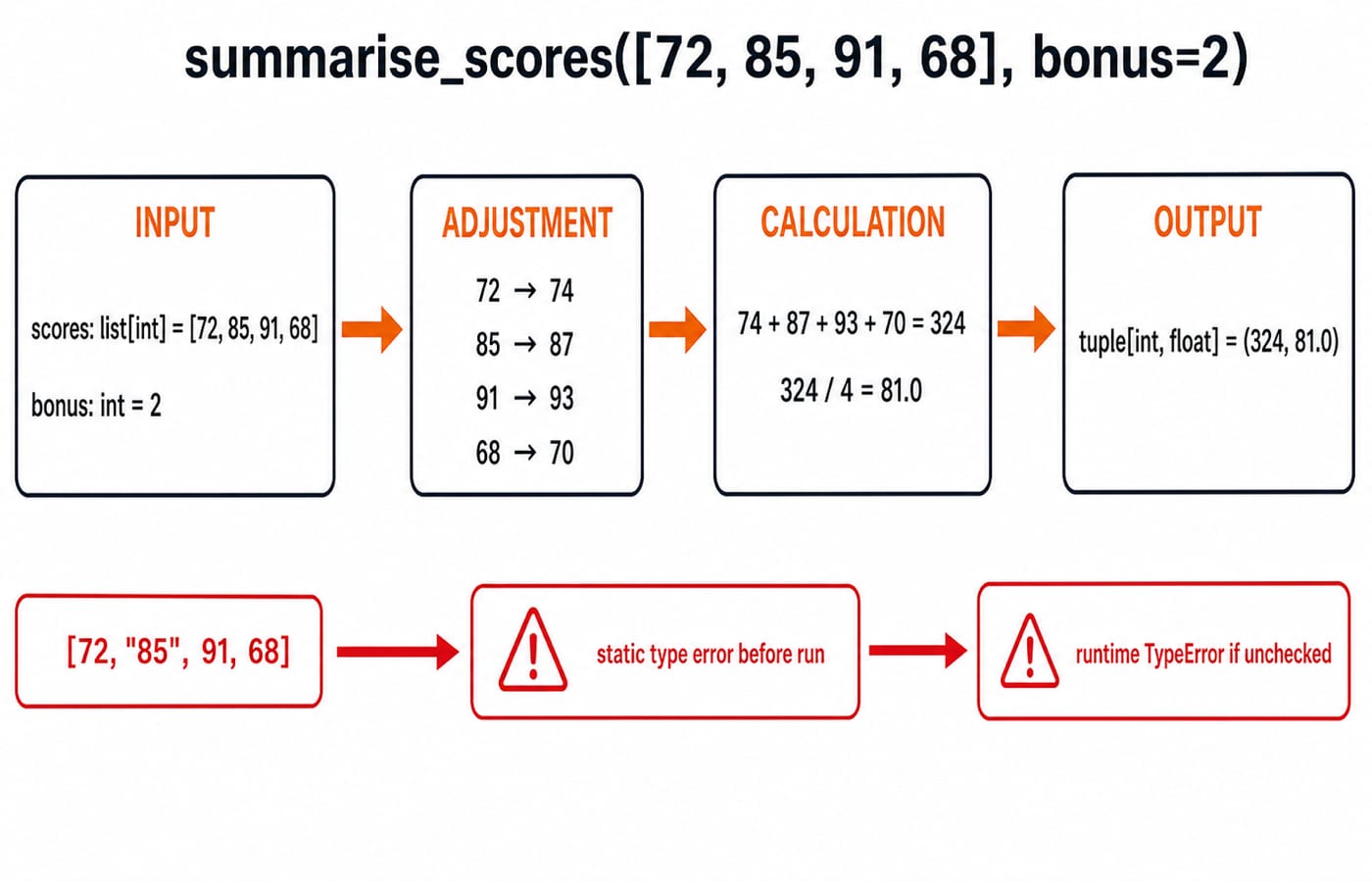
Add 2 to each score to get [74, 87, 93, 70]. The total is 74 + 87 + 93 + 70 = 324; there are 4 scores; and 324 / 4 = 81.0. The returned tuple[int, float] is (324, 81.0), so the printed lines are exactly 324 and 81.0.
summarise_scores([72, "85", 91, 68], bonus=2) violates list[int], so a checker should reject the string item. Unchecked execution fails when Python adds integer 2 to string "85". The ValueError guard handles an empty list, not a wrong element type.
Optional values, unions and type narrowing in Python
def percentage(score: int, maximum: int | None = None) -> float:
    if maximum is None:
        maximum = 100
    if maximum <= 0:
        raise ValueError("maximum must be positive")
    return round(score / maximum * 100, 2)

print(percentage(42, 50))
print(percentage(42))
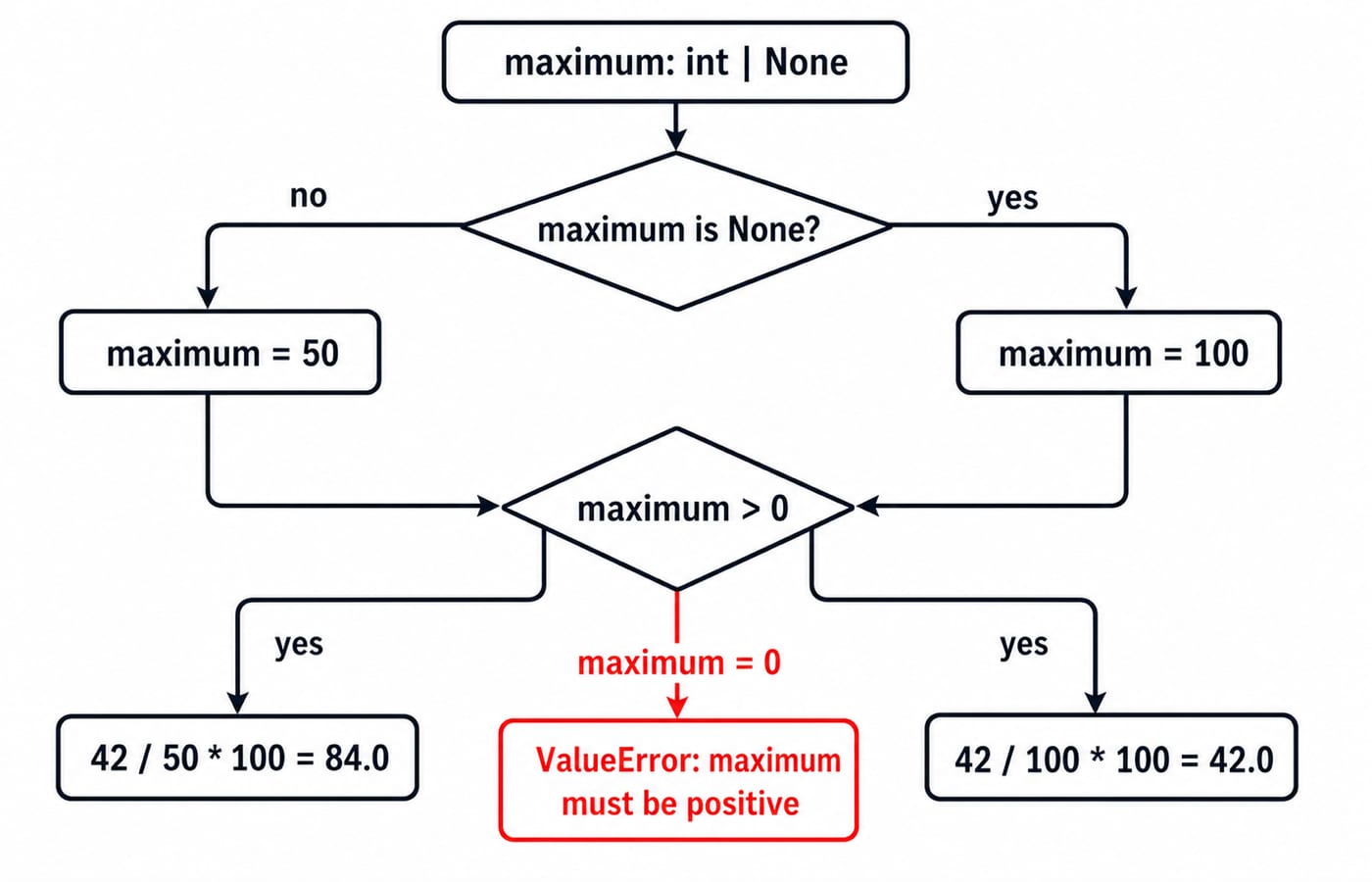
The outputs are 84.0 from 42 / 50 * 100 = 84.0, and 42.0 from 42 / 100 * 100 = 42.0. Before the check, maximum may be int or None; after the branch assigns 100, the arithmetic path has an int.
The union int | None permits None; = None makes the argument omissible. Use int | str only when both forms belong to the contract, not to silence errors. Any suppresses most useful checking.
TypedDict and Callable for structured Python data
from typing import TypedDict

class Student(TypedDict):
    name: str
    scores: list[int]

meera: Student = {"name": "Meera", "scores": [84, 90, 78]}

def mean_score(student: Student) -> float:
    return sum(student["scores"]) / len(student["scores"])

print(mean_score(meera))
Here 84 + 90 + 78 = 252, and 252 / 3 = 84.0, so the output is 84.0. A checker can catch a missing name or a string inside scores, but the runtime value remains an ordinary dictionary without separate validation.
from typing import Callable

def add_five(score: int) -> int:
    return score + 5

def apply_rule(score: int, rule: Callable[[int], int]) -> int:
    return rule(score)
apply_rule(78, add_five) returns 83. Use built-in containers for homogeneous data, TypedDict for named dictionary fields, and Callable for a passed function. Classes, protocols, and generic type parameters are later topics.
Python type hint mistakes and how coding questions test them
Mistake | What goes wrong | Repair |
|---|---|---|
Parameter | One mutable default is shared across calls | Use |
| The argument is still required | Add |
| It changes only the checker's view | Convert or validate the runtime value separately |
Broad | Useful checking disappears | Model the actual accepted types |
Repeated | Real mismatches are hidden | Repair the model or input |
Save the worked function in scores.py, add the bad string call, and run the project's checker, such as mypy scores.py. Expect a list-item or argument incompatibility without relying on version-specific wording. Restore 85, rerun the checker, then run Python and confirm 324 and 81.0. Static checking complements tests and runtime validation; it replaces neither.
Typical tasks ask you to choose str | None for a lookup that may miss, explain why Optional[str] creates no default, annotate a callback, find an Any leak, or predict unchecked double("KG") returns KGKG. Type hints improve clarity and defect detection, but not the algorithmic cost explained in Time Complexity and Asymptotic Notation: Big-O.
Type hints in Python: the short version and next exercise
Annotate public function boundaries first.
Keep container element types explicit.
Model missing values with a union and a deliberate default.
Narrow a union before using one of its members.
Use
TypedDictfor a stable dictionary shape.Run a static checker alongside ordinary tests.
The central result is [72, 85, 91, 68] plus bonus 2 becoming (324, 81.0).
Now call summarise_scores([80, 75, 95], bonus=1). The adjusted scores are [81, 76, 96], the total is 81 + 76 + 96 = 253, and the average is 253 / 3 = 84.333..., which the same .1f format prints as 84.3. Add name: str beside this result in a TypedDict. Then replace 95 with "95", confirm that the checker catches it, and restore the integer.
For the complete language sequence and more practice, continue with Python Course: Concepts, MCQs & Coding. Use the Coding & DSA practice path for mixed language and algorithm practice.
Keep learning

Python for GATE: DA Syllabus, Observed Weightage and Prep Order
Settle the DA-versus-CS language question, see what one official DA paper contained, and build Python, data structures and algorithms in the right sequence.
Updated 6 Nov 20265 min readPython
Python functools Tutorial: partial, reduce, Caching and Decorators
Learn when and how to use Python's main function tools through runnable examples with exact outputs, step-by-step traces, common mistakes and practice checks.
Updated 3 Nov 20266 min readPython

Python Standard Library Tour: Practical Tutorial with Examples
Choose Python modules by task, then combine paths, CSV, dates, counters, averages, and JSON in a runnable report.
Updated 2 Nov 20265 min readPython
Python os and pathlib Tutorial: Paths, Files and Directories
Build one small Python workspace from start to finish. Learn portable paths, file operations, directory walks, safe renames, environment variables and deliberate cleanup.
Updated 1 Nov 20265 min readPython