

Physical Security and Disaster Control: Layered Controls, RPO and RTO Worked Example
Learn how physical controls, disaster planning and recovery targets work together. Follow an exact incident timeline to test RPO, RTO and a warm standby.
KnowledgeGate Team
Exam prep & CS education
Updated 6 Nov 20266 min read
Physical security is often reduced to putting a lock on a server-room door. A usable design must protect people, equipment, records and service continuity against unauthorised entry, fire, water, power loss and other disruptions. A three-zone control model applies to incidents in which a backup plan meets its RPO but misses its RTO. That distinction matters when studying Computer Science for government teaching jobs, because a short scenario can test several related ideas at once.
Physical security protects more than the building
Physical security protects people, facilities, equipment and information-bearing media from events that can cause unauthorised access, damage, theft or interruption. It differs from logical security. A password controls system access, while a badge-controlled door, equipment cage and visitor escort control physical reach. These layers reinforce each other, but neither replaces the other.
Use the sequence deter, delay or prevent, detect, respond, recover. A sign may deter, a locked door may delay or prevent entry, a door sensor may detect opening, a trained guard may respond, and a tested standby may restore service. One control can serve several purposes, so classify it by its primary function in the scenario. Prioritise life safety, then containment, continuity and asset recovery. Computer Fundamentals for CS Teaching Exams supplies the wider hardware, storage and system context.
Build defence in depth with three zones
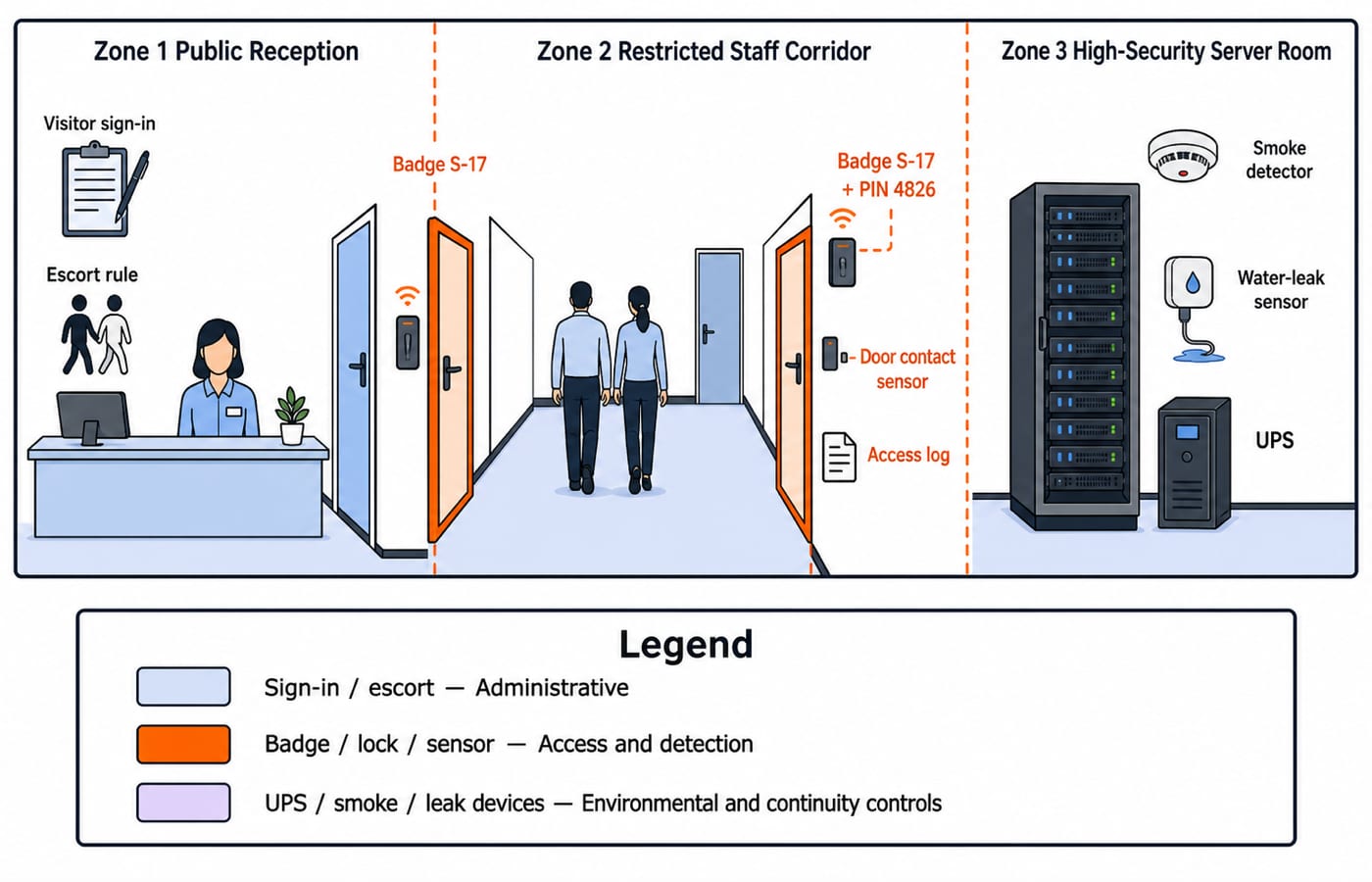
The three zones are a public reception, a restricted staff corridor, and a high-security server room. Zone 1 is a public reception open to visitors. Zone 2 is a restricted staff corridor entered with badge S-17. A visitor may stay in Zone 1 but needs an escort for Zone 2. Zone 3 is a high-security server room for authorised operations staff only. It requires badge S-17 plus PIN 4826, a door contact sensor and an access log. These values are examples, not advice to use a shared or visible PIN.
The reception desk and sign-in register are administrative controls. The badge reader, lock and door sensor are technical and physical mechanisms. Walls, lighting and equipment anchoring are structural controls. Access reviews and escort rules are procedural. If a badge is borrowed, the second factor, sensor, log and response process still carry load. Badge plus PIN authenticates a claimant, while the access list decides whether that identity may enter. See ICT for Teaching Exams: Fundamentals Explained for the wider ICT setting.
Disaster control is a lifecycle
Disaster control has four phases. Prevention or mitigation reduces probability or impact, such as repairing a known roof leak. Preparedness defines roles, contacts, backups, alternate facilities and exercises, such as rehearsing a shutdown checklist. Response protects people and contains the event, such as isolating power during water ingress. Recovery restores priority services and captures lessons, such as activating a clean standby.
Possible controls include smoke or heat detection, fire suppression suited to the hazard, water-leak sensing, temperature and humidity monitoring, a UPS, generator or alternate power, safe cable routing, and protected off-site or logically separated backups. Applicable safety rules and qualified facilities professionals determine the real design. A business continuity plan keeps priority operations running; a disaster recovery plan restores disrupted technology and data. A backup is an input, not proof that restoration will work.
RPO, RTO and maximum tolerable downtime
The three limits answer different questions. Recovery point objective (RPO) is the target maximum data loss, measured backwards from the disruption to the last usable recovery point. Recovery time objective (RTO) is the target time allowed to restore a service after disruption. Maximum tolerable downtime, called maximum acceptable outage in some material, is the outer business limit beyond which the disruption becomes unacceptable. Terminology varies, so use the terms given in the question.
For a hypothetical learning platform, policy sets RPO = 15 minutes, RTO = 60 minutes, and maximum tolerable downtime = 120 minutes. These are learning inputs, not universal standards. Remember: RPO asks, “How far back may the recovered data be?” RTO asks, “How soon must the service return?” A plan can meet one and fail the other.
Worked incident: recent backup, slow restoration
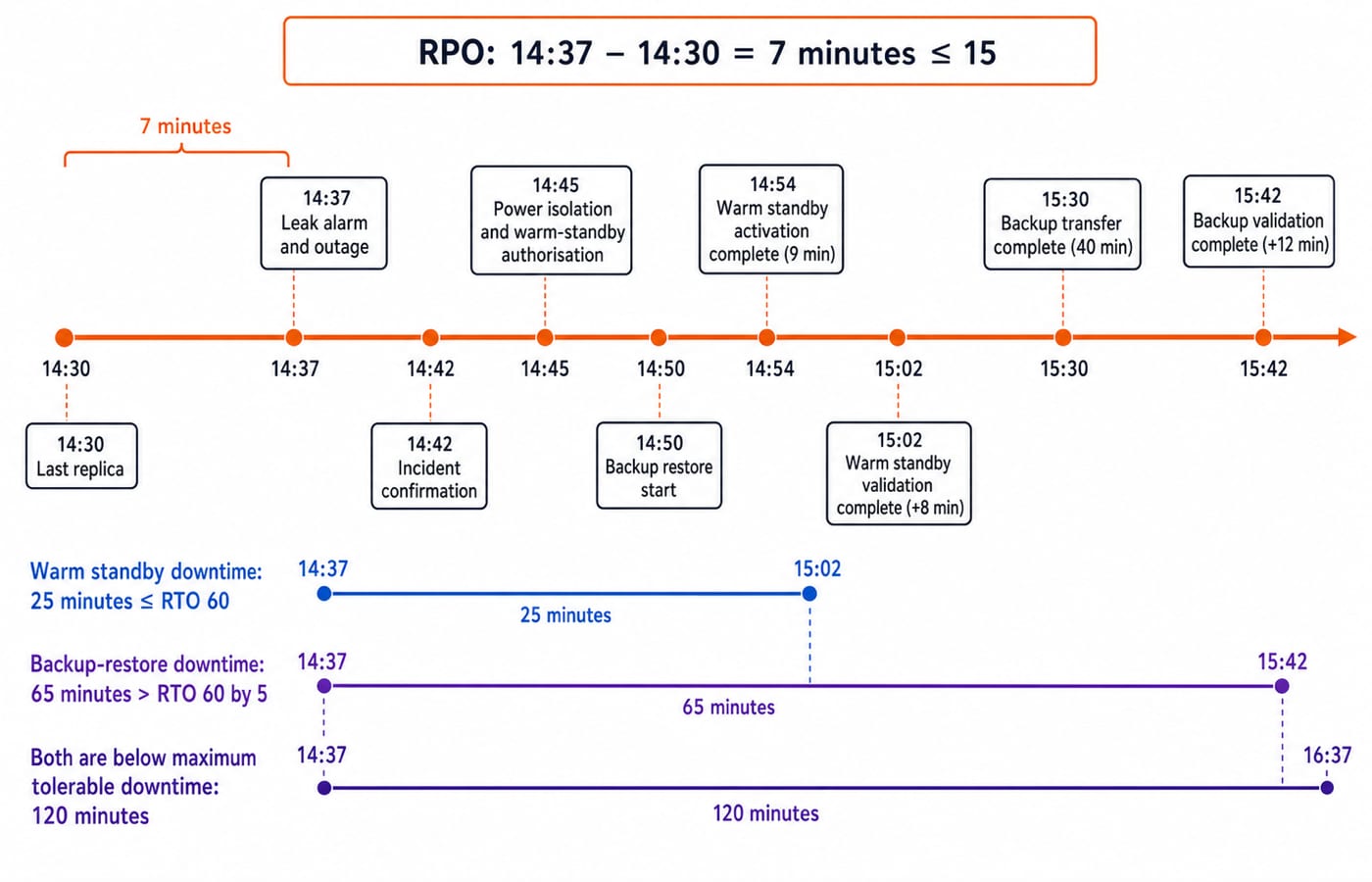
A water-leak sensor alarms at 14:37, and the primary learning-platform server is shut down. The latest completed recoverable replica is timestamped 14:30. The incident is confirmed at 14:42, affected power is isolated at 14:45, and restoration begins at 14:50. The dataset is 180 GB. Using decimal units, 180 GB = 180,000 MB. Measured restore throughput is 75 MB/s, followed by 12 minutes of validation.
First calculate data exposure:
14:37 - 14:30 = 7 minutes.7 <= 15, so the RPO is met.Margin:
15 - 7 = 8 minutes.
Seven minutes is the maximum exposure under the stated last-recovery-point assumption. It is not proof that seven minutes of data was actually lost.
Now calculate restoration:
180,000 MB / 75 MB/s = 2,400 seconds.2,400 / 60 = 40 minutes, so transfer ends at15:30.Add
12 minutesof validation. Service returns at15:42.Downtime from
14:37to15:42is65 minutes.
Because 65 > 60, the RTO is missed by 5 minutes. Because 65 < 120, 55 minutes remain before maximum tolerable downtime.
Now test a corrective design without changing the baseline. A warm standby using the same 14:30 replica is authorised at 14:45. Activation takes 9 minutes, reaching 14:54, and validation takes 8 minutes, reaching 15:02. Downtime is 25 minutes, so it meets the RTO by 35 minutes. Data exposure remains 7 minutes because faster failover did not create a newer recovery point. Real plans must also test capacity, integrity, credentials and dependencies.
Common traps and their corrections
“CCTV prevents unauthorised entry.” CCTV primarily supports deterrence, detection and investigation. Access barriers and a response process are still needed.
“A badge proves authorisation forever.” Credentials can be lost or shared, permissions need review, and authentication is separate from the current access decision.
“A backup completes disaster recovery.” The
14:30replica meets the 15-minute RPO, but the 65-minute restoration misses the 60-minute RTO.Swapping RPO and RTO. Think data-backwards for RPO and service-forwards for RTO.
Counting only floods and earthquakes as disasters. Fire, water ingress, prolonged power failure, equipment failure, accidental damage and malicious physical acts can also disrupt service, though their likelihoods differ.
Keeping every recovery copy beside the primary server. A correlated physical event can destroy both, so use an appropriately separated, access-controlled copy.
Blocking emergency exit for stronger security. Life safety and applicable building or fire rules govern emergency egress. There is no universal fail-safe or fail-secure choice.
Turn the concepts into answerable scenarios
Classify each control by its primary purpose, identify missing zone layers, order the four lifecycle phases, distinguish BCP from DRP, and calculate RPO and RTO from the scenario.
Two teaching drills apply these targets:
A server fails at
11:20, the latest usable copy is11:05, and RPO is20 minutes. Exposure is15 minutes, so RPO is met by5 minutes.A service fails at
09:10, returns at10:25, and RTO is60 minutes. Actual recovery is75 minutes, so RTO is missed by15 minutes.
For a statement set: I. A recent backup can meet RPO even when restoration misses RTO. II. A camera always prevents tailgating. III. Recovery testing can reveal whether a backup is usable. The correct answer is I and III only. A recent backup can satisfy RPO while a slow restoration misses RTO; a camera may deter or detect tailgating but cannot always prevent it; recovery testing checks whether a backup restores usable service.
The short version and next study step
Ask four questions: what must be protected, which physical event can harm it, which control deters, prevents, detects, responds or recovers, and whether the plan meets its RPO and RTO. Here, 7-minute exposure meets the 15-minute RPO, the 65-minute backup restore misses the 60-minute RTO, and the 25-minute warm-standby path meets it. Redraw both diagrams and recompute every interval. For structured study options, review the DSSSB TGT CS 2026 Section B Course and RSSB Basic Computer Instructor Course.
Keep learning
Disaster Recovery Planning: RTO, RPO, Backup Design and Worked Exam Scenarios
Learn to separate outage time from data-loss exposure, compare backup chains, and build a dependency-aware recovery runbook through exact worked calculations.
Updated 17 Nov 20266 min readGATE Strategy & Roadmap
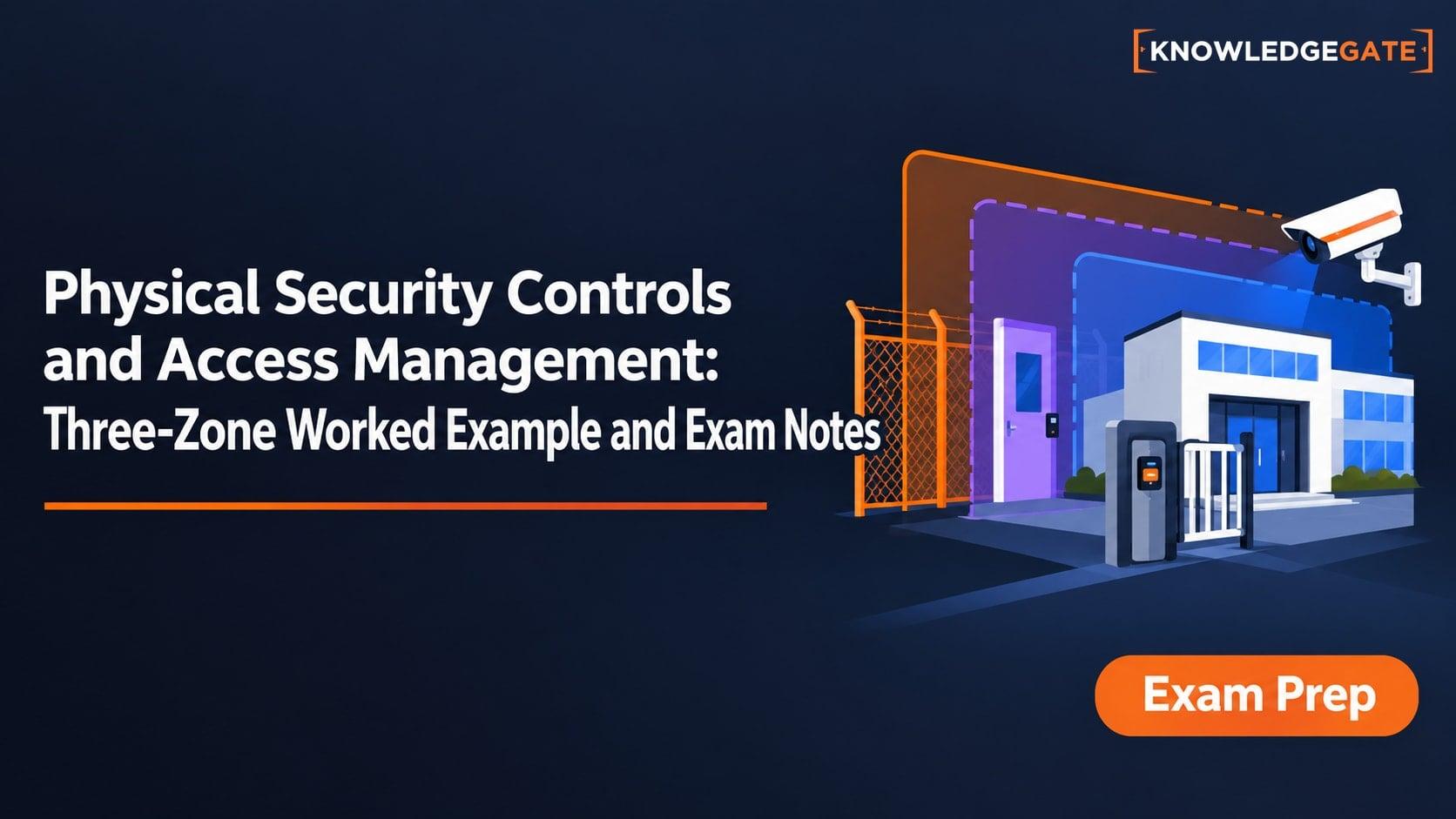
Physical Security Controls and Access Management: Three-Zone Worked Example and Exam Notes
Learn how layered physical controls work with authentication, authorization and audit. Then test four requests against a complete three-zone access policy.
Updated 20 Nov 20266 min readGATE Strategy & Roadmap
Physical Security Assets and Risk Factors: Worked Audit, Controls and Exam Traps
Follow a fictional college server-room audit from asset inventory to residual risk. Calculate four priorities, test power continuity, and avoid common exam traps.
Updated 6 Nov 20266 min readUGC NET Computer Science
Physical Security and Cryptography Basics: Controls, Ciphers and Worked Examples
Connect physical and logical security through Lab L-07. Learn layered controls, calculate residual risk, trace XOR, compare SHA-256 outputs and choose the right primitive.
Updated 25 Oct 20265 min readDSA & Algorithms