

ICT in Education: Concepts, Worked Example and Exam Patterns
Learn to classify ICT tools by purpose, separate e-learning from e-governance, calculate classroom gains correctly and recognise common objective-question traps.
KnowledgeGate Team
Exam prep & CS education
Updated 30 Oct 20265 min read
Learners often memorise ICT abbreviations but still confuse a tool with its purpose, e-learning with e-governance, and percentage rise with percentage-point rise. Revise hardware, internet and email in ICT for Teaching Exams: Fundamentals Explained. Educational-tool questions require a different method: classify purpose first, then name the denominator when measuring a lesson.
ICT in education: the definition and its boundaries
Information and communication technology combines digital tools and communication systems to create, store, process, share and use information. In education, it supports teaching, learning, assessment, access, collaboration and administration. ICT is wider than the Internet and hardware because offline tools, software, content and human decisions also matter.
A five-part model is device, software, network, digital content, and people or process. A tablet is the device, an LMS the software, Wi-Fi the network, a captioned lesson the content, and the teacher's feedback plan the process. Without a teaching purpose, technology does not automatically improve education.
One school portal shows the boundary. Distributing lessons and recording quiz feedback supports e-learning. Processing admissions, attendance or scholarships supports e-governance. Digital India is the broad policy context, not a reason to treat these functions as interchangeable.
Classify ICT tools by what the learner actually does
Attach each tool to its primary educational function.
Tool | Primary educational function | Mode | Common confusion |
|---|---|---|---|
LMS | Organises content, submissions and feedback | Usually asynchronous online | It manages learning; it is not a course format |
Interactive whiteboard | Enables live explanation and annotation | Synchronous, often offline | Static slides are not automatically interactive |
Recorded video | Enables repeatable, self-paced study | Asynchronous, online or offline | Recorded is not live |
Video conference | Enables real-time remote interaction | Synchronous online | Remote is not always asynchronous |
OER | Provides openly reusable material | Any mode | Free access does not grant reuse rights |
MOOC | Offers a structured course at scale | Mostly asynchronous online | It may use an LMS but is not one |
Screen reader or captions | Improves accessibility | Any mode | Access must be designed |
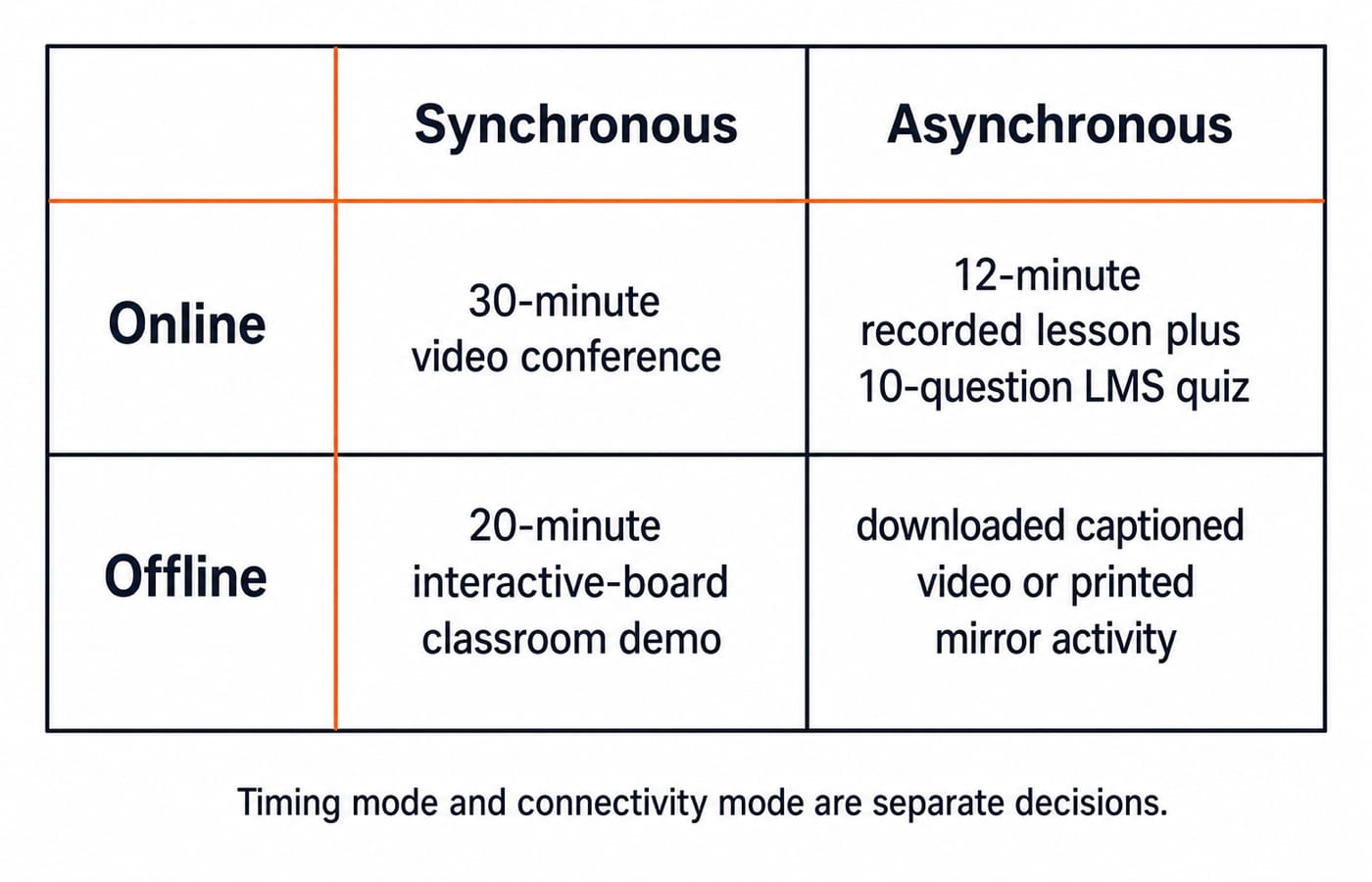
Synchronous means same-time participation, such as a 20-minute live whiteboard explanation or video conference. Asynchronous permits later participation, such as a 12-minute recording or LMS quiz. Online versus offline is separate: downloaded audio can be asynchronous and offline.
Worked example: measure an ICT-supported lesson without overclaiming
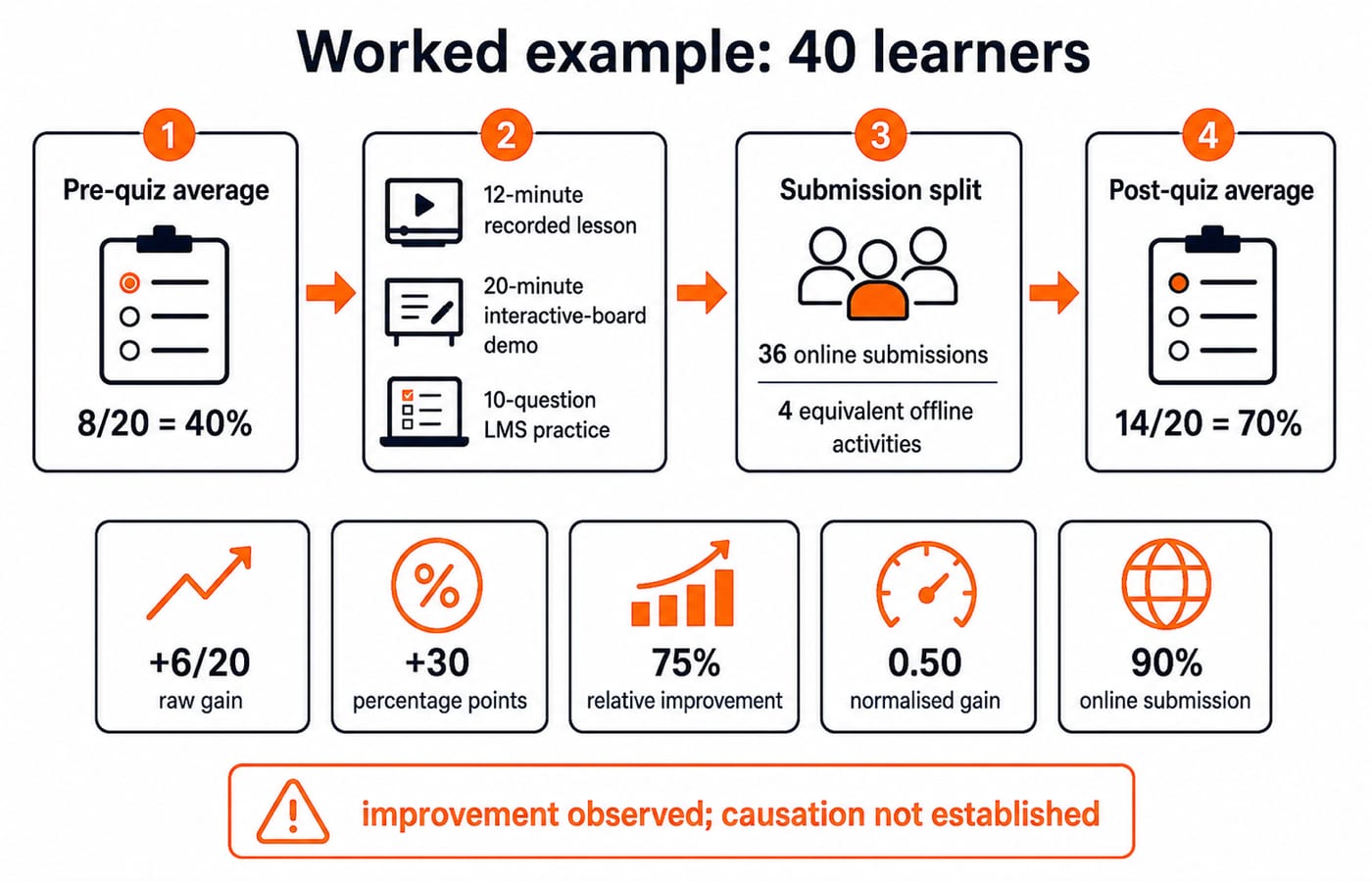
A teacher has 40 learners whose pre-quiz average is 8 out of 20. The lesson has a 12-minute recording, a 20-minute interactive-board demonstration and a 10-question LMS set. Thirty-six submit online; four with unreliable connectivity use the equivalent printed or downloaded activity. All 40 take the same-format post-quiz and average 14 out of 20.
Calculate each measure:
Pre-quiz percentage =
8 / 20 × 100 = 40%.Post-quiz percentage =
14 / 20 × 100 = 70%.Raw gain =
14 - 8 = 6 marks out of 20.Percentage-point gain =
70% - 40% = 30 percentage points.Relative improvement over the starting score =
(14 - 8) / 8 × 100 = 75%.Normalised gain =
(14 - 8) / (20 - 8) = 6 / 12 = 0.50, or 50% of the available improvement.Online submission rate =
36 / 40 × 100 = 90%.
Learning and participation improved in this class during the intervention. This one-group comparison does not prove ICT caused the gain. Causation needs a suitable comparison, equivalent assessment conditions and attention to other teaching changes.
Calling this a 30% rise is wrong. From 40% to 70% is 30 percentage points; relative to the original 40%, it is 30 / 40 × 100 = 75%. Name the denominator and type of change.
When ICT improves learning, access and assessment
ICT helps through mechanisms. Multiple representations combine text, narration and visuals. Replay supports self-paced revision. An LMS can return timely feedback, collaborative tools can enable peer explanation, assistive technology can remove barriers, and digital records can reveal missed work.
For the four offline learners, offer captions or transcripts, screen-reader-friendly text, low-bandwidth or downloadable material, and an equivalent offline route. Keep the task and feedback standard equivalent across routes.
Limits include connectivity, device access, training, distraction, inaccessible design, unreliable content, privacy, copyright and excessive screen use. Before choosing a tool, state the learning objective, access route, feedback method and data collected.
Common traps and the correction for each
Trap | Why it fails | Correct rule |
|---|---|---|
ICT means only computers | It omits networks, software, content and people | Use all five parts |
Every online activity is synchronous | Connectivity and timing differ | Ask whether participation is same-time |
A projector makes a class interactive | Display does not require learner action | Identify learner action and feedback |
All free material is OER | Free does not mean reusable | Check the licence |
E-learning and e-governance are interchangeable | Learning and administration differ | Classify the portal's function |
A higher post-test proves ICT caused the change | Other factors may explain the difference | Separate observation from causation |
A rise from 40% to 70% is 30% | Percentage points and relative change differ | Report 30 points, or 75% relative |
Exam language adds another trap. Computer-assisted learning uses computer support; technology-enabled learning is broader. Distance learning separates teacher and learner; blended learning deliberately combines face-to-face and digital activity. They overlap but are not synonyms.
How exams turn ICT in education into objective questions
Four question forms recur because each can be answered from the definitions above:
Definition: A recording watched later is asynchronous learning.
Scenario: Scholarship records are e-governance; lessons and quizzes are e-learning.
Match: LMS to submission tracking, whiteboard to live annotation, screen reader to visual-access support, and MOOC to a structured large-enrolment course.
Numerical: From 40% to 70%, the percentage-point increase is 30.
Distractors swap a tool and its purpose, mix timing modes, treat digitisation as pedagogy, or switch between percentage points and relative percentages. Apply the rule instead of memorising a brand.
For the broader exam's general and subject split, read UGC NET Paper 1 vs Paper 2: What Each Tests. Confirm each topic's current applicability against your exam's official syllabus or notice.
The short version and the next practice step
Purpose before tool.
Synchronous means same-time participation.
Asynchronous means participation can happen later.
E-learning serves learning; e-governance serves administration and public service.
Observed improvement is not automatic proof of causation.
For full Paper 1 teaching, use the NTA UGC NET Paper 1 Course. After learning the concepts, move to timed practice in the UGC NET Paper 1 Test Series.
Go deeper with the full courseUGC NET Computer Science (Paper 1 + Paper 2)
Keep learning

ICT in Education MCQs: 12 Solved Questions on Digital Learning Tools
Solve 12 ICT in Education MCQs, then use clear explanations and a five-layer model to separate files, tools, platforms and public initiatives.
Updated 30 Oct 20268 min readUGC NET Computer Science

Higher Education Structure and Accreditation for Teaching Exams: UGC, NAAC, NBA and NIRF
Learn what UGC, NAAC, NBA and NIRF actually tell you through a role-first map and a fictional college case.
Updated 30 Oct 20266 min read66 viewsUGC NET Computer Science
EVS for CTET: Environmental Studies vs Environmental Education with Worked Examples
Learn how primary-stage EVS differs from Environmental Education, how six themes integrate around a child's life, and how to solve evidence-led CTET choices.
Updated 11 Nov 20265 min readCTET & UPTET
Inclusive Education and Special Needs for Teaching Exams: Concepts, Classroom Cases and MCQ Traps
Learn to separate inclusion from integration and accommodation from modification. Then apply a barrier-to-support method to classroom scenarios and MCQs.
Updated 8 Nov 20266 min readCTET & UPTET