

File Uploads in Node.js: Multer, Validation and Runnable Examples
Build and test single-file and multi-file uploads in Express. The example covers Multer disk storage, strict limits, predictable error JSON and safer production boundaries.
KnowledgeGate Team
Exam prep & CS education
Updated 22 Nov 20266 min read

JSON body parsing stops when a browser sends an image. Then req.body is insufficient and the request needs a multipart parser. The Express application includes single-photo and three-photo routes, exact fields, a 2,097,152-byte per-file ceiling, a fixed MIME allowlist, collision-resistant names, controlled errors, and curl tests with known fixtures. Local disk exposes the request lifecycle but is not always a durable production store.
File uploads in Node.js begin as multipart requests, not JSON
application/json carries a JSON document; application/x-www-form-urlencoded carries encoded key-value pairs. multipart/form-data uses a boundary to separate text and file parts, each with headers and bytes. JSON middleware cannot turn them into req.file.
In this minimal browser form, avatar must match upload.single('avatar') exactly. See HTML Interview Questions for Freshers for a browser-form refresher.
<form method="post" action="/api/profile-photo" enctype="multipart/form-data">
  <input type="text" name="caption">
  <input type="file" name="avatar" accept="image/png,image/jpeg">
  <button type="submit">Upload</button>
</form>
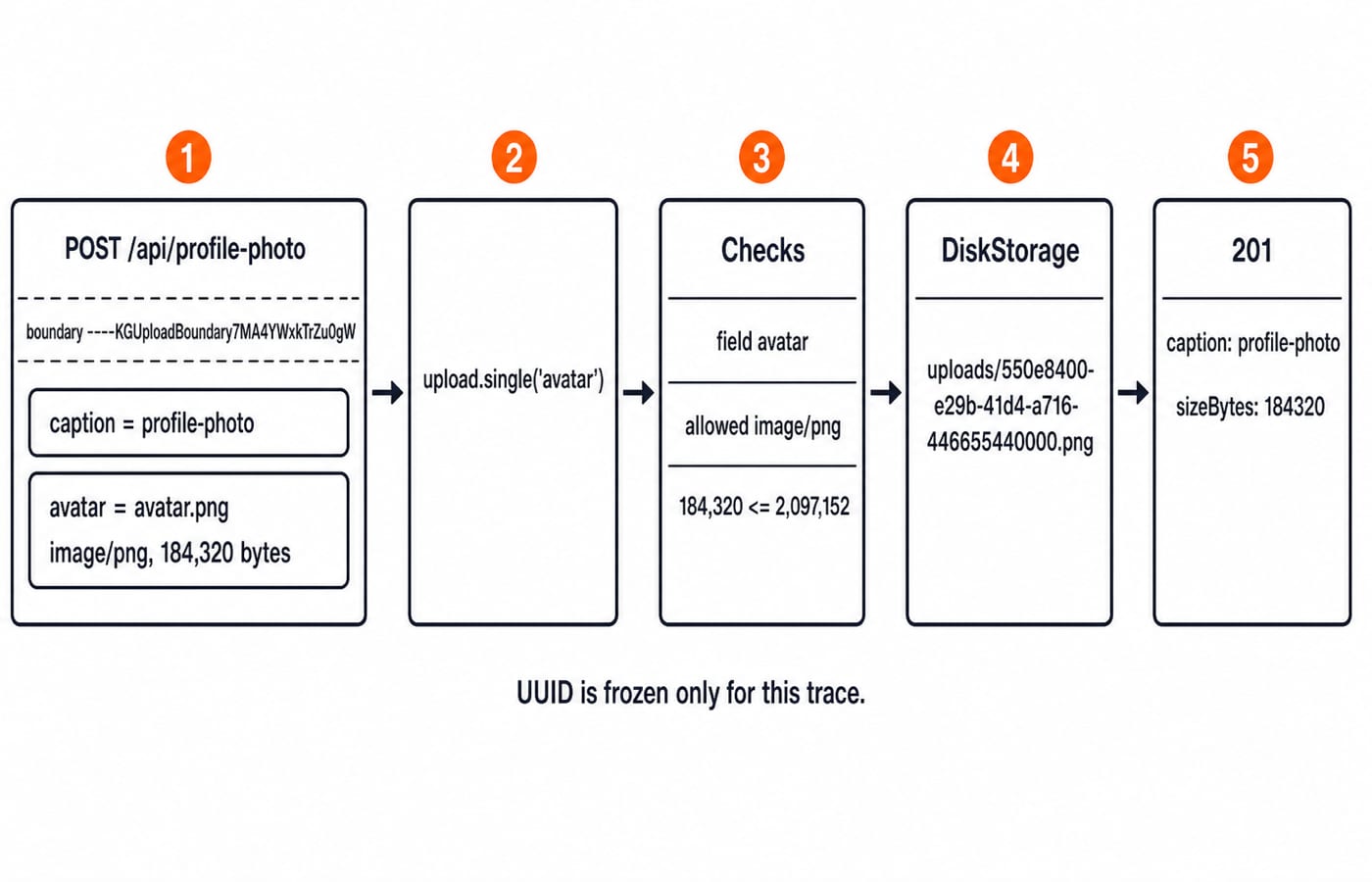
An illustrative request uses boundary ----KGUploadBoundary7MA4YWxkTrZu0gW, a text part containing caption=profile-photo, and a file part with name="avatar", filename="avatar.png", Content-Type: image/png, and 184,320 payload bytes. Browsers choose their own boundaries. The Application Layer Protocols: DNS and HTTP Guide explains the headers and body framing.
Set up one runnable Express and Multer upload project
Create the project without version pins:
mkdir node-upload-demo
cd node-upload-demo
npm init -y
npm install express multer
Add "type": "module" to package.json, create server.js, and start it with node server.js. UPLOAD_DIR points to the project's uploads directory, which mkdirSync(..., { recursive: true }) creates at startup.
The MIME map allows only PNG and JPEG and chooses the stored extension. Multer is attached only to the upload routes. Its limits allow three files, one text field, four parts, and 2,097,152 bytes per file. Combining a UUID with an extension from the fixed map prevents the client filename from choosing the storage path.
Build and trace the single-file upload endpoint
Create server.js with this Express application:
import express from 'express';
import multer from 'multer';
import { mkdirSync } from 'node:fs';
import { join } from 'node:path';
import { randomUUID } from 'node:crypto';

const app = express();
const UPLOAD_DIR = join(process.cwd(), 'uploads');
mkdirSync(UPLOAD_DIR, { recursive: true });

const ALLOWED_TYPES = new Map([
  ['image/png', '.png'],
  ['image/jpeg', '.jpg'],
]);

const storage = multer.diskStorage({
  destination: UPLOAD_DIR,
  filename: (req, file, cb) =>
    cb(null, randomUUID() + ALLOWED_TYPES.get(file.mimetype)),
});

const upload = multer({
  storage,
  limits: { fileSize: 2 * 1024 * 1024, files: 3, fields: 1, parts: 4 },
  fileFilter: (req, file, cb) => {
    if (ALLOWED_TYPES.has(file.mimetype)) return cb(null, true);
    const error = new Error('Only PNG and JPEG files are allowed');
    error.code = 'UNSUPPORTED_MEDIA_TYPE';
    cb(error);
  },
});

const fileJson = file => ({
  field: file.fieldname,
  originalName: file.originalname,
  storedAs: file.filename,
  mimeType: file.mimetype,
  sizeBytes: file.size,
});

app.post('/api/profile-photo', upload.single('avatar'), (req, res) => {
  if (!req.file) {
    return res.status(400).json({
      error: { code: 'FILE_REQUIRED', message: 'Choose one avatar file' },
    });
  }
  res.status(201).json({
    ok: true,
    caption: req.body.caption,
    file: fileJson(req.file),
  });
});

app.post('/api/gallery', upload.array('photos', 3), (req, res) => {
  if (!req.files?.length) {
    return res.status(400).json({
      error: { code: 'FILE_REQUIRED', message: 'Choose at least one photo' },
    });
  }
  const totalBytes = req.files.reduce((sum, file) => sum + file.size, 0);
  res.status(201).json({
    ok: true,
    count: req.files.length,
    totalBytes,
    files: req.files.map(file => {
      const { originalName, storedAs, mimeType, sizeBytes } = fileJson(file);
      return { originalName, storedAs, mimeType, sizeBytes };
    }),
  });
});

app.use((err, req, res, next) => {
  if (err instanceof multer.MulterError) {
    if (err.code === 'LIMIT_FILE_SIZE') {
      return res.status(413).json({ error: {
        code: 'FILE_TOO_LARGE', message: 'Each file must be 2 MiB or smaller',
      }});
    }
    if (err.code === 'LIMIT_UNEXPECTED_FILE') {
      return res.status(400).json({ error: {
        code: 'UNEXPECTED_FILE',
        message: 'Check the upload field name and file count',
      }});
    }
    if (err.code === 'LIMIT_FILE_COUNT') {
      return res.status(400).json({ error: {
        code: 'UNEXPECTED_FILE',
        message: 'Check the upload field name and file count',
      }});
    }
  }
  if (err.code === 'UNSUPPORTED_MEDIA_TYPE') {
    return res.status(415).json({ error: {
      code: 'UNSUPPORTED_MEDIA_TYPE', message: err.message,
    }});
  }
  res.status(500).json({
    error: { code: 'UPLOAD_FAILED', message: 'Upload failed' },
  });
});

app.listen(3000, () => console.log('Upload server listening on port 3000'));
Test a valid 184,320-byte PNG:
curl -i -F "caption=profile-photo" \
  -F "avatar=@fixtures/avatar.png;type=image/png" \
  http://localhost:3000/api/profile-photo
For this trace only, freeze randomUUID() at 550e8400-e29b-41d4-a716-446655440000. A real run produces a different UUID. The illustrative 201 body is exactly:
{"ok":true,"caption":"profile-photo","file":{"field":"avatar","originalName":"avatar.png","storedAs":"550e8400-e29b-41d4-a716-446655440000.png","mimeType":"image/png","sizeBytes":184320}}Multer copies the text part to req.body.caption, exposes the file headers and measured bytes through req.file, writes the generated name, and the handler selects those values for the response.
Accept multiple files without losing count or size control
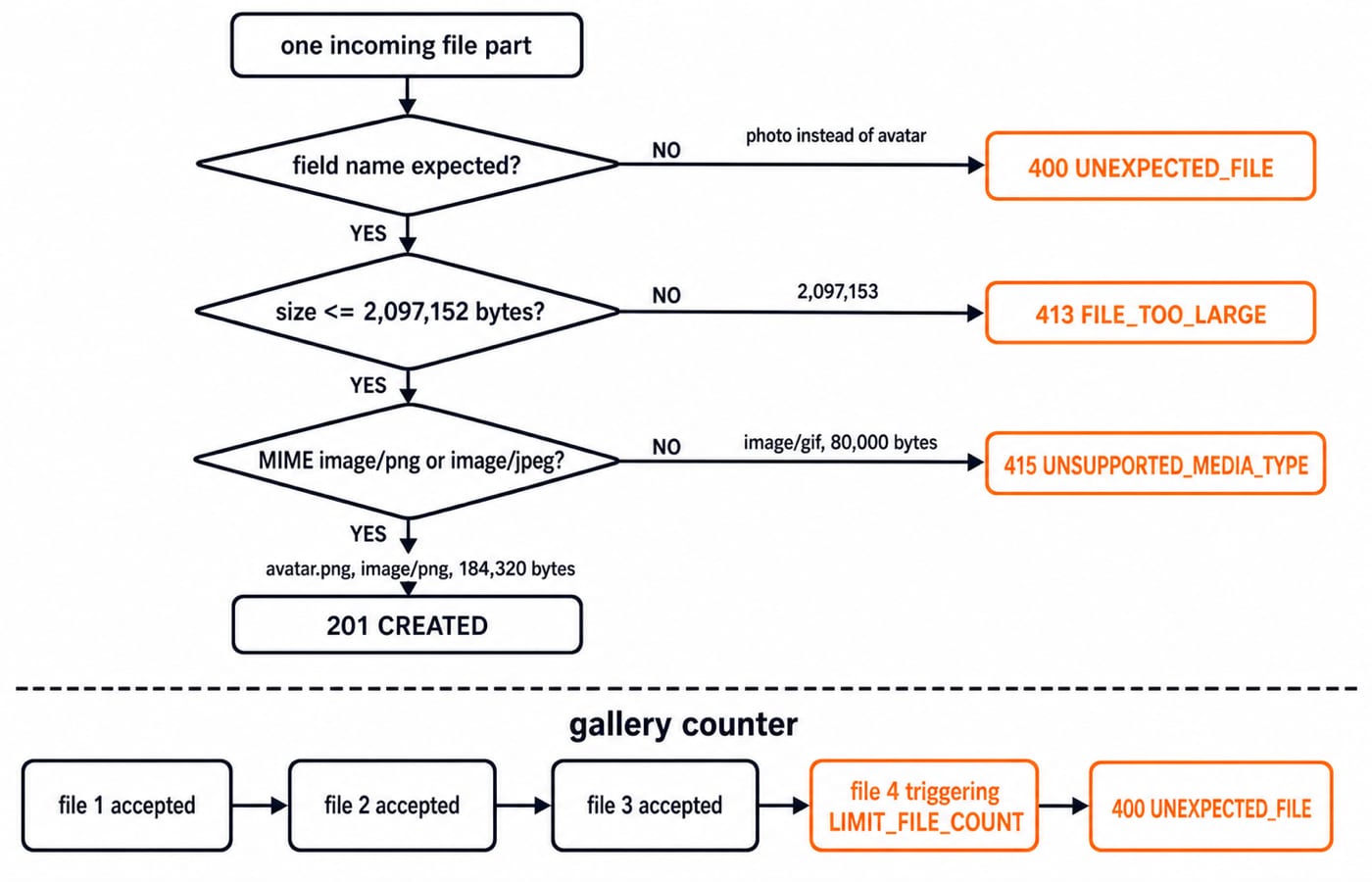
The gallery route uses upload.array('photos', 3), so every file part needs the field name photos. Three differently named fields do not satisfy that contract. An empty array returns 400 FILE_REQUIRED; an accepted request returns the file count, each file's details, and a reduced byte total.
For front.png = 125,000 bytes, side.jpg = 210,500 bytes, and receipt.png = 64,000 bytes:
curl -i \
  -F "photos=@fixtures/front.png;type=image/png" \
  -F "photos=@fixtures/side.jpg;type=image/jpeg" \
  -F "photos=@fixtures/receipt.png;type=image/png" \
  http://localhost:3000/api/gallery
125,000 + 210,500 + 64,000 = 399,500
The response therefore has count: 3 and totalBytes: 399500. The controls are independent: array('photos', 3) allows no more than three files, while fileSize: 2,097,152 limits each file rather than their sum. A fourth photo is rejected, not ignored. This is not a global 6 MiB request ceiling because multipart framing adds its own bytes.
Turn upload failures into exact, useful HTTP responses
The final four-argument middleware first checks multer.MulterError. Separate branches map LIMIT_FILE_SIZE to 413 FILE_TOO_LARGE, LIMIT_UNEXPECTED_FILE to 400 UNEXPECTED_FILE, and LIMIT_FILE_COUNT to 400 UNEXPECTED_FILE. The filter creates a separate UNSUPPORTED_MEDIA_TYPE error for a 415 response. HTML accept is only client guidance, so the server still decides. Unknown errors expose only the safe 500 UPLOAD_FAILED response.
Request case | Parser result | Exact response |
|---|---|---|
no | handler sees no |
|
|
|
|
file field is |
|
|
| custom filter error |
|
fourth item on |
|
|
File upload validation is layered, not one MIME check
file.mimetype comes from multipart metadata and can be forged. This allowlist establishes a clear request boundary, but a real ingestion pipeline should inspect file signatures, decode or scan content as appropriate, and delete rejected temporary files before trusting an upload.
Authenticate before upload middleware so unauthorised callers do not consume storage work.
Keep Multer route-scoped instead of using global
upload.any().Retain strict field, count, part, and byte limits.
Generate names on the server instead of trusting
originalname.Keep untrusted files outside a public static directory.
Move durable objects to object storage or managed media when instances are ephemeral or scaled horizontally.
The file store owns the object and generated key. A database record can separately hold its owner ID, storage key, display name, MIME type, and byte count. Mongoose Schemas and Models shows where metadata validation belongs. If the metadata write fails after storage succeeds, perform a compensating delete or use a cleanup job to prevent orphaned objects.
Debug common upload errors, then prove the route with exercises
Symptom | Cause | Fix |
|---|---|---|
| missing multipart encoding or file part | set |
|
| align field names and counts |
files vanish after redeploy | local container storage is ephemeral | store durable objects outside the instance |
server memory spikes | large or numerous buffers are in memory | use disk or streaming storage with strict limits |
Now make three checkable changes. First, allow only PDF on the single route, set fileSize to 1,048,576 bytes, and prove that 1,048,577 bytes returns 413. Second, send the three gallery fixtures and assert count = 3 and totalBytes = 399,500; add file four, trigger LIMIT_FILE_COUNT, and assert 400 UNEXPECTED_FILE. Third, rename avatar to photo, observe UNEXPECTED_FILE, and repair only the client field. Together, the changes exercise the field, count, MIME and size boundaries.
File uploads in Node.js: the short version and next step
Keep the seven-part model: multipart form, exact field name, route-scoped parser, strict limits, server-generated name, controlled error map, and storage plus metadata cleanup. The successful path is avatar.png, 184,320 bytes -> upload.single('avatar') -> UUID.png -> 201. Test that success, a missing file, GIF rejection, a 2,097,153-byte rejection, and finally the 399,500-byte three-photo batch.
Continue with the Node.js, Express.js & MongoDB Course for the focused backend path, or browse Skill Development Courses as the catalogue path.
Keep learning

Node.js File System Tutorial: Read, Write and Manage Files with Runnable Examples
Build one path-safe Node.js lab that reads attempt records, calculates accuracy, creates an output directory, writes a JSON summary, and appends an audit log.
Updated 9 Nov 20266 min readWeb Development

Testing APIs in Node.js: Jest and Supertest Tutorial with Runnable Examples
Build a small Express task API and test its routes, validation, headers, JSON responses and state changes without opening a fixed server port.
Updated 25 Nov 20266 min readWeb Development

CommonJS vs ESM in Node.js: Modules Tutorial with Runnable Examples
Learn how Node.js classifies CommonJS and ESM files, run both module formats, fix loader errors, and migrate across explicit boundaries.
Updated 11 Nov 20265 min readWeb Development

Node.js EventEmitter Tutorial: Events, Listeners and Runnable Examples
Build a precise mental model of Node.js events with three runnable programs. Trace listener order, nested emits, removal, return values and common mistakes.
Updated 8 Nov 20265 min readWeb Development