

CommonJS vs ESM in Node.js: Modules Tutorial with Runnable Examples
Learn how Node.js classifies CommonJS and ESM files, run both module formats, fix loader errors, and migrate across explicit boundaries.
KnowledgeGate Team
Exam prep & CS education
Updated 11 Nov 20265 min read
One Node.js file uses require, another uses import, and code copied between them throws loader errors even though both files are JavaScript. CommonJS and ESM are two module contracts, not two languages: each defines how a file exposes values, loads dependencies, and behaves at runtime. The same invoice calculation runs in both formats, produces 1475, and exposes predictable loader errors and format trade-offs.
CommonJS and ESM: the mental model before syntax
A module is a scoped file with a public interface. CommonJS exposes values through module.exports and loads them with require(). ESM uses export and import.
Question | CommonJS | ESM |
|---|---|---|
Marker syntax |
|
|
Explicit extensions |
|
|
Common |
|
|
Loading style | Synchronous | Statically declared imports, with asynchronous features such as top-level |
Local relative paths | Resolution conveniences | Explicit file extensions in imports |
The Node.js Packages documentation defines these rules. Packages can mix formats at explicit boundaries. Modules in JavaScript: Import, Export, and Runnable Examples develops ESM syntax, browser loading, dynamic import, and live bindings through cart and counter examples. The Node.js decision is narrower: contrast ESM live bindings with CommonJS caching, then test format detection, interop, and migration boundaries. For broader programming and web-development study, see Coding & Skill Development Courses.
Run the same invoice module in CommonJS and ESM
Create this exact tree:
module-lab/
|-- commonjs/
|   |-- invoice.cjs
|   `-- app.cjs
`-- esm/
    |-- invoice.mjs
    `-- app.mjs
Put this in commonjs/invoice.cjs:
function invoiceTotal(subtotal, taxRate) {
  return subtotal + subtotal * taxRate;
}
module.exports = { invoiceTotal };
Then create commonjs/app.cjs:
const { invoiceTotal } = require('./invoice.cjs');
const subtotal = 1250;
const taxRate = 0.18;
console.log(invoiceTotal(subtotal, taxRate));
node commonjs/app.cjs prints 1475: tax is 1250 x 0.18 = 225, then total is 1250 + 225 = 1475.
In esm/invoice.mjs, only the boundary syntax changes:
export function invoiceTotal(subtotal, taxRate) {
  return subtotal + subtotal * taxRate;
}
Create esm/app.mjs:
import { invoiceTotal } from './invoice.mjs';
const subtotal = 1250;
const taxRate = 0.18;
console.log(invoiceTotal(subtotal, taxRate));
node esm/app.mjs also prints 1475. Trace export, load, call with 1250 and 0.18, then output.
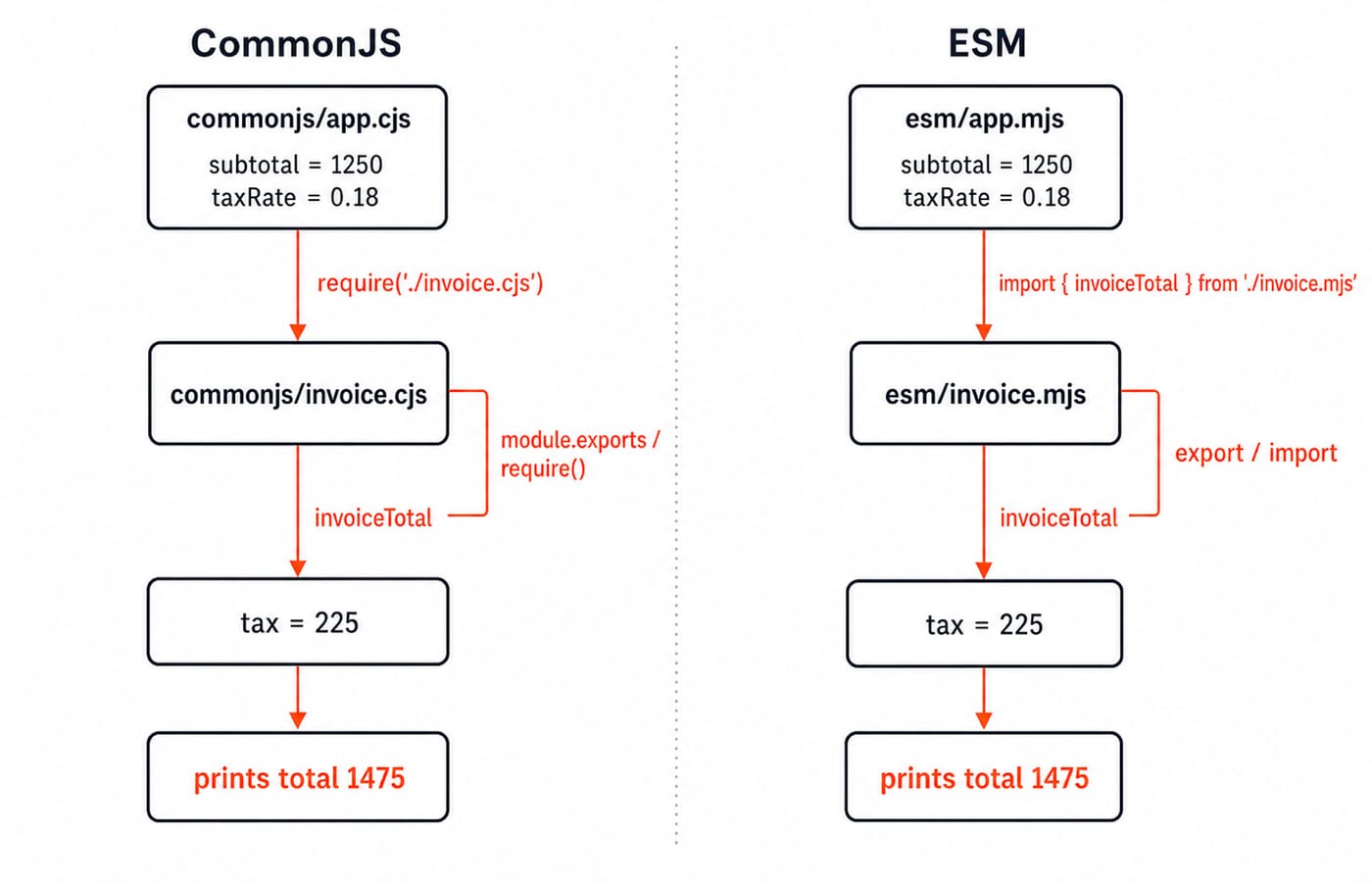
How Node.js decides whether a file is CommonJS or ESM
Node treats .cjs as CommonJS and .mjs as ESM. A .js file follows the nearest package.json: "type": "module" selects ESM and "type": "commonjs" selects CommonJS. Without a marker, Node.js can inspect syntax to detect ESM. Set type to remove ambiguity.
Copy the ESM files into explicit-esm/ as invoice.js and app.js, change the import to ./invoice.js, and add:
{ "type": "module" }node explicit-esm/app.js prints 1475. Copy the CommonJS files into explicit-cjs/ as .js, add { "type": "commonjs" }, and require ./invoice.js. node explicit-cjs/app.js prints 1475.
ESM local imports require the extension. from './invoice' produces ERR_MODULE_NOT_FOUND; restore ./invoice.mjs. This does not apply to node:path or installed package names.
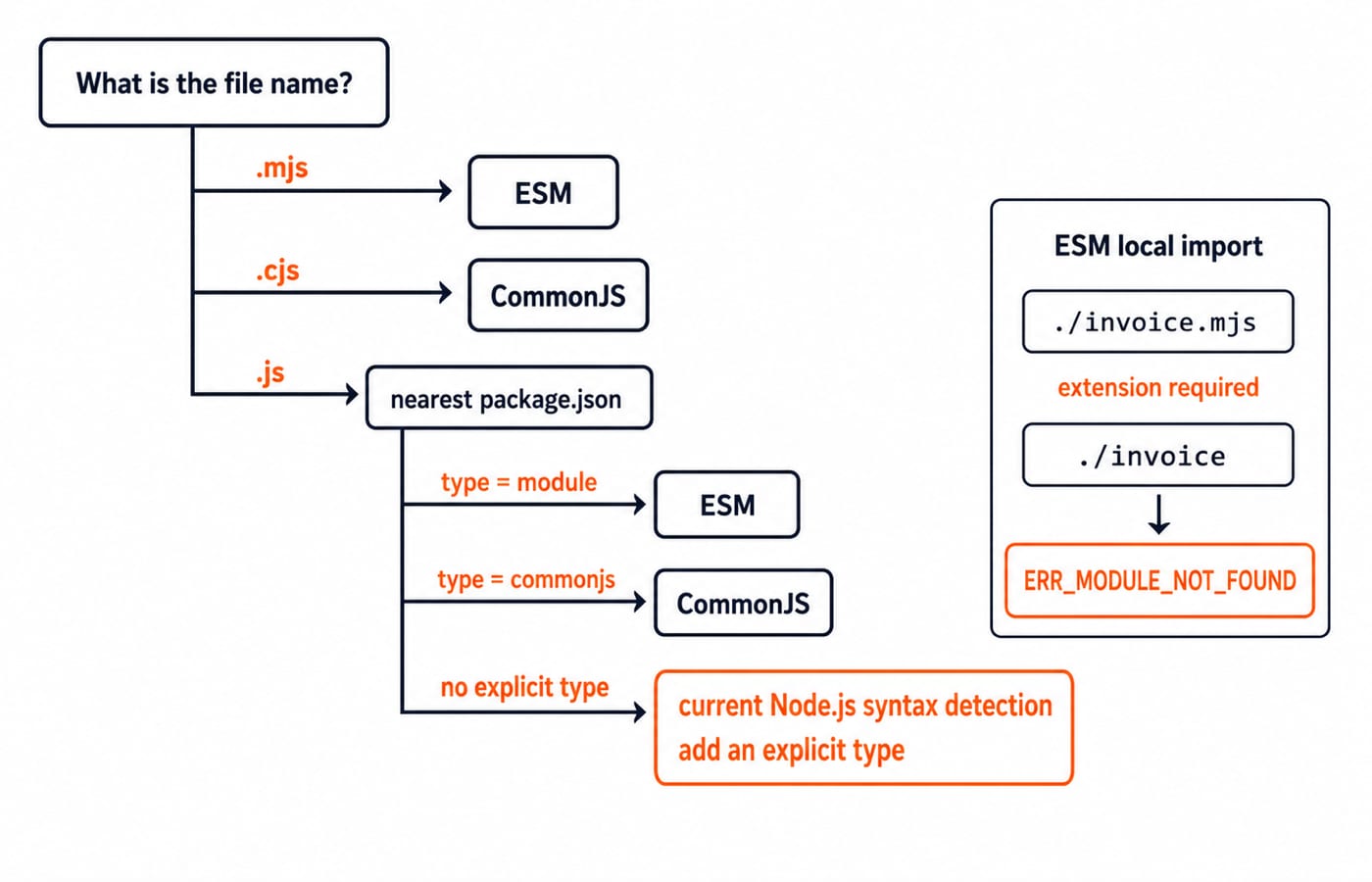
The behavioural differences syntax conversion can hide
CommonJS caches a module after its first resolved load. In counter.cjs:
let loads = 0;
loads += 1;
module.exports = { loads };
In cache-demo.cjs:
const first = require('./counter.cjs');
const second = require('./counter.cjs');
console.log(first.loads, second.loads, first === second);
The output is 1 1 true. The resolved module executed once, and both calls received its cached exported object, as the Node.js CommonJS modules documentation explains.
ESM imports are live bindings, not copied values. Put this in counter.mjs:
export let count = 1;
export function increment() { count += 1; }
In live-demo.mjs:
import { count, increment } from './counter.mjs';
console.log(count);
increment();
console.log(count);
It prints 1 and then 2: the imported binding reflects the exporter's update.
ESM also permits top-level await:
const value = await Promise.resolve(7);
console.log(value);
await-demo.mjs prints 7. In CommonJS, use an async function or dynamic import(). The Node.js ESM documentation defines this boundary.
Interoperability and a safe migration path
ESM can consume CommonJS through a default import:
// legacy.cjs
module.exports = { triple(number) { return number * 3; } };

// consume-legacy.mjs
import legacy from './legacy.cjs';
console.log(legacy.triple(14));
This prints 42. Node exposes module.exports as the default export. Do not assume its properties are reliable named exports.
For the broadly useful asynchronous bridge in the other direction:
// modern.mjs
export function triple(number) { return number * 3; }

// consume-modern.cjs
import('./modern.mjs').then(({ triple }) => console.log(triple(14)));
This prints 42. Current Node.js can require() synchronous ESM under documented conditions, so the word never is outdated. An ESM graph with top-level await needs asynchronous loading. This is version-sensitive, so check the official CommonJS and ESM documentation.
Migrate in four controlled steps:
Add or confirm tests.
Choose an explicit boundary with extensions or
package.jsontype.Convert exports and imports one module edge at a time.
Run the entry command after every edge.
Next, Mongoose Schemas and Models shows module boundaries meeting imported libraries.
Common errors, why they happen, and the exact repair
Symptom | Cause | Repair | Verification command |
|---|---|---|---|
| CommonJS syntax entered ESM | Use |
|
|
| Use |
|
| Local ESM extension is missing | Use |
|
A | The package now treats | Convert its syntax or rename it | Run the package entry command |
The exports shortcut has a trap. In wrong.cjs, exports = { answer: 42 }; only rebinds the local shortcut, so console.log(require('./wrong.cjs')); prints {}. Use module.exports = { answer: 42 }; and it prints { answer: 42 }. This follows Node's documented module.exports binding.
ESM does not provide __dirname automatically. Use this portable repair:
import { fileURLToPath } from 'node:url';
import { dirname } from 'node:path';
const __filename = fileURLToPath(import.meta.url);
const __dirname = dirname(__filename);
console.log(__dirname);
The printed path depends on your machine.
How interviews and coding exercises test module understanding
Predict first. The CommonJS cache demo prints 1 1 true; the ESM live binding prints 1 then 2; both invoices print 1475 under different contracts.
Now repair this broken.mjs:
const { invoiceTotal } = require('./invoice.cjs');
console.log(invoiceTotal(1250, 0.18));
Solution A keeps .mjs: use import invoice from './invoice.cjs';, then call invoice.invoiceTotal(1250, 0.18). Solution B moves the consumer to .cjs and keeps require. Both print 1475.
In five minutes, migrate invoice.cjs and app.cjs to .mjs, preserve the named invoiceTotal, include .mjs in the relative import, then prove it with node esm/app.mjs.
CommonJS vs ESM: the short version and next step
Use the format already established in the project.
Make new modern packages explicit instead of relying on syntax detection.
Use
.cjsand.mjswhen both systems must coexist.Test interoperability edges instead of assuming a syntax-only rename is enough.
Two contracts, the same 1250 subtotal, the same 18% tax, and the same 1475 output. Continue with the Node.js, Express.js & MongoDB Course for backend practice, or the MERN Stack Course - Full Stack Development for a wider full-stack path.
Keep learning

MongoDB Aggregation Pipeline: `$match` to `$group` with a Worked Example
Build one MongoDB aggregation pipeline step by step. Follow five fictional orders through filtering, array expansion, grouping, projection, and deterministic sorting.
Updated 17 Nov 20266 min readWeb Development

Future Internet Explained: Architecture, a Worked IoT Example and Exam Traps
Learn how device, edge, network, cloud and application layers cooperate, then solve a smart-campus example for data reduction and control-loop latency.
Updated 16 Nov 20266 min readWeb Development

Testing React Components: A Runnable Vitest and Testing Library Tutorial
Build and test a small React progress component from its initial render through completion. The examples use accessible queries, awaited actions, and an exact mock assertion.
Updated 15 Nov 20266 min readWeb Development

React Performance Optimization Tutorial: Profiler, memo, useMemo, and useCallback Examples
Build one React lab, measure its render and calculation counts, then remove avoidable work while keeping typing responsive.
Updated 14 Nov 20266 min readWeb Development