

Node.js File System Tutorial: Read, Write and Manage Files with Runnable Examples
Build one path-safe Node.js lab that reads attempt records, calculates accuracy, creates an output directory, writes a JSON summary, and appends an audit log.
KnowledgeGate Team
Exam prep & CS education
Updated 9 Nov 20266 min read

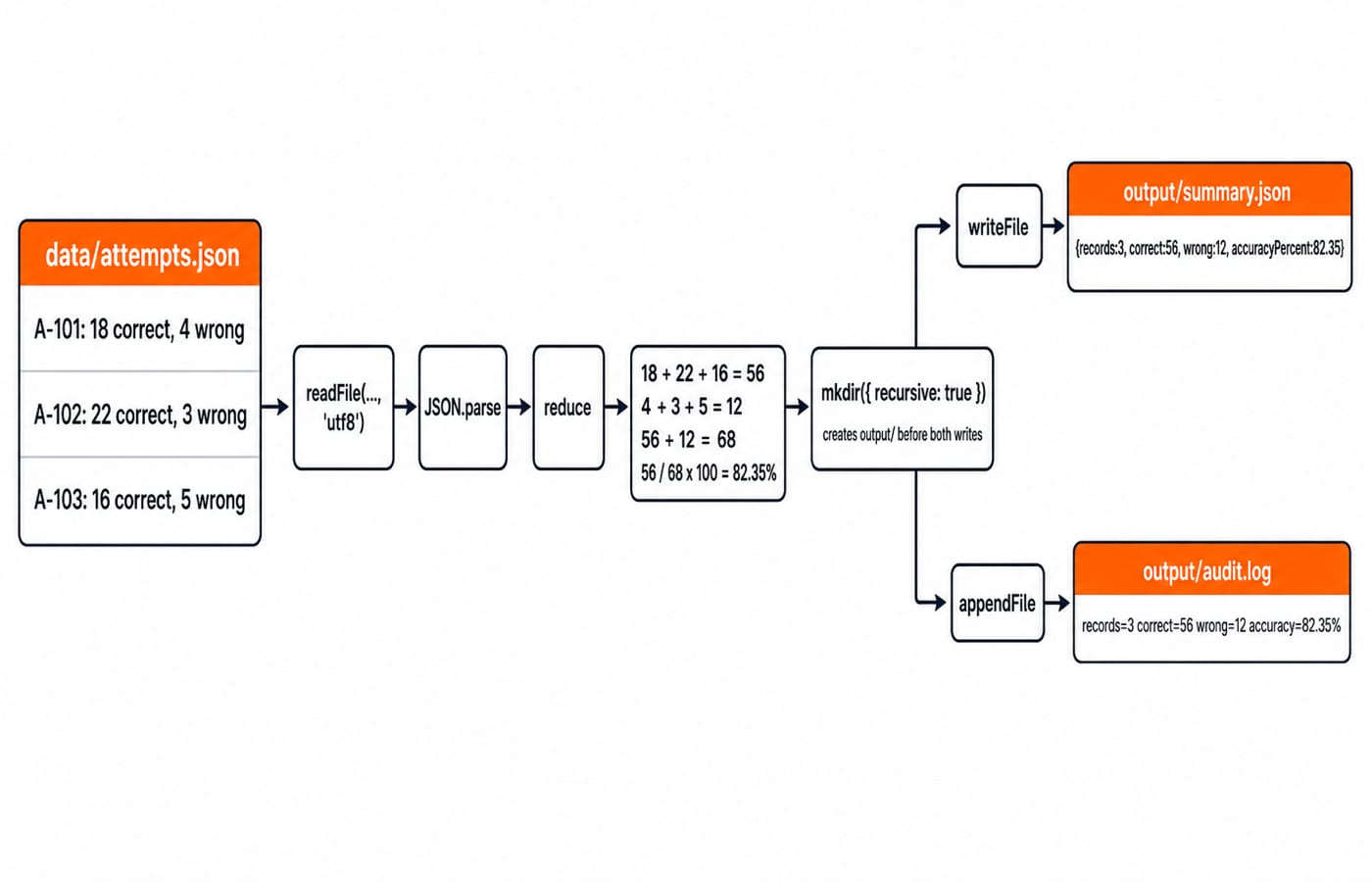
The node:fs module looks like a short list of methods, but small mistakes change program behaviour. A missing encoding returns a Buffer, a relative path can start from an unexpected directory, a write can replace content, and an ignored error can hide the real fault. This runnable .mjs lab reads three attempts, calculates 56 correct and 12 wrong answers, creates an output directory, writes JSON, and appends an audit line.
1. Understand node:fs: promise, callback and synchronous APIs
Node.js provides its built-in file-system features in promise, callback and synchronous forms, as the official File system documentation explains. Import from node:fs/promises when promise-returning methods fit an async/await flow. Import from node:fs for callbacks or synchronous methods commonly found in existing code.
Synchronous calls block the event loop until they finish. They can be reasonable during deliberate startup or in a small command-line script, but are a poor default inside a busy request path.
The data contract matters. readFile(path, 'utf8') returns text, while omitting the encoding returns a Buffer. A Buffer is valid binary data, not an error. writeFile replaces an existing file by default. appendFile adds data and creates the file when it does not exist. If promises are new, the Programming Languages tutorial map provides broader context.
2. Set up a path-safe file-system lab
Create this project. The script will create output/:
node-fs-lab/
|-- report.mjs
|-- data/
|   `-- attempts.json
`-- output/                 (created by report.mjs)
Put this exact input in data/attempts.json:
[
  { "id": "A-101", "correct": 18, "wrong": 4 },
  { "id": "A-102", "correct": 22, "wrong": 3 },
  { "id": "A-103", "correct": 16, "wrong": 5 }
]
In an ES module, fileURLToPath(new URL('.', import.meta.url)) derives the directory containing the script. Build each file path from that directory with join. The official Path documentation states that path.join() uses the platform-specific separator and normalises the resulting path. Therefore, node /full/path/node-fs-lab/report.mjs still finds the lab data even when the terminal is in another directory. A relative path based only on the current working directory would not have that stability.
3. Worked example: read, calculate, create, write and append
Save this complete program as report.mjs:
import { appendFile, mkdir, readFile, writeFile } from 'node:fs/promises';
import { join } from 'node:path';
import { fileURLToPath } from 'node:url';

const rootDir = fileURLToPath(new URL('.', import.meta.url));
const sourcePath = join(rootDir, 'data', 'attempts.json');
const outputDir = join(rootDir, 'output');
const summaryPath = join(outputDir, 'summary.json');
const auditPath = join(outputDir, 'audit.log');

const raw = await readFile(sourcePath, 'utf8');
const attempts = JSON.parse(raw);
const correct = attempts.reduce((sum, item) => sum + item.correct, 0);
const wrong = attempts.reduce((sum, item) => sum + item.wrong, 0);
const accuracyPercent = Number(
  ((correct / (correct + wrong)) * 100).toFixed(2),
);
const summary = {
  records: attempts.length,
  correct,
  wrong,
  accuracyPercent,
};

await mkdir(outputDir, { recursive: true });
await writeFile(summaryPath, JSON.stringify(summary, null, 2) + '\n', 'utf8');
await appendFile(
  auditPath,
  `records=${summary.records} correct=${correct} wrong=${wrong} accuracy=${accuracyPercent}%\n`,
  'utf8',
);

console.log(summary);
Run node report.mjs. The calculation is:
Correct:
18 + 22 + 16 = 56Wrong:
4 + 3 + 5 = 12Answered:
56 + 12 = 68Accuracy:
56 / 68 x 100 = 82.3529..., rounded to82.35
The console prints { records: 3, correct: 56, wrong: 12, accuracyPercent: 82.35 }. The exact output/summary.json is:
{
  "records": 3,
  "correct": 56,
  "wrong": 12,
  "accuracyPercent": 82.35
}
The audit line is records=3 correct=56 wrong=12 accuracy=82.35%. Run the script again and summary.json is replaced with the same summary, while audit.log receives a second identical line.
4. List directory entries and inspect file metadata
Add readdir and stat to the node:fs/promises import, then place this after the writes:
const entries = await readdir(outputDir, { withFileTypes: true });
entries.sort((a, b) => a.name.localeCompare(b.name));
for (const entry of entries) {
  console.log(`${entry.name}:${entry.isFile() ? 'file' : 'directory'}`);
}

const details = await stat(summaryPath);
console.log(details.size);
With withFileTypes: true, readdir returns directory-entry objects. Their isFile() checks produce audit.log:file and summary.json:file after sorting. stat(summaryPath) instead describes that one path. Its size is exactly 79 bytes for the controlled ASCII JSON above plus its final newline. Timestamps vary, so never hard-code them. The stats object also offers isFile() and isDirectory() type checks. In short, readdir answers what a directory contains, while stat answers what one path represents and exposes its metadata.
5. Choose whole-file helpers, streams and sequential writes deliberately
readFile and writeFile are convenient for small configuration, JSON and report files. readFile reads the entire file, so consider createReadStream or createWriteStream when data should be processed incrementally. There is no universal file-size threshold.
Do not modify the same file concurrently and guess which result wins:
await Promise.all([
  writeFile(statusPath, 'first\n'),
  writeFile(statusPath, 'second\n'),
]);
Both operations target statusPath, so the final content is unsafe to predict. Sequence dependent writes instead:
await writeFile(statusPath, 'first\n');
await appendFile(statusPath, 'second\n');
The exact content is first followed by second on the next line. Awaiting operations on unrelated files concurrently is a different case because those writes do not compete for one destination.
6. Handle ENOENT, invalid JSON and permission failures explicitly
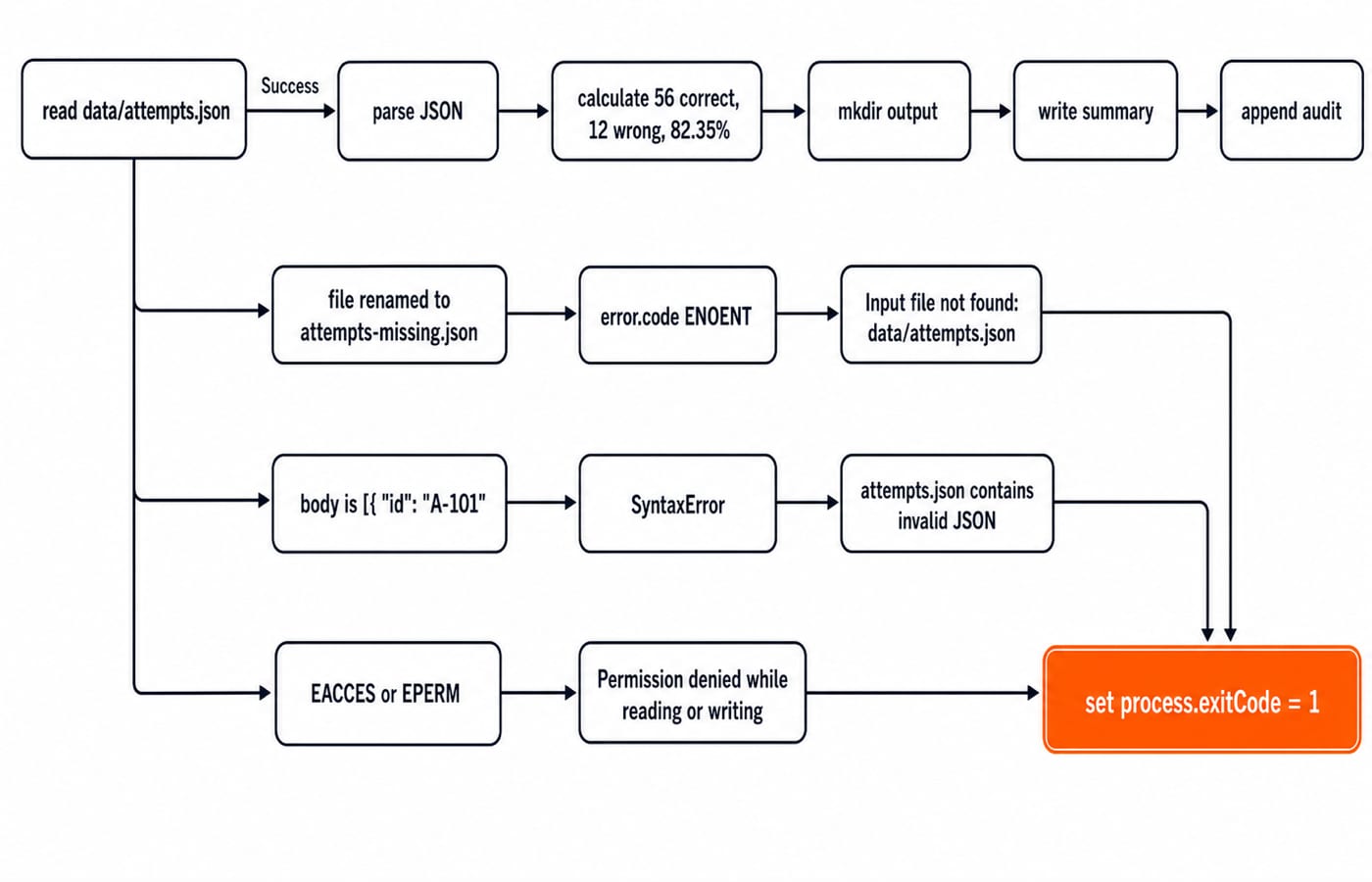
Wrap everything from const raw = await readFile(...) through console.log(summary) inside async function buildReport() { ... }, then put this call below its closing brace:
buildReport().catch((error) => {
  let message;
  if (error.code === 'ENOENT') {
    message = 'Input file not found: data/attempts.json';
  } else if (error instanceof SyntaxError) {
    message = 'attempts.json contains invalid JSON';
  } else if (error.code === 'EACCES' || error.code === 'EPERM') {
    message = 'Permission denied while reading or writing';
  } else {
    message = `Report failed: ${error.message}`;
  }

  console.error(message);
  process.exitCode = 1;
});
Drill the first branch by renaming attempts.json to attempts-missing.json without changing the script. Expect Input file not found: data/attempts.json. Restore the name, replace the body with [{ "id": "A-101", and expect attempts.json contains invalid JSON. Low-level operating-system messages can differ.
The official filesystem guidance warns against calling access() before open, readFile or writeFile. The filesystem can change after the check. Attempt the real operation and handle its error.
7. How coding tests and interviews probe file-system code
Durable questions ask you to choose a promise, callback or synchronous API for a scenario, predict text versus Buffer, identify overwrite versus append, diagnose an unawaited promise, distinguish readdir from stat, or make a path portable. Use the official File system page linked above for file APIs and the current Node.js Path API for path semantics.
Try three exact checks:
Add
{ "id": "A-104", "correct": 20, "wrong": 0 }. The result is4records,76correct and12wrong. Answered is76 + 12 = 88, so accuracy is76 / 88 x 100 = 86.36%after rounding.Remove
'utf8'fromreadFile. It returns aBuffer. Call.toString('utf8')explicitly or restore the encoding before text operations.Change the summary write to
{ encoding: 'utf8', flag: 'wx' }. Delete the old summary first. The next run succeeds, but the following run reachesEEXISTbecause exclusive creation refuses to replace the file.
These checks stay file-system-specific. Node.js Error Handling Tutorial: Patterns and Worked Examples covers thrown errors, promise rejections, callback errors and event errors across an application; this lab focuses on file-operation failures.
8. The short version and the next practical step
Build paths from the script location, read text with an explicit encoding, parse the input data, await dependent work, create directories deliberately, distinguish replacement from append, and handle file-operation errors explicitly. Here, three records became 56 correct, 12 wrong, 82.35%, a 79-byte summary and one audit line per run.
Rebuild report.mjs from memory, then complete the four-record exercise. Continue with the free Node.js, Express.js and MongoDB course, choose the broader MERN Stack course, or browse Coding & Skills.
Keep learning

Future Internet Explained: Architecture, a Worked IoT Example and Exam Traps
Learn how device, edge, network, cloud and application layers cooperate, then solve a smart-campus example for data reduction and control-loop latency.
Updated 16 Nov 20266 min readWeb Development

Testing React Components: A Runnable Vitest and Testing Library Tutorial
Build and test a small React progress component from its initial render through completion. The examples use accessible queries, awaited actions, and an exact mock assertion.
Updated 15 Nov 20266 min readWeb Development
React Performance Optimization Tutorial: Profiler, memo, useMemo, and useCallback Examples
Build one React lab, measure its render and calculation counts, then remove avoidable work while keeping typing responsive.
Updated 14 Nov 20266 min readWeb Development

Node.js Path and OS Modules: Build Portable Scripts with Runnable Examples
Learn how Path and OS remove hard-coded assumptions from Node.js scripts. Follow deterministic examples, memory maths, and a complete system-report build.
Updated 13 Nov 20265 min readWeb Development