

Node.js Deployment Basics: Deploy an Express App on a Linux VM
Deploy one Express service as an unprivileged Linux process. Build a locked release, supervise it with systemd, proxy it through Nginx, and test each boundary.
KnowledgeGate Team
Exam prep & CS education
Updated 21 Nov 20265 min read
node server.js proves the application starts locally. It does not make the process reproducible, domain-reachable, restartable after failure, or able to finish an active request while stopping.
Run release-001 as nodeapp on 127.0.0.1:8080 behind Nginx. Requests to https://app.example.com pass through DNS and the proxy to the private Express listener, while systemd supervises shutdown and restart.
Node.js deployment basics: five boundaries between code and a live service
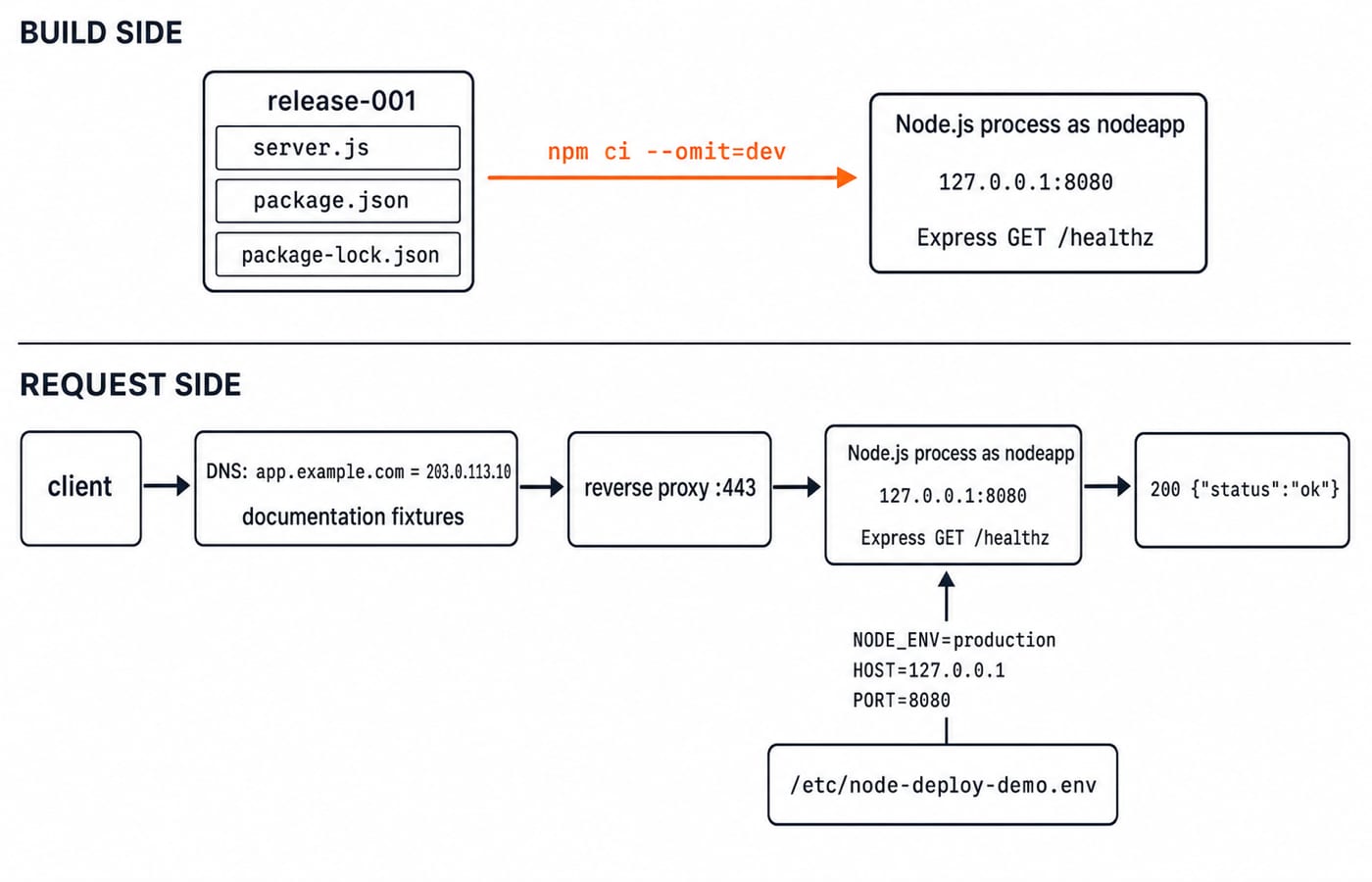
Deployment connects five boundaries: a reproducible release, runtime configuration, a supervised Node process, a public HTTP and TLS entry point, and observable health and logs. npm ci --omit=dev builds; node server.js runs; DNS and the proxy route requests.
DNS maps app.example.com to 203.0.113.10. The proxy accepts HTTPS on 443, forwards HTTP to 127.0.0.1:8080, and Express matches GET /healthz. The client receives 200, Content-Type: application/json, and {"status":"ok"}. Review the Application Layer Protocols: DNS and HTTP Guide if needed.
Prepare a small Express app for deployment
Create the project and its start contract:
mkdir node-deploy-demo
cd node-deploy-demo
npm init -y
npm install express
npm pkg set scripts.start="node server.js"
package.json declares how the service starts. The generated package-lock.json records resolved dependencies. If Express is new to you, use the Node.js, Express.js & MongoDB Course.
Create server.js using CommonJS:
const express = require("express");

const app = express();
const host = process.env.HOST || "0.0.0.0";
const port = Number(process.env.PORT || 3000);
let shuttingDown = false;

app.get("/healthz", (req, res) => {
  res.status(200).json({ status: "ok" });
});


const server = app.listen(port, host, () => {
  console.log("Server listening");
});

function shutdown(signal) {
  if (shuttingDown) return;
  shuttingDown = true;
  console.log(`Received ${signal}; starting graceful shutdown`);

  const forceExit = setTimeout(() => {
    console.error("Graceful shutdown timed out");
    process.exit(1);
  }, 10_000);
  forceExit.unref();

  server.close((error) => {
    if (error) {
      console.error("Server close failed", error);
      process.exit(1);
    }
    clearTimeout(forceExit);
    process.exit(0);
  });
}

process.on("SIGTERM", () => shutdown("SIGTERM"));
process.on("SIGINT", () => shutdown("SIGINT"));
Run HOST=127.0.0.1 PORT=8080 npm start. Then curl -i http://127.0.0.1:8080/healthz returns 200, Content-Type: application/json, and {"status":"ok"}. Log only the signal and lifecycle events, never environment values or secrets.
Build a reproducible release and keep configuration outside it
Define release-001 as exactly server.js, package.json, and package-lock.json. Do not copy node_modules or a .env file. In a clean release directory run:
npm ci --omit=dev
npm start
npm ci consumes the lockfile and rejects an inconsistent manifest-lock pair. Do not repair a release by deleting its lockfile or making an unrecorded upgrade.
For this VM, /etc/node-deploy-demo.env contains only:
NODE_ENV=production
HOST=127.0.0.1
PORT=8080
The same artefact can use port 9090 through configuration. A container that exposes the process outside its network namespace may require HOST=0.0.0.0; same-host Nginx uses 127.0.0.1 to keep the application port private.
Never commit database passwords, API keys, or the environment file. Inject secrets through the host or platform facility, restrict them to the runtime identity, and rotate any value already committed.
Deploy release-001 on a Linux VM as an unprivileged service
Create the nodeapp service account. Put release-001 at /srv/node-deploy-demo/releases/release-001, point /srv/node-deploy-demo/current to it, and grant nodeapp read and execute access. Install dependencies in the release directory. Verify distribution-specific account and copy commands; never run the app as root.
Confirm Node's path with command -v node, replacing /usr/bin/node below if needed. Save this as /etc/systemd/system/node-deploy-demo.service:
[Unit]
After=network.target

[Service]
Type=simple
User=nodeapp
Group=nodeapp
WorkingDirectory=/srv/node-deploy-demo/current
EnvironmentFile=/etc/node-deploy-demo.env
ExecStart=/usr/bin/node server.js
Restart=on-failure
RestartSec=5
KillSignal=SIGTERM
TimeoutStopSec=15

[Install]
WantedBy=multi-user.target
Activate and prove the service:
sudo systemctl daemon-reload
sudo systemctl enable --now node-deploy-demo
systemctl status node-deploy-demo
journalctl -u node-deploy-demo -n 50 --no-pager
curl -i http://127.0.0.1:8080/healthz
Node now runs as nodeapp. systemd restarts an unexpected non-zero exit after 5 seconds. A normal stop sends SIGTERM; the app's 10 second force timer fits within systemd's 15 second stop window.
Graceful Node.js restarts: finish active work, then replace the release
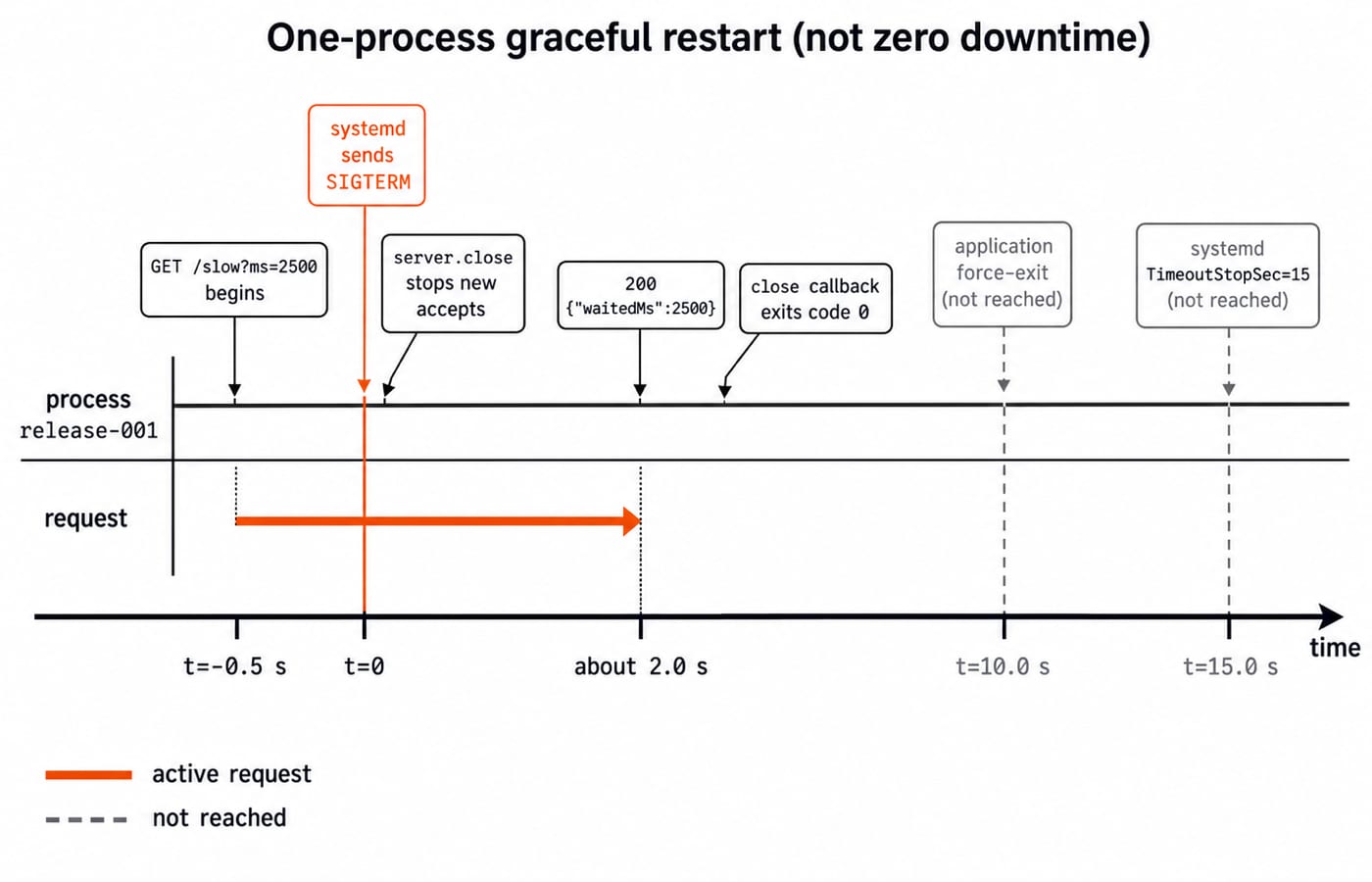
systemd provides the stable working directory, environment, logs, restart policy, and stop signal. On SIGTERM, server.close rejects new connections and lets active work finish before the 10-second safety exit. A single-process restart still has downtime.
Add this temporary teaching route before app.listen:
app.get("/slow", (req, res) => {
  const parsedMs = Number(req.query.ms);
  const waitedMs = Number.isFinite(parsedMs)
    ? Math.min(5000, Math.max(0, parsedMs))
    : 0;

  setTimeout(() => res.json({ waitedMs }), waitedMs);
});
Start GET /slow?ms=2500 at t=-0.5 s, then send SIGTERM at t=0. The request finishes at about t=2.0 s with 200 {"waitedMs":2500}. The close callback exits 0, so neither the 10-second app timer nor systemd's 15-second limit is reached.
Smoke-test release-002, repoint current, and restart. If health fails, restore the release-001 symlink and restart. Zero-downtime delivery instead needs multiple healthy instances, readiness-aware switching, and an automated rollback policy.
Put a reverse proxy, DNS and HTTPS in front of Node.js
Use this essential Nginx HTTP block for the worked host:
server {
    listen 80;
    server_name app.example.com;

    location / {
        proxy_pass http://127.0.0.1:8080;
        proxy_set_header Host $host;
        proxy_set_header X-Forwarded-For $proxy_add_x_forwarded_for;
        proxy_set_header X-Forwarded-Proto $scheme;
    }
}
Certificate issuance and the HTTPS block depend on your host and certificate tooling. The public target remains https://app.example.com, while port 8080 stays private to the VM.
Verify one layer at a time:
curl -i http://127.0.0.1:8080/healthz
curl -i -H 'Host: app.example.com' http://127.0.0.1/healthz
curl -i https://app.example.com/healthz
Run the first command on the VM, the second through Nginx before DNS, and the third only after DNS and TLS exist. Each success returns 200 and {"status":"ok"}. If step two fails while step one works, repair the proxy, not the Express route.
/healthz proves only that the process answers HTTP. If MongoDB is required, add a separate readiness check that fails when it cannot serve work; keep slow remote calls out of liveness. Mongoose Schemas and Models is the next persistence concept, not evidence of readiness.
Common Node.js deployment errors and checkable exercises
Start diagnosis at the failed boundary:
Symptom | Likely boundary | What to check | Repair |
|---|---|---|---|
| Process | Existing listener | Inspect it before freeing or changing the port |
Direct health is | Proxy |
| Keep upstream at |
| Release | Locked production install | Run |
App dies after logout | Supervisor | Shell-started process | Run it through systemd |
Remote clients cannot reach | Network boundary | Same-host proxy design | This is expected; use the proxy |
Environment change does nothing | Configuration | Service environment | Reload or restart the service |
Try three checkable changes. Run with PORT=9090 and prove /healthz returns the same JSON. Point the proxy to 127.0.0.1:8081, observe proxy failure while direct 8080 health stays green, then repair it. Finally, stop the service during /slow?ms=2500 and compare the journal with the timeline.
Node.js deployment basics: the short version and next step
Lock dependencies, keep configuration and secrets outside the release, run as nodeapp, supervise the process, handle SIGTERM, keep 8080 behind the proxy, and test health at all three layers. The successful path is app.example.com:443 -> 127.0.0.1:8080 -> GET /healthz -> 200 {"status":"ok"}.
Continue with the MERN Stack Course, or browse Skill Development Courses. Backups, dependency readiness, multiple instances, automated rollback, and provider-specific TLS are separate production decisions.
Keep learning

Express Basics in Node.js: Build Your First JSON API
Build a small Express books API and learn how requests move through JSON parsing, middleware, routes, validation, and predictable error responses.
Updated 26 Nov 20266 min readWeb Development
Sessions and Cookies in Node.js: A Runnable Express Login Tutorial
Build the complete localhost flow, then trace what the browser sends, what Express stores, and why logout makes the dashboard anonymous again.
Updated 24 Nov 20266 min readWeb Development

Node.js Security Best Practices: Harden an Express API with Runnable Examples
Build and test a small Express transfer API that layers authentication, strict Zod validation, authorisation, rate limiting, safe errors and dependency hygiene.
Updated 23 Nov 20266 min readWeb Development

Node.js Routing and Controllers Tutorial: Build a Runnable Express API
Build a small Express users API from scratch, separate routes from controllers, and test successful and failed requests against predictable responses.
Updated 3 Sep 20266 min readComputer Networks