

Sessions and Cookies in Node.js: A Runnable Express Login Tutorial
Build the complete localhost flow, then trace what the browser sends, what Express stores, and why logout makes the dashboard anonymous again.
KnowledgeGate Team
Exam prep & CS education
Updated 24 Nov 20266 min read

Your Express route works, but how does the server recognise the browser's next request? The localhost flow sets a preference cookie, creates a login session, protects a dashboard and logs out. Keep the literal credentials and MemoryStore on localhost; production authentication needs password hashing and persistent session storage.
Sessions and cookies in Node.js: browser state and server state
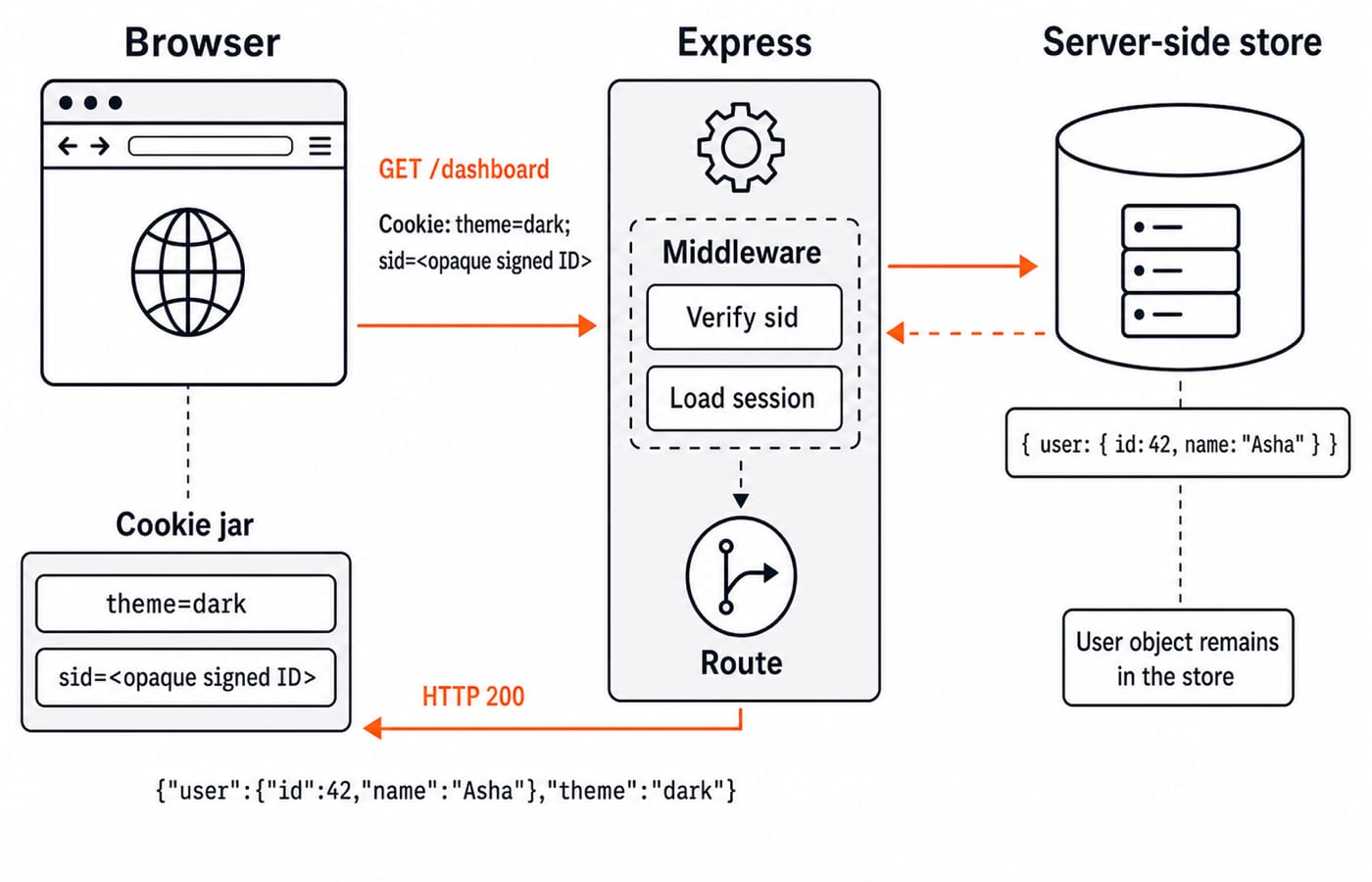
A cookie is a browser-held name-value pair returned on matching requests. A session is server-side state linked to a client by an opaque ID. Here, the browser stores theme=dark and sid=<opaque signed ID>; the store holds { user: { id: 42, name: "Asha" } }.
Set-Cookie in a response creates or updates a cookie; a later Cookie request header returns it. HTTP stays stateless. Middleware verifies sid, finds its record and attaches it as req.session.
Point | Cookie | Session |
|---|---|---|
Storage | Browser | Server-side store |
Browser can see | Cookie name and value | Identifier, not the stored record |
Normal use | Preference or opaque ID | Login and per-client state |
Invalidation | Expire or clear the cookie | Delete the record and clear its identifier |
Main risk | Theft or trusting client data | ID theft, fixation or weak storage |
They are not rivals. A cookie commonly connects the browser to its session.
JavaScript-side cookie CRUD and localStorage selection are covered in LocalStorage and Cookies in JavaScript. An Express session has a different job: theme remains a client-held preference, while sid points to server-controlled state.
Node.js cookie example: build the Express app
Create and install:
mkdir node-session-demo
cd node-session-demo
npm init -y
npm install express express-session cookie-parser
Save this as server.js. The process exits unless SESSION_SECRET is present.
const express=require("express");
const session=require("express-session");
const cookieParser=require("cookie-parser");

const SESSION_SECRET=process.env.SESSION_SECRET;
if (!SESSION_SECRET) throw new Error("SESSION_SECRET is required");

const app=express();
app.use(express.json());
app.use(cookieParser());
app.use(session({
  name:"sid",
  secret:SESSION_SECRET,
  resave:false,
  saveUninitialized:false,
  cookie: {
    httpOnly:true,
    sameSite:"lax",
    secure:false,
    maxAge:900000,
  },
}));

app.get("/theme/:value", (req, res) => {
  if (!["light", "dark"].includes(req.params.value)) {
    return res.status(400).json({ error: "theme must be light or dark" });
  }
  res.cookie("theme", req.params.value, {
    maxAge:86400000,
    httpOnly:false,
    sameSite:"lax",
  });
  res.json({ theme:req.params.value });
});

app.get("/theme", (req, res) => {
  res.json({ theme:req.cookies.theme || "light" });
});

app.post("/login", (req, res, next) => {
  const valid=req.body.email === "asha@example.com" &&
    req.body.password === "node123";
  if (!valid) return res.status(401).json({ error:"invalid credentials" });

  req.session.regenerate((regenerateError) => {
    if (regenerateError) return next(regenerateError);
    req.session.user={ id:42, name:"Asha" };
    req.session.save((saveError) => {
      if (saveError) return next(saveError);
      res.status(200).json({
        message:"logged in",
        user:{ id:42, name:"Asha" },
      });
    });
  });
});

app.get("/dashboard", (req, res) => {
  if (!req.session.user) {
    return res.status(401).json({ error:"login required" });
  }
  res.status(200).json({
    user:req.session.user,
    theme:req.cookies.theme || "light",
  });
});

app.post("/logout", (req, res, next) => {
  req.session.destroy((error) => {
    if (error) return next(error);
    res.clearCookie("sid", { path:"/" });
    res.status(204).end();
  });
});

app.listen(3000, () => console.log("Listening on http://localhost:3000"));
Run it with SESSION_SECRET=dev-session-secret node server.js. Test the preference:
curl -i -c cookies.txt http://localhost:3000/theme/dark
curl -i -b cookies.txt http://localhost:3000/theme
First comes Set-Cookie: theme=dark; Max-Age=86400; Path=/; Expires=<one day after the response>; SameSite=Lax; next comes Cookie: theme=dark and {"theme":"dark"}. 86,400,000 / 1,000 = 86,400 seconds, exactly one day. res.cookie emits both Max-Age and Expires, while express-session emits only Expires. httpOnly: false suits only this non-sensitive preference.
Node.js session example: login, dashboard and logout
Middleware must precede routes using req.session. The cookie lasts 900,000 / 1,000 = 900 seconds, or 900 / 60 = 15 minutes. secure: false is required for these HTTP localhost commands; HTTPS production uses true.
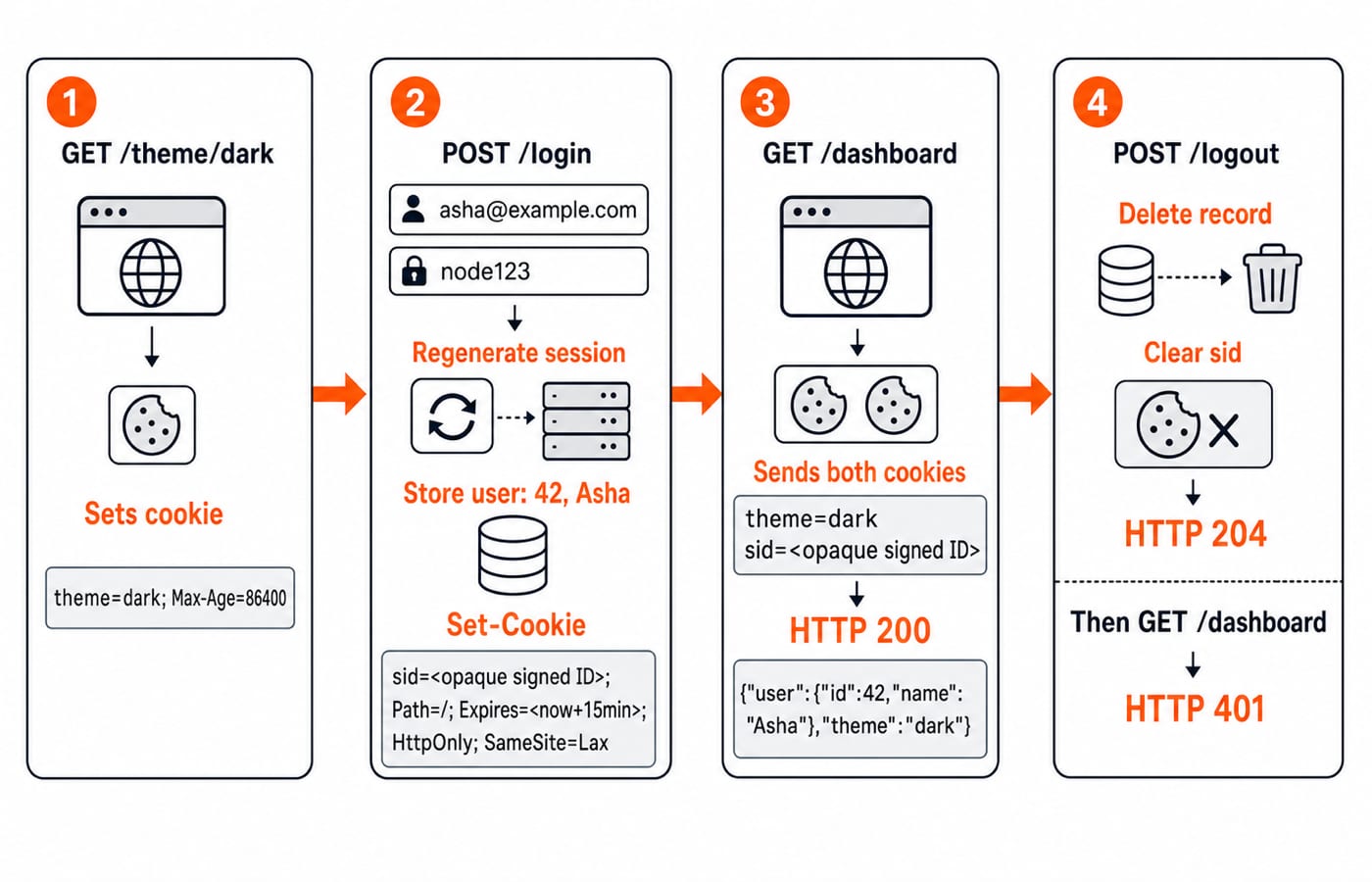
POST /login accepts {"email":"asha@example.com","password":"node123"}; otherwise it returns HTTP 401 with {"error":"invalid credentials"}. Regeneration replaces the pre-login ID, the store receives Asha, and save finishes before HTTP 200. No credentials enter the cookie.
GET /dashboard returns HTTP 401 without a stored user; otherwise it combines user and theme. Logout destroys the record, clears sid at / and returns HTTP 204.
Worked request trace: follow Asha through the session
Use one cookie jar for the whole flow:
curl -i -c cookies.txt http://localhost:3000/theme/dark
curl -i -b cookies.txt -c cookies.txt -H 'Content-Type: application/json' -d '{"email":"asha@example.com","password":"node123"}' http://localhost:3000/login
curl -i -b cookies.txt http://localhost:3000/dashboard
curl -i -b cookies.txt -c cookies.txt -X POST http://localhost:3000/logout
curl -i -b cookies.txt http://localhost:3000/dashboard
Request | Incoming cookies | Server session before | Response | State after |
|---|---|---|---|---|
| None | None | 200, theme cookie for 86,400 seconds | Browser has |
|
| None | 200, | Store has user |
| Theme and | User | 200 with Asha and dark theme | Unchanged |
| Theme and | User | 204, clear | Record deleted; browser retains theme |
|
| None | 401, | Still anonymous |
On login, -b sends the theme and -c records sid. The dashboard sends both cookies but resolves Asha from the store. <opaque signed ID> is random per run, not text to paste.
Session storage and cookie security in production
The default MemoryStore loses data on restart and cannot coordinate instances. Production needs a maintained shared store, a stable secret across instances and an explicit expiry policy.
httpOnly blocks JavaScript access to sid. sameSite: "lax" reduces some cross-site sending but does not replace CSRF protection. Use secure: true on HTTPS. Set app.set("trust proxy", 1) only behind a trusted proxy when secure-cookie handling needs it. Regeneration reduces fixation risk; logout removes record and ID.
Real authentication validates a password hash, rate-limits attempts and never logs credentials. Mongoose Schemas and Models helps model persistent users, but is not a ready-made authentication system.
Node.js session and cookie errors
Symptom | Cause | Fix |
|---|---|---|
| Middleware is below the route | Mount it before protected routes |
Every request creates a session | Client does not return | Use a cookie jar, or browser |
Cookie is absent on localhost |
| Keep it false locally; use HTTPS and true in production |
Login succeeds, next request is anonymous | Response finishes before async save | Save before redirecting or responding |
Sessions vanish or alternate |
| Use a stable secret and shared production store |
Cross-origin credentialed requests need an allowed origin and credentials enabled on client and server. A wildcard origin is incompatible.
Sessions and cookies practice questions
Try three code changes:
Change
maxAgefrom900000to300000. The session cookie'sExpirestime moves to five minutes after it is set because300,000 / 1,000 = 300seconds and300 / 60 = 5minutes.Before the dashboard response, add
req.session.visits = (req.session.visits || 0) + 1; includevisits: req.session.visitsin its JSON. Authenticated calls show1, then2; the cookie still contains onlysid.Delete
sidfromcookies.txtbut retaintheme=dark. The dashboard returns 401, while/themestill returns{"theme":"dark"}.
For interview practice, explain why the harmless theme may be client-side but user 42, Asha belongs in the server-controlled store. Middleware below /dashboard leaves req.session unavailable. HTTPS production changes secure to true while retaining httpOnly and suitable sameSite protection.
Sessions and cookies in Node.js: the short version
A cookie holds a small client value or an opaque identifier.
Session data stays server-side.
Session middleware comes before routes.
Regenerate the session on login.
Destroy the record and clear
sidon logout.Production needs HTTPS, a stable secret and a shared store.
The flow keeps theme=dark, resolves user 42 from a 15-minute session and returns HTTP 401 after logout. Continue with the Node.js, Express.js & MongoDB course, the wider MERN Stack course, or the Coding & Skills catalogue.
Keep learning

Node.js Security Best Practices: Harden an Express API with Runnable Examples
Build and test a small Express transfer API that layers authentication, strict Zod validation, authorisation, rate limiting, safe errors and dependency hygiene.
Updated 23 Nov 20266 min readWeb Development

Node.js Routing and Controllers Tutorial: Build a Runnable Express API
Build a small Express users API from scratch, separate routes from controllers, and test successful and failed requests against predictable responses.
Updated 3 Sep 20266 min readComputer Networks

Express Basics in Node.js: Build Your First JSON API
Build a small Express books API and learn how requests move through JSON parsing, middleware, routes, validation, and predictable error responses.
Updated 26 Nov 20266 min readWeb Development

Node.js Deployment Basics: Deploy an Express App on a Linux VM
Deploy one Express service as an unprivileged Linux process. Build a locked release, supervise it with systemd, proxy it through Nginx, and test each boundary.
Updated 21 Nov 20265 min readWeb Development