Node.js Routing and Controllers Tutorial: Build a Runnable Express API
Build a small Express users API from scratch, separate routes from controllers, and test successful and failed requests against predictable responses.
KnowledgeGate Team
Exam prep & CS education
Updated 3 Sep 20266 min read
An Express application feels simple while every callback sits in app.js. As it grows, matching, validation and responses become difficult to trace. Splitting that file into a router that only maps method and path, and controllers that only validate and answer, puts every request in exactly one function you can open. A two-user Express API, driven by exact curl commands, shows where route order and middleware order still change the result.
Related reading: JWT authentication and Express error handling.
Node.js routing and controllers: separate matching from application logic
Node.js runs the JavaScript process. Express adds HTTP routing and middleware. A route combines an HTTP method with a path pattern, such as GET /api/users/:id, and delegates the matched request to a controller.
The controller reads req.params, req.query or req.body, performs the operation, and sends one response through res.
Part | Responsibility |
|---|---|
| Configure the application and mount the router |
| Map each HTTP method and path to a controller |
| Validate input, find or create data, and select a response |
| Hold the two starting records |
This is a useful separation-of-concerns pattern, not the only valid Node.js folder layout. A request travels through application middleware, the mounted router, a matching route, its controller, the data operation, and the response. The middleware half of that chain, including centralised error handling and the trap of sending two responses, is worked out on a separate courses API in Express.js REST API: Routing, Middleware, Error Handling. The router built here maps method to path and nothing else, and each controller answers exactly once.
Build the runnable Express project and seed two users
Use CommonJS so the project runs without adding "type": "module":
mkdir node-routing-demo
cd node-routing-demo
npm init -y
npm install express
mkdir routes controllers data
touch app.js routes/userRoutes.js controllers/userController.js data/users.js
Put the data in data/users.js:
const users = [
  { id: 1, name: "Asha", role: "student" },
  { id: 2, name: "Ravi", role: "mentor" }
];

module.exports = users;
This array is in memory. Records survive only until the process restarts, so it is not a production database.
Now create app.js:
const express = require("express");
const userRoutes = require("./routes/userRoutes");

const app = express();

app.use(express.json());
app.use("/api/users", userRoutes);

app.use((req, res) => {
  return res.status(404).json({ error: "Route not found" });
});

app.listen(3000, () => {
  console.log("API running on http://localhost:3000");
});
Run node app.js. A first GET http://localhost:3000/api/users must return Asha followed by Ravi.
Express Router: map three endpoints without repeating the base path
Create routes/userRoutes.js:
const express = require("express");
const {
  listUsers,
  getUserById,
  createUser
} = require("../controllers/userController");

const router = express.Router();

router.get("/", listUsers);
router.get("/:id", getUserById);
router.post("/", createUser);

module.exports = router;
Method and path | Contract |
|---|---|
| List users, optionally filtered by |
| Return one user |
| Create one user |
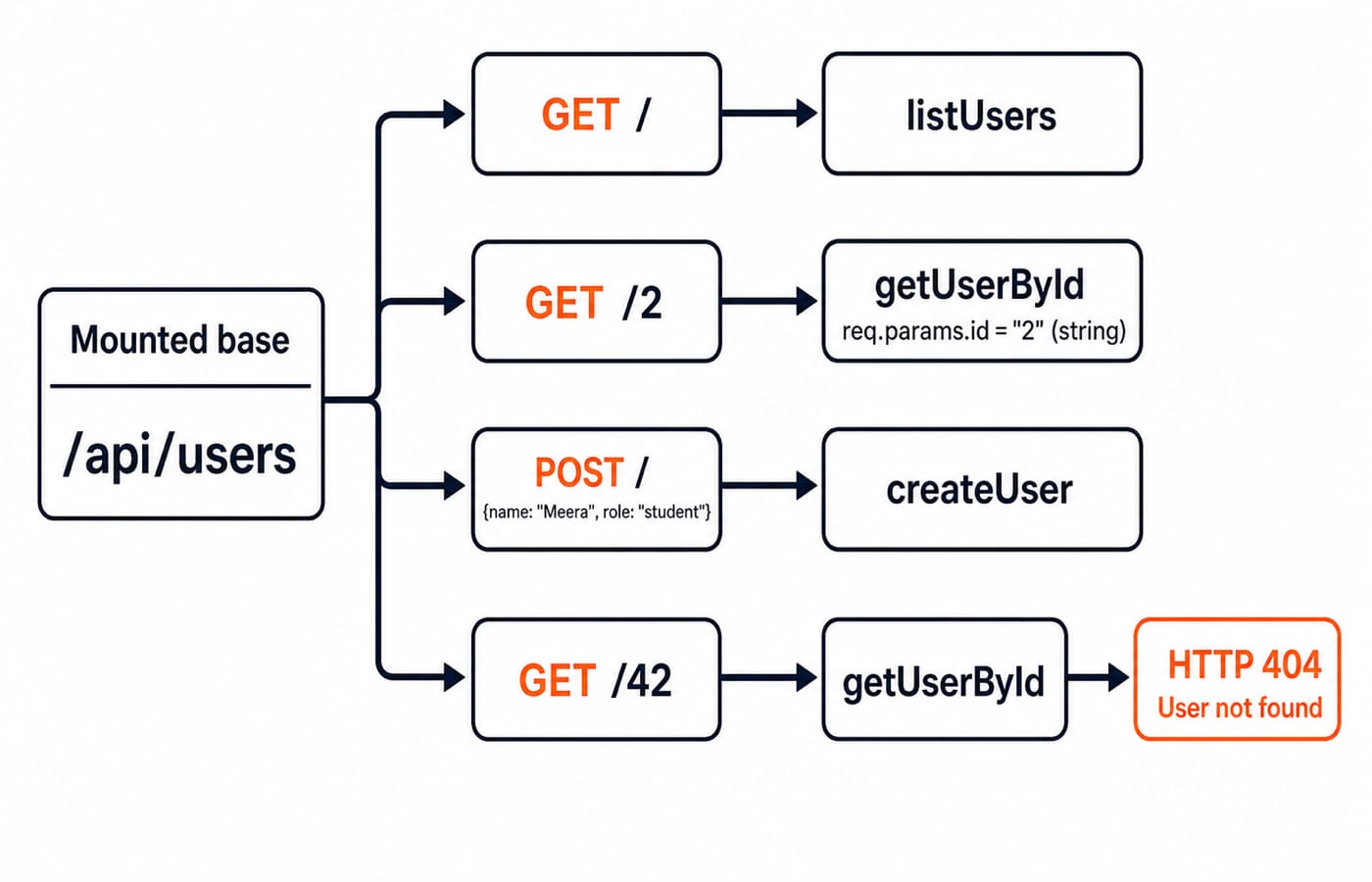
The mount supplies /api/users; the router supplies / or /:id. Express exposes :id as the string req.params.id. GET and POST can share a path because their methods differ. PUT /api/users matches neither route and reaches the final 404 handler.
Node.js controllers: validate, look up and create predictable responses
Create controllers/userController.js:
const users = require("../data/users");

let nextId = 3;

function listUsers(req, res) {
  const { role } = req.query;
  const result = role
    ? users.filter(user => user.role === role)
    : users;
  return res.status(200).json(result);
}

function getUserById(req, res) {
  const id = Number(req.params.id);
  if (!Number.isInteger(id) || id <= 0) {
    return res.status(400).json({
      error: "User id must be a positive integer"
    });
  }

  const user = users.find(item => item.id === id);
  if (!user) {
    return res.status(404).json({ error: "User not found" });
  }
  return res.status(200).json(user);
}

function createUser(req, res) {
  const { name, role } = req.body;
  const validName = typeof name === "string" && name.trim().length > 0;
  const validRole = role === "student" || role === "mentor";

  if (!validName || !validRole) {
    return res.status(400).json({
      error: "Name and role (student or mentor) are required"
    });
  }

  const user = { id: nextId++, name: name.trim(), role };
  users.push(user);
  res.location(`/api/users/${user.id}`);
  return res.status(201).json(user);
}

module.exports = { listUsers, getUserById, createUser };
With no query, listUsers returns the full array. Initially, ?role=student returns Asha. Converting the path value with Number rejects a non-integer or non-positive ID before searching.
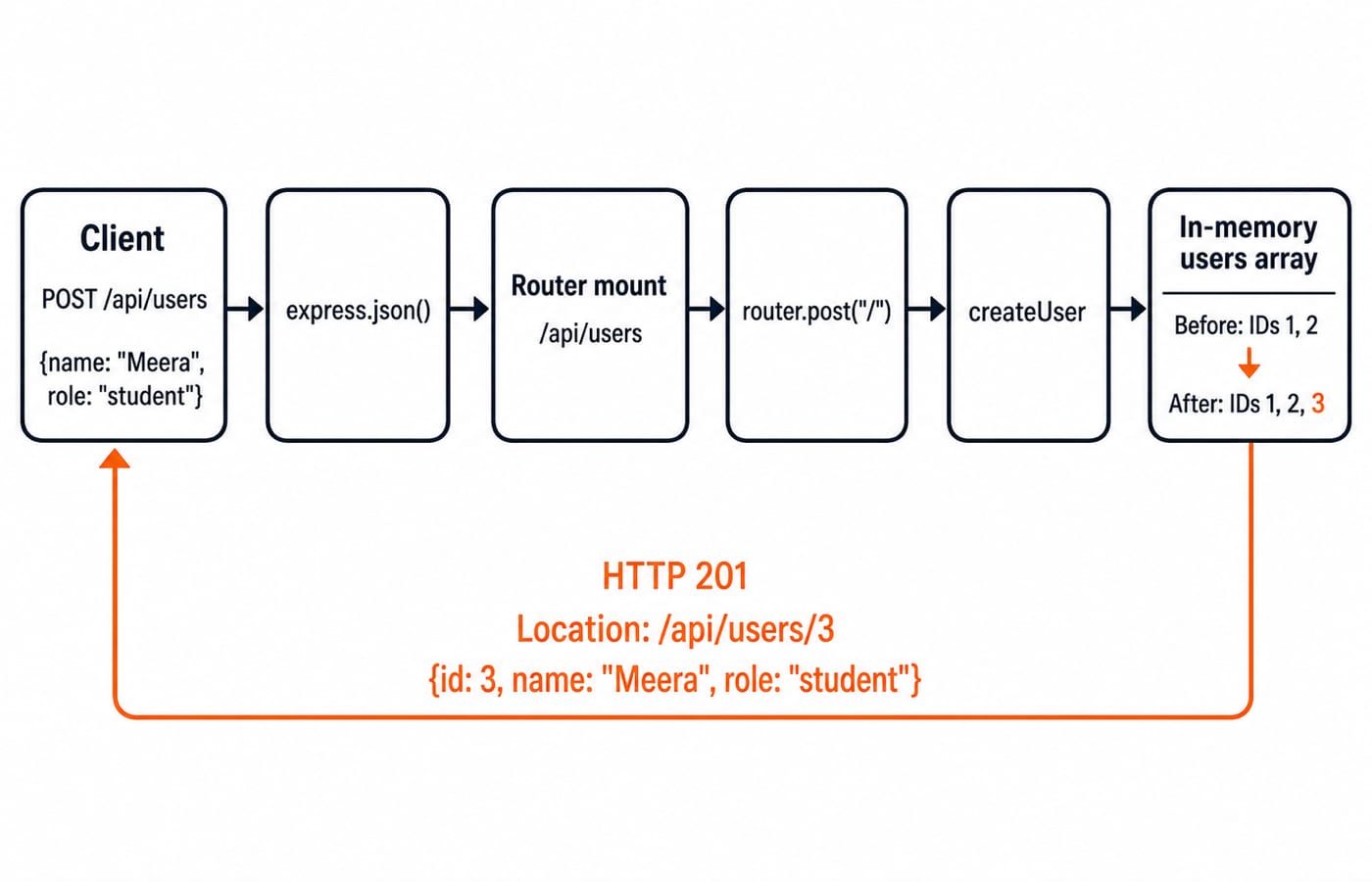
For { "name": "Meera", "role": "student" }, nextId supplies 3, then increments to 4. The array grows from two records to three, while the response is 201 with Location: /api/users/3 and Meera's record.
Test Node.js routes end to end with exact requests and outputs
Run these checks in order so the in-memory state is reproducible:
curl -i http://localhost:3000/api/users
curl -i 'http://localhost:3000/api/users?role=student'
curl -i http://localhost:3000/api/users/2
curl -i http://localhost:3000/api/users/42
curl -i -X POST http://localhost:3000/api/users \
  -H 'Content-Type: application/json' \
  -d '{"name":"Meera","role":"student"}'
curl -i http://localhost:3000/api/users/3
The first request returns both seed records with 200. The filter returns Asha, and /2 returns Ravi. /42 matches /:id but has no record, so its controller returns 404 with { "error": "User not found" }.
During the POST, express.json() creates req.body, the route matches, validation passes, ID 3 is assigned, and the array reaches three records. The next GET for /3 returns Meera with 200.
The two failing requests matter as much as the successful ones. GET /api/users/abc returns 400 with { "error": "User id must be a positive integer" }. Posting { "name": "", "role": "admin" } returns 400 with the required validation error and adds no record.
Status | Demonstrated outcome |
|---|---|
| List or retrieve succeeds |
| Meera is created |
| An ID or request body is invalid |
| A user is absent or no route matches |
Express routing and controller errors that change behaviour
Route order matters. If /:id appears before /search, then /api/users/search is captured as id = "search" and returns the integer-validation 400. Declare /search first because Express checks routes in registration order.
Three setup failures are common:
Omitting
express.json(), or mounting the router before it, leavesreq.bodyunavailable to this JSON controller.Importing
createUserunder a name that was not exported supplies a non-function route handler and fails during startup.Mixing
importwith this CommonJS project without configuring modules prevents the application from loading.
Return every terminal response. If a controller sends a 404 but continues into a later res.json(), it can produce Cannot set headers after they are sent. /api/users/42 is a controller-level 404 because a route matched but no record existed. /api/orders is a route-level 404 because no mounted route matched.
How coding exercises and interviews test routes and controllers
First answer three matching questions. For GET /api/users/2, req.params.id is the string "2". POST cannot reach a GET handler because its method differs. /search must precede /:id because the parameter can capture the literal segment. Name the matching rule and resulting controller.
Then extend the project:
Add
PATCH /api/users/:id/rolewith{ "role": "mentor" }. Updating user1must return200with{ "id": 1, "name": "Asha", "role": "mentor" }. Roleadminmust return400without changing Asha.Add
DELETE /api/users/:id. Deleting user2must return204with no body. The next GET for/2, and a second DELETE for/2, must each return404.
Keep path mapping in the router, and keep validation plus mutation in the controller. For wider preparation on explaining API decisions and debugging projects in interviews, use Placement Preparation.
Node.js routing and controllers: the short version and next step
Register JSON middleware before JSON routes.
Mount one router at
/api/users.Keep method and path declarations in the router.
Keep validation, data access and exactly one response in each controller.
One sequence proves the whole design: the valid Meera POST creates ID 3, returns 201, and can then be read at GET /api/users/3.
Continue the backend sequence with the Node.js, Express.js & MongoDB Course. For a larger full-stack project path, use the MERN Stack Course. To browse alternatives without committing to either path, visit Coding & Skills.
Keep learning

Data Transmission Modes and Connection Types: Simplex, Half-Duplex and Full-Duplex
Learn to classify simplex, half-duplex, full-duplex, point-to-point and multipoint links, then calculate completion time without relying on memorised examples.
Updated 22 Oct 20265 min readComputer Networks
Computer Networks Interview Questions: Trace OSI, TCP/IP and Routing Step by Step
Follow one synthetic web request across DNS, ARP, TCP, NAT and longest-prefix routing, then turn each step into a strong interview answer.
Updated 18 Oct 20266 min readComputer Networks

Basics of Cyber Security: CIA Triad, Risks and a Worked Defence
Learn a consistent security vocabulary, connect common attack paths to suitable controls, and calculate how two defensive layers reduce account takeovers.
Updated 14 Oct 20266 min readComputer Networks

Cyber Threats and Attacks Explained: Types, Worked DDoS Example and Exam Traps
Learn to separate threats, vulnerabilities, vectors and attacks, then apply the distinctions to a calculated DDoS scenario and exam-style questions.
Updated 10 Oct 20266 min readComputer Networks