

Express Basics in Node.js: Build Your First JSON API
Build a small Express books API and learn how requests move through JSON parsing, middleware, routes, validation, and predictable error responses.
KnowledgeGate Team
Exam prep & CS education
Updated 26 Nov 20266 min read
Node.js can listen for HTTP requests by itself, but a first server becomes difficult to organise once routes, JSON bodies, validation, and errors enter the picture. The API starts with two books, then handles a filtered GET, a route parameter, a valid POST, and two failure cases. The Node.js, Express.js and MongoDB course is an optional guided path, not a prerequisite.
The Node.js learning path places a books API between Express fundamentals and database persistence. That checkpoint becomes runnable route code with request parsing, middleware order, validation branches, and exact responses.
1. Express basics: the request, route, and response mental model
Express matches an HTTP method plus a path to a handler. Five pieces matter:
appis the Express application.Middleware processes a request before or after a route handler.
A route pairs a method and path, such as
GET /api/books/:id.reqcontains request data.ressends the response.
For example, GET /api/books/2 matches app.get('/api/books/:id', ...). Express places the string "2" in req.params.id, and the handler sends one JSON object with res.json().
Node.js runs the JavaScript process and provides networking. Express supplies routing and middleware conventions. If request methods, paths, headers, and responses are new to you, review these HTML and HTTP foundations. The server handles these requests and responses.
2. Create and run the smallest Express server
Create a project and install Express:
mkdir express-books-api
cd express-books-api
npm init -y
npm install express
npm init -y creates package.json. npm install express records Express as a dependency. Create app.js:
const express = require('express');
const app = express();
const PORT = 3000;

app.get('/health', (req, res) => res.json({ status: 'ok' }));

app.listen(PORT, () =>
  console.log(`Server running at http://localhost:${PORT}`)
);
Run node app.js and leave that process running. In a second terminal, run curl http://localhost:3000/health. The response is exactly {"status":"ok"} with status 200, meaning the request succeeded.
3. Read route parameters, query strings, and JSON bodies
The in-memory data uses an array and the next unused ID:
let books = [
  { id: 1, title: 'Computer Networks', copies: 3 },
  { id: 2, title: 'Database Systems', copies: 0 }
];
let nextBookId = 3;
The API reads input from three places. GET /api/books/2 supplies req.params.id. GET /api/books?inStock=true supplies req.query.inStock. A POST sends its fields through req.body.
Parameters and query values arrive as strings. We therefore use Number(req.params.id) and compare the query value explicitly with 'true'. Place app.use(express.json()) before every route. It parses a JSON request body so that req.body.title and req.body.copies are available to the POST handler.
4. Worked example: build the books API from request to response
Replace app.js with the following program:
const express = require('express');
const app = express();
const PORT = 3000;

app.use(express.json());
app.use((req, res, next) => {
  console.log(`${req.method} ${req.originalUrl}`);
  next();
});

let books = [
  { id: 1, title: 'Computer Networks', copies: 3 },
  { id: 2, title: 'Database Systems', copies: 0 }
];
let nextBookId = 3;

app.get('/health', (req, res) => res.json({ status: 'ok' }));

app.get('/api/books', (req, res) => {
  const onlyInStock = req.query.inStock === 'true';
  const result = onlyInStock
    ? books.filter((book) => book.copies > 0)
    : books;
  res.json(result);
});

app.get('/api/books/:id', (req, res) => {
  const id = Number(req.params.id);
  const book = books.find((item) => item.id === id);

  if (!book) {
    return res.status(404).json({ error: 'Book not found' });
  }

  return res.json(book);
});

app.post('/api/books', (req, res) => {
  const { title, copies } = req.body;
  const validTitle = typeof title === 'string' && title.trim().length > 0;
  const validCopies = Number.isInteger(copies) && copies >= 0;

  if (!validTitle || !validCopies) {
    return res.status(400).json({
      error: 'title must be text and copies must be a non-negative integer'
    });
  }

  const book = { id: nextBookId, title: title.trim(), copies };
  nextBookId += 1;
  books.push(book);
  return res.status(201).json(book);
});

app.use((req, res) =>
  res.status(404).json({ error: 'Route not found' })
);

app.use((err, req, res, next) => {
  console.error(err);
  res.status(500).json({ error: 'Internal server error' });
});

app.listen(PORT, () =>
  console.log(`Server running at http://localhost:${PORT}`)
);
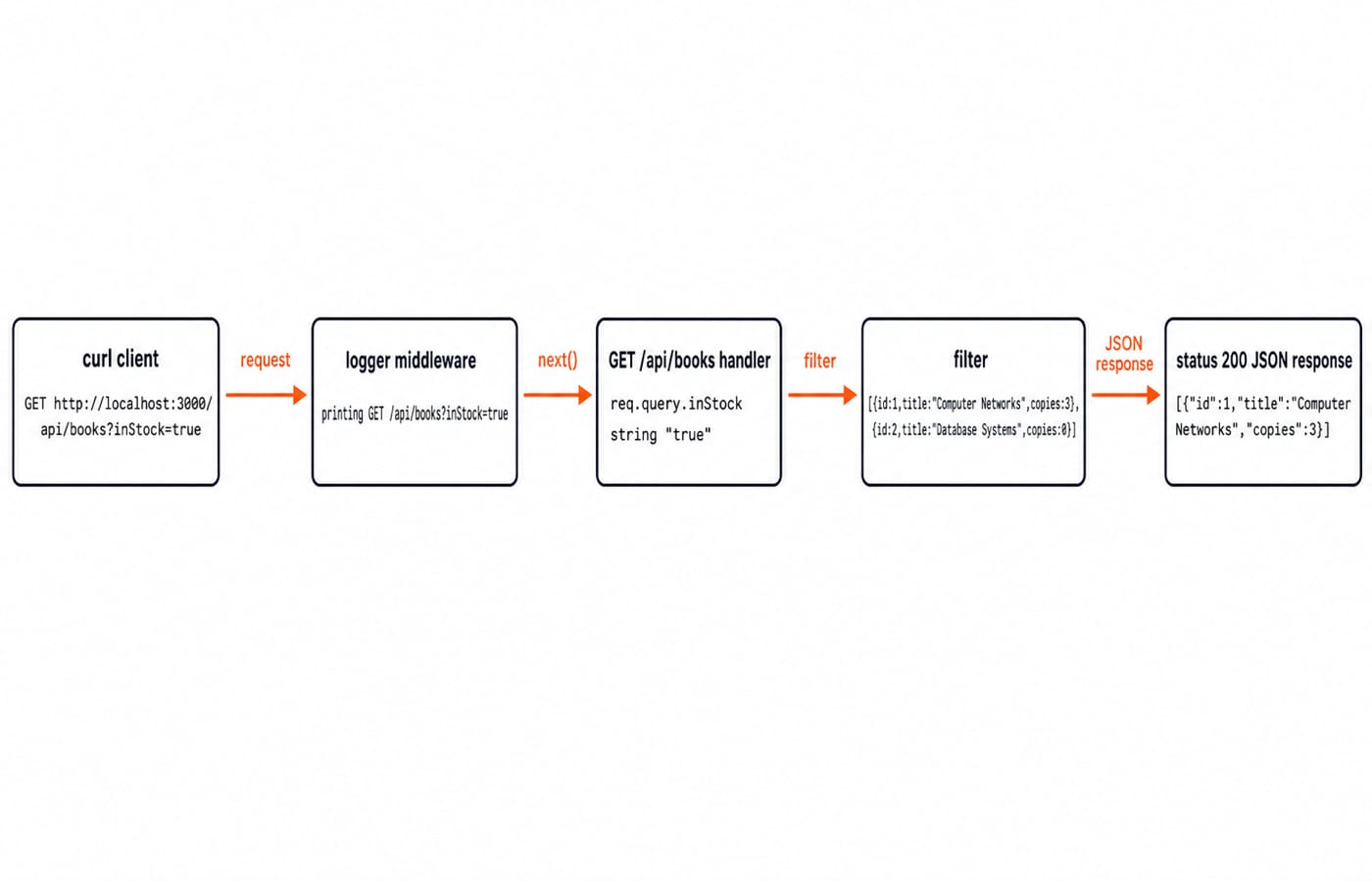
Start with the filtered request:
curl 'http://localhost:3000/api/books?inStock=true'It returns [{"id":1,"title":"Computer Networks","copies":3}] with status 200. The filter keeps the first record because 3 > 0 and removes the second because its copy count is zero.
Next, curl http://localhost:3000/api/books/2 converts "2" to 2 and returns {"id":2,"title":"Database Systems","copies":0} with status 200.
Now create a book:
curl -X POST http://localhost:3000/api/books \
  -H 'Content-Type: application/json' \
  -d '{"title":"Operating Systems","copies":5}'
The next unused ID is 3. The server assigns it, advances nextBookId to 4, and adds the record. It returns status 201, meaning a resource was created, with {"id":3,"title":"Operating Systems","copies":5}. A following unfiltered GET /api/books contains all three records.
5. Middleware order and predictable error responses
The logger sits immediately after express.json() and before the routes. Its next() call hands control to the next matching middleware or route. Without next(), the request remains unfinished unless that middleware sends a response itself.
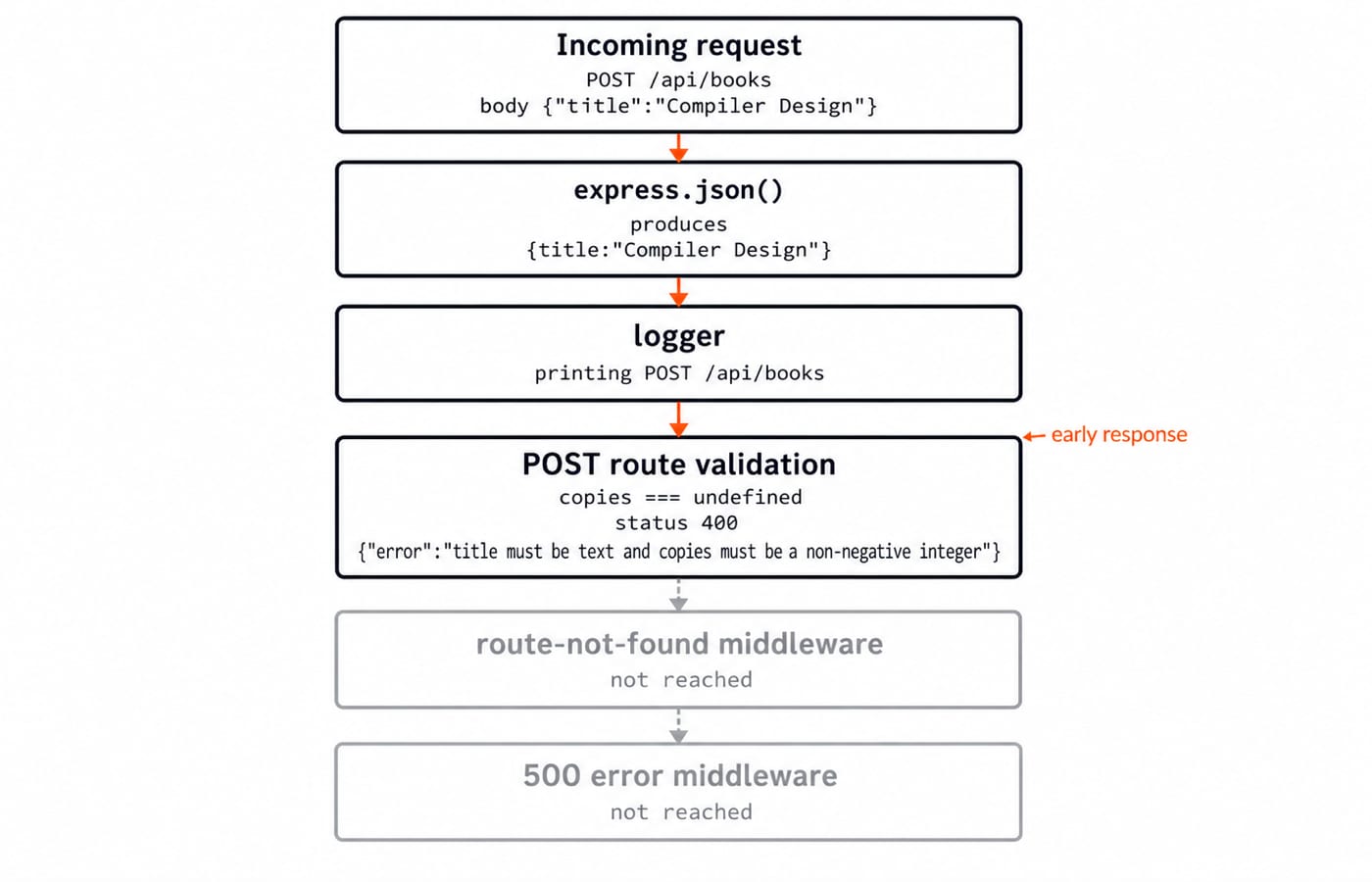
The unmatched-route handler belongs after every valid route. It returns status 404 for an unknown path. The error handler comes last and has four parameters, which identifies it as error-handling middleware. If an earlier operation passes an error, it logs that error and sends a status 500 response. The POST route handles validation, so it does not reach either final handler.
Requesting GET /api/books/99 finds no matching id. It returns status 404 and {"error":"Book not found"}. Posting {"title":"Compiler Design"} returns status 400 and {"error":"title must be text and copies must be a non-negative integer"} because copies is missing and therefore is not a non-negative integer.
6. Four common Express mistakes and how to fix them
req.bodyisundefined. The JSON parser may be absent or below the route. Moveapp.use(express.json())above the POST route and sendContent-Type: application/json.Cannot GET /. This application defines/healthand/api/books..., not/. Request a defined path or deliberately add a root route.Cannot set headers after they are sent. Code shaped like
res.status(404).json(...); res.json(book)tries to send twice. Usereturn res.status(404).json(...)to stop the handler after the first response.EADDRINUSEon port 3000. Another process owns the port. Stop the earlier server or changePORTto 3001, then use 3001 in every curl command.
7. Exercises that prove you understand the API
Add
PATCH /api/books/:id. A request to/api/books/2with{"copies":4}should return{"id":2,"title":"Database Systems","copies":4}. Validate thatcopiesis a non-negative integer and reuse the existing 404 lookup.Add
DELETE /api/books/:id. Deleting id 1 should return status 204 with no JSON body. A second delete of id 1 should return{"error":"Book not found"}with status 404. Check the array usingGET /api/booksafter each operation.Restart the server. The array resets to its original two books because it exists only in process memory. Persistence is the next boundary. Mongoose schemas, models, validation, and population explains the database concepts that follow, but they are not required for this starter API.
8. Short version and the next practical step
The repeatable chain is simple: create app, install JSON middleware, define method-plus-path routes, read params, query, or body, return one response with an intentional status, and place 404 and error middleware last.
Rebuild the books API without copying, then compare the four exact outcomes: filtered GET, id GET, valid POST, and invalid POST. Browse the coding skills category for broader practice. Once you are ready to add persistence and a front end, the MERN Stack course provides a wider project path.
Keep learning
Node.js Routing and Controllers Tutorial: Build a Runnable Express API
Build a small Express users API from scratch, separate routes from controllers, and test successful and failed requests against predictable responses.
Updated 3 Sep 20266 min readComputer Networks

Node.js Security Best Practices: Harden an Express API with Runnable Examples
Build and test a small Express transfer API that layers authentication, strict Zod validation, authorisation, rate limiting, safe errors and dependency hygiene.
Updated 23 Nov 20266 min readWeb Development
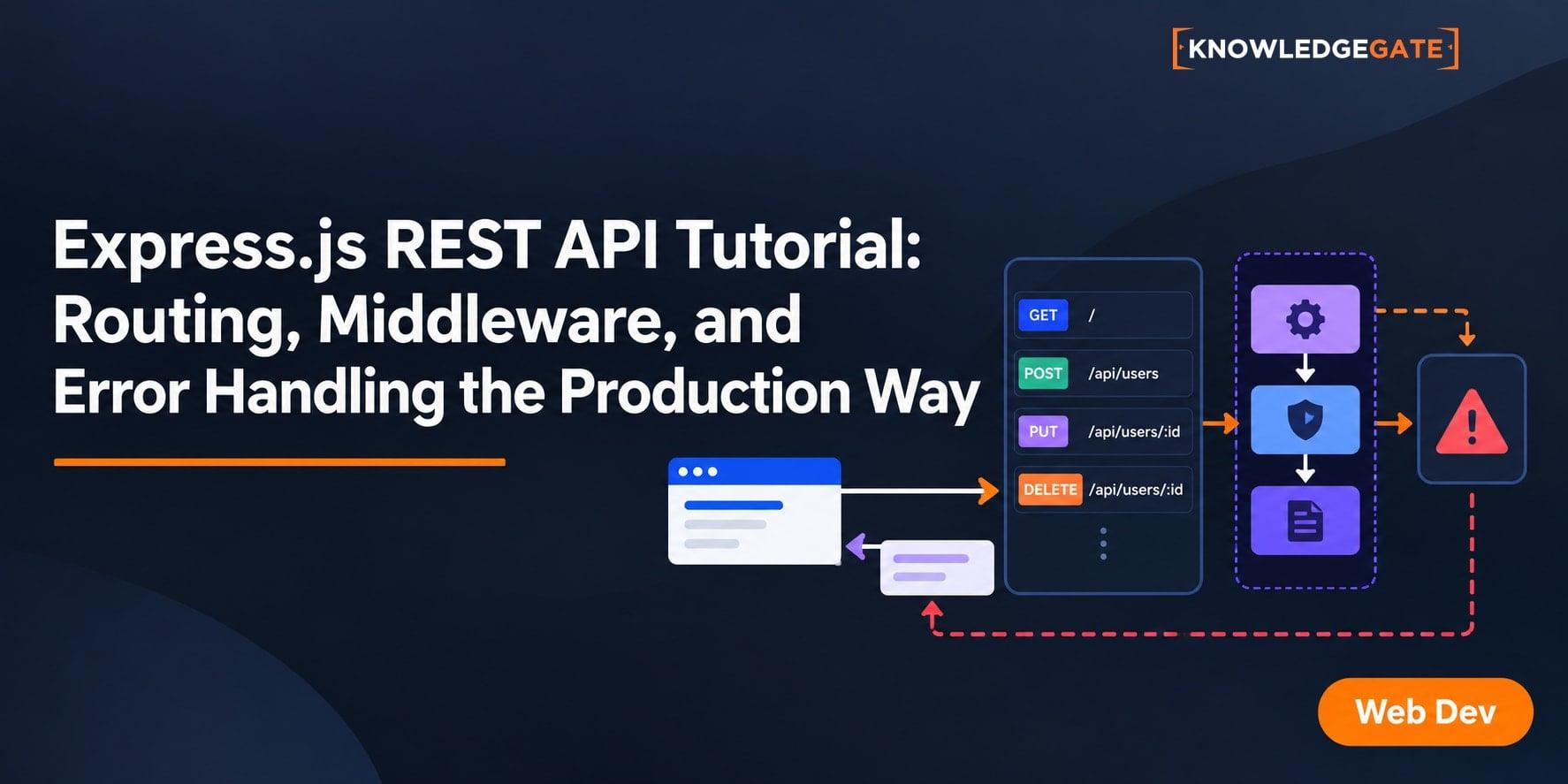
Express.js REST API Tutorial: Routing, Middleware, and Error Handling the Production Way
Build one small courses API and trace every request through parsing, routing, 404 handling, and a single error path.
Updated 30 Oct 20266 min readComputer Networks
NPM and package.json in Node.js: Setup, Scripts, Dependencies, and SemVer
Build a small Node.js project from an empty folder, install Lodash, add reusable npm scripts, compare the manifest and lockfile, and practise SemVer ranges.
Updated 12 Nov 20266 min readWeb Development