

Debugging in Python: A Step-by-Step Tutorial with Runnable Examples
A repeatable Python debugging workflow built around one runnable invoice example. Learn to reproduce, inspect, fix, and protect the result with tests.
KnowledgeGate Team
Exam prep & CS education
Updated 31 Oct 20265 min read
A Python program can crash loudly, finish with the wrong answer, or fail only on one awkward edge case. Random edits usually make all three problems harder to diagnose. A better loop is to reproduce the failure, reduce the input, read the evidence, inspect state, make one hypothesis, fix one cause, and run a regression test. Run the same small invoice example line by line, then build wider foundations through the Coding & Skill Development Courses.
1. What Debugging Means in Python: Syntax, Runtime, and Logic Bugs
Debugging means finding the cause of observed behaviour, not merely making an error message disappear.
A syntax bug stops parsing. For example,
if score >= 50without a colon raisesSyntaxError. Use the parser location to inspect the nearby syntax.A runtime bug begins in valid code but fails during execution.
420 / 0raisesZeroDivisionError. Read the final traceback line, then follow the call frames to learn how the invalid value arrived.A logic bug runs but produces the wrong result.
price * discount_pcttreats10as a multiplier, not as 10 percent. Compare expected and actual intermediate values.
Correctness and efficiency are separate concerns. Code can return the correct answer yet still take too long. Debug the wrong behaviour first, then measure performance instead of guessing about it.
2. Read a Python Traceback from the Bottom Up
Run this small crash:
def average_marks(total, subjects):
    return total / subjects

def make_report():
    return average_marks(420, 0)

make_report()
Start at the bottom: ZeroDivisionError: division by zero names the failure. The failing expression is total / subjects. Move one frame upward to make_report(), which supplied subjects=0.
For each relevant entry, note the filename, line number, and frame or function. Then connect those details to the exception message. The last line tells you what happened, while the frames tell you how execution reached it.
Do not fix the final line blindly. The function's contract decides the repair. It may reject zero with ValueError, or the caller may need to supply the missing non-zero count. For demonstration, average_marks(420, 6) produces 70.0 because 420 / 6 = 70.0.
3. Reproduce and Shrink a Wrong-Answer Bug
Now use one central example:
def invoice_total(prices, discount_pct):
    subtotal = sum(prices)
    discount = subtotal * discount_pct
    return round(subtotal - discount, 2)

cart = [499.0, 250.0, 125.0]
print(invoice_total(cart, 10))
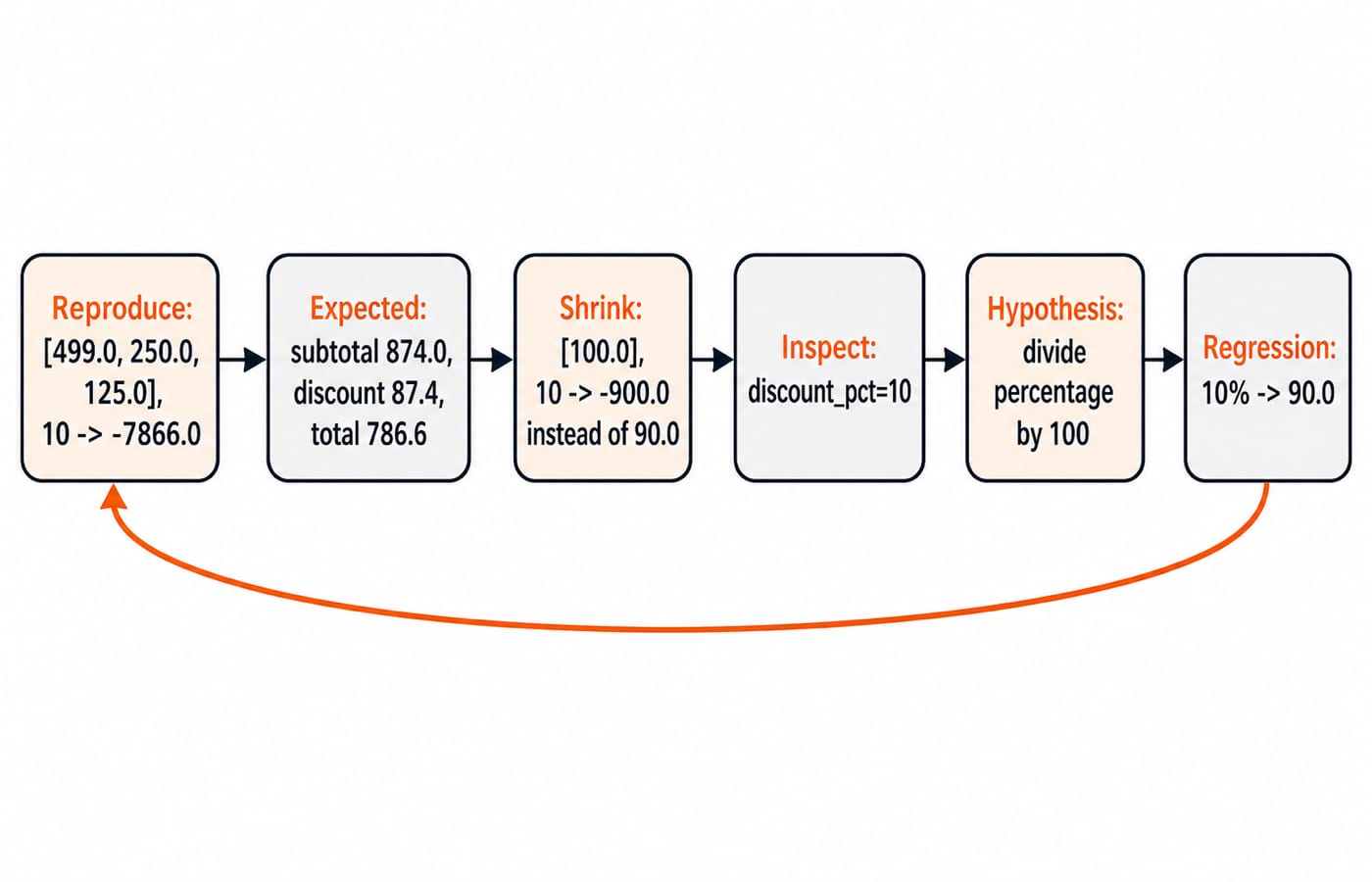
Calculate the expected result before touching the code. The subtotal is 499.0 + 250.0 + 125.0 = 874.0. A 10 percent discount is 874.0 * 10 / 100 = 87.4, so the expected total is 874.0 - 87.4 = 786.6.
The buggy line instead calculates 874.0 * 10 = 8740.0, then returns 874.0 - 8740.0 = -7866.0. Capture that mismatch as a repeatable failing check:
assert invoice_total([499.0, 250.0, 125.0], 10) == 786.6Shrink the input without losing the bug:
assert invoice_total([100.0], 10) == 90.0This simpler case actually returns -900.0: the program calculates a discount of 1000.0, then 100.0 - 1000.0. The one-item input removes irrelevant arithmetic while preserving the defect. State the hypothesis before editing: discount_pct arrives as the whole number 10, but multiplication treats it as 10.0, not 0.10.
4. Inspect Values with print() and Logging
Place one targeted inspection immediately after the buggy discount line:
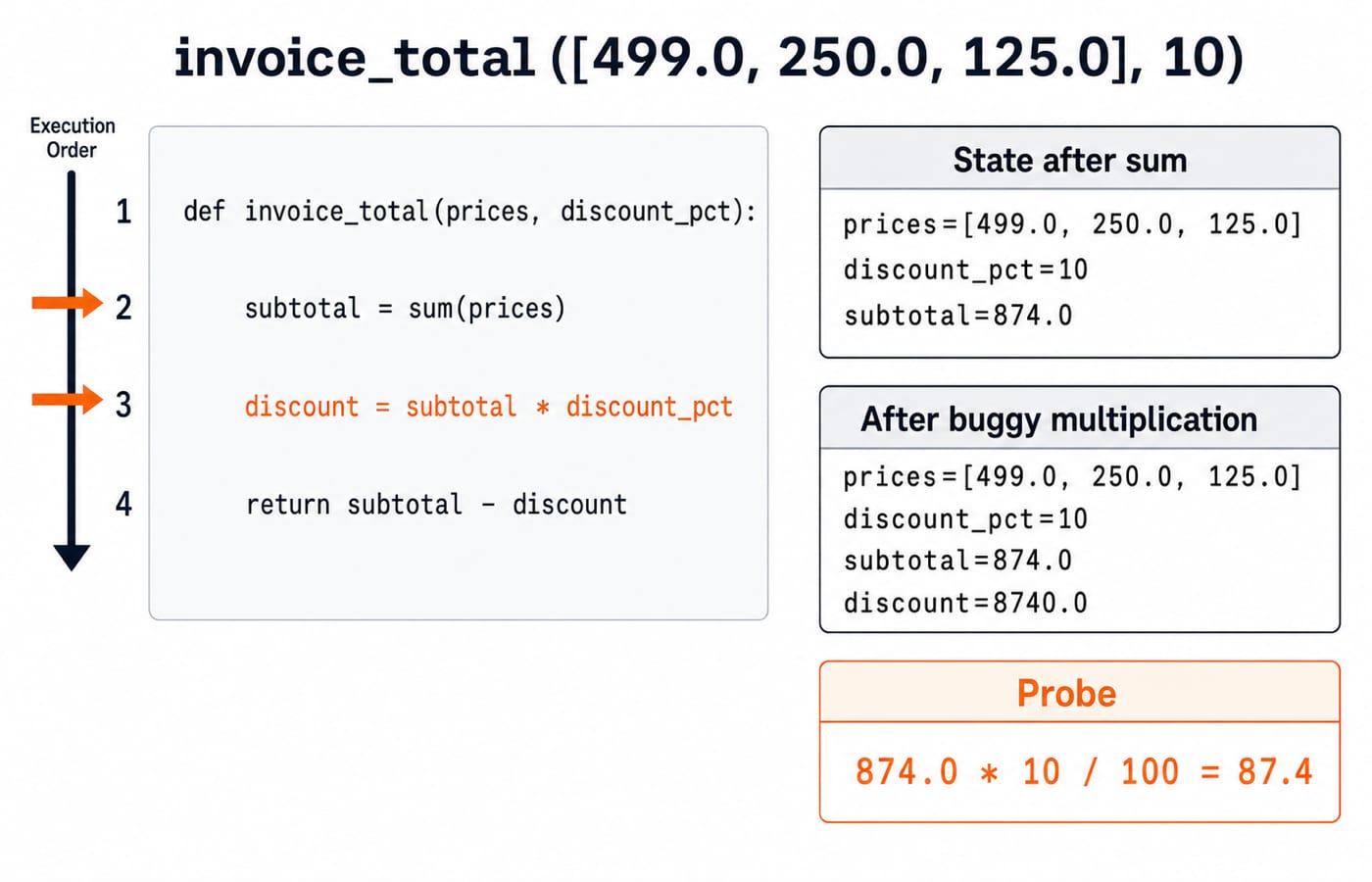
print(f"{subtotal=}, {discount_pct=}, {discount=}")For the original cart it prints:
subtotal=874.0, discount_pct=10, discount=8740.0Inspect the value, type, and point of change that can confirm or reject your hypothesis. Here, type(subtotal) is float and type(discount_pct) is int, but mixing those numeric types is not the defect. The missing conversion from percentage units is.
Temporary print() calls are convenient in a small script. In a larger application, logging.debug("subtotal=%s discount_pct=%s discount=%s", subtotal, discount_pct, discount) can preserve levels and context. Logging still does not identify the cause for you. The evidence supports one conclusion: 874.0 * 10 created 8740.0, so the percentage formula is wrong.
5. Step Through the Same Function with breakpoint() and pdb
Put breakpoint() after the subtotal and before the buggy multiplication:
subtotal = sum(prices)
breakpoint()
discount = subtotal * discount_pct
The official Python pdb documentation describes the debugger's inspection and stepping commands. Use this short session:
(Pdb) p subtotal
874.0
(Pdb) p discount_pct
10
(Pdb) n
(Pdb) p discount
8740.0
(Pdb) p subtotal * discount_pct / 100
87.4
(Pdb) c
p evaluates an expression in the current frame. n executes the next line in the current function, which creates the wrong discount. c continues execution. Crucially, the probe subtotal * discount_pct / 100 returns 87.4, supporting the hypothesis before you change the source. If the bad value came from a caller, w shows the call stack so you can inspect its origin.
6. Fix One Cause and Lock It In with Regression Tests
Make one minimal formula fix and state the accepted input range:
def invoice_total(prices, discount_pct):
    if not 0 <= discount_pct <= 100:
        raise ValueError("discount_pct must be between 0 and 100")

    subtotal = sum(prices)
    discount = subtotal * discount_pct / 100
    return round(subtotal - discount, 2)
Now lock the behaviour in:
assert invoice_total([499.0, 250.0, 125.0], 10) == 786.6
assert invoice_total([100.0], 0) == 100.0
assert invoice_total([100.0], 100) == 0.0

try:
    invoice_total([100.0], 110)
except ValueError as exc:
    assert str(exc) == "discount_pct must be between 0 and 100"
else:
    raise AssertionError("110 percent should be rejected")
The original failing case is the regression test because it prevents this exact bug from returning. The 0 percent, 100 percent, and invalid 110 percent cases test boundaries. Changing several unrelated lines at once would make it harder to prove which edit corrected the behaviour.
7. Common Debugging Traps and Two Practice Bugs
Trap | Better replacement |
|---|---|
Make random edits | Write one testable hypothesis from the evidence. |
Use | Handle a known failure or re-raise it with useful context. |
Test only the happy path | Add boundaries, invalid inputs, and the original failure. |
Leave diagnostic output in normal output | Remove it or use an appropriate log level. |
For practice, sum(score > 40 for score in [40, 41, 55]) returns 2. If the pass rule is at least 40, the expected count is 3; change the condition to score >= 40.
Next, nums.sort(); return nums[:2] on [8, 3, 11, 5] returns [3, 5] and mutates nums. If the requirement is the top two values, the answer should be [11, 8]. Use sorted(nums, reverse=True)[:2]. Review Sorting Algorithms: Complexity, Stability, n log n Bound, then practise the same debugging loop on the implementations in Stacks and Queues: LIFO vs FIFO, Postfix, Circular Queue.
8. The Short Version and What to Practise Next
Keep the loop compact: reproduce, shrink, read, inspect, hypothesise, fix, regress. A debugger helps because it exposes program state, but the reasoning loop does the real work. If you need language foundations, start with the Python Course: Concepts, MCQs & Coding. When you are ready to debug data-structure implementations and interview problems, continue with DSA Using Python.
Keep learning

Python for GATE: DA Syllabus, Observed Weightage and Prep Order
Settle the DA-versus-CS language question, see what one official DA paper contained, and build Python, data structures and algorithms in the right sequence.
Updated 6 Nov 20265 min readPython

Type Hints in Python: Functions, Collections and Checked Examples
Learn what Python type hints do, how to annotate common data shapes, and how a checker catches mistakes through exact, runnable examples.
Updated 5 Nov 20266 min readPython
Python functools Tutorial: partial, reduce, Caching and Decorators
Learn when and how to use Python's main function tools through runnable examples with exact outputs, step-by-step traces, common mistakes and practice checks.
Updated 3 Nov 20266 min readPython

Python Standard Library Tour: Practical Tutorial with Examples
Choose Python modules by task, then combine paths, CSV, dates, counters, averages, and JSON in a runnable report.
Updated 2 Nov 20265 min readPython