

Python Standard Library Tour: Practical Tutorial with Examples
Choose Python modules by task, then combine paths, CSV, dates, counters, averages, and JSON in a runnable report.
KnowledgeGate Team
Exam prep & CS education
Updated 2 Nov 20265 min read

Python tutorials often teach syntax one feature at a time. Then a practical task asks you to handle file paths, parse CSV, compare dates, count values, calculate statistics, and produce JSON. The Python standard library supplies ready-made modules for these jobs. The skill is recognising the job, choosing a tool, and checking its documentation. Start with small runnable examples, then combine the modules in one report script. Module availability can vary by build, so confirm availability notes in the official reference.
1. What the Python standard library includes
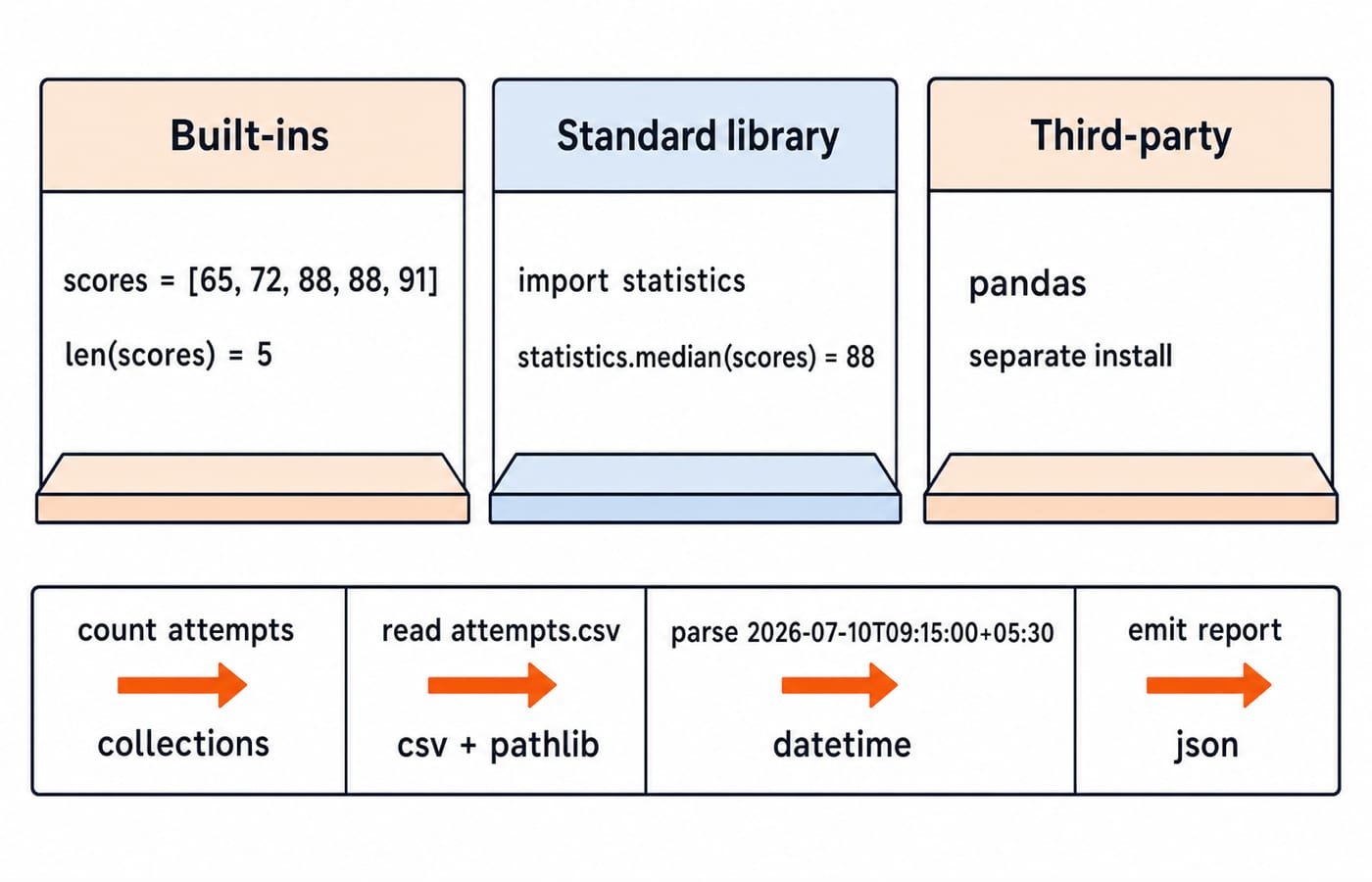
Python has three shelves. Built-in functions and types such as len, list, and dict need no import. Standard-library modules such as pathlib, collections, and json ship with Python and are normally imported. Third-party packages such as pandas need separate installation. The official Python Library Reference defines this scope and records availability and version-sensitive behaviour.
Map jobs to modules: re and textwrap for text; collections for containers; itertools for iteration; math, decimal, fractions, and statistics for numbers; pathlib, csv, and json for files and data; datetime for dates; argparse and logging for command-line work; and secrets for secure randomness. The Coding & Skills path places these tools within wider programming practice.
2. Import and discover modules without guesswork
Choose an import form that makes the source of each name clear:
import statistics
statistics.mean(scores)

from pathlib import Path
Path("attempts.csv")

from collections import Counter
Counter(scores)
statistics.mean keeps a large module's namespace visible. Directly importing distinctive names such as Path or Counter is concise when they recur. Avoid from module import *: it hides origins and can overwrite names.
Inspect instead of guessing. Run python -m pydoc collections.Counter in a terminal and help(Counter.most_common) in the Python REPL. Confirm signatures, availability, and version notes in the official Library Reference. For package structure, __name__, and python -m, use Python Modules and Packages Tutorial: Imports, Structure and Runnable Examples. Standard-library selection is a different decision: identify the job, inspect the callable, then import the narrowest clear name.
3. Count data and build lazy pipelines with collections and itertools
from collections import Counter
from itertools import accumulate, islice

topics = ["arrays", "strings", "arrays", "graphs", "arrays", "strings"]
daily_solved = [3, 5, 2, 4]

print(Counter(topics).most_common(2))
print(list(accumulate(daily_solved)))
print(list(islice(accumulate(daily_solved), 2)))[('arrays', 3), ('strings', 2)]
[3, 8, 10, 14]
[3, 8]Counter counts hashable values; a missing key reads as zero, and most_common ranks frequent items. accumulate emits 3, 3 + 5 = 8, 8 + 2 = 10, and 10 + 4 = 14; islice consumes only the first two. Iterators are consumed as read, so create a fresh one for another pass.
4. Worked example: turn a CSV attempt log into a JSON report
Create attempts.csv with these six lines:
timestamp,user,topic,score
2026-07-10T09:15:00+05:30,Asha,arrays,72
2026-07-10T10:05:00+05:30,Ravi,strings,88
2026-07-11T08:20:00+05:30,Asha,arrays,91
2026-07-11T11:45:00+05:30,Meera,strings,88
2026-07-12T07:30:00+05:30,Ravi,arrays,65
Now run this script from the same directory:
from collections import Counter, defaultdict
from datetime import datetime
from pathlib import Path
from statistics import mean
import csv
import json

path = Path("attempts.csv")
topic_counts = Counter()
user_scores = defaultdict(list)
earliest = None
latest = None

with path.open(newline="", encoding="utf-8") as file:
    for row in csv.DictReader(file):
        timestamp = datetime.fromisoformat(row["timestamp"])
        score = int(row["score"])
        topic_counts[row["topic"]] += 1
        user_scores[row["user"]].append(score)
        earliest = timestamp if earliest is None or timestamp < earliest else earliest
        latest = timestamp if latest is None or timestamp > latest else latest

averages = {
    user: round(float(mean(scores)), 1)
    for user, scores in user_scores.items()
}
ranking = sorted(averages, key=lambda user: (-averages[user], user))
report = {
    "date_range": [earliest.date().isoformat(), latest.date().isoformat()],
    "topic_counts": dict(sorted(topic_counts.items())),
    "user_averages": {user: averages[user] for user in ranking},
}
print(json.dumps(report, indent=2))
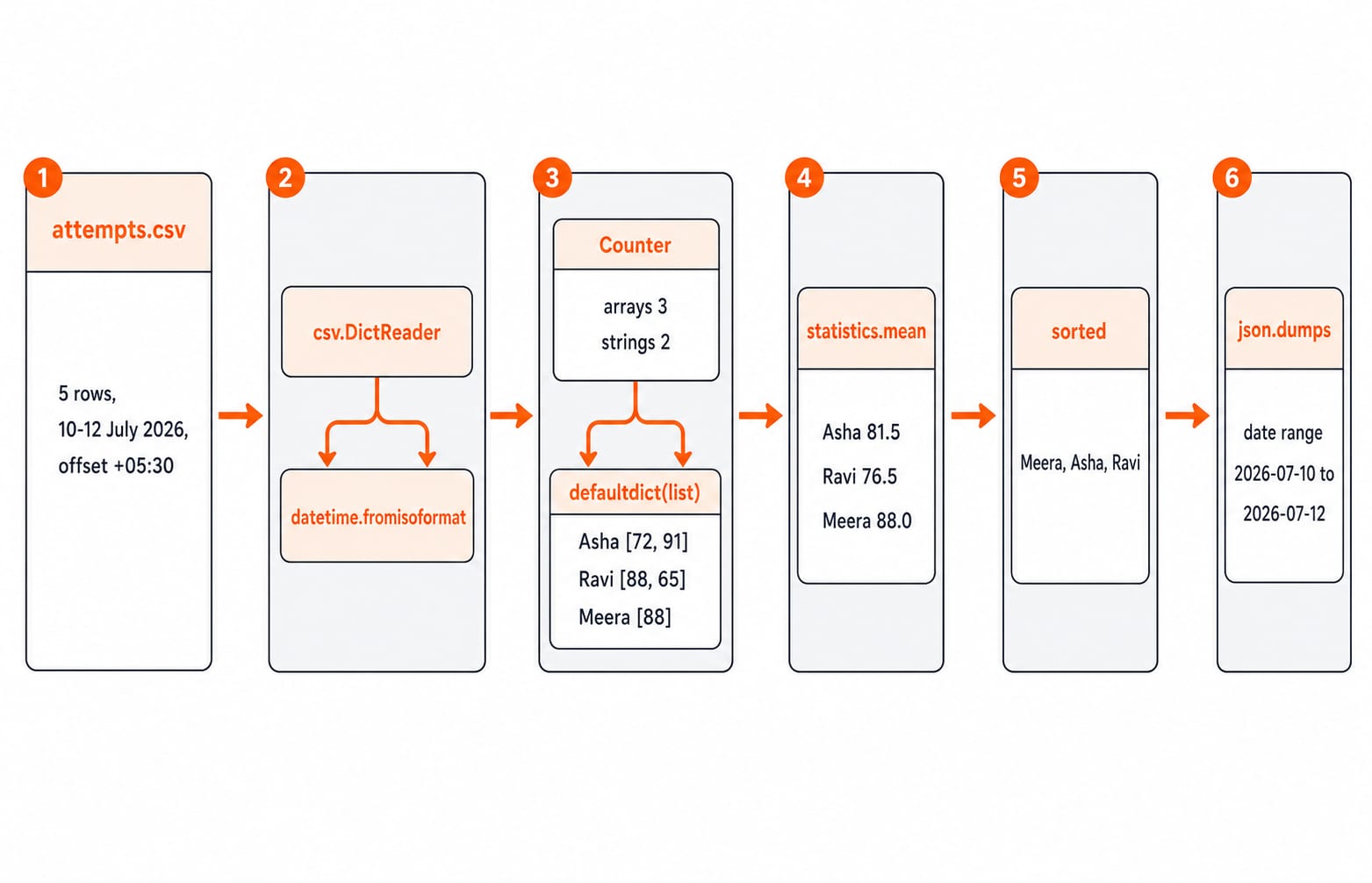
Path opens portably; csv.DictReader names columns; datetime.fromisoformat creates offset-aware datetimes. Counter counts topics, defaultdict(list) gathers each user's scores, mean calculates averages, and json.dumps serialises the dictionary. Use File Handling in Python: Read, Write, Append, CSV and Binary Examples when the task is file modes, cursor movement, CSV quoting, or binary I/O. The report treats CSV only as its input boundary and concentrates on cross-module integration.
The counts are arrays = 3 and strings = 2. Asha: (72 + 91) / 2 = 163 / 2 = 81.5. Ravi: (88 + 65) / 2 = 153 / 2 = 76.5. Meera: 88 / 1 = 88.0. Descending averages give Meera, Asha, Ravi.
{
  "date_range": [
    "2026-07-10",
    "2026-07-12"
  ],
  "topic_counts": {
    "arrays": 3,
    "strings": 2
  },
  "user_averages": {
    "Meera": 88.0,
    "Asha": 81.5,
    "Ravi": 76.5
  }
}
5. Choose numeric, text, random, and command-line tools by intent
Intent | Module and exact result |
|---|---|
Combinations |
|
Rational arithmetic |
|
Decimal arithmetic |
|
Text tokens |
|
Program operation |
|
Decimal is not a replacement for every float, nor is regex a parser for every format. Use random for simulations and reproducible data, secrets for passwords or tokens, and follow official guidance for security-sensitive choices.
6. Common standard-library mistakes and their fixes
Symptom | Cause | Fix |
|---|---|---|
| A same-name local file shadows the module | Rename it and remove stale |
| JSON has no datetime value | Use |
Text differs across machines | Encoding was implicit | Pass |
Datetime comparison fails | A naive value was mixed with one using | Use consistently offset-aware values |
A reset token is predictable |
| Use |
Two items require a full list | The whole iterator was materialised | Use |
For n CSV rows, the input pass is expected O(n) because each counter and dictionary update is expected constant time. Ranking u users costs O(u log u), and storing every user's scores uses O(n) memory. Iterator tools save memory only when their output is not fully materialised.
7. How interviews and tests probe this topic, plus exercises
Tests ask you to choose among Counter, Path, json, Decimal, and secrets; predict snippet output; or debug shadowing, serialisation, and timezone mistakes. Use the Library Reference for signatures and availability.
Try these extensions:
Append
2026-07-12T12:15:00+05:30,Asha,graphs,84. Thengraphs = 1, and Asha's average is(72 + 91 + 84) / 3 = 247 / 3 = 82.3. The ranking remains Meera, Asha, Ravi.Keep only scores of at least 80. The retained scores are
88, 91, 88, 84.Replace the final print with
Path("report.json").write_text(json.dumps(report, indent=2), encoding="utf-8"). Verify that the file begins with{and preserves the same values.
The DSA Using Python course connects these exercises with algorithmic problem solving.
8. Short version and the next practical step
Learn the standard library by task families, not as a catalogue. Check the official module page for availability and version-sensitive behaviour, then combine small tools deliberately. This report used pathlib -> csv -> datetime -> collections -> statistics -> json to turn five rows into a checked result. Recreate it without copying, complete the three extensions, and compare your output. Then use the Python Programming course for a structured pass through the language and its libraries.
Keep learning

Python for GATE: DA Syllabus, Observed Weightage and Prep Order
Settle the DA-versus-CS language question, see what one official DA paper contained, and build Python, data structures and algorithms in the right sequence.
Updated 6 Nov 20265 min readPython

Type Hints in Python: Functions, Collections and Checked Examples
Learn what Python type hints do, how to annotate common data shapes, and how a checker catches mistakes through exact, runnable examples.
Updated 5 Nov 20266 min readPython
Python functools Tutorial: partial, reduce, Caching and Decorators
Learn when and how to use Python's main function tools through runnable examples with exact outputs, step-by-step traces, common mistakes and practice checks.
Updated 3 Nov 20266 min readPython
Python os and pathlib Tutorial: Paths, Files and Directories
Build one small Python workspace from start to finish. Learn portable paths, file operations, directory walks, safe renames, environment variables and deliberate cleanup.
Updated 1 Nov 20265 min readPython