

Python os and pathlib Tutorial: Paths, Files and Directories
Build one small Python workspace from start to finish. Learn portable paths, file operations, directory walks, safe renames, environment variables and deliberate cleanup.
KnowledgeGate Team
Exam prep & CS education
Updated 1 Nov 20265 min read

A path that works in one folder can fail as soon as a script moves, and slash-heavy strings make the failure harder to spot. Use one small pathlib_demo workspace to construct paths, create and find files, move them safely, bridge to os, and clean up. Run every snippet in sequence from a fresh working directory.
Python os and pathlib: what each module is for
Start with both modules:
import os
from pathlib import Path, PurePosixPath, PureWindowsPath
The official os documentation describes portable operating-system interfaces. The pathlib documentation defines path objects with useful methods and properties. The wider Coding & Skill Development Courses page groups Python with the wider programming sequence.
Task | Use |
|---|---|
Construct or inspect a path |
|
Read, write, list, rename or delete a known entry |
|
Read the current directory or an environment variable |
|
Pass a path to a string-based API |
|
Inspect another platform's path rules without I/O |
|
Prefer Path for normal file operations, use os for the operating-system interface you need, and convert only at an API boundary. Neither module replaces the other.
The earlier File Handling in Python: Read, Write, Append, CSV and Binary Examples owns stream modes, cursor state, encodings, CSV quoting and binary bytes. A fixed scores dataset now moves through constructed paths, directory traversal, guarded renames, an environment-derived filename and cross-platform path objects.
Build and inspect paths without touching the filesystem
Path construction and inspection do not create a file:
report = Path("pathlib_demo") / "incoming" / "mock.v2.csv"

print(report.name)                 # mock.v2.csv
print(report.stem)                 # mock.v2
print(report.suffix)               # .csv
print(report.suffixes)             # ['.v2', '.csv']
print(report.parent.as_posix())    # pathlib_demo/incoming
print(report.with_name("mock.final.csv").as_posix())  # pathlib_demo/incoming/mock.final.csv
print(report.with_suffix(".json").as_posix())         # pathlib_demo/incoming/mock.v2.json
The / operator joins components while the path class handles separators. with_name() replaces the final name, while with_suffix() replaces only the final suffix. Avoid a literal such as "pathlib_demo\\incoming\\mock.v2.csv", because it embeds Windows separators. Path.cwd() depends on where the reader runs the script, so do not expect one fixed value.
Create directories, write files and check their state
Now create the workspace and two deterministic files:
root = Path("pathlib_demo")
incoming = root / "incoming"
processed = root / "processed"

incoming.mkdir(parents=True, exist_ok=True)
processed.mkdir(exist_ok=True)

score_text = "name,score\nAsha,84\nRavi,76\nMeera,91\n"
note_text = "OS calls, Path objects.\n"
print((incoming / "scores.csv").write_text(score_text, encoding="utf-8"))  # 36
print((incoming / "notes.txt").write_text(note_text, encoding="utf-8"))    # 24
parents=True creates missing parent directories. exist_ok=True accepts an existing directory, but not an existing non-directory at that path. write_text() returns character counts. These files are also 36 and 24 bytes because every character is ASCII.
print(root.exists())                              # True
print(incoming.is_dir())                          # True
print((incoming / "scores.csv").is_file())       # True
print(sorted(p.name for p in incoming.iterdir()))  # ['notes.txt', 'scores.csv']
print((incoming / "scores.csv").read_text(encoding="utf-8").splitlines())  # ['name,score', 'Asha,84', 'Ravi,76', 'Meera,91']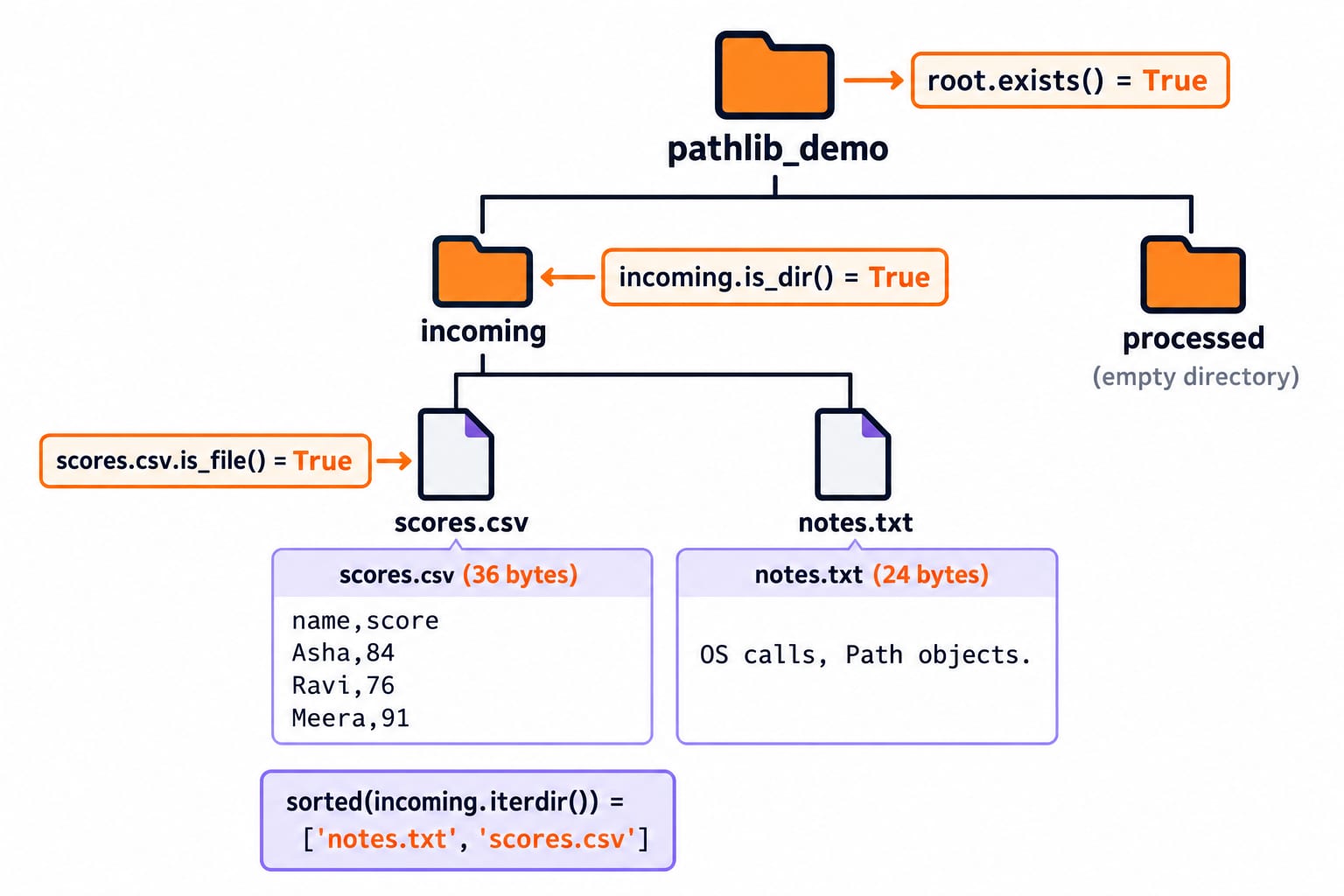
List, filter and walk a directory tree
Use glob() for one directory and rglob() for recursive matching:
print(sorted(p.name for p in incoming.glob("*.csv")))  # ['scores.csv']
print(sorted(p.relative_to(root).as_posix()
             for p in root.rglob("*") if p.is_file()))  # ['incoming/notes.txt', 'incoming/scores.csv']
relative_to() gives a path relative to root. When a loop needs the current directory plus separate directory and file lists, use os.walk():
for current, dirs, files in os.walk(root):
    dirs.sort()
    files.sort()
    rel = Path(current).relative_to(root)
    print(rel.as_posix(), dirs, files)
The exact lines are . ['incoming', 'processed'] [], incoming [] ['notes.txt', 'scores.csv'], and processed [] []. Explicit sorting makes the teaching output deterministic. For the storage concepts behind these trees, read File Systems and Disk Scheduling in OS; that article does not teach Python APIs.
Rename and delete safely, with common errors visible
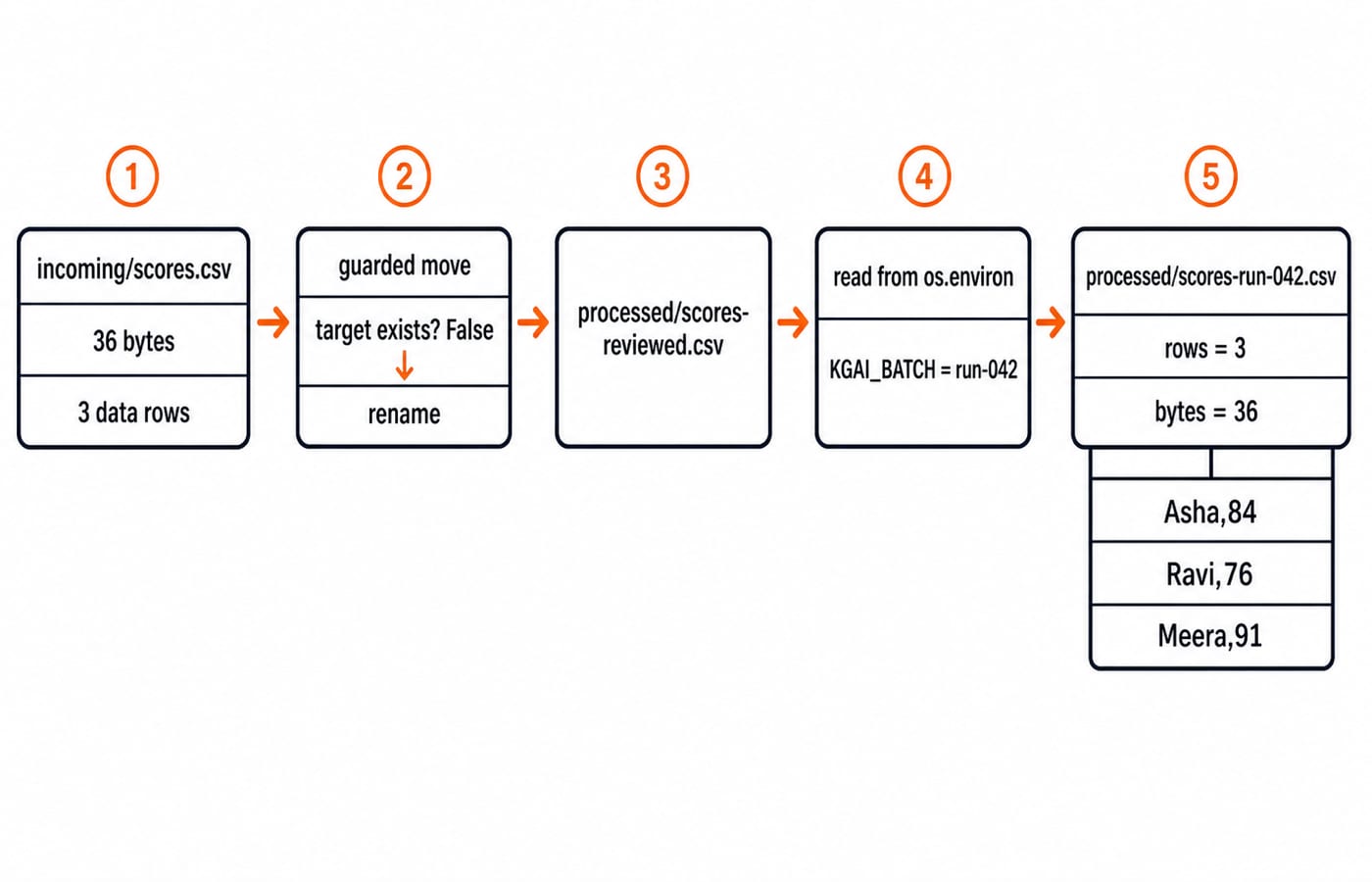
Move the CSV without silently overwriting a target:
source = incoming / "scores.csv"
target = processed / "scores-reviewed.csv"
if target.exists():
    raise FileExistsError(f"Refusing to overwrite {target}")
source.rename(target)

print(source.exists())                         # False
print(target.exists())                         # True
print(target.relative_to(root).as_posix())     # processed/scores-reviewed.csv

try:
    source.read_text(encoding="utf-8")
except FileNotFoundError:
    print("Source moved; read target")              # Source moved; read target
This check is a useful beginner guard in a single process, not an atomic concurrency guarantee. Three common errors now become visible:
Reading
sourceraisesFileNotFoundError; readtargetafter the move. The preceding narrow catch reports that expected state without hiding unrelated errors.Calling
root.mkdir()withoutexist_ok=TrueraisesFileExistsError; allow reuse only when intended.Calling
processed.rmdir()now raisesOSError;rmdir()removes only an empty directory.
Remove only the known note, then its empty directory:
(incoming / "notes.txt").unlink()
incoming.rmdir()
print(incoming.exists())  # False
os.replace() is an explicitly overwrite-capable alternative. Read its exact platform semantics before using it.
Bridge pathlib to os and keep paths cross-platform
Path and os interoperate directly:
print(Path(os.getcwd()) == Path.cwd())  # True
legacy_path = os.fspath(target)

os.environ["KGAI_BATCH"] = "run-042"
print(os.getenv("KGAI_BATCH", "unassigned"))     # run-042
print(os.getenv("MISSING_BATCH", "unassigned")) # unassigned
os.fspath() returns the string or bytes form accepted by an older API, so its separators are platform-dependent. Changing os.environ affects this process and child processes launched later, not the user's permanent shell configuration.
Pure paths parse another platform's syntax without accessing its filesystem:
win = PureWindowsPath("C:/Users/Asha/report.csv")
print(win.drive, win.name)  # C: report.csv

posix = PurePosixPath("/home/asha/report.csv")
print(posix.root, posix.name)  # / report.csv
Join components with / on path objects. Do not assume a drive letter or leading slash, compare paths by lowercasing strings, or hard-code Path.home(), Path.cwd() or os.name in expected output.
Finish a small file-organising automation and practise
Continue from the current state and include the environment value in the final name:
batch = os.getenv("KGAI_BATCH", "unassigned")
final = processed / f"scores-{batch}.csv"
if final.exists():
    raise FileExistsError(f"Refusing to overwrite {final}")
target.rename(final)

data_rows = final.read_text(encoding="utf-8").splitlines()[1:]
print(final.relative_to(root).as_posix())  # processed/scores-run-042.csv
print(len(data_rows))                      # 3
print(final.stat().st_size)                # 36
print(data_rows)                           # ['Asha,84', 'Ravi,76', 'Meera,91']
This combines os.environ for run configuration with Path for naming, moving, reading and metadata.
Try these before checking the answers:
Inspect
Path("archive") / "2026" / "mock.test.csv".List the CSV names in
processedwithglob().Set
os.environ["KGAI_BATCH"] = "run-043", form the corresponding path underprocessed, and display it relative toroot.
Answer checks:
The name is
mock.test.csv, stem ismock.test, suffixes are['.test', '.csv'], and parent isarchive/2026.sorted(p.name for p in processed.glob("*.csv"))returns['scores-run-042.csv'].(processed / f"scores-{os.environ['KGAI_BATCH']}.csv").relative_to(root).as_posix()returnsprocessed/scores-run-043.csv.
Finish by deleting only the demo paths this program created:
final.unlink()
processed.rmdir()
root.rmdir()
print(root.exists())  # False
Recursive deletion can remove every descendant, so validate the target before using a recursive tool.
The short version and the next Python step
Use Path and / to build paths, properties to inspect them, and mkdir(), read_text(), write_text(), glob(), rename() and unlink() for common filesystem work. Use os for environment variables, directory traversal and lower-level operating-system interfaces.
Work in a fresh demo directory, specify text encoding, sort output when order matters, check before a rename that must not overwrite, catch the specific expected exception, and remove only recognised paths. Build the language and standard-library foundation with the Python Course, then apply Python to data structures and interview problem solving with DSA Using Python.
Keep learning

Python for GATE: DA Syllabus, Observed Weightage and Prep Order
Settle the DA-versus-CS language question, see what one official DA paper contained, and build Python, data structures and algorithms in the right sequence.
Updated 6 Nov 20265 min readPython

Type Hints in Python: Functions, Collections and Checked Examples
Learn what Python type hints do, how to annotate common data shapes, and how a checker catches mistakes through exact, runnable examples.
Updated 5 Nov 20266 min readPython

Python functools Tutorial: partial, reduce, Caching and Decorators
Learn when and how to use Python's main function tools through runnable examples with exact outputs, step-by-step traces, common mistakes and practice checks.
Updated 3 Nov 20266 min readPython

Python Standard Library Tour: Practical Tutorial with Examples
Choose Python modules by task, then combine paths, CSV, dates, counters, averages, and JSON in a runnable report.
Updated 2 Nov 20265 min readPython