JavaScript Fetch and AJAX Tutorial: GET, POST and Error Handling
Build a small browser app that loads task 7, renders it, sends JSON, and handles HTTP, network, parsing and cancellation failures clearly.
KnowledgeGate Team
Exam prep & CS education
Updated 30 Aug 20265 min read

You may be able to copy a fetch() snippet but still wonder why response.json() needs await, why a 404 misses catch, or how returned data reaches the page. One small browser app loads task 7, renders its exact values, sends one JSON POST, and makes failures visible. The Coding & Skill Development Courses page offers a broader route beyond this example.
AJAX and Fetch in JavaScript: technique versus API
AJAX requests data in the background and updates part of a page without navigating to a new document. Its historical name mentions XML, but modern AJAX usually carries JSON. It is a technique, not a function or package.
fetch() is the modern, promise-based JavaScript interface for HTTP. XMLHttpRequest uses an older event and callback style. MDN's Using the Fetch API explains Fetch response and body handling.
A request has a URL, method, headers and optional body; a response has a status, headers and body. Fetch can settle before parsing, making JSON reading a second asynchronous operation.
Build the mini AJAX page and trace one request
Create index.html with the four required elements and keep the JavaScript in app.js:
<!doctype html>
<html lang="en">
<head><meta charset="UTF-8"><title>Fetch task</title></head>
<body>
  <button id="load-task">Load task 7</button>
  <p id="status">Idle</p>
  <pre id="output"></pre>
  <script src="app.js"></script>
</body>
</html>
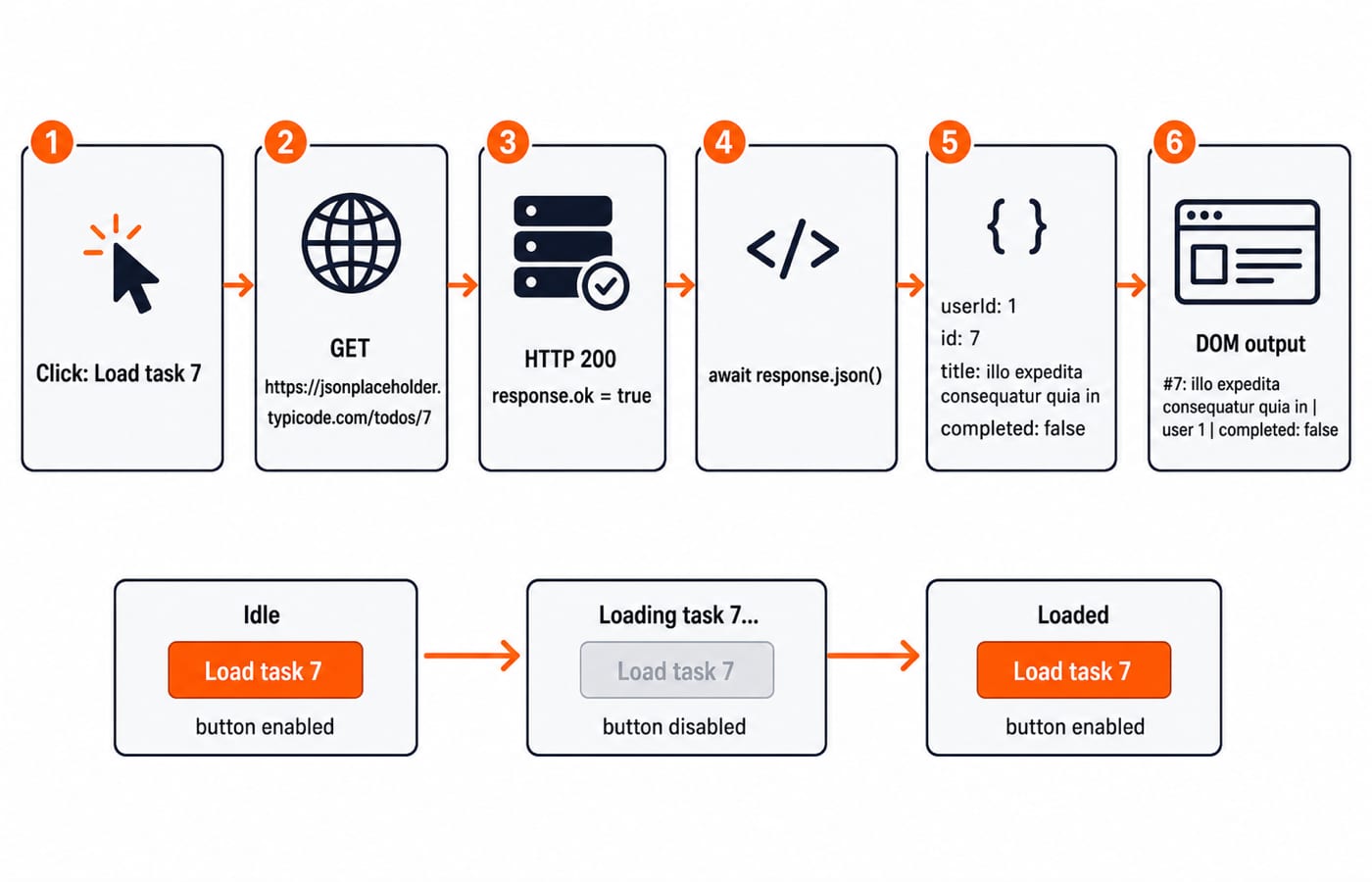
The click fetches /todos/7, checks response.ok, parses with response.json(), then writes to the DOM. Fetch uses HTTP rather than replacing it, as the Application Layer Protocols: DNS Walk-Through, HTTP explains.
The UI contract is fixed: disable the button, show Loading task 7..., clear old output, then show Loaded or Could not load task: <message>. Always re-enable the button in finally.
Fetch a GET request with async and await
Put this complete handler in app.js:
const loadButton = document.querySelector("#load-task");
const statusText = document.querySelector("#status");
const output = document.querySelector("#output");

async function loadTask() {
  loadButton.disabled = true;
  statusText.textContent = "Loading task 7...";
  output.textContent = "";

  try {
    const response = await fetch(
      "https://jsonplaceholder.typicode.com/todos/7"
    );
    if (!response.ok) throw new Error("HTTP " + response.status);

    const task = await response.json();
    output.textContent = `#${task.id}: ${task.title} | user ${task.userId} | completed: ${task.completed}`;
    statusText.textContent = "Loaded";
  } catch (error) {
    statusText.textContent = `Could not load task: ${error.message}`;
  } finally {
    loadButton.disabled = false;
  }
}

loadButton.addEventListener("click", loadTask);
HTTP 200 makes response.ok true. The first await gives a Response; the second gives { userId: 1, id: 7, title: "illo expedita consequatur quia in", completed: false }. Now task.id is number 7, task.completed is Boolean false, and the line is #7: illo expedita consequatur quia in | user 1 | completed: false. Fetch does not convert JSON automatically.
Send JSON with Fetch using POST
The input object becomes a JSON request string; the response becomes a new object:
const newPost = {
  title: "Fetch practice",
  body: "First AJAX request",
  userId: 7
};

async function createPost() {
  const response = await fetch("https://jsonplaceholder.typicode.com/posts", {
    method: "POST",
    headers: { "Content-Type": "application/json; charset=UTF-8" },
    body: JSON.stringify(newPost)
  });
  if (!response.ok) throw new Error("HTTP " + response.status);
  const createdPost = await response.json();
  console.log(createdPost);
}

createPost();
HTTP 201 returns { title: "Fetch practice", body: "First AJAX request", userId: 7, id: 101 }. The data moves through input object, JSON.stringify() wire string and parsed object with ID 101.
JSONPlaceholder simulates creation without persistence. Fetch is the browser client; validation, storage and authentication belong to the server. The Node.js, Express.js & MongoDB Course is a relevant server-side route, but this endpoint does not claim that stack.
Handle 404, network, CORS and cancellation
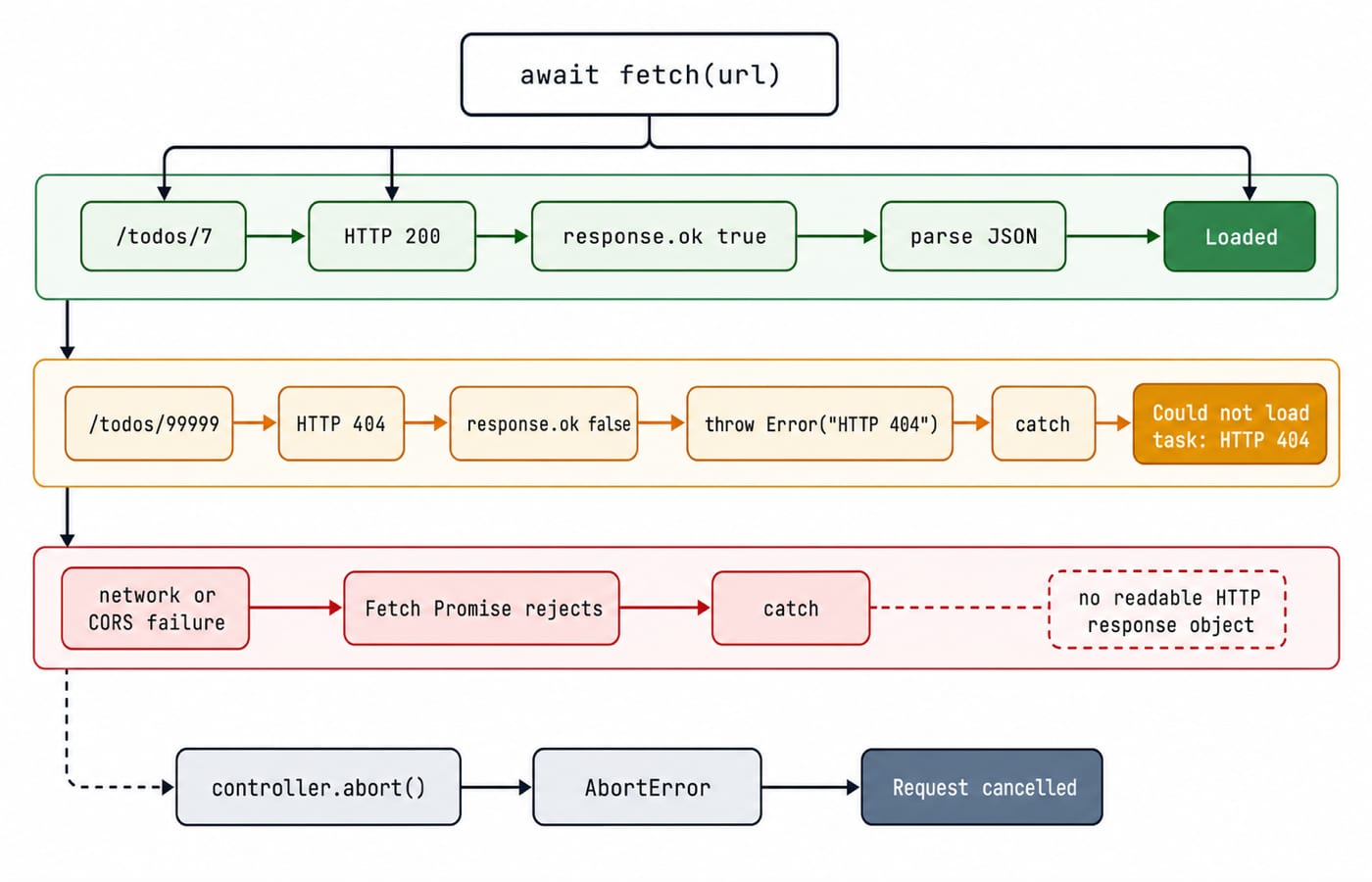
Change only the GET URL to /todos/99999. HTTP 404 returns {}, but Fetch still fulfils with a Response. The guard throws Error("HTTP 404"); catch displays Could not load task: HTTP 404.
Failure | What happens | Repair |
|---|---|---|
HTTP 404 | Fetch fulfils; | Check |
Network loss or blocked cross-origin response | Fetch rejects | Handle it in |
Invalid response JSON |
| Inspect status, content type and body |
mode: "no-cors" is not a CORS fix. Its opaque response has no readable status, headers or body.
For cancellation, add <button id="cancel">Cancel</button>, pass a signal and distinguish the abort:
const cancelButton = document.querySelector("#cancel");

async function fetchWithCancel(url) {
  const controller = new AbortController();
  cancelButton.onclick = () => controller.abort();
  try {
    const response = await fetch(url, { signal: controller.signal });
    if (!response.ok) throw new Error("HTTP " + response.status);
  } catch (error) {
    statusText.textContent = error.name === "AbortError"
      ? "Request cancelled"
      : `Could not load task: ${error.message}`;
  }
}

fetchWithCancel("https://jsonplaceholder.typicode.com/todos/7");
Aborting rejects with AbortError; it does not guarantee that the server stopped work.
Refactor repeated Fetch code and compare Promises
A small helper standardises status checking and parsing while leaving options visible:
async function requestJSON(url, options = {}) {
  const response = await fetch(url, options);
  if (!response.ok) throw new Error("HTTP " + response.status);
  return response.json();
}

async function runExamples() {
  const task = await requestJSON(
    "https://jsonplaceholder.typicode.com/todos/7"
  );
  const post = await requestJSON("https://jsonplaceholder.typicode.com/posts", {
    method: "POST",
    headers: { "Content-Type": "application/json; charset=UTF-8" },
    body: JSON.stringify(newPost)
  });
  return { task, post };
}

runExamples();
The same GET in Promise-chain form is:
fetch("https://jsonplaceholder.typicode.com/todos/7")
  .then(response => {
    if (!response.ok) throw new Error("HTTP " + response.status);
    return response.json();
  })
  .then(task => output.textContent = task.title)
  .catch(error => statusText.textContent = error.message);
The first .then() matches the first await and returns the parsing Promise. The second receives task; .catch() matches try/catch. Loading, cancellation, authentication and non-JSON handling remain call-specific.
Common Fetch and AJAX mistakes
A 404 looks successful: relying only on
catchignores HTTP status. Checkresponse.ok.The console shows a Promise:
response.json()was not awaited or returned.Parsing reports an unexpected token: inspect status,
Content-Typeand the Network tab for HTML or malformed JSON.The request body is wrong: stringify objects and set the JSON content type when expected. GET uses supported query parameters, not a body.
The browser path is unsafe: CORS is not a Fetch syntax problem. Avoid
innerHTMLfor untrusted data; usetextContent, restore controls infinally, prevent click races, and optionally cancel an old request.
Fetch and AJAX exercises and the short version
Exercises may ask for a Promise conversion, response.ok guard, 404 prediction, JSON POST, or DOM update. Practise checkable outcomes:
Render
Pendingwhen task 7 hascompleted: false.Make
/todos/99999displayCould not load task: HTTP 404.POST the worked payload and assert status
201and returned ID101.Route both calls through
requestJSON()without duplicating theresponse.okguard.
Preserve loading state and finally cleanup.
Recall five lines: AJAX updates without navigation. Fetch returns a Promise of Response. Check response.ok. Parse with a second await. Manage loading, success and failure deliberately.
Use the Complete JavaScript Course for a structured next step. For the wider stack, revise Web Technologies for Teaching Exams: HTML, HTTP, DNS Guide, then use JavaScript questions in the practice bank as broad JavaScript practice, not as Fetch-specific coverage.
Keep learning
Regular Expressions in JavaScript: Match, Extract, Replace, and Validate
Learn JavaScript regex by tracing what each token consumes. Build a validator and a named-group log parser, then practise extraction, replacement, flags, and common traps.
Updated 23 Oct 20265 min readWeb Development
Functions and Arrow Functions in JavaScript: Syntax, Scope and Runnable Examples
Build function declarations, expressions and arrows in JavaScript, then trace parameters, closures, lexical this and array callbacks through exact outputs.
Updated 19 Oct 20266 min readWeb Development
Modules in JavaScript: Import, Export, and Runnable Examples
Build JavaScript modules from scratch with a shopping-cart project that runs in Node.js and the browser. Learn live bindings, re-exports, lazy loading, and practical fixes.
Updated 15 Oct 20265 min readWeb Development

LocalStorage and Cookies in JavaScript: Store, Read and Delete Data
Run one lesson-progress object and one preference cookie through their complete life cycles, then learn which browser store fits a feature and which security traps to avoid.
Updated 11 Oct 20266 min readWeb Development