Cloud Computing Explained: Service Models, Worked Calculations and Exam Traps
Build a clean cloud-computing concept map, classify common scenarios, and solve VM-hour, availability and replicated-storage calculations step by step.
KnowledgeGate Team
Exam prep & CS education
Updated 26 Oct 20265 min read
Many aspirants can expand IaaS, PaaS and SaaS but still mix service models with deployment models. They may call every virtual machine a cloud or lose the thread when a scenario becomes a small calculation. Cloud computing combines service models, deployment models and resource calculations, and objective questions test how those ideas fit together. If the underlying terms feel unfamiliar, first strengthen your broader ICT foundation.
Cloud computing: the five characteristics that make the definition work
NIST SP 800-145 defines cloud through on-demand network access to a shared configurable-resource pool, rapidly provisioned and released with little management effort or provider interaction. Its five characteristics are:
Characteristic | Meaning | Concrete cue |
|---|---|---|
On-demand self-service | Users provision capacity when needed | A learner creates a server without a support ticket |
Broad network access | Standard network access | The learner reaches the service over a network |
Resource pooling | Shared capacity is dynamically assigned | A workload draws from a common pool |
Rapid elasticity | Capacity expands and contracts | Release capacity after a spike |
Measured service | Use is monitored, controlled and reported | Record VM-hours |
Build bottom-up: servers, storage and networks; abstraction such as virtualisation; a provisioning and monitoring control plane; then the user-facing service. Virtualisation enables cloud, but one manually created VM does not demonstrate all five characteristics.
Pooling shares capacity, not tenant data. Logical isolation and access control separate workloads. Measured service permits monitoring and reporting, but specifies neither charges nor a universal unit.
IaaS, PaaS and SaaS: classify by who manages each layer
Model | Provider manages | User manages | Control gained | Typical scenario |
|---|---|---|---|---|
IaaS | Compute, storage, networking, virtualisation | OS, runtime, application, data | OS control | The team needs a custom Linux kernel module |
PaaS | Runtime and lower layers | Application and data | Managed application deployment | The team pushes code to a managed runtime |
SaaS | Complete application stack | Configuration and data | Finished software use | A college configures accounts and courses in a finished LMS |
Classify by the layer the customer controls, not by browser access. A browser can manage IaaS, deploy to PaaS or consume SaaS. Also keep the taxonomies separate: IaaS, PaaS and SaaS are service models, not public, private or hybrid deployment choices.
Public, private, community and hybrid cloud: classify the deployment
NIST's four deployment models classify who may use infrastructure and how distinct clouds combine.
Scenario | Deployment model | Why |
|---|---|---|
A provider serves unrelated customers | Public | Open use by the general public |
A university serves only its departments | Private | Exclusive use by one organisation |
Universities share infrastructure for a research consortium | Community | A specific community has shared concerns |
A university keeps sensitive records privately but moves stateless result processing to public capacity at peak demand | Hybrid | Distinct clouds remain separate but connect for data or application portability |
Private does not mean on-premises. A laptop plus an ordinary website is not automatically hybrid. Cloud hosts applications discussed under ML & Data Science, but hosting does not make them AI.
Elastic cloud capacity: work out resource-hours step by step
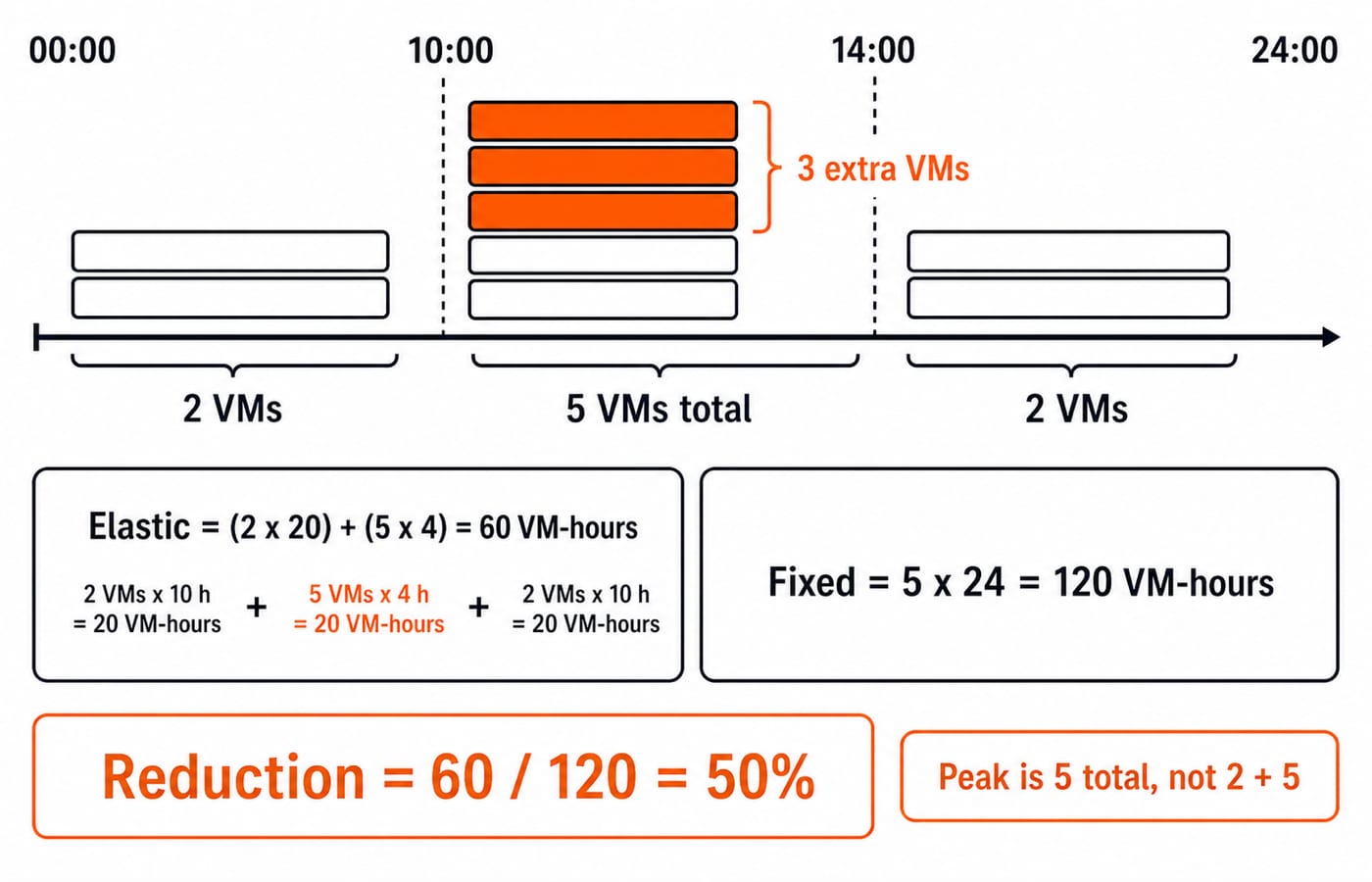
A quiz portal needs 2 VMs for 20 off-peak hours and 5 VMs total from 10:00 to 14:00. A fixed setup keeps 5 active all day; the elastic setup releases 3 outside the peak.
Fixed capacity =
5 x 24 = 120 VM-hours.Elastic capacity =
(2 x 20) + (5 x 4) = 40 + 20 = 60 VM-hours.Reduction =
120 - 60 = 60 VM-hours.Percentage reduction =
60 / 120 x 100 = 50%.
The peak is 5 VMs total, not 2 plus 5. This shows elasticity and measured use, not guaranteed savings. Real comparisons also depend on storage, network transfer, billing units, reserved capacity, software and provider terms.
Scale-up enlarges one machine, scale-out adds machines, and elasticity adjusts capacity with demand.
Cloud availability and redundancy: keep the denominator and units visible
For this exercise, availability is available time / total scheduled time x 100.
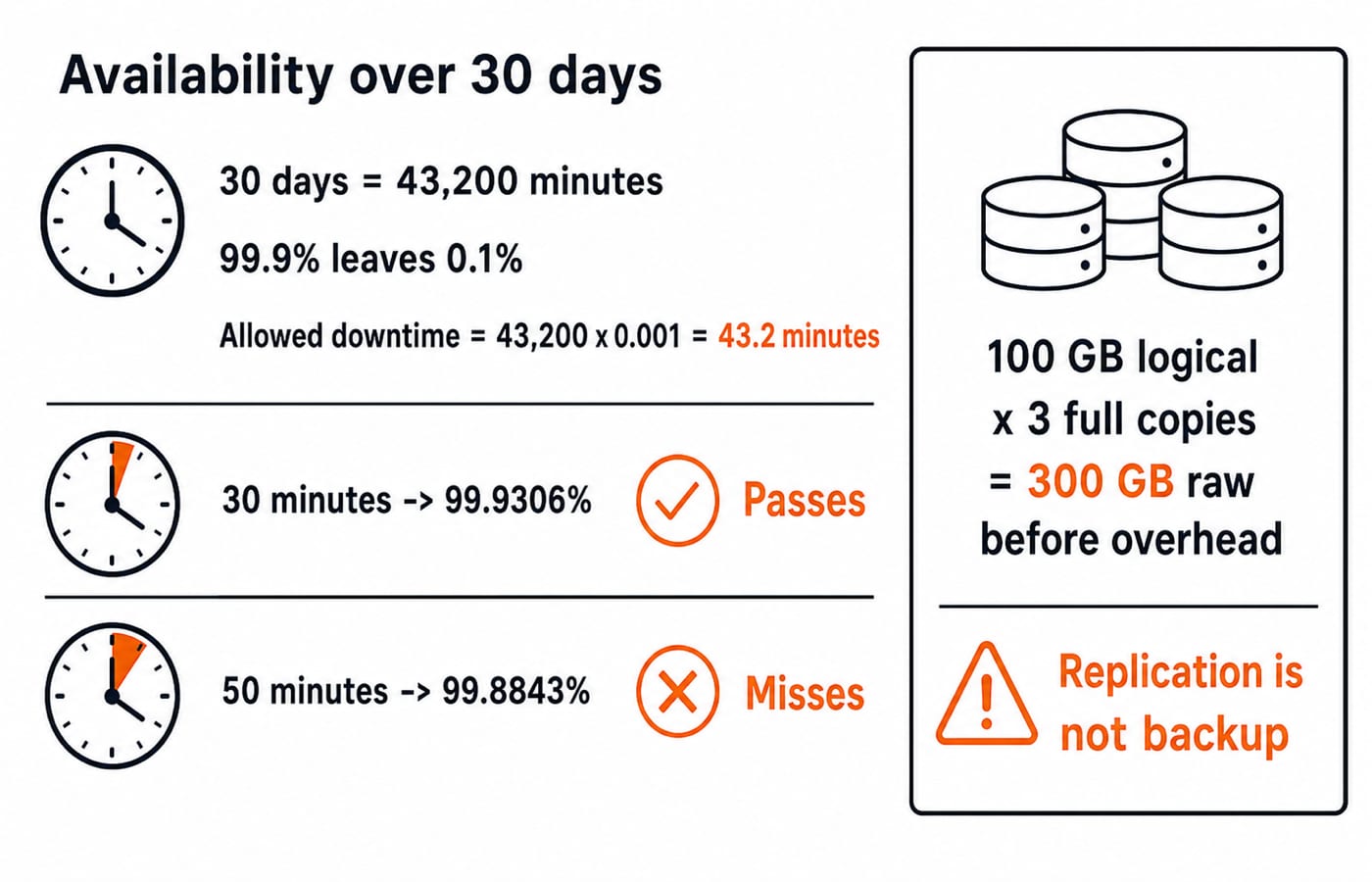
A 30-day month contains
30 x 24 x 60 = 43,200 minutes.A 99.9% target leaves an unavailable fraction of
0.1% = 0.001.Allowed downtime =
43,200 x 0.001 = 43.2 minutes.
Do not round before comparing. With 30 minutes unavailable, (43,200 - 30) / 43,200 x 100 = 99.9306%, about 99.931%, which clears 99.9%. With 50 minutes, (43,200 - 50) / 43,200 x 100 = 99.8843%, about 99.884%, which misses it.
Keep redundancy separate. For 100 GB of logical data with 3 full copies, simplified raw capacity is 100 x 3 = 300 GB before metadata, coding or compression overhead. Replication may improve resilience, but is not backup or proof of an availability percentage.
Cloud computing traps: fix the category error before calculating
Trap | Why it fails | Correct rule |
|---|---|---|
Virtualisation equals cloud | One VM may lack cloud characteristics | Virtualisation is only an enabler |
Scalability equals elasticity | Scaling need not follow demand both ways | Elasticity follows demand |
IaaS means public cloud | It mixes two taxonomies | Separate responsibility from deployment |
Browser access means SaaS | Browsers reach all three models | Ask what the customer controls |
Replication equals backup | Replicas can copy damage | The two solve different problems |
High availability means perfect reliability or security | Availability measures accessible scheduled time | Assess reliability and security separately |
Distributed systems coordinate components over a network. Grid computing pools distributed resources for coordinated tasks. Edge computing moves processing closer to the source or user. All can work with cloud, but none is its synonym. If servers, operating systems, storage and networks blur together, revisit Computer Fundamentals for CS Teaching Exams.
Cloud computing exam patterns: definitions, scenarios and numericals
Four objective-question shapes cover the core reasoning:
Characteristic: capacity released after demand falls indicates rapid elasticity; recorded usage indicates measured service.
Responsibility: customer control of the operating system indicates IaaS.
Deployment: distinct private and public clouds connected for workload portability indicate hybrid cloud.
Numerical: the elastic schedule uses 60 VM-hours versus 120 VM-hours at fixed peak capacity, a 50% reduction.
Assertion: virtualisation alone is insufficient to establish cloud computing. Reason: cloud also requires on-demand provisioning, network access, resource pooling, elasticity and measured service. Both are true, and the reason explains the assertion.
More than 30 questions are live in our practice bank for cloud computing, so each shape above can be drilled on fresh scenarios rather than a single example. UGC NET Preparation Courses and Test Series is a broader route through the rest of the paper.
Cloud computing short version and the next practice step
Five essential characteristics establish the cloud model.
IaaS, PaaS and SaaS classify management responsibility.
Public, private, community and hybrid classify deployment.
Virtualisation is an enabler, not the whole definition.
Elasticity follows demand.
Every numerical answer must name its denominator and unit.
Redraw the two model tables and classify the study-portal scenarios. Then recompute 60 VM-hours, 50%, 43.2 minutes, 99.9306%, 99.8843% and 300 GB without looking back. Add a one-line interpretation after each result so the arithmetic stays connected to the concept.
For structured ICT preparation, the NTA UGC NET Paper 1 Course is an optional next step.
Keep learning
Windows System Keys Explained: Shortcut Meanings, a Worked Workflow and Exam Traps
Learn what Windows system keys do, how neighbouring shortcuts differ, and how to trace a two-desktop workflow without losing track of the final state.
Updated 25 Oct 20265 min readUGC NET Computer Science

Society, Law and Ethics in ICT: Concepts, Worked Example and Exam Traps
Learn a three-lens method for separating social impact, legal requirements and ethical judgment in ICT, then apply it to an exact hypothetical AI-proctoring audit.
Updated 24 Oct 20265 min readUGC NET Computer Science
Function Keys F1-F12 Explained: Uses, Worked Shortcut Map and Exam Traps
Learn what F1 through F12 do in named Windows and Microsoft application contexts, then solve a nine-command classification and avoid common modifier traps.
Updated 20 Oct 20266 min readUGC NET Computer Science
E-Waste Management Explained: Lifecycle, Worked Recovery Example and Exam Traps
Learn how e-waste moves from use to reuse, recycling and controlled residue. A hypothetical 600 kg batch shows how to close the mass balance and avoid denominator traps.
Updated 16 Oct 20266 min readUGC NET Computer Science