

2D Geometrical Transforms and Viewing Mistakes: 7 Exact Fixes
Stop losing correct answers to convention errors. Work through seven coordinate-based checks for composites, pivots, viewing, axis direction, and clipping.
KnowledgeGate Team
Exam prep & CS education
Updated 27 Nov 20264 min read
Learners often remember translation, rotation and viewport formulas separately, yet lose the answer by mixing conventions, reversing a composite, using the wrong centre or mapping before clipping. These seven correction checks use exact coordinates instead of another formula list. Throughout, points are homogeneous column vectors with p' = Mp, positive rotation is counter-clockwise on mathematical axes, and window boundaries are inclusive unless stated otherwise.
1. Mistake 1: Mixing row-vector and column-vector conventions
Why it happens: A matrix is memorised without noting the vector side or homogeneous coordinate.
What goes wrong: For column vectors, translation by (tx, ty) = (3, -2) is T = [[1,0,3],[0,1,-2],[0,0,1]]. It maps point P = (2,1,1)^T to (5,-1,1)^T, but leaves direction d = (2,1,0)^T unchanged. Giving the direction w = 1 wrongly produces (5,-1,1)^T. Row [2,1,1] multiplied by the same matrix gives [2,1,5], exposing the mismatch.
What to do instead: Write column vector, p'=Mp, point w=1, direction w=0 before calculating. If needed, use Linear Algebra for GATE CS: Rank, Consistency, Eigenvalues as your matrix refresher.
2. Mistake 2: Reversing the order of a composite transform
Why it happens: Operations are read left to right, then matrices are written in that same order.
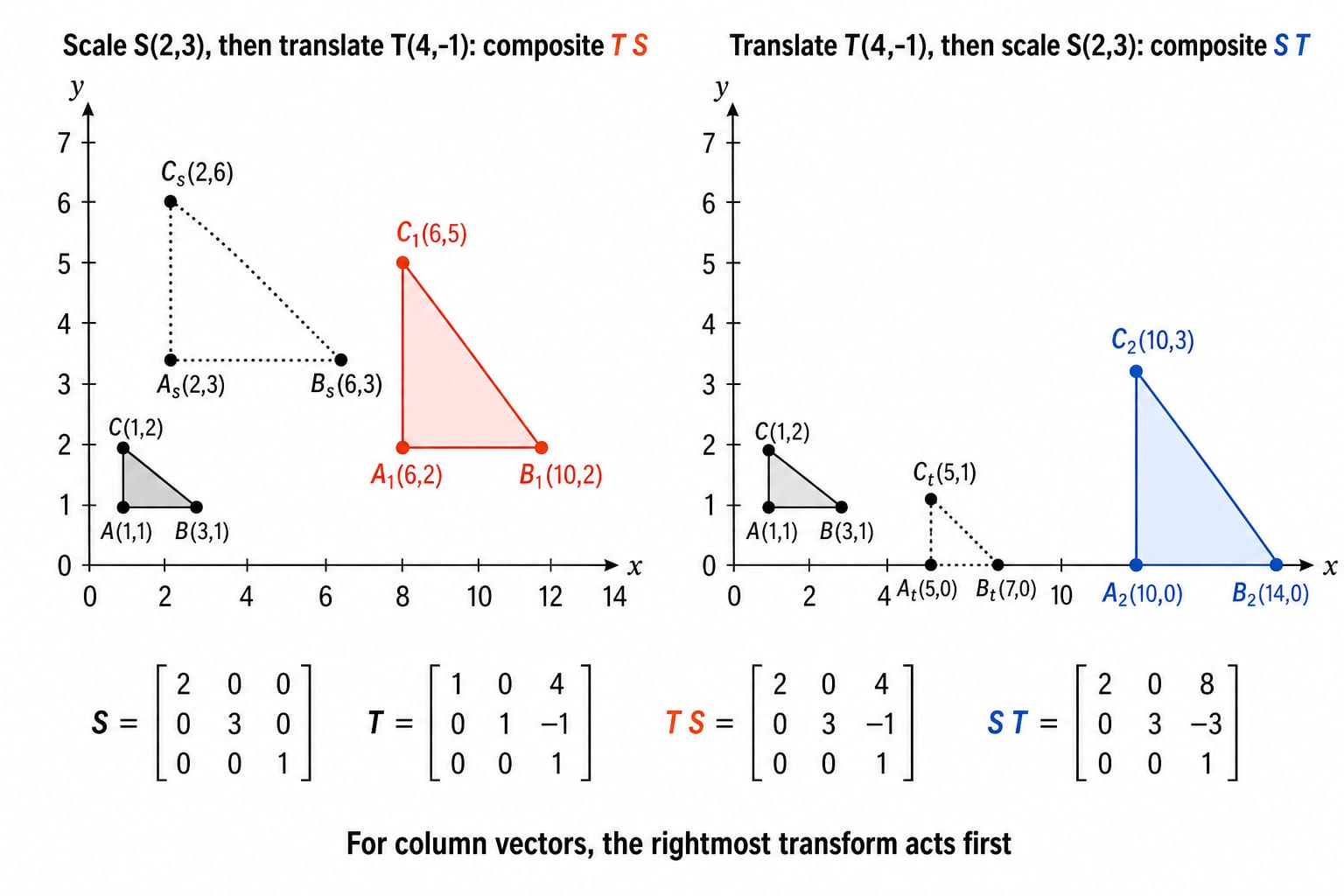
What goes wrong: With column vectors, the rightmost matrix acts first, and transforms need not commute. Take A=(1,1), B=(3,1), C=(1,2), scale S(2,3) and translation T(4,-1). Scale then translate means TS. Scaling gives (2,3), (6,3), (2,6); translating gives A1=(6,2), B1=(10,2), C1=(6,5). Translate then scale means ST. Translation gives (5,0), (7,0), (5,1); scaling gives A2=(10,0), B2=(14,0), C2=(10,3).
What to do instead: State the verbal order, calculate one vertex in stages, then form the composite. The matrix must reproduce that check.
3. Mistake 3: Guessing the signs in the rotation matrix
Why it happens: The positions of sin theta and -sin theta are recalled by shape, not checked against the positive direction.
What goes wrong: For Q=(3,2) and theta=90 degrees, the counter-clockwise matrix R=[[0,-1],[1,0]] gives Q'=(-2,3). The clockwise pattern [[0,1],[-1,0]] instead gives (2,-3), in a different quadrant.
What to do instead: State the angle convention and test a unit vector. Positive 90-degree counter-clockwise rotation must send (1,0) to (0,1). Keep degrees and radians explicit in calculators and programs.
4. Mistake 4: Transforming about the origin instead of the stated pivot
Why it happens: The standard rotation or scaling matrix is applied directly even when the centre is not (0,0).
What goes wrong: Rotate P=(5,3) by 90 degrees counter-clockwise about C=(2,1). Direct origin rotation wrongly gives (-3,5). The correct repair has three stages:
Translate to the pivot frame:
P-C=(3,2).Rotate:
(3,2) -> (-2,3).Translate back:
(-2,3)+C=(0,4).
Clockwise signs would instead give (2,-3)+C=(4,-2).
What to do instead: Write P'=T(2,1) R90 T(-2,-1) P. Use the same translate, transform, translate-back structure for scaling, reflection or shear about a fixed point.
5. Mistake 5: Dropping the window and viewport offsets
Why it happens: Only a width ratio is remembered, so the source and destination minima disappear.
What goes wrong: Let the world window be x=[10,30], y=[20,60] and the mathematical y-up viewport be u=[100,500], v=[50,250]. Then sx=(500-100)/(30-10)=20 and sy=(250-50)/(60-20)=5. For P=(15,50):
u=100+(15-10)*20=200v=50+(50-20)*5=200
Thus P_v=(200,200). Dropping source offsets gives u=100+15*20=400 and v=50+50*5=300, placing y outside the viewport.
What to do instead: Write all eight bounds, compute two scales, subtract each window minimum, then add each viewport minimum. Use one common scale only when aspect preservation is required.
6. Mistake 6: Applying the wrong y-axis orientation
Why it happens: A mathematical y-up formula is copied to screen coordinates where y increases downward, or an unnecessary inversion is added.
What goes wrong: Keep world y=[20,60], but let screen rows run from top v=50 to bottom v=250. World y=20 must map to 250, while y=60 must map to 50. The formula is v=250-(y-20)*5, so (15,50) maps to (200,100). Using the y-up result (200,200) mirrors its position vertically.
What to do instead: Draw an arrow beside each axis and test both endpoints before an interior point. Invert only when the two systems have opposite y directions.
7. Mistake 7: Rejecting with outcode OR or clipping against the viewport
Why it happens: Window, viewport and clipping boundaries are treated as interchangeable, while Cohen-Sutherland's OR and AND tests are swapped.
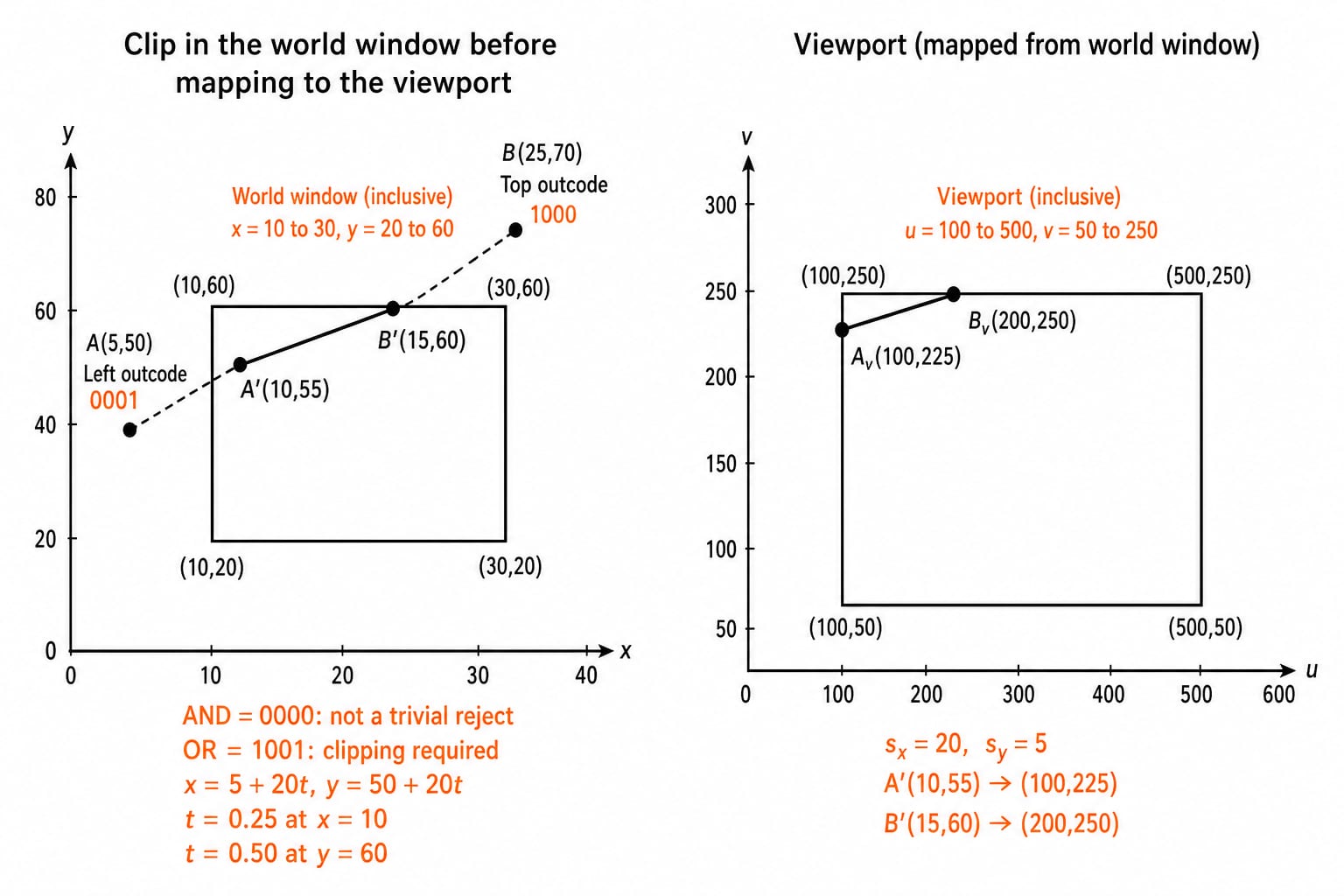
What goes wrong: Use the world window above and bits Top=1000, Bottom=0100, Right=0010, Left=0001. For line A=(5,50) to B=(25,70), code(A)=0001 and code(B)=1000. OR=1001 means it is not trivially accepted, not that it must be rejected. Since AND=0000, clipping is required.
Parameterise x=5+20t, y=50+20t. At x=10, t=0.25, so A'=(10,55). At y=60, t=0.50, so B'=(15,60).
What to do instead: Clip against the inclusive world window before mapping. In the y-up viewport, A' maps to (100,225) and B' maps to (200,250).
8. The 60-second correction checklist and next step
Check: vector convention and w; matrix order on one point; rotation with (1,0); pivot moved to (0,0) and back; all eight viewing bounds; both y-axis endpoints; outcode AND for rejection, then clipping before mapping.
Remember: scale then translate sends A to (6,2); pivot rotation sends P to (0,4); y-up sends (15,50) to (200,200); screen-y-down sends it to (200,100); clipping retains (10,55) to (15,60).
Practise with questions in KnowledgeGate's live question bank. For the complete window-to-viewport derivation, read Window-to-Viewport Mapping: Formula and Worked Example, which owns the formula and one worked map; use these seven checks for transform, axis, and clipping errors. GATE aspirants can continue with Aptitude for GATE Exam: Complete Course or browse GATE exam preparation courses.
Go deeper with the full courseEngineering Mathematics for GATE Exam
Keep learning

2-D Transformations and Viewing in Computer Graphics: Matrices, Rotation, and Worked Examples
Build 2-D transformations from column vectors to homogeneous matrices, then work through pivot rotation, composite order, and viewport mapping.
Updated 14 Sep 20266 min read57 viewsTeaching Recruitment (Computer Science)
Semantic Analysis and SDT Mistakes That Cost Marks: Exact Fixes
Knowing a grammar is not enough if attributes flow backwards or actions fire at the wrong point. Correct seven common errors with worked semantic and TAC traces.
Updated 9 Nov 20265 min readCompiler Design
Intermediate Code Generation Mistakes: 7 Mark-Losing Errors and Exact Fixes
Seven tempting shortcuts can corrupt an otherwise neat intermediate-code answer. Trace each wrong result, then apply the exact repair for TAC, arrays, records, jumps, loops and expression reuse.
Updated 8 Nov 20265 min readCompiler Design

Run-Time Environment Mistakes: 7 Mark-Losing Errors and Exact Fixes
Definitions are not enough when a trace depends on storage duration, calling order, lexical nesting and frame-address rules. Repair seven common errors through small, checkable examples.
Updated 3 Nov 20265 min readCompiler Design