Introduction to Viewing in Computer Graphics: Window-to-Viewport Mapping with a Worked Example
Follow a point and a triangle from a world window to a viewport. Derive the transform, audit the arithmetic, and separate clipping, distortion, and y-axis reversal.
KnowledgeGate Team
Exam prep & CS education
Updated 19 Aug 20266 min read
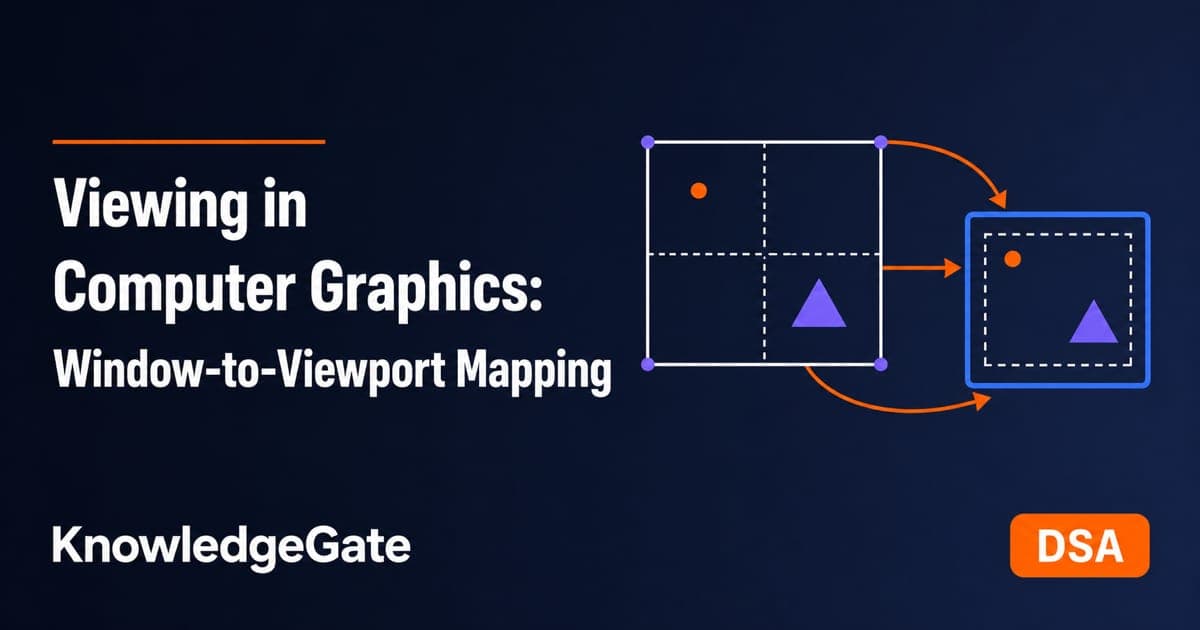
Students often learn translation, rotation and scaling, then treat the viewing window and display viewport as the same rectangle. They are not. Follow a single point through and the gap opens up: (16, 38) inside a world window lands at (220, 560) on the device, and clipping, aspect ratio and a downward-growing y-axis each move that answer again.
What viewing does in a 2-D graphics pipeline
A 2-D pipeline proceeds through object or model coordinates, world coordinates, a chosen viewing window, clipping, normalised window coordinates, and viewport or device coordinates. Viewing does not move the world. It selects a rectangular part and maps it onto a display rectangle.
The window is the world-coordinate rectangle [xw_min, xw_max] x [yw_min, yw_max]. The viewport is [xv_min, xv_max] x [yv_min, yv_max] on the output device. The window is the camera's view; the viewport is its screen region.
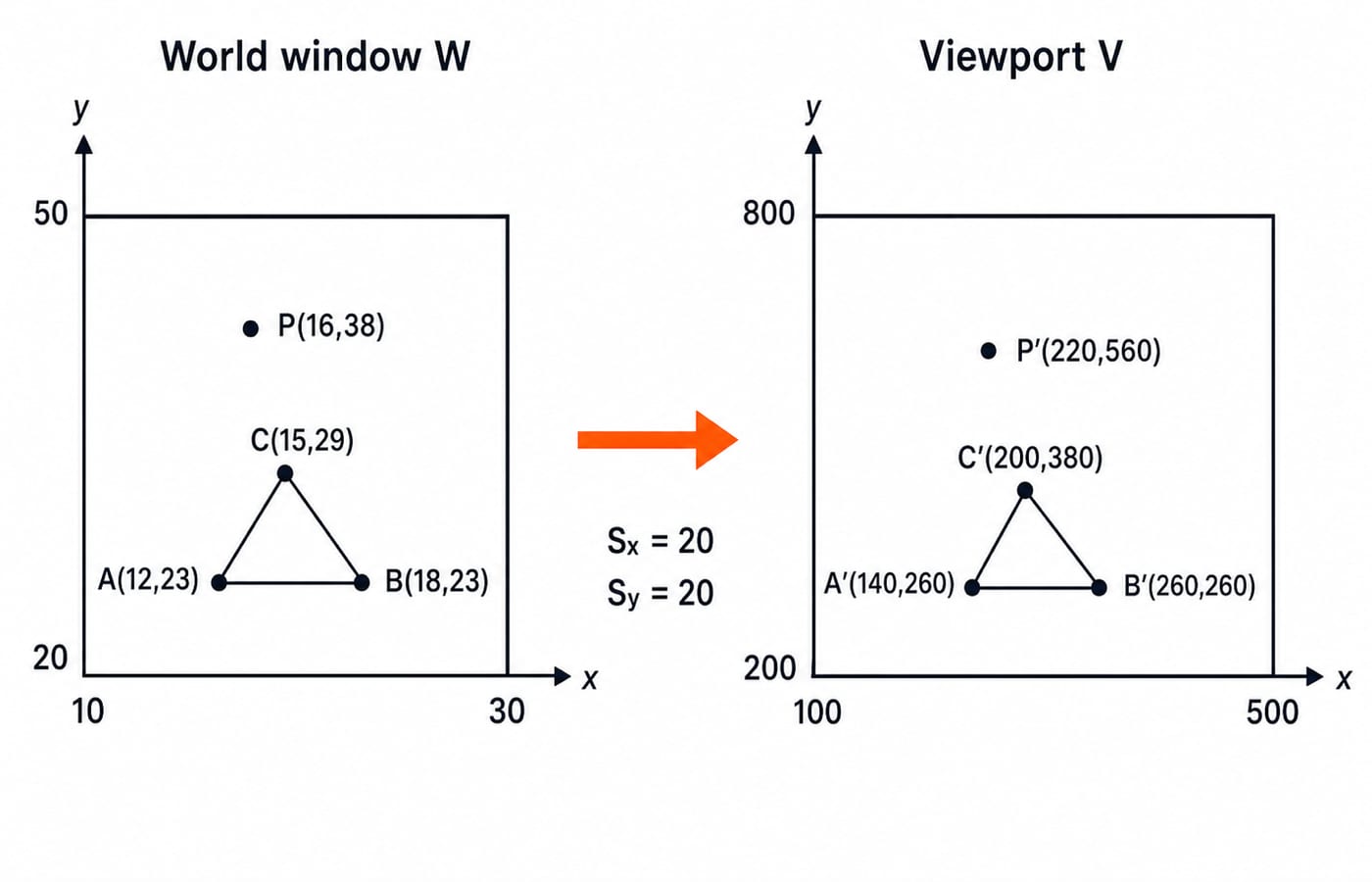
Use this running data:
Window
W = [10, 30] x [20, 50]Viewport
V = [100, 500] x [200, 800]Point
P = (16, 38)Triangle
A = (12, 23),B = (18, 23),C = (15, 29)
Modelling transforms come before viewing and rasterisation comes after, and both sit in the CS fundamentals learning path.
Derive the window-to-viewport formula
First normalise a world point inside the window:
u = (xw - xw_min) / (xw_max - xw_min)
v = (yw - yw_min) / (yw_max - yw_min)
Under Cartesian y-up, u = 0 and u = 1 are the left and right edges. Similarly, v = 0 and v = 1 are the bottom and top edges.
Next scale and translate those fractions into the viewport:
xv = xv_min + u(xv_max - xv_min)
yv = yv_min + v(yv_max - yv_min)
Combining the steps gives xv = xv_min + (xw - xw_min)Sx and yv = yv_min + (yw - yw_min)Sy, where:
Sx = (xv_max - xv_min) / (xw_max - xw_min)
Sy = (yv_max - yv_min) / (yw_max - yw_min)
For column vectors, the composite homogeneous transform is M = T(xv_min, yv_min) . S(Sx, Sy) . T(-xw_min, -yw_min). Row vectors reverse the multiplication order. Declare the convention and do not mix forms.
Fully worked example: map the point and triangle
Compute the rectangle sizes first:
Window width
= 30 - 10 = 20; window height= 50 - 20 = 30Viewport width
= 500 - 100 = 400; viewport height= 800 - 200 = 600Sx = 400 / 20 = 20;Sy = 600 / 30 = 20
For P = (16, 38), normalisation gives u = (16 - 10) / 20 = 6 / 20 = 0.3 and v = (38 - 20) / 30 = 18 / 30 = 0.6. Therefore:
P' = (100 + 0.3 x 400, 200 + 0.6 x 600) = (220, 560)
The column-vector matrix multiplication is:
M = T(100, 200) x S(20, 20) x T(-10, -20)

T(100, 200)  =  [[1, 0, 100], [0, 1, 200], [0, 0, 1]]
S(20, 20)    =  [[20, 0, 0],  [0, 20, 0],  [0, 0, 1]]
T(-10, -20)  =  [[1, 0, -10], [0, 1, -20], [0, 0, 1]]

M            =  [[20, 0, -100], [0, 20, -200], [0, 0, 1]]
Checking the point, M[16, 38, 1]^T = [220, 560, 1]^T. Applying the same transform vertex by vertex gives A' = (140, 260), B' = (260, 260) and C' = (200, 380).
Check the boundaries: (10, 20) maps to (100, 200), while (30, 50) maps to (500, 800). If either fails, inspect the scale, translation and bound order.
Aspect ratio and the screen y-axis are separate decisions
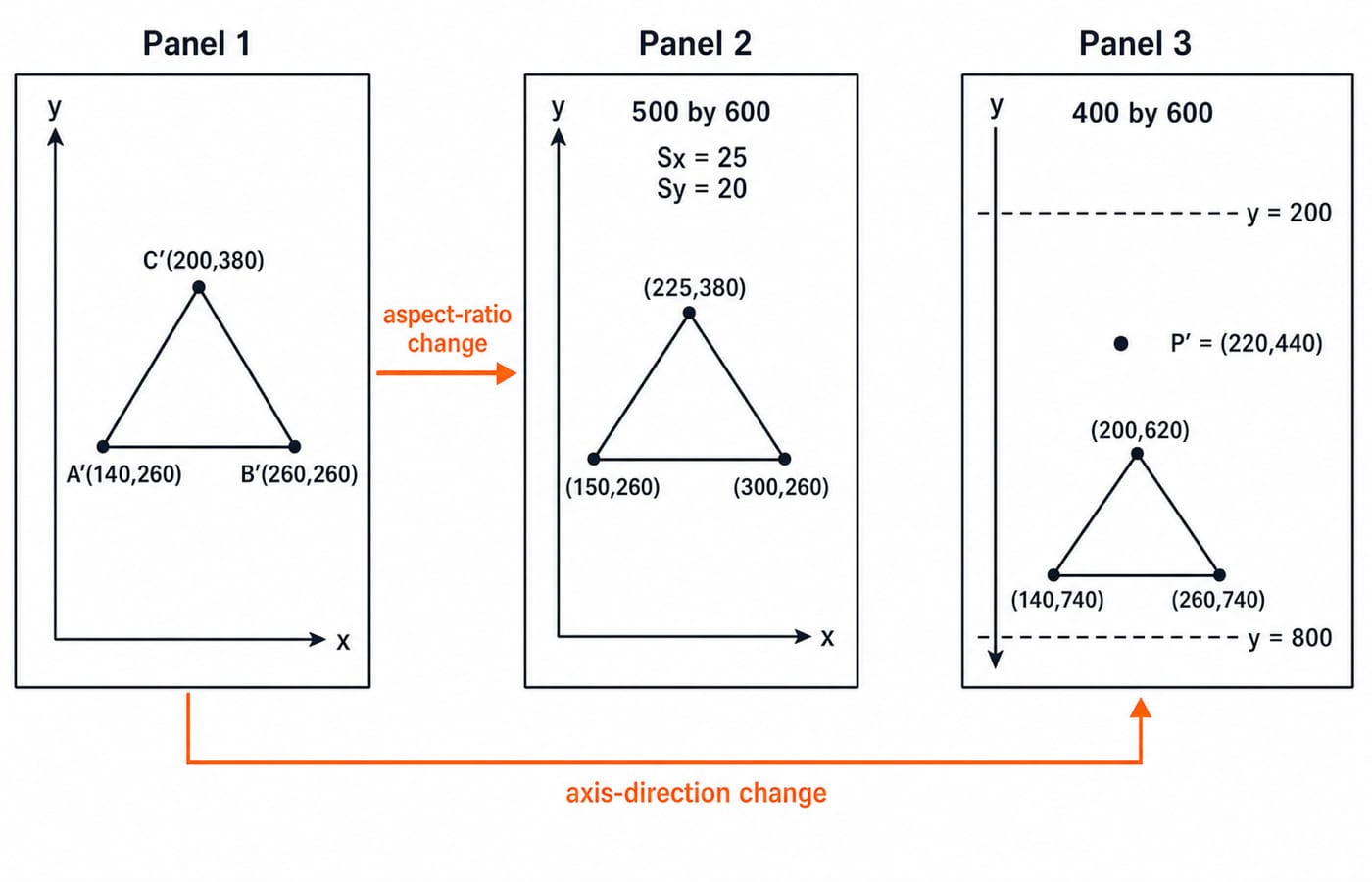
The window ratio is 20:30 = 2:3, and the viewport ratio is 400:600 = 2:3. Since Sx = Sy = 20, the running triangle keeps its shape.
Now change only the viewport to [100, 600] x [200, 800]. Then Sx = 500 / 20 = 25 and Sy = 600 / 30 = 20. The triangle becomes A' = (150, 260), B' = (300, 260), C' = (225, 380). Horizontal lengths receive 25 / 20 = 1.25 times the vertical scaling, or 25 percent more.
To preserve shape, choose the uniform scale min(25, 20) = 20. A 400 x 600 active viewport centred inside the 500 x 600 outer box leaves 50 pixels on each horizontal side, so its active x-range is [150, 550].
Axis direction is separate. If the device places y = 200 at the top and y = 800 at the bottom, use y_screen = 800 - (yw - 20) x 20 = 1200 - 20yw. Now P = (16, 38) maps to (220, 440), not (220, 560). The triangle maps to (140, 740), (260, 740), (200, 620). Flip y only when required.
Clip before mapping: one short line example
Take the horizontal segment from L1 = (5, 35) to L2 = (25, 35). Its part with x < 10 lies outside W, so clip the segment to (10, 35) through (25, 35) before transforming it. The clipped endpoints map to (100, 500) and (400, 500).
Point R = (34, 42) is outside because 34 > 30. Substitution produces (580, 640), but it is not visible in the chosen viewport. A point is rejected; a line or polygon is clipped, using algorithms such as Cohen-Sutherland or Sutherland-Hodgman when required.
Traps that produce plausible wrong answers
Using a bound as a width:
xw_maxis30, but the width is30 - 10 = 20.Forgetting the minimum:
100 + 16 x 20 = 420is wrong becausexw_minwas not subtracted. The correct x-coordinate is220.Translating too early: normalise relative to the window minimum, scale, then add the viewport origin.
Mixing matrix conventions: keep the multiplication order consistent with the declared column-vector convention.
Skipping clipping:
R = (34, 42)transforms algebraically, but it is outside the visible window.Flipping y automatically:
Phas y-coordinate560for Cartesian y-up and440for the stated y-down screen.
Before accepting an answer, subtract both minima, compare aspect ratios, identify the y direction, and test both boundary corners.
How exams test viewing and window-to-viewport mapping
A question can ask for direct point mapping, the composite matrix, non-uniform distortion, a y-down result, or whether a point or primitive must be clipped first.
For a 30-second check, use the original y-up W and V with Q = (24, 26). Then u = 14 / 20 = 0.7 and v = 6 / 30 = 0.2, so Q' = (380, 320). Under the y-down convention, (380, 680) is the result and therefore a legitimate distractor.
Scope matters. IIT Guwahati's official GATE 2026 CS syllabus does not list Computer Graphics or 2-D viewing among its ten sections, so this is not a current GATE CS syllabus topic. Check the current official syllabus for the university or competitive exam you are targeting. For wider exam strategy, learn how GATE question types differ, then prioritise only after checking the syllabus.
The short version and next step
Select a world window.
Clip points and primitives to it.
Normalise with
uandv.Scale and translate into the viewport.
Handle aspect ratio and y direction according to the stated device convention.
The result worth memorising is P(16, 38) -> (220, 560) under Cartesian y-up and (220, 440) once the device counts y downward. Hold both, because in a multiple-choice question the wrong option is usually the other one.
The Zero to Hero complete CS course covers Computer Graphics, with a dedicated 2-D Geometrical Transforms and Viewing unit, for readers who want the surrounding sequence. Redraw the two rectangles, recompute the matrix without notes, and verify both corner mappings before attempting practice questions.
Keep learning
Graphical Method in Linear Programming: Feasible Region, Corner Points and Optimality with a Worked Example
Learn the two-variable graphical method in the right order, then solve and audit a complete maximisation model without trusting the sketch alone.
Updated 21 Oct 20265 min readEngineering Mathematics

Duality in LP: Construct the Dual, Solve a Worked Example, and Apply Key Properties
Learn a reliable matrix-first method to form an LP dual, solve both programs to value 21, and use duality properties to check optimality and avoid sign errors.
Updated 17 Oct 20266 min readEngineering Mathematics

Commutative Property and Abelian Groups: Tests, Worked Examples and Exam Traps
Learn how to separate commutativity from the other group axioms, test custom operations step by step, and avoid the usual classification traps.
Updated 13 Oct 20266 min readEngineering Mathematics

Closure, Semigroup and Monoid: Worked Algebraic Structure Examples
Learn a reliable order for testing closure, associativity and identity. Worked tables and counterexamples show exactly when a structure becomes a semigroup or monoid.
Updated 9 Oct 20266 min readEngineering Mathematics