

Internet and Web Technology: How Websites, Browsers, and Web Services Actually Work
Follow one website request from DNS lookup to browser rendering. Along the way, learn URL parts, web protocols, browser services, and the HTTP facts exams test.
KnowledgeGate Team
Exam prep & CS education
Updated 1 Nov 20266 min read
Internet and Web Technology questions often mix HTTP, DNS, URL, browser, server, and IP into one prompt.
Internet Fundamentals: Architecture, Connections, DNS, URLs and Worked Examples owns Internet architecture, connection types, packetisation and transfer-time calculations. Internet Fundamentals for GATE: DNS, HTTP and a Worked Web Request Trace follows cold-cache DNS, TCP, TLS and HTTP timing, while Web Design and Development Explained continues into HTML, CSS, JavaScript and rendering after the first response.
Recognition questions instead require clean boundaries between websites, browsers and web services, protocols, URL parts and HTTP outcomes.
What happens when you open a website: the client-server model
The client is the browser on your device, which asks for a resource. The server stores or generates that resource and responds. The internet is the global network carrying these messages, while the World Wide Web is the collection of linked pages delivered over it. Email and file transfer use the internet, but they are not the web.
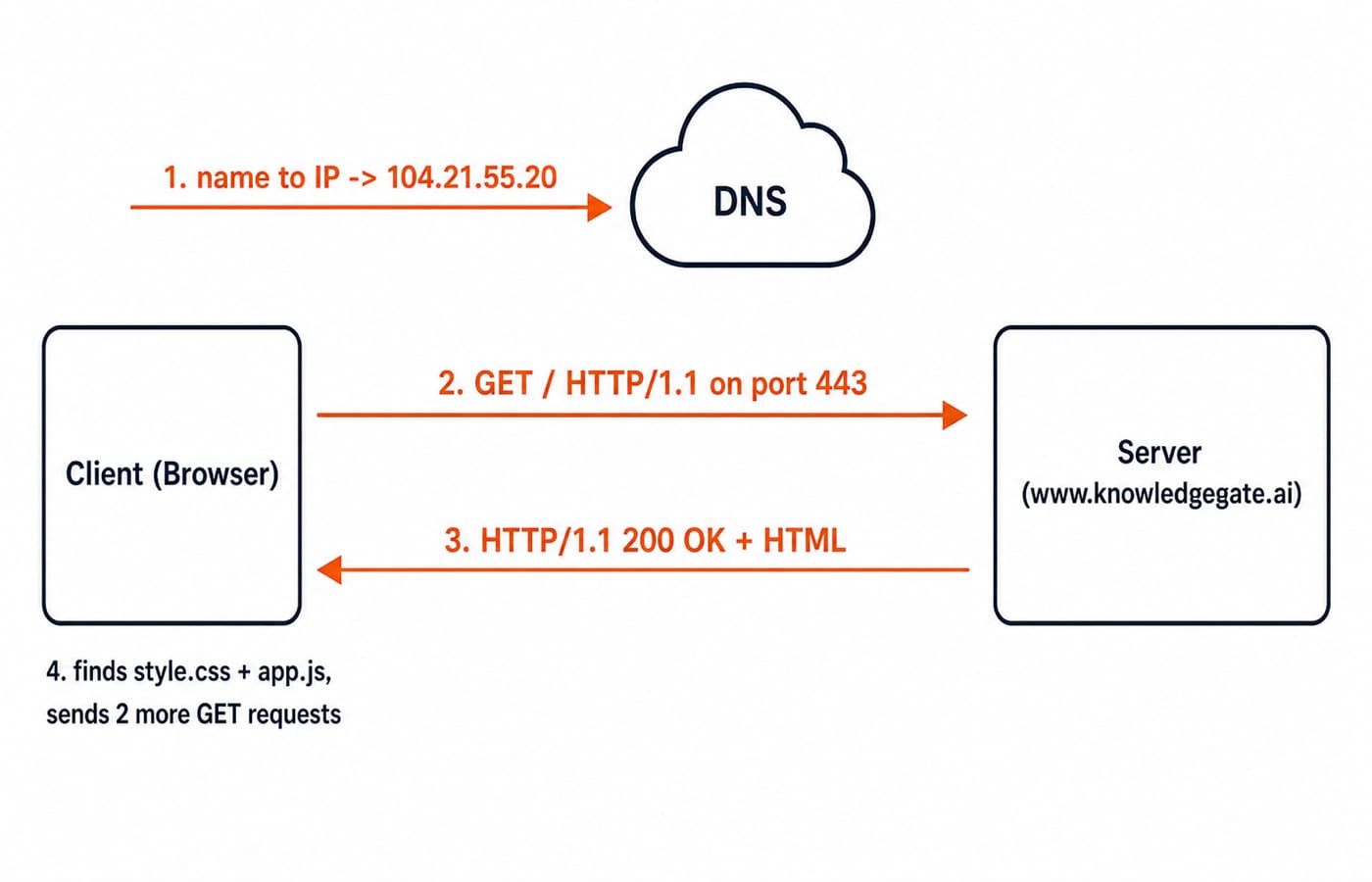
Trace one page load. Suppose you type www.knowledgegate.ai and press Enter:
The browser asks DNS to translate the name into an IP address. Assume the illustrated lookup returns
104.21.55.20.The browser opens a secure connection to that IP on port
443.It sends an HTTP request containing
GET / HTTP/1.1and the headerHost: www.knowledgegate.ai.The server replies with
HTTP/1.1 200 OK, response headers, and an HTML body.The browser finds
style.cssandapp.jsin the HTML and sends a GET request for each.It combines the resources and paints the page.
Under this simplified resource model, the page needs three HTTP request-response exchanges: one for HTML and two for the linked files. Request, response, protocol, and port are the exam keywords. A web server is the software serving resources over HTTP, not the physical machine itself.
Anatomy of a URL, part by part
A URL, or Uniform Resource Locator, is a resource's complete address. A domain is its named host, while an IP address is the host's numeric network address.
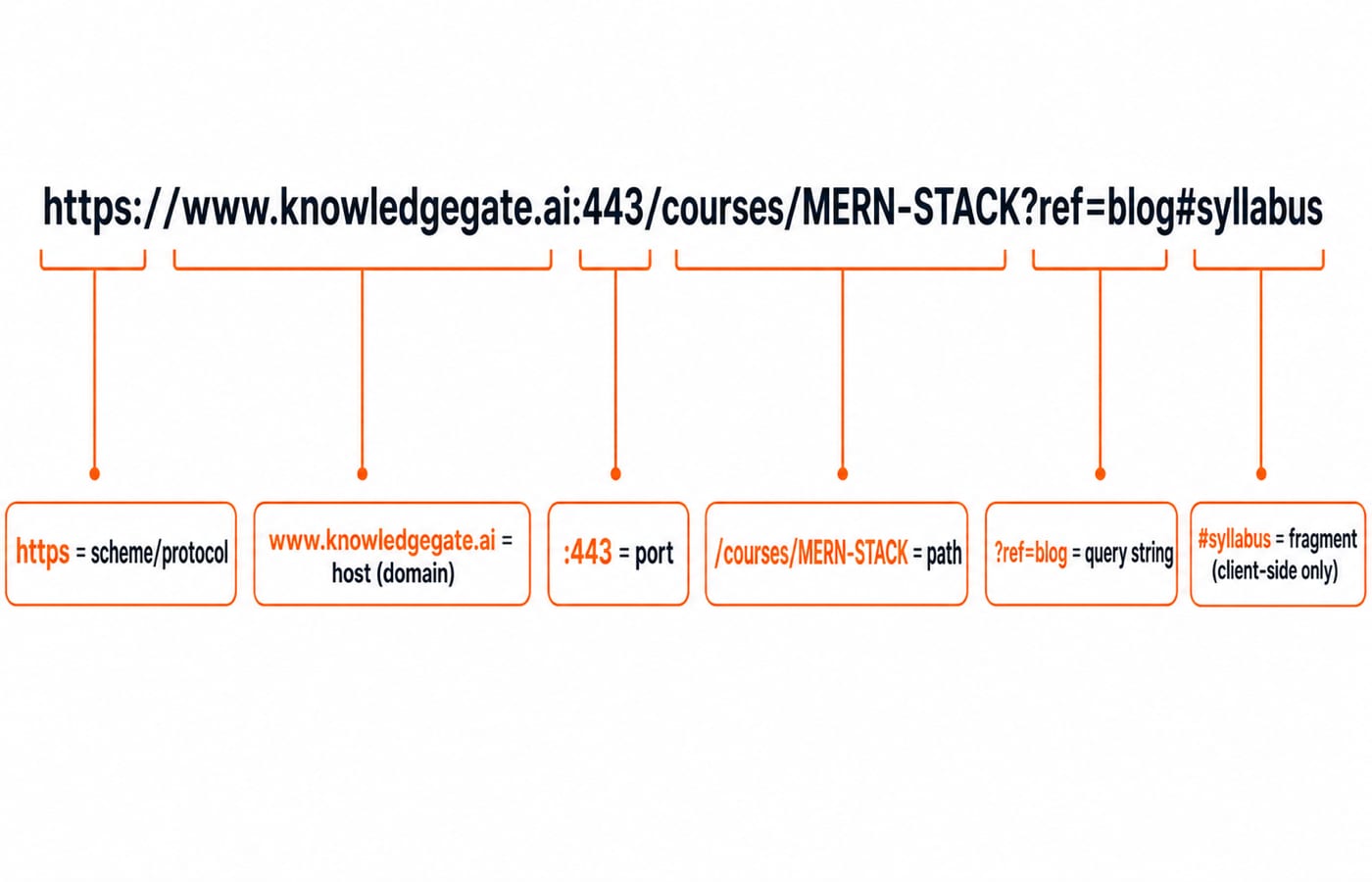
Break down this URL: https://www.knowledgegate.ai:443/courses/MERN-STACK?ref=blog#syllabus.
Part | Value | What it tells the browser |
|---|---|---|
Scheme |
| Use the secure HTTP scheme |
Host or domain |
| Contact this named host |
Port |
| Use the default HTTPS port, shown explicitly here |
Path |
| Ask for this resource on the server |
Query string |
| Send extra data, with key |
Fragment |
| Jump to this section in the browser |
The fragment is handled by the browser and is not sent as part of the server request. The familiar defaults are port 80 for HTTP and 443 for HTTPS, so users normally do not type either one.
The core web protocols you are expected to name
A protocol is an agreed set of rules for exchanging data. Learn each purpose with its default port.
Protocol | Main purpose | Default port |
|---|---|---|
HTTP / HTTPS | Fetch web resources; HTTPS protects HTTP traffic with TLS encryption |
|
DNS | Translate domain names into IP addresses |
|
FTP | Transfer files between a client and server |
|
SMTP | Send email between mail servers |
|
TCP/IP | Provide the underlying transport and addressing foundation | Not one application port |
HTTP and HTTPS share HTTP methods and status-code meanings. HTTPS adds TLS, so a network observer sees encrypted bytes instead of a readable password. Security is the point, not speed. TLS handshakes belong in deeper Computer Networks study; protocol matching comes after the role boundaries are secure.
What websites, browsers, and web services each do
A website is a collection of related pages and resources under one identity. A browser is client software that requests and displays those resources. A web service exposes data or an operation to another program, commonly through an HTTP API, and may return JSON rather than a visual page.
A browser resolves addresses, sends requests, and renders pages. Its engine turns HTML into structure, applies CSS, and executes JavaScript. It also caches files, stores session cookies, maintains history and bookmarks, manages tabs, and enforces HTTPS checks and sandboxing.
For a login button, HTML creates <button>Login</button>, CSS makes it blue and rounded, and JavaScript responds to a click. HTML is structure, CSS is style, JavaScript is behaviour.
A static website sends everyone the same stored HTML, like a notes page. A dynamic site uses application logic and database data to show content such as a personalised dashboard. Content that changes by user or time without a manual file edit is dynamic.
For example, a page can ask a weather service for Delhi data with GET /api/weather?city=Delhi. The service returns a data representation, and the page's JavaScript turns it into visible text. The website supplies the human-facing interface; the web service supplies the program-facing operation.
A browser is the application opening pages. A search engine is a web service visited through it.
HTTP methods and status codes with worked cases
The HTTP standard defines method and status-code semantics. GET asks for a resource without requesting a server-side change. POST sends data for processing, such as a login form. PUT and DELETE cover updating and removing resources. For exact wording, consult RFC 9110, HTTP Semantics.
Status codes are grouped by their first digit:
1xx, information: the request is still being handled.
2xx, success:
200 OKmeans the requested page was returned successfully.3xx, redirect:
301 Moved Permanentlymeans the old URL points permanently to another location.4xx, client error:
404 Not Foundmeans the requested page does not exist, while403 Forbiddenmeans the server refuses access.5xx, server error:
500 Internal Server Errormeans the server failed while processing the request.
Now connect them. Incorrect credentials sent to POST /login receive 401 Unauthorized, in the 4xx group. After the password is corrected, another POST /login receives 302 Found, a 3xx redirect to the dashboard. The method states the request's purpose; the status code reports its outcome.
Traps and confusions this topic loves
Internet and web are the same. The internet is the network. The web is one service running on it.
HTTP and HTTPS differ only in speed. HTTPS adds TLS encryption. Security is the important difference.
A URL and domain are the same. The domain is the host part. The URL also includes the scheme, path, and optional query and fragment.
A browser is a search engine. The browser is software. A search engine is a website or web service used through it.
Cookies are viruses. A cookie is a small piece of text data stored by the browser to remember state. It is not executable malware.
How exams test Internet and Web Technology
Expect matching questions on protocols and ports, status-code meanings, URL parts, static versus dynamic pages, and the internet versus web distinction. Most are factual one-mark questions, so precise vocabulary matters more than a vague overall impression.
Drill the facts in both directions. Given 53, say DNS. Given #syllabus, say client-side fragment. Given 404, say client-error group and missing resource. Then mix these associations in timed Computer Networks questions.
The short version and your next step
A page load begins when a client asks a server for resources over HTTP after DNS converts a name into an IP address. The URL tells the browser where the resource is, and the browser renders HTML, CSS, and JavaScript while managing cache, cookies, and security. Get the internet-versus-web line, URL parts, protocol-port map, and status-code groups right, and the common traps become direct marks.
If you want to build the page rather than only classify its parts, start with the Complete HTML course. The wider Skill Development Courses catalogue provides routes into full-stack development and other technical skills.
Go deeper with the full courseGATE Guidance by Sanchit Sir
Keep learning
Internet Protocols and Web Services: DNS, HTTP, Email and FTP with Worked Examples
Trace a browser request through DNS, TCP and HTTP, then separate email from FTP.
Updated 11 Nov 20265 min readGATE Strategy & Roadmap

Internet and Web Services: Security, Cyber Law and Worked Examples
Separate the Internet from the Web, map common services to ports and controls, then trace a secure order request and calculate a file transfer.
Updated 9 Nov 20265 min readGATE Strategy & Roadmap
Internet & Web Technology for GATE: Syllabus Mapping, Weightage Method and Preparation Order
Map Internet and Web Technology to the right Computer Networks boundary, trace a complete HTTPS request, audit past papers honestly, and study it in 12 focused hours.
Updated 8 Nov 20265 min readGATE Strategy & Roadmap
Server-Side and Web Security: HTTP Sessions, Attacks, and Defences
Follow one illustrative login request from browser to proxy, application, and database, then map sessions, status codes, and common attacks to the controls that stop them.
Updated 3 Nov 20266 min readGATE Strategy & Roadmap