

Internet Fundamentals for GATE: DNS, HTTP and a Worked Web Request Trace
Connect Internet, Web, DNS, IP, ports and HTTP in one request lifecycle. Trace a cold HTTPS request and calculate latency, cache freshness and DNS expiry.
KnowledgeGate Team
Exam prep & CS education
Updated 29 Oct 20266 min read
Internet, Web, URL, DNS, IP address, HTTP and browser are easy to memorise separately. The confusion starts when a question follows one cold HTTPS request from a URL to a response. For the broader architecture, connection types, packetisation and throughput calculations, use Internet Fundamentals: DNS, URLs and Worked Examples. A cold-cache trace is the complementary problem: exact addresses, TCP sequence numbers, DNS TTL, HTTP freshness and end-to-end timing connect the terms inside the broader GATE CS Exam Preparation path.
1. Internet fundamentals: separate the Internet from the Web
The Internet is a packet-switched network of networks. End systems and access networks form the edge, routers form the core, and ISPs interconnect networks. The Web is one application on this infrastructure, using browsers, servers, URLs and HTTP or HTTPS.
Term | Meaning | Example |
|---|---|---|
Internet | Interconnected packet networks | A laptop reaching a server |
World Wide Web | Linked HTTP or HTTPS resources | Pages and web apps |
Website | Related resources under one identity |
|
Web page | One web document |
|
Browser | Fetches and renders web resources | A browser app |
Web server | Answers web requests | An HTTPS origin |
Search engine | Indexes and finds resources | A search service |
Email and file transfer use the Internet but are not the Web. The Web uses HTTP or HTTPS, email uses SMTP plus retrieval such as IMAP, and lookup uses DNS. HTML structures a document, CSS presents it, and JavaScript adds behaviour. The browser may then request CSS, scripts, fonts, images and API data.
2. The Internet protocol stack: names, addresses, ports and packets
Layer | Examples | Main job |
|---|---|---|
Application | DNS, HTTP, HTTPS, SMTP | User-facing network services |
Transport | TCP, UDP, QUIC | Process-to-process delivery |
Network | IP | Routing across networks |
Data link | Ethernet, Wi-Fi | Delivery on the current link |
Physical | Electrical, radio or optical signals | Transmitting bits |
HTTPS is HTTP protected by TLS. Our trace uses HTTP/1.1 over TLS over TCP. HTTP/3 can use QUIC, so HTTPS does not always mean TCP.
A URL identifies a resource, and its domain is human-readable. An IP address identifies a routing destination, while a port selects the process. A MAC address serves the current link, not end-to-end routing. Encapsulation carries an HTTP message inside transport data, an IP packet and a link-layer frame. If prefixes and host portions are not yet clear, practise them with Subnetting MCQs: 12 Solved IP Addressing Questions.
3. URL parsing and DNS: turn a resource name into a destination
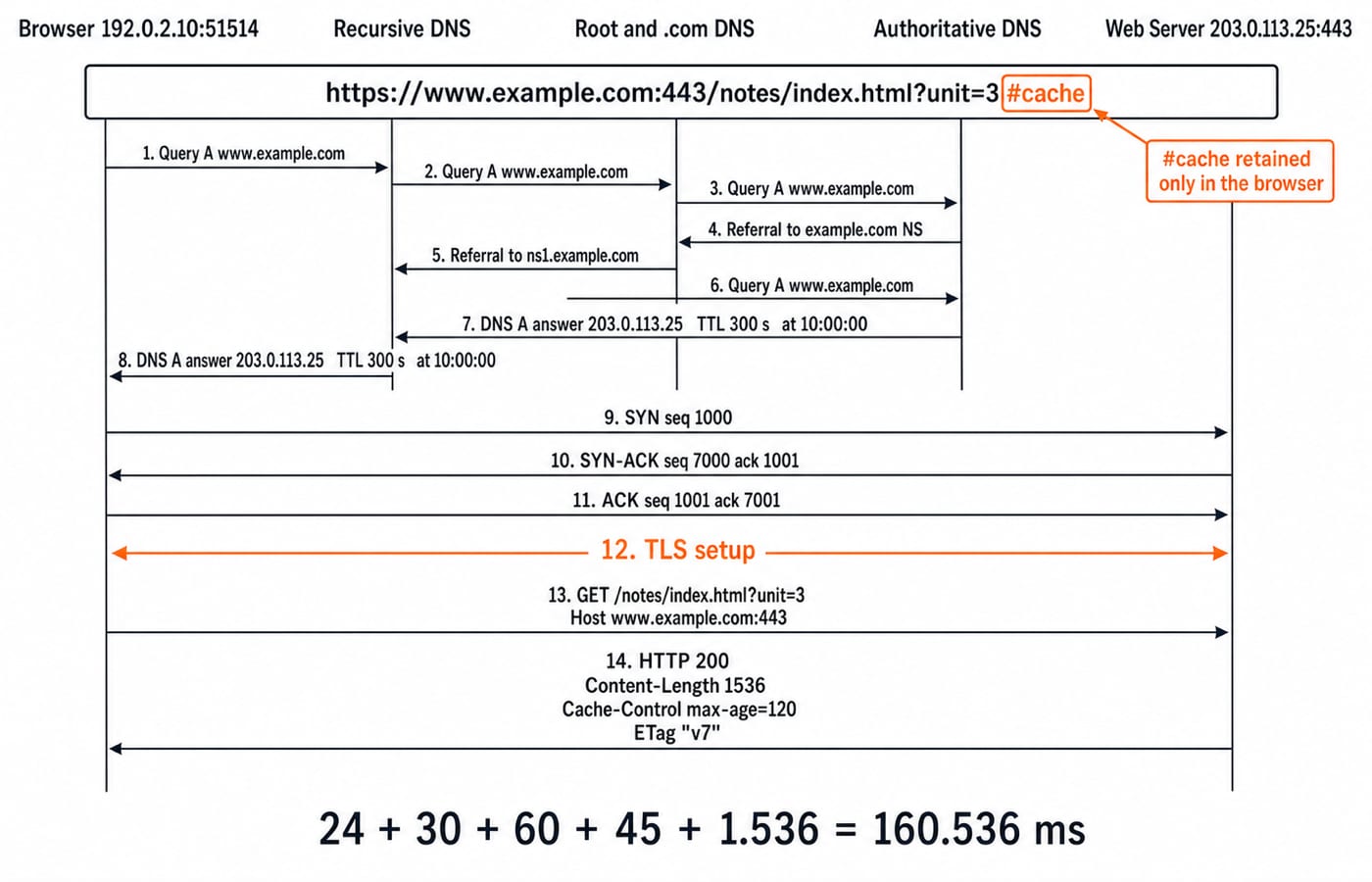
Parse https://www.example.com:443/notes/index.html?unit=3#cache as follows:
Scheme:
httpsHost:
www.example.comExplicit port:
443Path:
/notes/index.htmlQuery:
unit=3Fragment:
cache
The browser handles #cache; it is not sent in the HTTP request target. DNS resolves only the host, not the path, query or fragment.
With cold caches, the browser or operating system asks a stub resolver, which contacts a recursive resolver. When needed, that resolver follows iterative referrals from a root server to a .com TLD server and then the authoritative server. An A record maps to IPv4, AAAA to IPv6, CNAME to an alias, NS to an authoritative server and MX to mail routing.
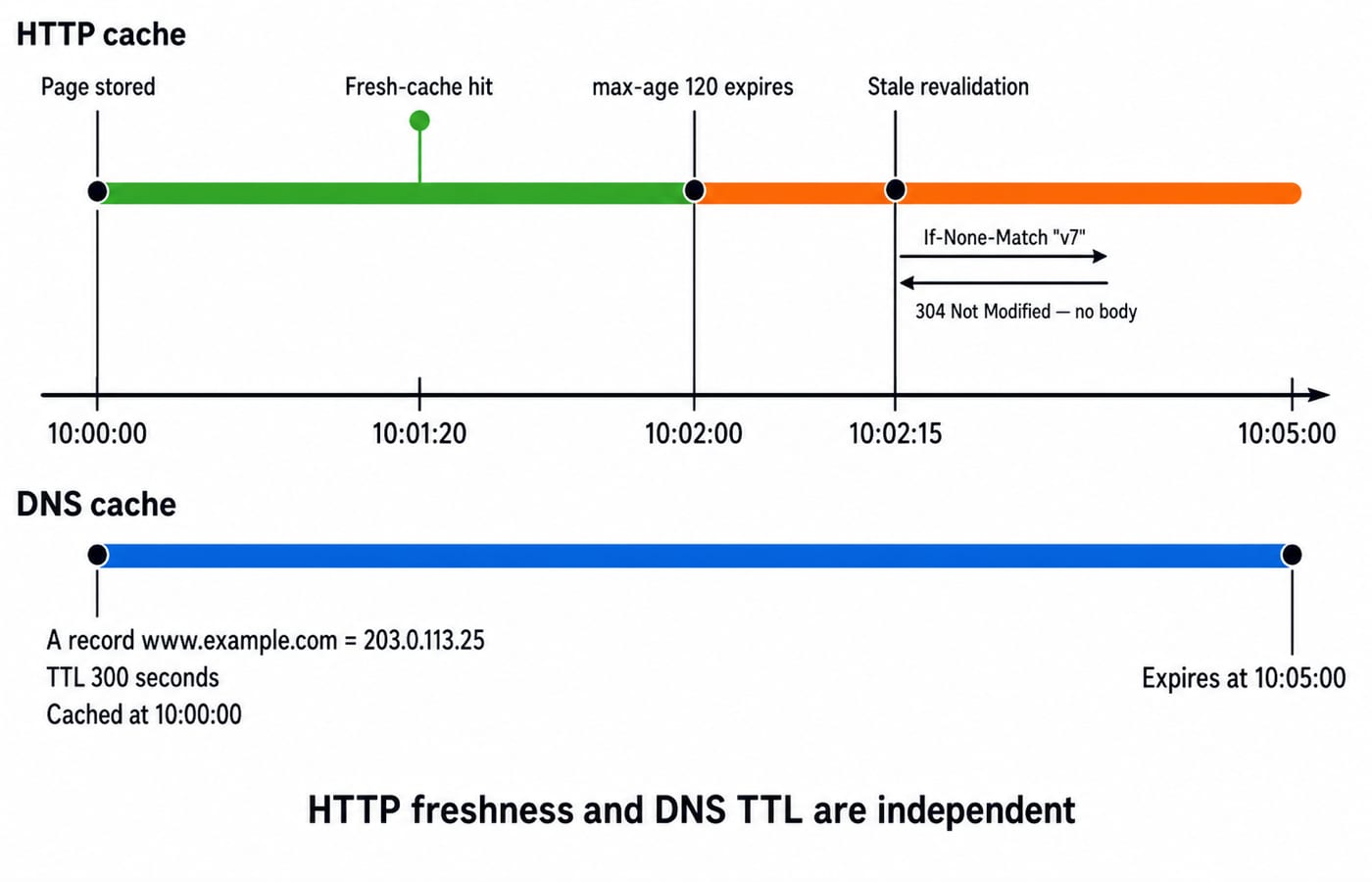
Assume the resolver returns A = 203.0.113.25 at 10:00:00 with TTL = 300 seconds. This documentation address is hypothetical, not live DNS data. The cached entry expires at 10:05:00. For practice that joins these DNS ideas with HTTP, use Application Layer MCQs: 12 Solved DNS, HTTP, Email.
4. HTTP and HTTPS: requests, responses, state and caching
The browser sends this origin-form request, without the fragment:
GET /notes/index.html?unit=3 HTTP/1.1
Host: www.example.com:443
Connection: keep-alive
The start line contains the method, request target and version. Headers carry metadata, and some requests may also have a body. GET and HEAD are safe and idempotent. PUT and DELETE are defined as idempotent, while POST is not generally idempotent.
The server responds:
HTTP/1.1 200 OK
Content-Length: 1536
Cache-Control: max-age=120
ETag: "v7"

[1,536-byte body]
2xx means success, 3xx covers redirection and cache-control outcomes, 4xx indicates a client-side problem, and 5xx indicates a server-side problem. 304 Not Modified is a successful cache revalidation outcome with no representation body, not a broken page.
Keep three ideas separate. HTTP messages are stateless, a TCP connection may still persist, and cookies or server-side sessions can carry continuity across requests. TLS provides confidentiality, integrity and server authentication for the connection. It does not prove that a site's content is truthful.
5. Worked example: calculate the complete HTTPS request trace
This is a hypothetical trace using documentation addresses, not a live request. The browser is 192.0.2.10:51514, DNS supplies server address 203.0.113.25, the destination port is 443, and the protocol is HTTP/1.1 over TLS over TCP. Caches and connections are initially cold.
For the TCP handshake, the client sends SYN seq=1000. The server replies SYN-ACK seq=7000, ack=1001, and the client sends ACK seq=1001, ack=7001. Each SYN consumes one sequence number, which explains both acknowledgement values.
Now add the stated sequential stages:
DNS lookup:
24 msTCP setup:
30 msTLS setup:
60 msHTTP request to first response byte:
45 msBody transmission on an
8,000,000 bit/slink:(1,536 x 8) / 8,000,000 = 0.001536 s = 1.536 ms
Therefore, the simplified total is 24 + 30 + 60 + 45 + 1.536 = 160.536 ms. This model excludes HTTP, TLS, TCP and IP overhead, rendering, extra subresources, queueing and stage overlap.
Assume the response has current age zero when stored at 10:00:00. With max-age=120, it is fresh before 10:02:00 and becomes stale at 10:02:00. A request at 10:01:20 needs no network validation. At 10:02:15, the browser can send If-None-Match: "v7"; if the resource is unchanged, the server returns 304 Not Modified. DNS is independently still cached because its 300-second TTL ends at 10:05:00. Do not assume the earlier TCP connection remains open.
6. Internet fundamentals traps that produce wrong answers
Trap | Why it fails | Correct model |
|---|---|---|
Internet equals Web | The Web is one Internet application | The Web runs over the Internet |
DNS returns a complete URL or page | DNS resolves a host | It returns address-related records |
Send | The fragment stays local | Use |
Port | A port selects a process | Use |
MAC routes end to end | MAC is link-local | IP routes across networks |
Stateless HTTP needs new TCP | Message state differs from connection reuse | TCP may persist |
Every |
|
|
HTTPS protects the connection, not a site's truthfulness. DNS plus payload time undercounts the cold trace because TCP, TLS and first-byte delay are also given. The total is 160.536 ms. HTTP freshness ends at 10:02:00; DNS freshness ends at 10:05:00.
7. How GATE and interviews test Internet fundamentals
Common question forms ask you to map a protocol or identifier to its layer and job, parse a URL, follow DNS referrals and TTL expiry, classify an HTTP method or status, or compute delay from given stages. Computer Networks MCQs provides broader question-format practice.
In interviews, you may explain what happens after a URL is entered, locate possible latency, distinguish cookies from cache, or compare HTTP with HTTPS. Give a causal explanation like the worked trace, not a chain of memorised terms.
Treat the patterns above as durable question forms rather than a forecast for any single paper.
8. Internet fundamentals: the short version and next step
The Web is an application over the Internet.
A URL names a resource, and DNS maps its host to an address.
IP routes packets to that address.
The transport connection reaches a port.
HTTP carries requests and responses.
TLS protects HTTPS data in transit.
Redraw the trace and recompute 160.536 ms, 10:02:00 and 10:05:00 without looking. Then use GATE Guidance by Sanchit Sir as a structured next step for placing Internet fundamentals inside a broader subject-wise preparation plan.
Go deeper with the full courseGATE Guidance by Sanchit Sir
Keep learning

Internet Protocols and Web Services: DNS, HTTP, Email and FTP with Worked Examples
Trace a browser request through DNS, TCP and HTTP, then separate email from FTP.
Updated 11 Nov 20265 min readGATE Strategy & Roadmap
Internet Fundamentals: Architecture, Connections, DNS, URLs and Worked Examples
Build a clean mental model of the Internet and Web, then trace a browser request and calculate transfer time, cache expiry and segment count.
Updated 6 Aug 20266 min readGATE Strategy & Roadmap

Server-Side and Web Security: HTTP Sessions, Attacks, and Defences
Follow one illustrative login request from browser to proxy, application, and database, then map sessions, status codes, and common attacks to the controls that stop them.
Updated 3 Nov 20266 min readGATE Strategy & Roadmap

Web Design and Development Explained: How a Web Page Loads, HTML, CSS, JS and HTTP
Follow one web page from its URL to the server and back. See how HTML, CSS, JavaScript, HTTP and the database work as one connected system.
Updated 31 Oct 20265 min readGATE Strategy & Roadmap