

Server-Side and Web Security: HTTP Sessions, Attacks, and Defences
Follow one illustrative login request from browser to proxy, application, and database, then map sessions, status codes, and common attacks to the controls that stop them.
KnowledgeGate Team
Exam prep & CS education
Updated 3 Nov 20266 min read
HTTP can look like a simple exchange: the browser asks for a page and a server sends it back. The difficult questions go deeper. They ask what executes on the server, where login state lives, and which control stops a particular attack. A clear end-to-end model follows a login request through the stack, preserves the user's session, and places a specific defence at every trust boundary.
What server side means in a web transaction
The client renders HTML and CSS, runs browser-side JavaScript, and collects input. The server validates that input, applies business rules, checks identity and permission, reads or writes data, and constructs the response.
Never trust a request merely because the page performed client-side validation. An attacker can create the request without using your page at all.
The contrast is clear in two GET requests. GET /logo.svg may return a stored file unchanged. GET /users/42/dashboard must authenticate the caller, authorise access to user 42, query the required records, and produce a user-specific response.
Keep six boundaries in mind: browser, network, edge or reverse proxy, application process, session store, and database. Each boundary has a different job and needs its own control.
From HTTP request to application response
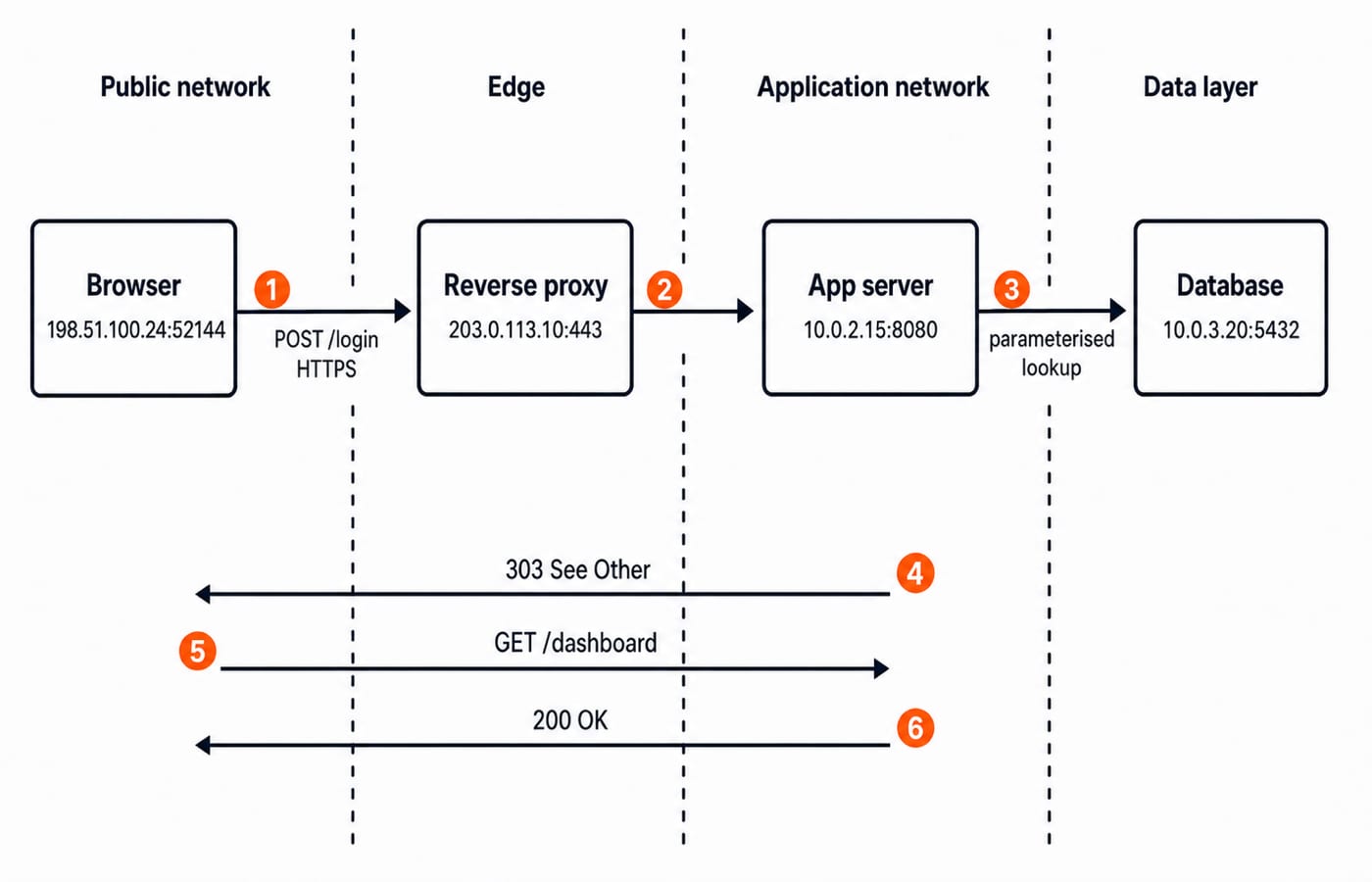
Our illustrative browser is 198.51.100.24:52144. It opens HTTPS to the public reverse proxy at 203.0.113.10:443. The proxy forwards the request to the application at 10.0.2.15:8080, and the application uses the database at 10.0.3.20:5432. The first two networks, 198.51.100.0/24 and 203.0.113.0/24, are documentation ranges. The 10.0.0.0/8 addresses are private illustrative addresses.
The proxy terminates HTTPS and routes traffic. The application runs the server-side logic. The database persists records. Older CGI systems commonly started one process per request, while modern servers normally keep an application process or worker pool running for many requests.
HTTP meaning sits above the transport connection. A TCP question and an HTTP question therefore need different vocabulary, even when they describe the same exchange.
HTTP is stateless, so the server must design state
Each HTTP request should contain enough information for the server to understand it independently. Login continuity is added deliberately. A cookie is data stored by the browser and sent with matching requests. A server-side session is trusted state kept by the application, often in a session store. A cookie is only a transport mechanism, not automatically an authentication system.
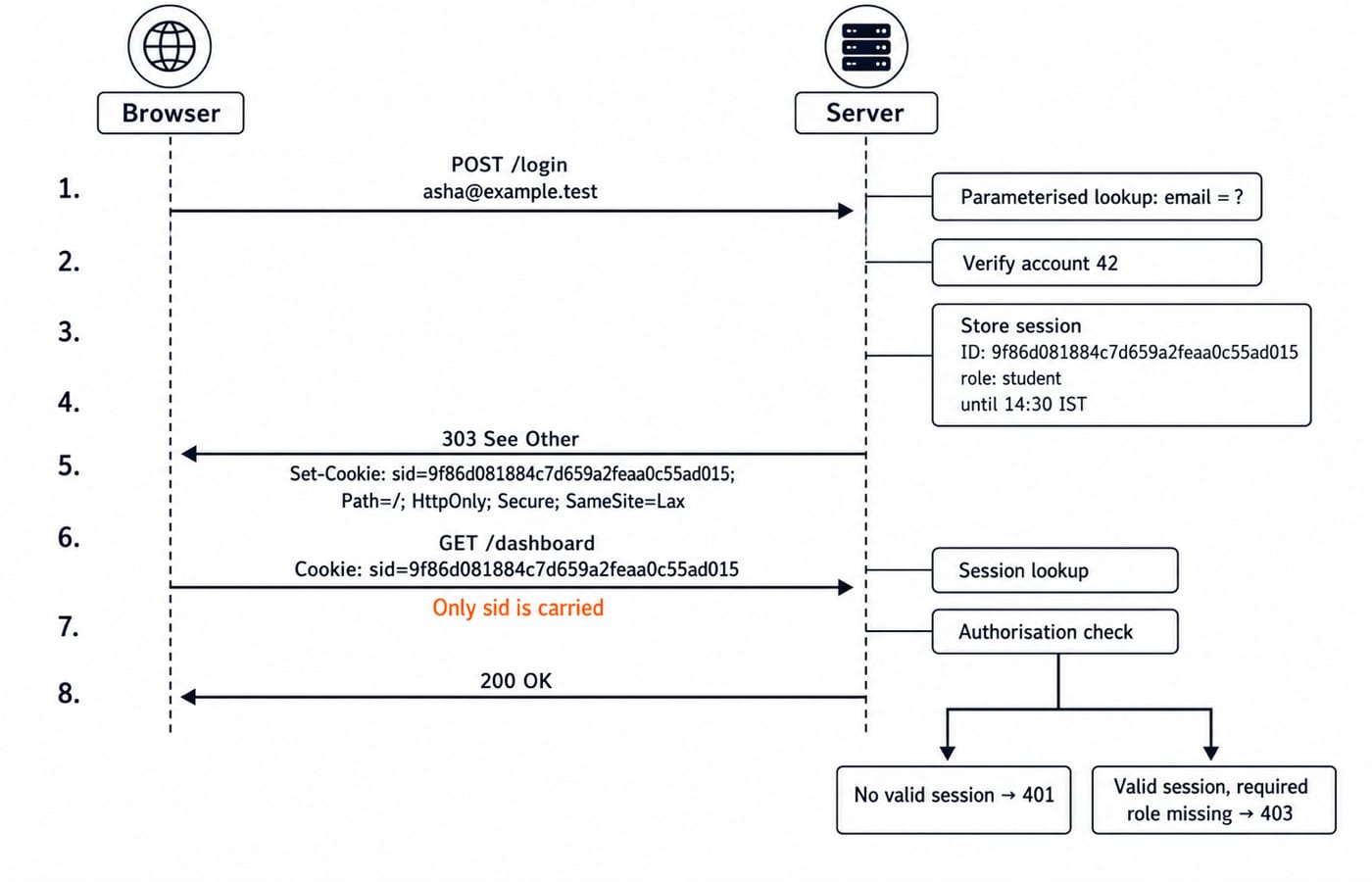
Suppose the session key 9f86d081884c7d659a2feaa0c55ad015 identifies user 42, whose role is student and whose session expires at 14:30 IST. The browser sends only the opaque identifier. The server recovers the user and role from its own store. This fixed key is a teaching value. A real session identifier must come from a cryptographically secure random generator.
Authentication asks, "Which account is this?" Authorisation asks, "May account 42 perform this action?" For the browser-side path through DNS, TCP, TLS, caching, and HTTP status codes, use Internet Fundamentals for GATE. Server-side security begins where that protocol trace ends: the application must turn an untrusted request into trusted session state and an authorised result.
Worked example: a secure login and dashboard request
Assume the illustrative login begins at 14:00 IST. The browser sends:
POST /login HTTP/1.1
Host: learn.example
Content-Type: application/x-www-form-urlencoded

email=asha%40example.test&password=correct-horse-7
The server validates the fields and looks up asha@example.test with a bound database parameter instead of inserting submitted text into the SQL string. The password verifier matches account 42, so the server invalidates any pre-authentication identifier and creates a fresh session identifier.
HTTP/1.1 303 See Other
Location: /dashboard
Set-Cookie: sid=9f86d081884c7d659a2feaa0c55ad015; Path=/; Max-Age=1800; Secure; HttpOnly; SameSite=Lax
Path=/ sends the cookie across the site. Max-Age=1800 means 1,800 / 60 = 30 minutes, so a session created at 14:00 expires at 14:30. Secure restricts transmission to HTTPS, HttpOnly blocks browser JavaScript from reading it, and SameSite=Lax reduces cross-site request risk while allowing ordinary top-level navigation. Status 303 tells the browser to follow the POST with a GET.
The next request is GET /dashboard HTTP/1.1 with Cookie: sid=9f86d081884c7d659a2feaa0c55ad015. The server finds user 42, reads the student role from server-side state, authorises the dashboard, and returns 200 OK. An absent, expired, or unknown session gets 401 Unauthorized.
Security properties and controls behind the example
Three properties organise the controls:
Confidentiality: HTTPS protects data in transit, and access checks keep records from unauthorised users.
Integrity: parameter binding, input validation, authentication, and authorisation prevent unauthorised changes.
Availability: rate limiting and capacity controls help the service remain usable under heavy or hostile traffic.
Password verification needs a slow password-hashing function with a unique salt, not reversible encryption. HTTPS needs encryption in transit. Neither replaces authorisation on the server.
This is defence in depth: TLS operates at :443; validation and parameter binding run in the app at :8080; least-privilege database access limits what the app can do at :5432; secure cookie flags protect the identifier; the session expires after 1,800 seconds; and every sensitive action receives a server-side role check. No single layer carries the whole security burden.
Common web attacks and the exact server-side defence
Match each attack to the control that addresses its mechanism:
Attack | Server-side defence |
|---|---|
SQL injection | Parameterised queries and allow-list validation |
Cross-site scripting | Context-aware output encoding and a restrictive Content Security Policy |
Cross-site request forgery | An anti-CSRF token on state-changing requests and an appropriate |
Session hijacking | HTTPS, |
Broken access control | Authorise the requested object and action on every server request |
Consider the submitted email asha@example.test' OR '1'='1. Concatenating it into SQL changes the meaning of the query. Treating the same text as a bound value makes the entire string data, so it simply finds no matching email. Client-side validation cannot stop a crafted request that bypasses the page.
Two traps appear often. HTTPS does not sanitise input, so an encrypted malicious request is still malicious. Hiding an admin button does not block a direct request to the admin route, so the server must check permission every time. For URL parts, browser and web-service roles, and general HTTP methods, use Internet and Web Technology: How Websites, Browsers, and Web Services Actually Work. Here the narrower task is to match web attack mechanisms with trusted-session and server controls.
How exams and interviews test the topic
Typical questions ask you to arrange the request-flow components, choose the correct status code or cookie attribute, or match an attack to the control that actually blocks it. Do not stop after naming the correct option. Explain why each distractor operates at the wrong layer or solves a different problem.
Try the worked case: the session is valid for user 42, but /admin/reports requires role admin. Should the server return 401 or 403? The answer is 403, because identity is known and permission is insufficient. An unknown sid gets 401 because no valid identity has been established.
For an interview, narrate the login path from 443 to 8080 to 5432. Name each trust boundary, then place validation, authentication, and authorisation at the boundary where they must operate.
The short version and next step
Remember this chain: untrusted request, server-side validation, authentication, authorisation, encoded response. Transport security, secure state, and database safety are separate layers, so one cannot replace another.
While revising, ask which layer owns each decision before choosing the control.
For focused preparation, use the GATE Guidance course and the GATE category. To strengthen the wider subject base, continue with the CS Fundamentals course.
Go deeper with the full courseGATE Guidance by Sanchit Sir
Keep learning

Internet Protocols and Web Services: DNS, HTTP, Email and FTP with Worked Examples
Trace a browser request through DNS, TCP and HTTP, then separate email from FTP.
Updated 11 Nov 20265 min readGATE Strategy & Roadmap

Web Design and Development Explained: How a Web Page Loads, HTML, CSS, JS and HTTP
Follow one web page from its URL to the server and back. See how HTML, CSS, JavaScript, HTTP and the database work as one connected system.
Updated 31 Oct 20265 min readGATE Strategy & Roadmap
Internet Fundamentals for GATE: DNS, HTTP and a Worked Web Request Trace
Connect Internet, Web, DNS, IP, ports and HTTP in one request lifecycle. Trace a cold HTTPS request and calculate latency, cache freshness and DNS expiry.
Updated 29 Oct 20266 min readGATE Strategy & Roadmap

Web technologies for teaching exams: HTML, HTTP and the internet explained
Web technologies for teaching CS exams: HTML basics, the client-server model, HTTP and URLs, DNS, static versus dynamic pages, and web-authoring tools.
Updated 30 Oct 20265 min readTeaching Recruitment (Computer Science)