Internet Fundamentals: Architecture, Connections, DNS, URLs and Worked Examples
Build a clean mental model of the Internet and Web, then trace a browser request and calculate transfer time, cache expiry and segment count.
KnowledgeGate Team
Exam prep & CS education
Updated 6 Aug 20266 min read
Internet, Web, browser, Wi-Fi and bandwidth often get used as if they mean the same thing. That shortcut fails when a question follows one webpage from its URL to an IP address and then to a server response. Three numbers settle most of that confusion: a DNS entry resolved at 14:00:00 expires at 14:05:00, the response it fetches stays fresh until 14:10:02, and a 1,000 KB page needs 1.78 seconds at 5 Mbit/s of measured throughput, not the 0.8 seconds a 10 Mbit/s link advertises. Computer Networks is one of the subjects in GATE CS exam preparation, and separating access, addressing and capacity is its entry cost.
Internet, network and Web are related, not interchangeable
A network is connected devices exchanging data. The Internet joins independently operated networks through shared protocol rules. The Web is one service over it, alongside email, messaging, file transfer, streaming and remote access.
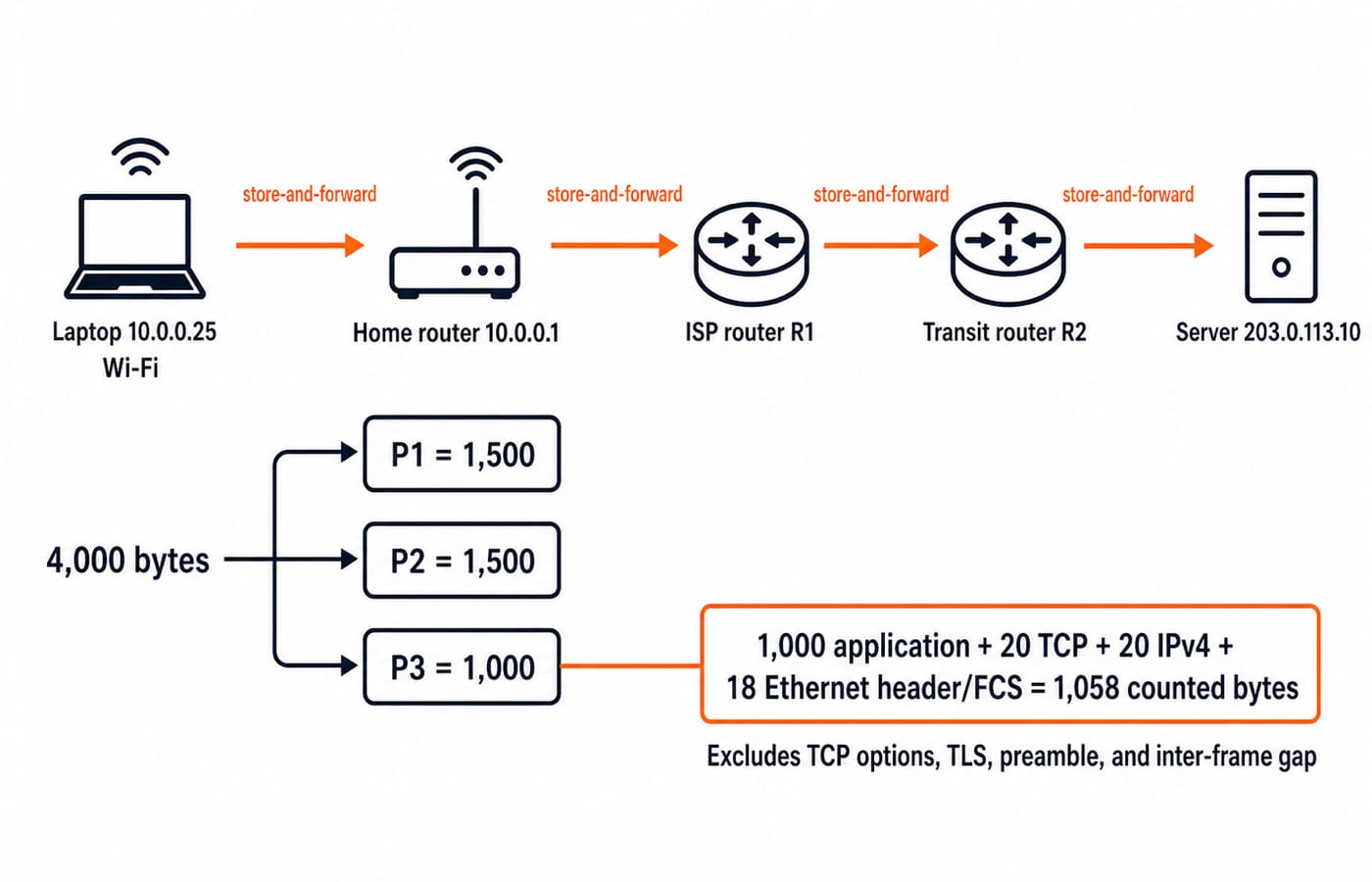
A laptop at 10.0.0.25 runs a browser. Wi-Fi reaches router 10.0.0.1, DNS maps learn.example to 203.0.113.10, and the server returns a resource. Wi-Fi is local access, the browser an application and a search engine a remote service. None is the Internet.
The sequence is isolated networks, packet switching, common internetworking protocols, global name resolution, then linked Web documents and browsers. Internet architecture preceded the Web as its most visible service.
How the Internet moves data from edge through core
Hosts create and consume data at the edge. Access networks reach an ISP, routers forward packets, backbones carry them farther, peering links join independent networks, and data centres host services. There is no central Internet machine.
Packet switching does not reserve a permanent end-to-end circuit. Split a 4,000-byte message into P1 = 1,500, P2 = 1,500 and P3 = 1,000 bytes. Each router stores enough to process and forward a packet. Real sizes and headers vary, so this is not a universal format.
The stack is application, transport, Internet and link. DNS and HTTP are application protocols; TCP or UDP adds ports; IP supplies addressing and routing; Ethernet or Wi-Fi handles one hop. With no options or TLS, 1,000 + 20 TCP + 20 IPv4 + 18 Ethernet header/FCS = 1,058 counted bytes. TCP options, TLS records, preamble and inter-frame gap are excluded.
Addresses, names, ports and URLs identify different things
Identifier | Job | Example |
|---|---|---|
MAC address | Delivery on one local link | Laptop Wi-Fi interface |
IP address | Network-layer delivery to an interface |
|
Port | Destination application endpoint on a host |
|
Domain name | Human-usable name that DNS can resolve |
|
Client 10.0.0.25:51514 connects to server 203.0.113.10:443. The IP reaches an interface; the port selects the application endpoint.
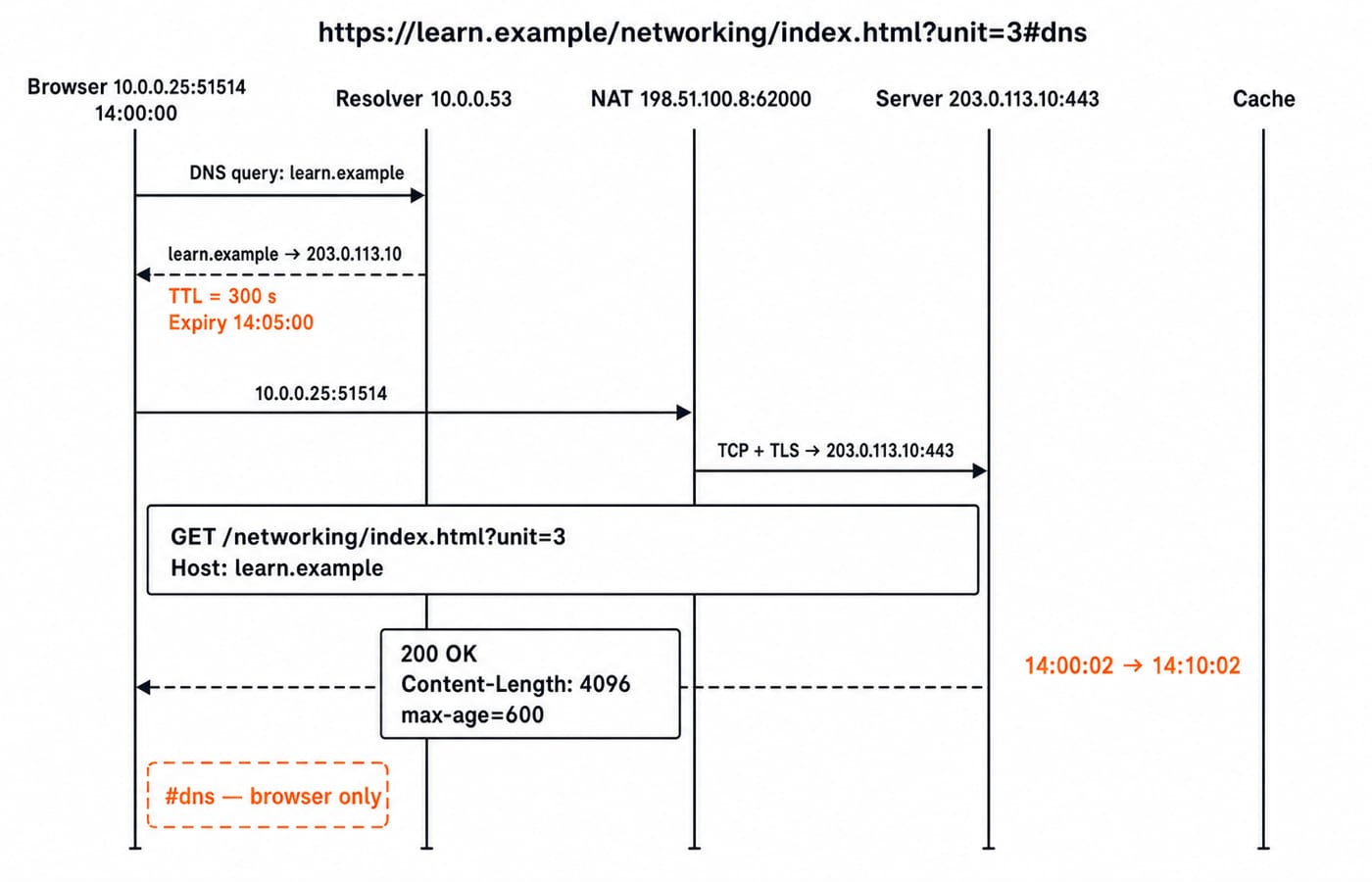
In https://learn.example/networking/index.html?unit=3#dns, https is the scheme, learn.example the host, 443 the default port, /networking/index.html the path, unit=3 the query and dns the fragment. The browser uses the fragment locally, so it is absent from the HTTP request target.
Client-server and peer-to-peer describe organisation, not access. A browser requests and a server responds; a peer can do both. DNS, transport setup and application exchange remain separate.
Internet connection types and network scope choices
Connection | Last-mile medium | Mobility | Shared or dedicated aspects | Typical strength | Typical limitation |
|---|---|---|---|---|---|
Ethernet or fibre | Copper or fibre | Fixed | Service-dependent | Stability | Cabling |
Cable | Coaxial | Fixed | Often shared | Availability | Contention |
DSL | Telephone copper | Fixed | Line plus shared core | Existing wiring | Distance-sensitive |
Mobile data | Radio | Mobile | Shared capacity | Mobility | Variable coverage |
Fixed wireless | Radio | Fixed | Shared spectrum | Fast deployment | Obstructions |
Public Wi-Fi | Radio | Local | Shared access point | Convenience | Congestion and trust |
Satellite | Satellite radio | Fixed or portable | Shared capacity | Remote reach | Potentially higher delay |
Speed, latency, coverage and limits vary. Bandwidth is maximum capacity under a stated model; throughput is achieved rate. Latency is delay, jitter its variation, packet loss is missing delivery, and availability means usable when required. Jitter and loss can disrupt a video call despite ample throughput.
Scope differs from connection type. The public Internet is broadly reachable. An intranet restricts organisational access; an extranet admits selected outsiders. All may use Ethernet, Wi-Fi and TCP/IP.
Worked example: from a URL to a cached HTTP response
At 14:00:00, resolver 10.0.0.53 maps learn.example to 203.0.113.10 with TTL 300 seconds. The browser opens 10.0.0.25:51514 toward 203.0.113.10:443; the gateway maps it to 198.51.100.8:62000.
After TCP and TLS setup, the request is GET /networking/index.html?unit=3 HTTP/1.1 with Host: learn.example, excluding #dns. The response has HTTP/1.1 200 OK, Content-Length: 4096 and Cache-Control: max-age=600. Here 4096 counts body bytes only.
The DNS entry lasts from 14:00:00 to 14:05:00 because 300 seconds = 5 minutes. A response stored at 14:00:02 stays fresh until 14:10:02 because 600 seconds = 10 minutes. DNS caching and HTTP caching are independent. Practise their boundaries with Application Layer MCQs: 12 Solved DNS, HTTP, Email.
Worked example: bandwidth, throughput, packet count and load time
Use a serial classroom model with no cache, compression or concurrent transfers. HTML is 50 KB, CSS 30 KB, JavaScript 120 KB and one image 800 KB, using decimal units.
Total:
50 + 30 + 120 + 800 = 1,000 KB.Convert:
1,000 KB = 1,000,000 bytes = 8,000,000 bits.At
10 Mbit/s, the capacity-only lower bound is8,000,000 / 10,000,000 = 0.8 seconds.At measured throughput of
5 Mbit/s, transfer time is8,000,000 / 5,000,000 = 1.6 seconds.DNS, setup and processing add
40 + 80 + 60 = 180 ms = 0.18 secondswithout overlap.Simplified total:
1.6 + 0.18 = 1.78 seconds.
For the earlier 4096-byte body and a TCP maximum segment payload of 1460 bytes, ceil(4096 / 1460) = 3 payload segments. They carry 1460, 1460 and 1176 bytes, and 1460 + 1460 + 1176 = 4096. HTTP headers, TLS records, acknowledgements, retransmissions and concurrency are excluded, so neither result is universal.
How exams and interviews test Internet fundamentals
Exam questions may distinguish Internet from Web, order DNS and HTTP, identify URL parts, match layers, compare access, classify scope or calculate transfer time. Interviews cover the same ground out loud: walk from https://learn.example/networking/index.html?unit=3#dns to a rendered page naming every step, then say why #dns never reaches the server and why 203.0.113.10 on its own cannot deliver to a process.
Rapid checks:
Destination endpoint:
203.0.113.10:443.Omitted from the request target:
#dns.DNS expiry:
14:05:00.HTTP freshness expiry:
14:10:02.Transfer time for
8,000,000bits at5 Mbit/s:1.6 seconds.Segments for
4096bytes at1460bytes each:3.
Correct these shortcuts: Internet equals Web -> Web is one Internet service; Wi-Fi equals Internet -> Wi-Fi is local access; DNS downloads a page -> DNS resolves a name; bandwidth equals throughput -> throughput is achieved delivery; 10 Mbit/s equals 10 MB/s -> it is 1.25 MB/s before overhead; an IP identifies an application -> a port is needed; an intranet needs different protocols -> it can use TCP/IP with restricted access. Use the live Computer Networks MCQs for mixed practice.
Internet fundamentals in one minute
The Internet joins networks; the Web runs over it.
Hosts sit at the edge; routers form forwarding paths.
Packets carry layered protocol data.
Names, IP addresses, ports and URLs identify different things.
Access quality depends on more than bandwidth.
DNS resolves names; transport security protects exchange; HTTP carries Web messages.
Connection type and network scope answer different questions.
The KnowledgeGate question bank carries more than 40 Internet Fundamentals questions, split across Internet Basics & History, Internet Connections and Internet Types. Redraw the request through the 14:10:02 cache expiry, then recompute the 1.78-second load without looking. For structured study, use GATE Guidance by Sanchit Sir. Then use the GATE Test Series for timed practice.
Keep learning
ISRO Scientist/Engineer CS Syllabus vs GATE CS: The Subject Overlap Map
See which core CS subjects transfer directly from GATE to ISRO, what drops out, how the question texture changes and where an ISRO-specific polish helps.
Updated 5 Oct 20264 min readGATE Strategy & Roadmap
Union-Find for GATE: Union by Rank, Path Compression and the Near-Constant Bound
Trace seven unions, inspect the final ranks, then compress the deepest path by hand. The worked forest makes the inverse-Ackermann bound much less mysterious.
Updated 1 Oct 20265 min readGATE Strategy & Roadmap
RAID Levels for GATE: Striping, Mirroring, Parity and the Two Capacity Formulas
Stop memorising RAID names in isolation. Tie each level to usable capacity, failure tolerance and write cost, then test the formulas on one eight-disk array.
Updated 26 Sep 20265 min read58 viewsGATE Strategy & Roadmap
Memory Interfacing for GATE: Chip-Count and Address-Decoding Numericals, Fully Worked
Separate words from bits, split the address correctly, and verify the result with a gap-free hexadecimal map. This guide works through depth and width expansion step by step.
Updated 24 Sep 20265 min read55 viewsGATE Strategy & Roadmap