

Web Design and Development Explained: How a Web Page Loads, HTML, CSS, JS and HTTP
Follow one web page from its URL to the server and back. See how HTML, CSS, JavaScript, HTTP and the database work as one connected system.
KnowledgeGate Team
Exam prep & CS education
Updated 31 Oct 20265 min read

DNS, TCP, TLS, latency and cache lifetime are the network side of a page load. Internet Fundamentals: Architecture, Connections, DNS, URLs and Worked Examples maps Internet architecture, connection types, packets and transfer time; Internet Fundamentals for GATE: DNS, HTTP and a Worked Web Request Trace carries the detailed DNS-to-HTTP trace, latency calculation and cache timing. After the first HTML response, web design and development take over: HTML builds structure, CSS computes layout, JavaScript changes the DOM, and HTTP fetches each supporting resource.
Web page loading: HTTP delivery becomes a rendered page
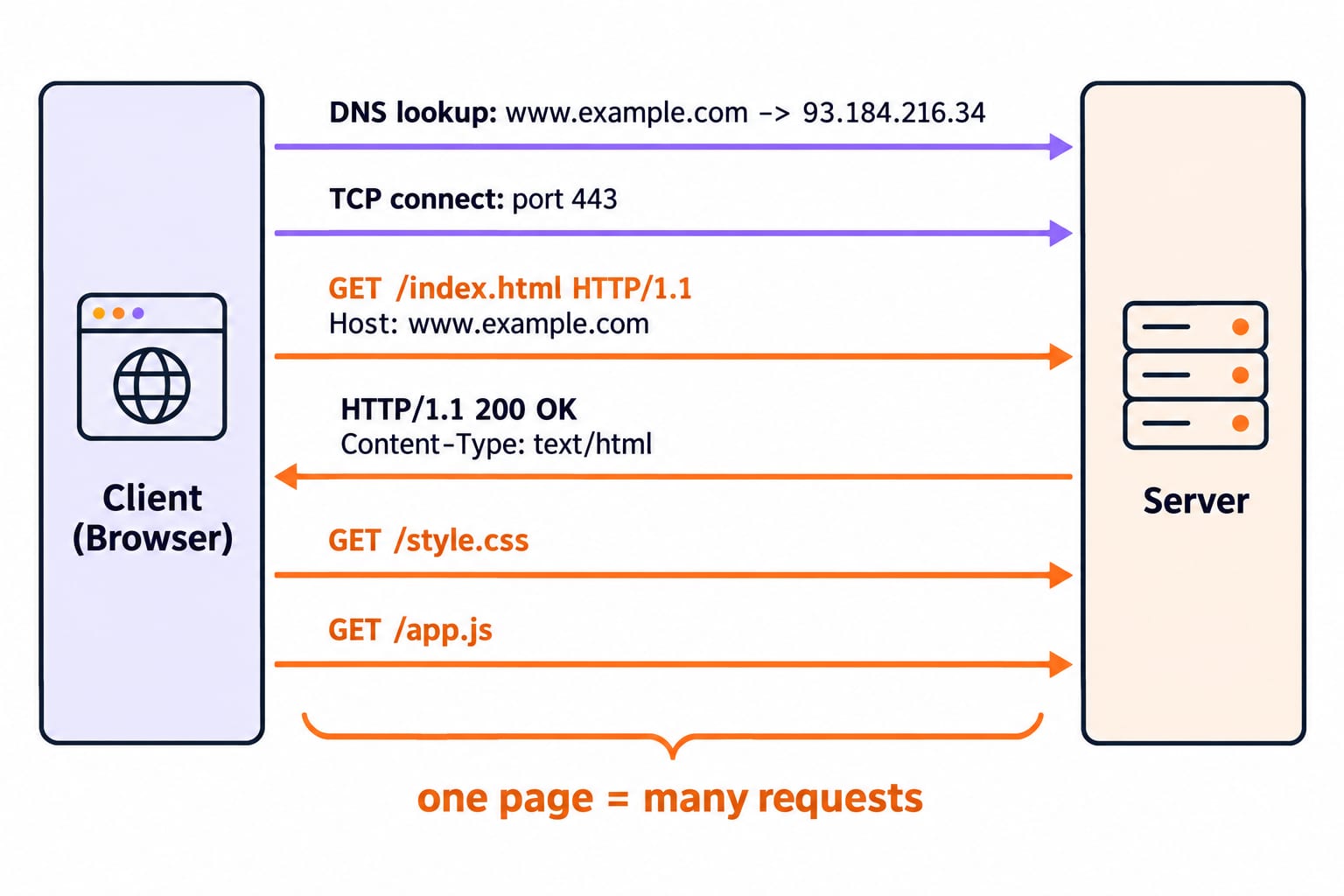
The client is the browser requesting resources. The server stores or produces them. Trace https://www.example.com/index.html from request to interaction:
The browser resolves
www.example.comand opens a secure connection to port443.It sends
GET /index.html HTTP/1.1; the server returns200 OKwith an HTML body.The HTML parser builds the DOM and discovers references to
style.cssandapp.js.The browser sends separate GET requests for those files. CSS is parsed into style rules, combined with the DOM, laid out and painted.
JavaScript runs, attaches the click handler used later in the example, and can change the DOM without reloading the page.
One visible page therefore creates many requests. Images, fonts and background data explain the many rows in a browser's Network panel.
URL structure: every part of a web address has a job
A URL, or Uniform Resource Locator, tells the browser where to direct a request. Break down https://www.example.com:443/products?id=42#reviews:
httpsis the scheme, secure HTTP.www.example.comis the host that DNS resolves.443is the port. It is normally hidden because it is the HTTPS default; HTTP normally uses port80./productsis the path to the resource.?id=42is a query string containing the keyidand value42.#reviewsis a fragment that points to a place within the loaded page.
The fragment is handled by the browser and is not sent in the HTTP request. That last detail is a common conceptual trap.
HTML: the structure and meaning of a web page
HTML, HyperText Markup Language, describes content and structure rather than appearance. Most elements use an opening tag, content and a closing tag.
<!DOCTYPE html>
<html>
  <head>
    <title>My Page</title>
    <link rel="stylesheet" href="/style.css">
    <script src="/app.js" defer></script>
  </head>
  <body>
    <main class="card">
      <h1>Hello</h1>
      <p class="intro">Welcome to web tech.</p>
      <button id="btn">Click me</button>
      <p id="out"></p>
    </main>
  </body>
</html>
<!DOCTYPE html> selects modern HTML. The <link> element requests the stylesheet, while <script defer> requests JavaScript without blocking HTML parsing. The <body> contains visible content; class="card" and id="btn" give CSS and JavaScript stable targets.
Semantic elements such as <header>, <nav>, <main> and <footer> describe purpose. That meaning helps accessibility tools and search engines understand the page. A <div> is useful as a generic container, but carries no meaning by itself.
CSS box model: calculating the real width
CSS, Cascading Style Sheets, controls colour, type, spacing and layout. A rule has the form selector { property: value; }. The selector .card targets the HTML element in the running example. When rules conflict, source order and selector specificity help determine the winner.
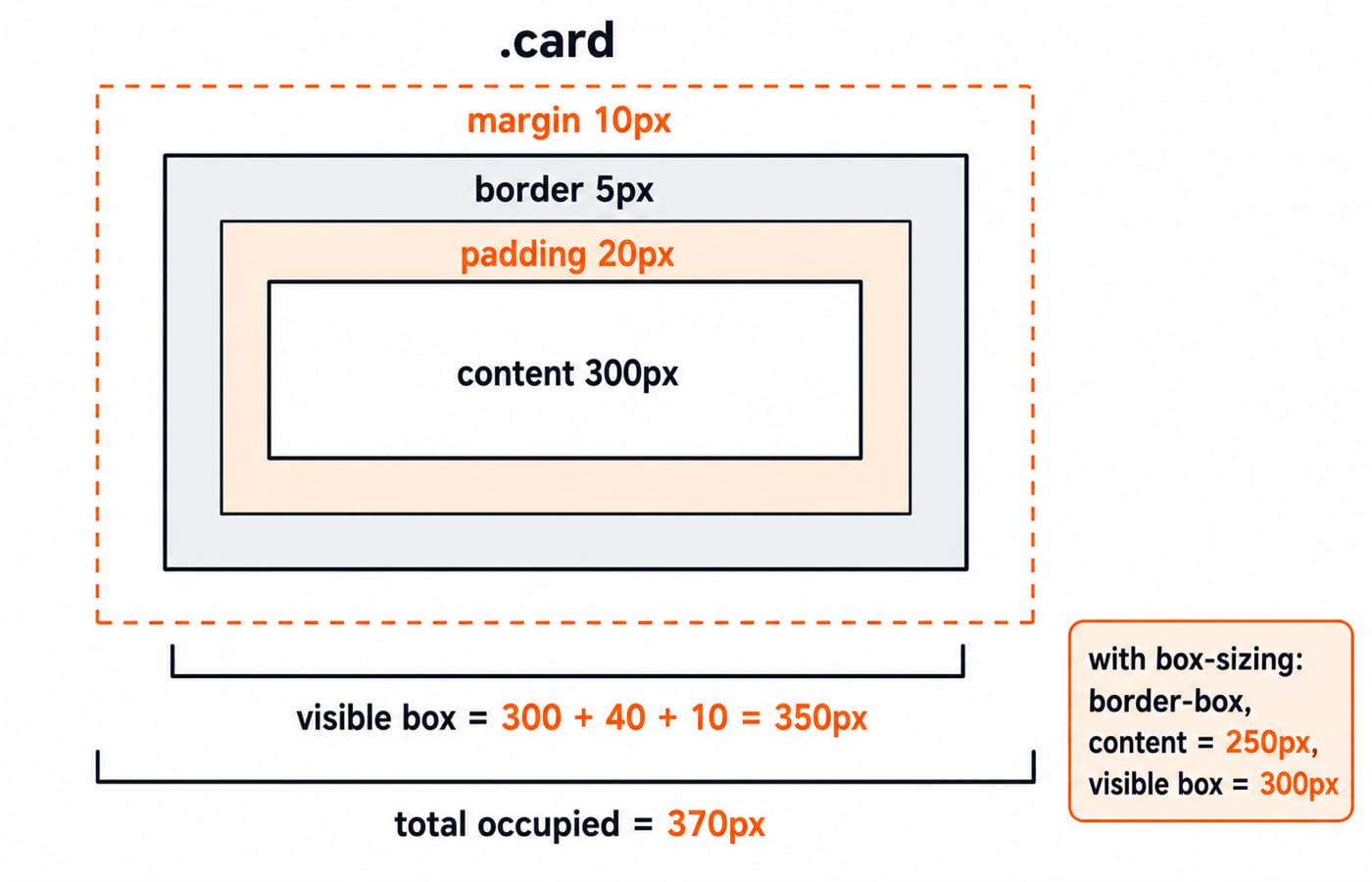
Every rendered element is a rectangular box. From inside to outside, its layers are content, padding, border and margin. Consider:
.card {
  width: 300px;
  padding: 20px;
  border: 5px solid;
  margin: 10px;
}
With the default content-box sizing, calculate horizontally:
Content width is
300px.Padding contributes
20 + 20 = 40px.Border contributes
5 + 5 = 10px.Visible width is
300 + 40 + 10 = 350px.Margin contributes
10 + 10 = 20pxoutside the visible box.Total occupied horizontal space is
350 + 20 = 370px.
With box-sizing: border-box, the declared 300px includes padding and border. Content becomes 300 - 40 - 10 = 250px, the visible box remains 300px, and margins bring occupied width to 320px.
JavaScript and the DOM: making the page react
HTML and CSS can present a complete page, but JavaScript adds behaviour. The browser represents parsed HTML as the DOM, the Document Object Model, which is a live tree that scripts can read and change.
document.getElementById("btn").addEventListener("click", function () {
  document.getElementById("out").textContent = "You clicked!";
});
The script finds the button already created by the HTML parser and attaches a click listener. Before the click, the output paragraph is empty; after the click, its exact text is You clicked!. That DOM update needs no page reload and no new HTTP request. JavaScript can also use fetch to request data in the background and update selected nodes.
The clean distinction is: HTML provides structure, CSS provides presentation, and JavaScript provides behaviour.
Front end, back end and full stack: the three tiers
The front end runs in the browser and includes HTML, CSS and JavaScript. The back end runs on the server, applies application rules and communicates with a database. These form three tiers: presentation, application or logic, and data.
For a login, the browser might send POST /login with credentials in the request content. Server code checks the submitted identity against the database and returns a response, perhaps 200 OK with a session or 401 Unauthorized when valid authentication credentials are absent. HTTPS protects the credentials in transit; POST alone is not encryption.
MERN is one concrete full-stack combination: MongoDB for data, Express for back-end routing, React for the front end and Node.js as the server-side JavaScript runtime. Node.js lets JavaScript run on both sides of the connection, while the database persists the application state.
HTTP connects the front end to the back end
HTTP defines the exchange at the browser-server boundary. The first GET returns HTML; later GET requests return CSS and JavaScript. A JavaScript fetch call can request JSON from an API, while POST submits data for processing. HTTPS protects those messages in transit; using POST without HTTPS does not encrypt them.
A response status tells the front end what happened: 200 OK means the request succeeded, 401 Unauthorized means valid authentication credentials are absent, 404 Not Found means the resource was not found or disclosed, and 500 Internal Server Error signals an unexpected server condition. These meanings come from the IETF HTTP Semantics specification, RFC 9110.
The short version: learn the pipeline, then build it
The complete flow is URL to DNS, HTTP request to server, database work, HTTP response, HTML parsing, CSS layout, JavaScript execution and finally an interactive page. Each technology has a separate job, but none makes much sense when studied alone.
If you are starting at the structure layer, use the Complete HTML course before adding CSS and JavaScript. Browse the broader path under Coding and Skills courses, then use the MERN Stack course when you want to build the whole stack rather than only name its parts.
Go deeper with the full courseGATE Guidance by Sanchit Sir
Keep learning
Web Design Basics: HTML, CSS, a Worked Responsive Page and Exam Traps
Build a three-card revision page, resolve its CSS cascade and calculate every card width at three viewports. Then use five compact traps to test the same ideas.
Updated 19 Nov 20266 min readGATE Strategy & Roadmap
Web Technologies Explained: HTML, CSS, JavaScript and HTTP with Worked Examples
Connect HTML, CSS, JavaScript, DNS and HTTP by following one result page from its URL to its final DOM state after two button clicks.
Updated 20 Nov 20266 min readWeb Development

Web technologies for teaching exams: HTML, HTTP and the internet explained
Web technologies for teaching CS exams: HTML basics, the client-server model, HTTP and URLs, DNS, static versus dynamic pages, and web-authoring tools.
Updated 30 Oct 20265 min readTeaching Recruitment (Computer Science)

Internet Protocols and Web Services: DNS, HTTP, Email and FTP with Worked Examples
Trace a browser request through DNS, TCP and HTTP, then separate email from FTP.
Updated 11 Nov 20265 min readGATE Strategy & Roadmap