Web technologies for teaching exams: HTML, HTTP and the internet explained
Web technologies for teaching CS exams: HTML basics, the client-server model, HTTP and URLs, DNS, static versus dynamic pages, and web-authoring tools.
KnowledgeGate Team
Exam prep & CS education
Updated 18 Jul 20265 min read
Web technology is a small but reliable section of Computer Science teaching papers. DSSSB, KVS, NVS, and state TGT and PGT exams expect a teacher to understand how the web works well enough to explain it to a class, so the questions stay at a foundational level: what HTML is, how a browser and server talk, what a URL contains. Our question bank carries over 200 questions on the internet and web technology, and they cluster around exactly these basics.
The web is two machines and one conversation: your browser asks for a page, a web server sends it back, and the page itself is HTML. Everything in this section is a name for some part of that conversation, or for the tools that produce the page. Numerical protocol work sits a level deeper, in networking papers rather than teaching ones.
The client-server model
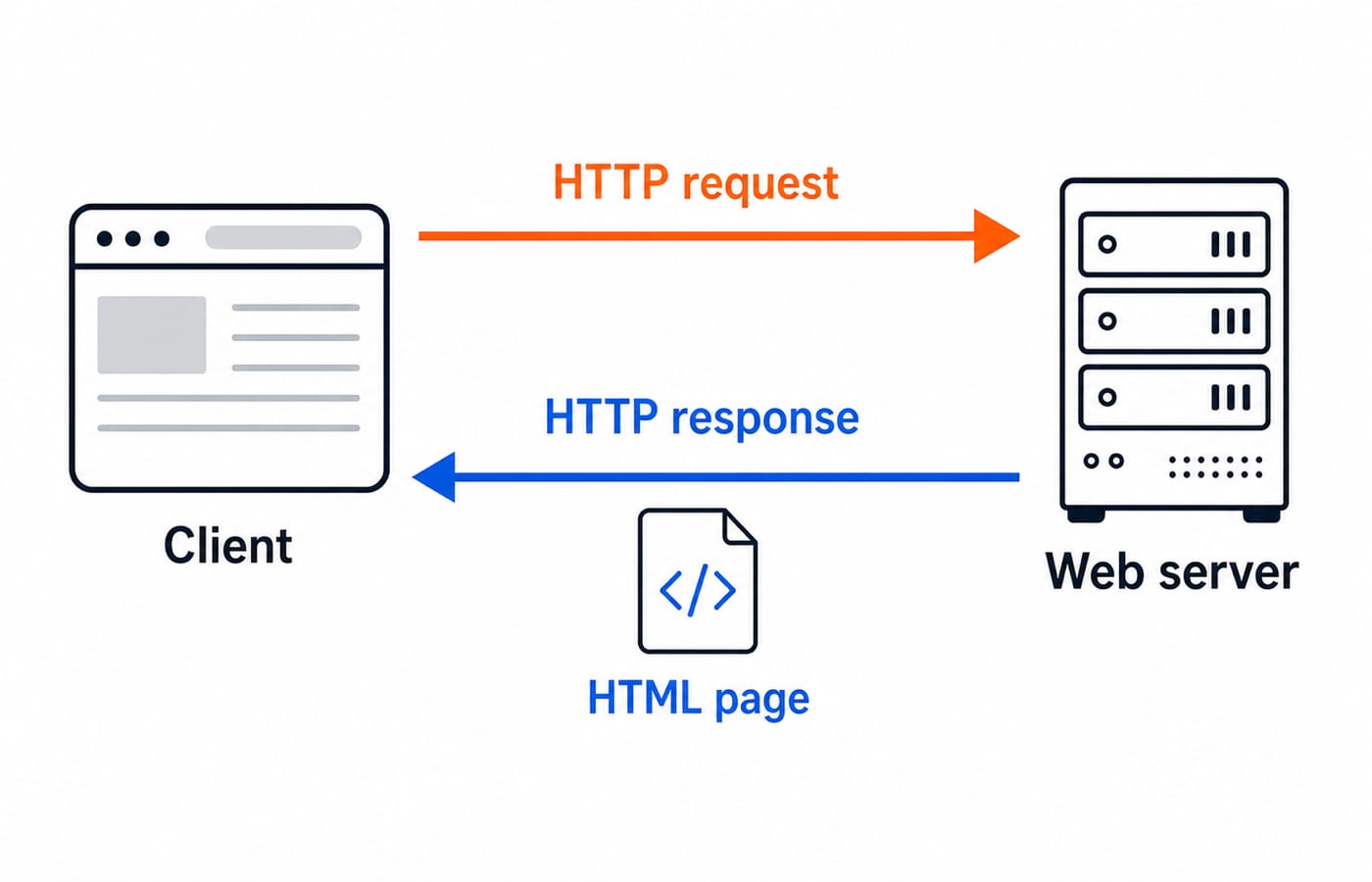
The web runs on a client-server model. Your browser (Chrome, Firefox) is the client; it requests pages. A web server is an always-on machine that stores those pages and responds to requests. You type an address, the browser sends a request, the server sends back the page, and the browser displays it.
That request-response cycle is the mental model everything else hangs on. The client asks, the server answers, and the network in between carries both. A teaching paper tests that you can state this cleanly, not that you can time it.
URLs, HTTP and DNS
A URL (Uniform Resource Locator) is the address of a web resource. Break https://www.example.com/index.html into its parts:
https is the protocol (HTTP secured with encryption).
www.example.com is the domain name of the server.
/index.html is the path to the specific page on that server.
HTTP (HyperText Transfer Protocol) is the set of rules the browser and server use to exchange pages; HTTPS is HTTP with encryption for safety. DNS (Domain Name System) is the internet's directory: it translates a name like www.example.com into the numeric IP address the network actually routes to, because computers locate each other by IP, not by name.
At teaching level you need the roles: HTTP carries the page, DNS turns a name into an address, and HTTPS adds security. The step-by-step resolution walk, HTTP methods, and status-code tables are networking-paper material; if you sit GATE as well, take those from the application layer protocols: DNS, HTTP and email deep-dive.
HTML: the structure of a page
HTML (HyperText Markup Language) is the language that structures a web page. It is not a programming language; it is a markup language, describing content with tags. Tags usually come in pairs, an opening <p> and a closing </p>, wrapping the content they format.
A minimal page has a fixed skeleton:
<html>
  <head>
    <title>My Class Page</title>
  </head>
  <body>
    <h1>Welcome</h1>
    <p>This is a paragraph of text.</p>
    <a href="notes.html">Class notes</a>
  </body>
</html>
Read it structurally:
<html>wraps the whole document.<head>holds information about the page, here the<title>shown on the browser tab.<body>holds the visible content:<h1>is a heading,<p>a paragraph, and<a href="...">a hyperlink to another page.
The common tags a paper expects you to know: headings <h1> to <h6>, paragraph <p>, line break <br>, bold <b>, italic <i>, image <img>, hyperlink <a>, and list tags <ul>, <ol>, <li>. The single most tested fact is that HTML is markup, not programming, and that most tags come in open-close pairs.
Static versus dynamic pages
A key distinction teaching papers draw:
A static page shows the same fixed content to every visitor. It is plain HTML, served exactly as stored, and changes only when someone edits the file.
A dynamic page is generated on request and can differ by user, time, or input, for example a page that greets you by name or shows today's date. It uses server-side processing or scripting to build the content.
The exam framing: static is fixed and pre-written; dynamic is generated and can change per request. You may also meet client-side scripting (JavaScript, running in the browser) versus server-side scripting (running on the server before the page is sent), and the idea that CSS (Cascading Style Sheets) handles the look of a page while HTML handles its structure.
Web-authoring tools
A teaching syllabus expects awareness of how pages are made:
Text editors like Notepad, where you write raw HTML by hand.
WYSIWYG editors ("what you see is what you get"), which let you design a page visually while the tool generates the HTML underneath.
A web browser as the tool that renders and tests the page.
The one term worth fixing is WYSIWYG: you edit the visual result directly and the HTML is produced for you, the opposite of hand-coding in a plain text editor.
How web technologies are tested in teaching CS exams
Teaching papers keep this section at recall and simple application:
HTML tags and structure. Identify what a tag does, complete a skeleton, know that HTML is markup and tags pair up.
Definitions. What HTTP, HTTPS, URL, and DNS each mean; what CSS is for.
Distinctions. Static versus dynamic pages, client-side versus server-side scripting, WYSIWYG versus a plain text editor.
Every official specific (the number of web-technology questions, the marks, and the exact sectional split) lives in the recruiting body's notification and varies by cycle, so confirm it there; DSSSB, KVS, NVS and the state TGT and PGT papers that carry this section are listed in the government teaching jobs category. The concepts do not move between cycles, and they are exactly what our internet and web technology questions test.
The short version
Web technology for teaching exams is foundational: fix the client-server request-response cycle, break a URL into protocol, domain, and path, know that HTTP carries pages while DNS resolves names, and read a minimal HTML skeleton confident that HTML is markup with paired tags. Keep the static-versus-dynamic and structure-versus-style (HTML versus CSS) pairs straight.
If you want this section sequenced with the rest of the syllabus, the Teaching Recruitment Exams bundle covers it with the CS core, and the DSSSB TGT Computer Science bundle targets the Delhi papers. Learn the HTML skeleton and the request-response cycle cold, and web technology becomes easy, dependable marks.
Keep learning

Excel Functions and Charts Explained: Formulas, a Worked Sheet and Exam Traps
Learn how Excel formulas, references and charts work by building one mock-test worksheet from scratch. Every output is calculated and every common trap has a fix.
Updated 19 Oct 20265 min readTeaching Recruitment (Computer Science)
Digital Society Explained: Core Concepts, a Worked Inclusion Audit and Exam Patterns
Learn to separate access, skills and outcomes, audit digital inclusion with a worked funnel, apply data minimisation and solve common exam cases.
Updated 15 Oct 20266 min readTeaching Recruitment (Computer Science)
Common Editing Ctrl Keys Explained: Copy, Cut, Paste, Undo and Redo with Worked Examples
Learn what each common Ctrl key does, then trace the document, clipboard, cursor and edit history through precise examples without confusing Copy, Cut or Undo.
Updated 11 Oct 20266 min readTeaching Recruitment (Computer Science)
Browsers and Search Engines MCQs: 9 Solved Questions with Explanations
Solve nine published browser and search engine questions, check each answer, and rebuild the browser, cache, crawler and indexing distinctions that exam distractors blur.
Updated 6 Oct 20267 min readTeaching Recruitment (Computer Science)