

Web Publishing and Hosting Explained: DNS, URLs, and HTTP with Worked Examples
Trace one browser request from domain lookup to rendered page, then learn the hosting models, protocol details, and exam traps that make the process click.
KnowledgeGate Team
Exam prep & CS education
Updated 2 Nov 20266 min read

A release succeeds when an origin serves the right artifact, DNS points the name to it, TLS accepts that name, and HTTP returns the version. Diagnose failures by layer; domain, hosting, server and page are not interchangeable.
Web publishing and hosting: the release path and ownership map
Web publishing moves a tested release into a location that a web server can expose. Hosting supplies the compute, storage and network path that keep that release reachable. A domain is the human-readable name, DNS maps that name to an address, and the origin server answers HTTP requests for the named site.
Object | Job | Typical failure |
|---|---|---|
Release artifact | HTML, CSS, scripts, images or server code | A missing or stale file |
Hosting origin | Stores files or runs the application | Timeout, crash or wrong server root |
DNS record | Maps the host name to an address | Old cached address or wrong record |
TLS certificate | Authenticates the host for HTTPS | Name mismatch or expired certificate |
HTTP configuration | Selects the site and response rules | Wrong virtual host, redirect or cache policy |
The broader Internet Fundamentals: Architecture, Connections, DNS, URLs and Worked Examples owns architecture, connection types, packetisation and throughput. Publishing starts at the origin: prepare a release, expose it safely, connect the name, and keep versions compatible during changeover.
Worked publishing example: put a static release on an origin
Assume notes.example is a reserved example name and 203.0.113.42 is a documentation address. Release v3 contains index.html, app.css and logo.svg. These files are tested together as one immutable release, but the browser requests each resource separately.
Build and checksum the release, then keep its directory immutable.
Upload
v3beside the livev2directory. Keeping both makes rollback possible without reconstructing files.Configure the HTTPS virtual host for
notes.exampleto servev3, and test it before changing public DNS.Switch the A record only after the origin returns the expected status, content type and release identifier. Keep the old origin healthy through the cache window.
A pre-DNS probe can force the host name to the new address while preserving the HTTPS name:
curl --resolve notes.example:443:203.0.113.42 \
  https://notes.example/ -I
The expected response is 200 OK with Content-Type: text/html and a marker for v3. DNS cannot repair a wrong document root, failed certificate or broken release, so those checks happen first.
DNS and URL roles after deployment
An A record can map notes.example to 203.0.113.42; an AAAA record carries an IPv6 address, and a CNAME makes one name an alias of another. DNS resolves the host only. It does not know which file path, query parameter or fragment the browser will use. A recursive resolver may answer from cache until the record's TTL expires.
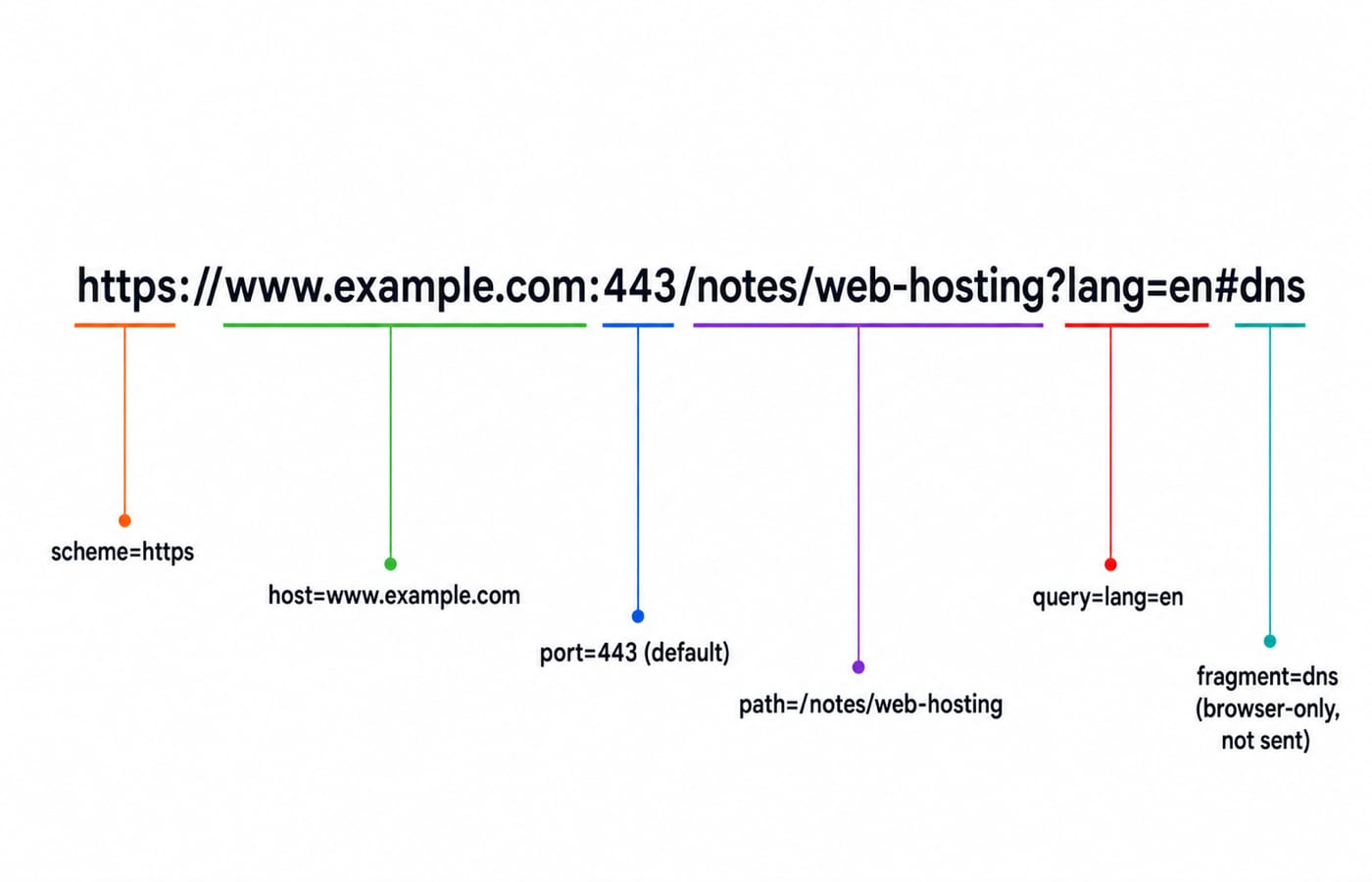
Parse https://www.example.com:443/notes/web-hosting?lang=en#dns into scheme https, host www.example.com, port 443, path /notes/web-hosting, query lang=en and fragment dns. The browser removes the fragment before contacting the server and uses it locally after the document arrives.
For the full cold-cache DNS, TCP, TLS and HTTP timing calculation, use Internet Fundamentals for GATE: DNS, HTTP and a Worked Web Request Trace. Its request-timing treatment is canonical; the deployment calculation here concerns when old and new hosting origins may both receive traffic.
HTTP delivery: select the site, resource and release
After DNS supplies an address and the secure connection is ready, the browser can send:
GET /guide/hosting?mode=static HTTP/1.1
Host: notes.example
Accept: text/html
The Host header lets one address serve several domains through name-based virtual hosting. The path and query choose the resource; #rollback is absent because fragments never enter the request target. The server might answer:
HTTP/1.1 200 OK
Content-Type: text/html; charset=utf-8
Content-Length: 2048
Cache-Control: max-age=300
ETag: "release-v3"
Content-Length: 2048 counts the index.html response body, not every file in the release. max-age=300 makes a stored response fresh for 300 seconds under the simplified zero-age assumption. DNS caching and HTTP caching have separate clocks, so a resolver can know the new origin while a browser still displays a fresh old document.
Internet and Web Technology: How Websites, Browsers, and Web Services Actually Work owns the browser, website, web-service and protocol-recognition view. Hosting operations instead ask which release a virtual host serves, which cache retains it, and how a deployment changes without breaking active readers.
Hosting models: choose by control and operating burden
Model | Best fit | Control and responsibility |
|---|---|---|
Static object hosting or CDN | Versioned HTML, CSS, scripts and media | Low server administration; no per-request application process |
Managed application hosting | Dynamic application with a supported runtime | Provider manages more infrastructure; team owns code and data behaviour |
Virtual private server | Custom web server, runtime or network rules | Team patches, monitors and configures the operating system |
Cloud infrastructure | Elastic or multi-service systems | Flexible capacity; architecture, permissions and cost controls need active design |
Static and dynamic describe response production, not the ownership label on the server. A static origin returns stored bytes such as index.html. A dynamic origin executes code, may query a database and builds a response for that request. Managed hosting can serve either kind, and a virtual private server can also serve either kind.
A personalised dashboard is dynamic because authentication and current data affect its output. Its HTML shell can remain static while /api/results?student=42 is generated separately. Choose hosting from each component's state and scaling needs.
Worked migration and rollback trace: two cache clocks
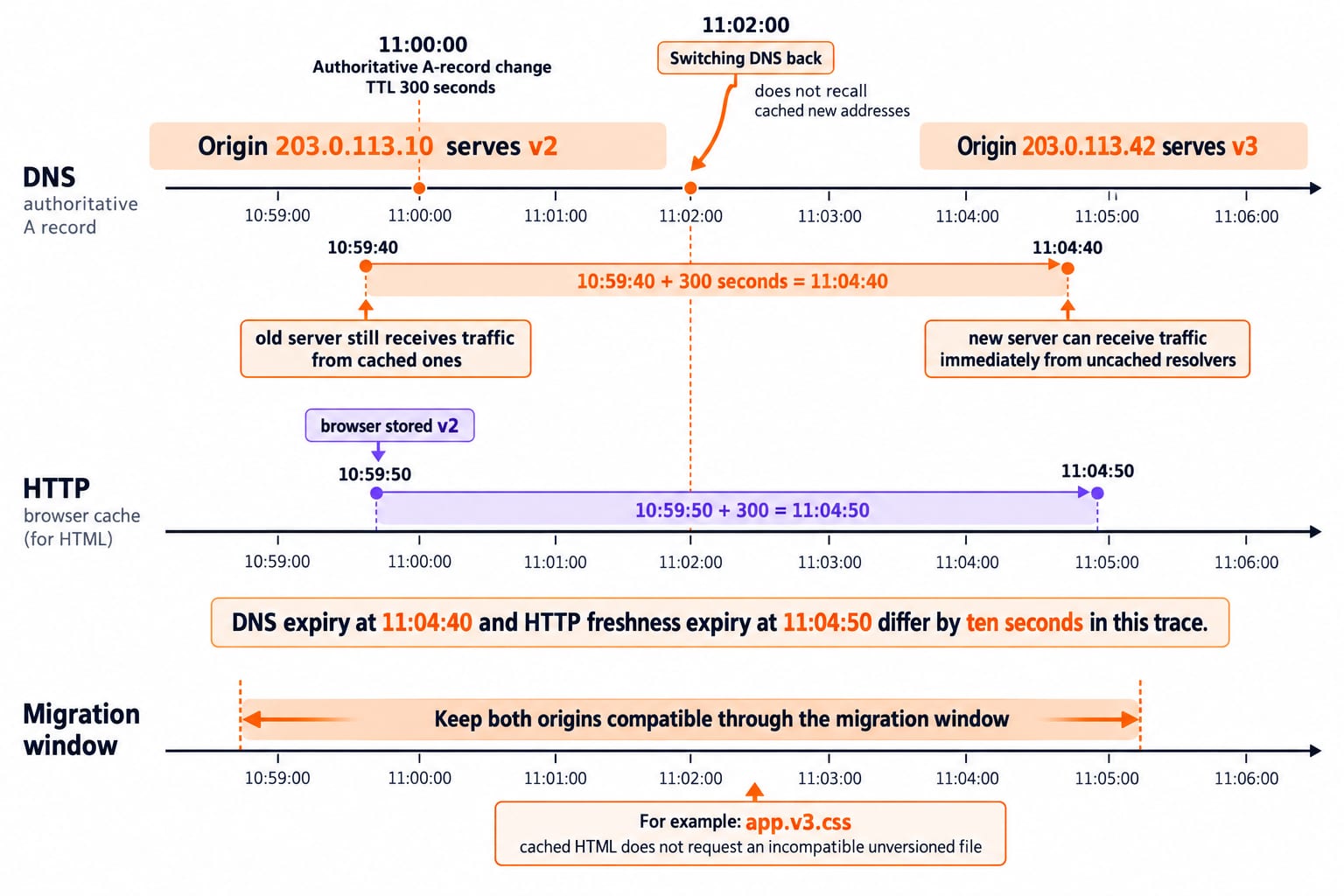
Origin 203.0.113.10 serves v2; origin 203.0.113.42 serves v3. The authoritative A record changes at 11:00:00 with TTL 300 seconds. A resolver that cached the old record at 10:59:40 may use it until 11:04:40 because 10:59:40 + 300 seconds = 11:04:40. The new server can receive traffic immediately from uncached resolvers while the old server still receives traffic from cached ones.
Now add HTTP caching. A browser stored v2 at 10:59:50 with max-age=300, so that response stays fresh until 11:04:50. DNS may already point that browser to the new origin, yet the browser can render cached v2 without making any request. DNS expiry at 11:04:40 and HTTP freshness expiry at 11:04:50 differ by ten seconds in this trace.
Keep both origins compatible through the migration window. An immediate shutdown of the old origin creates failures for resolvers still holding its address.
Version asset names, for example
app.v3.css, so cached HTML does not request an incompatible unversioned file.Rollback is another distributed change. Switching DNS back at 11:02:00 does not recall cached new addresses, so monitor both origins until traffic converges.
Common web publishing and hosting traps
Domain is not hosting. The domain is a name; hosting supplies the origin. DNS connects them.
DNS does not publish files. It returns address-related records. The origin must already serve the correct release.
A successful upload does not prove a successful site. TLS, virtual-host selection, redirects and application health can still fail.
A 404 is not a DNS failure. The request reached an HTTP server, which could not find the selected resource.
A short DNS TTL does not clear browser cache. DNS and HTTP freshness are independent.
Static does not mean unhosted. Stored files still need an origin or content-delivery service that answers requests.
How exams and interviews test publishing, DNS, URLs and HTTP
Questions can ask for release, DNS and HTTP responsibilities; the URL part omitted from a request; the purpose of the Host header; the difference between static and dynamic output; or the expiry of two independent caches. The migration trace gives exact checks: old DNS can remain usable until 11:04:40, old HTTP content until 11:04:50, and the fragment never reaches either origin.
If a domain resolves but returns 404, investigate the HTTP path or document root. A TLS name mismatch cannot be fixed in HTML. If only some users reach the old server, compare resolver caches and TTLs. The IETF RFC series remains the authority for HTTP and DNS semantics.
The short version and your next step
Publishing moves a verified release onto a reachable origin. Hosting keeps it available. DNS maps the name to an address, the URL chooses a resource, TLS protects the connection, and HTTP returns the response. During migration, both origins may receive traffic because DNS and HTTP caches expire independently.
Recreate the 11:00 migration with a 600-second DNS TTL and predict both expiry times before checking them. To build and deploy a complete application, use the MERN Stack + DSA. For a narrower route through HTML, programming or development, browse the Coding & Skills.
Keep learning
Internet Fundamentals: Architecture, Connections, DNS, URLs and Worked Examples
Build a clean mental model of the Internet and Web, then trace a browser request and calculate transfer time, cache expiry and segment count.
Updated 6 Aug 20266 min readGATE Strategy & Roadmap

Internet Protocols and Web Services: DNS, HTTP, Email and FTP with Worked Examples
Trace a browser request through DNS, TCP and HTTP, then separate email from FTP.
Updated 11 Nov 20265 min readGATE Strategy & Roadmap

Internet Fundamentals for GATE: DNS, HTTP and a Worked Web Request Trace
Connect Internet, Web, DNS, IP, ports and HTTP in one request lifecycle. Trace a cold HTTPS request and calculate latency, cache freshness and DNS expiry.
Updated 29 Oct 20266 min readGATE Strategy & Roadmap
Introduction to Web Services MCQs: 12 Solved Questions on WWW, URLs and Web 2.0
Solve 12 Introduction to Web Services MCQs on search engines, URL parts, WWW components, browser flow, hypertext, wikis and Web 2.0, with clear explanations.
Updated 6 Nov 20267 min readComputer Networks MCQs