

Web Technologies Explained: HTML, CSS, JavaScript and HTTP with Worked Examples
Connect HTML, CSS, JavaScript, DNS and HTTP by following one result page from its URL to its final DOM state after two button clicks.
KnowledgeGate Team
Exam prep & CS education
Updated 20 Nov 20266 min read
HTML, CSS, JavaScript, HTTP, DNS, browsers and servers are often memorised as separate definitions. That makes a question combining them much harder than it needs to be. The pieces make more sense when followed in sequence. A page can be understood as one connected sequence from a typed URL to two button clicks. The sequence shows each technology's role, the CSS calculation, and the JavaScript output.
Web technologies form one client-server system
The Internet is the network infrastructure and protocol stack that connects computers. The Web is a service built on that infrastructure using URLs, HTTP or HTTPS, browsers and web servers.
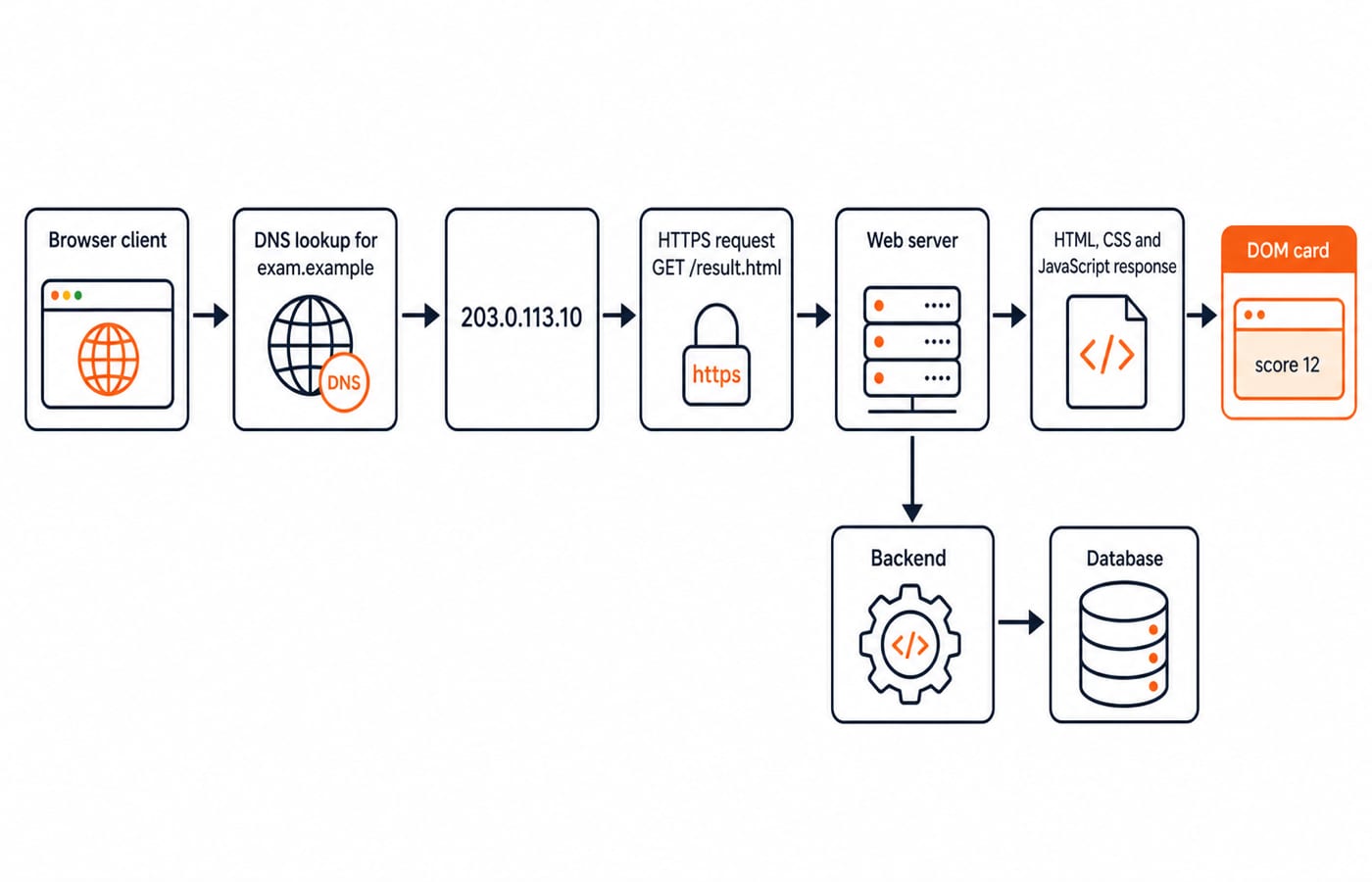
A client, usually a browser, requests a resource such as an HTML document. A server receives the request and returns a response containing that resource or an outcome explaining what happened. HTML provides document structure, CSS controls presentation, and JavaScript changes behaviour and state. DNS maps a host name to an address, while HTTP transfers representations of resources.
For a dynamic page, a backend may read or update a database before producing the response. In the normal three-tier model, the browser talks to the server-side application, not directly to the database. If you want a broader practical route through these layers, explore the Skills category.
HTML builds the document and the DOM tree
An HTML element is a unit of document structure, commonly written with tags. Attributes add information to an element, such as an identifier or class. Nesting places one element inside another, while semantic elements describe the purpose of content instead of only its appearance.
Consider this source fragment:
<div id="card" class="panel">
  <p class="score">12</p>
  <button id="add">Add 5</button>
</div>
The browser parses it into a DOM tree. Its root here is div#card.panel, with two children: p.score, containing the text 12, and button#add, containing Add 5. The source is text sent to the browser; the DOM is the browser's in-memory tree built from it. JavaScript selects and changes DOM nodes, not an abstract screenshot. An id should identify one element, while a class can be reused. Practise these relationships in Complete HTML.
CSS chooses a winning rule and computes a box
CSS uses selectors to target elements and declarations to assign property values. The cascade resolves competing declarations by considering factors including origin, importance, specificity and source order. Some properties, such as color, can be inherited by descendants when they have no winning value of their own.
Suppose the page contains these rules:
p { color: black; }
.panel .score { color: blue; }
#card .score { color: orange; }
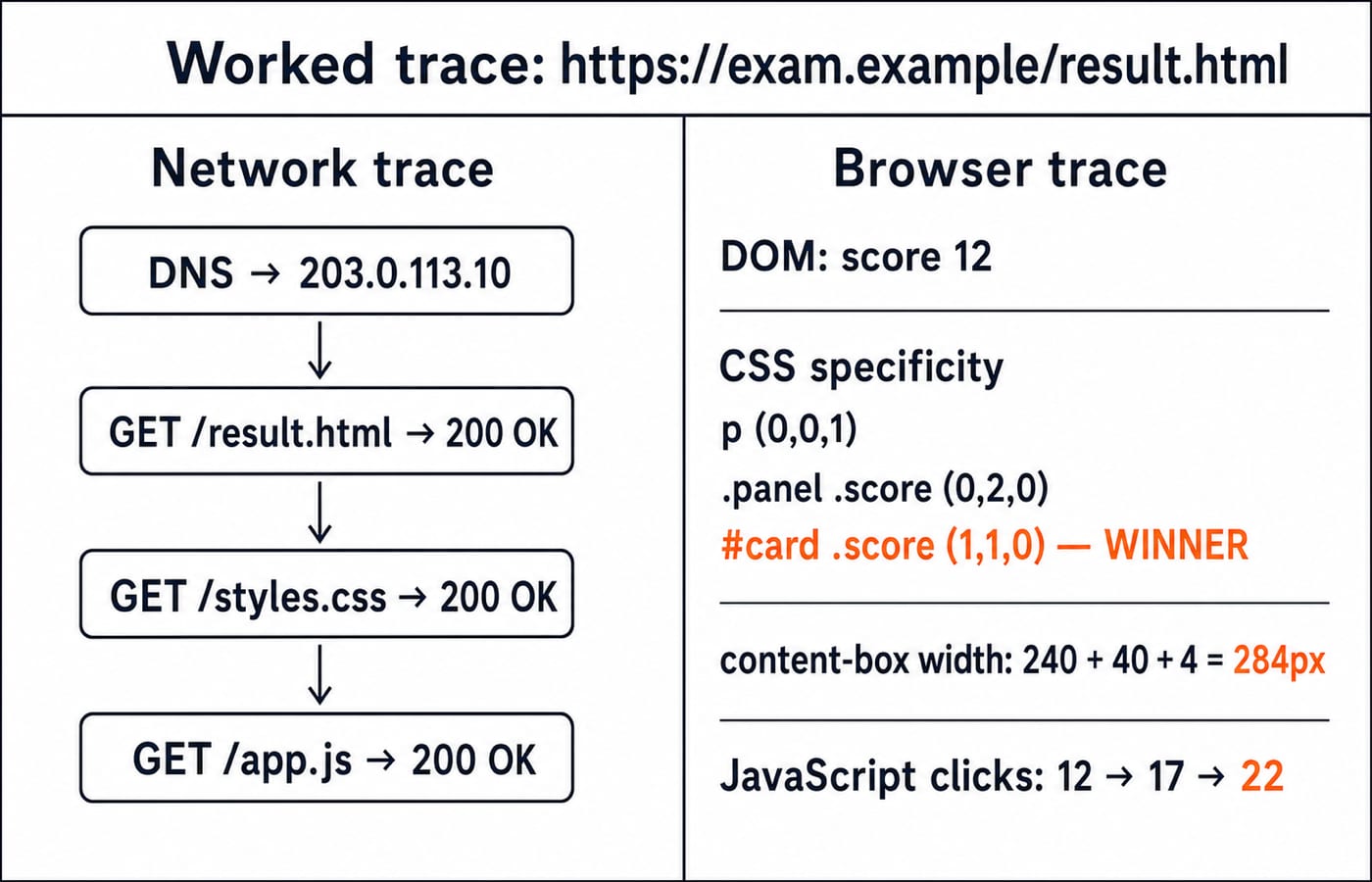
Their specificities are (0,0,1), (0,2,0) and (1,1,0) respectively. Compare the ID column first. The third selector has one ID, so #card .score wins and the score is orange. A later rule wins by source order only when origin, importance and specificity are otherwise equal.
Now give .panel a content width of 240px, left and right padding of 20px, and left and right borders of 2px. With box-sizing: content-box, its outer width is 240 + 20 + 20 + 2 + 2 = 284px. With border-box, the outer width stays 240px, while the content width becomes 240 - 40 - 4 = 196px.
JavaScript turns the static DOM into an interactive page
The initial HTML creates a static DOM state. JavaScript can listen for an event, select a DOM node and update one of its properties without loading a new document.
const score = document.querySelector('.score');
document.querySelector('#add').addEventListener('click', () => {
  score.textContent = Number(score.textContent) + 5;
});
The first selector stores the paragraph node in score. The second finds the button and attaches a click listener. Before any click, score.textContent is the string "12". On the first click, Number("12") + 5 evaluates to 17, which becomes the new text. On the second, Number("17") + 5 = 22. The final DOM text is "22", and the winning CSS rule still makes it orange.
The conversion matters. Without Number, JavaScript can concatenate a string and a number, producing "125" from "12" + 5 instead of the arithmetic result 17.
URLs, DNS, HTTP and HTTPS carry the page
Parse https://exam.example/result.html into scheme https, host exam.example and path /result.html. Both exam.example and 203.0.113.10 are documentation-only values here, not live services.
In this HTTP/1.1 teaching trace, DNS returns 203.0.113.10. The client opens a TCP connection, negotiates TLS and sends GET /result.html HTTP/1.1 with Host: exam.example. The server returns HTTP/1.1 200 OK with Content-Type: text/html. After parsing that HTML, the browser requests /styles.css and /app.js; both are assumed to return 200 OK in this example.
Each component has a distinct job. DNS finds an address. HTTP defines request and response messages. HTTPS protects HTTP in transit and authenticates the server. Status families communicate outcomes. The first digit groups responses broadly, while all three digits identify a specific status: 200 means success, 301 is redirection, 404 identifies a client-error outcome, and 500 identifies a server-error outcome.
Web page worked example: trace the result from URL to two clicks
The page request and interactions proceed in this order:
Parse the URL into
https,exam.exampleand/result.html.Resolve the host through DNS to
203.0.113.10.Establish the secure connection and send
GET /result.html.Receive
200 OK, then parse the HTML intodiv#card.panelwith score text12and the button.Fetch the CSS and JavaScript, each with an assumed
200 OKresponse.Compare CSS specificity.
(1,1,0)beats(0,2,0)and(0,0,1), so orange wins.Calculate the content-box width again:
240 + 20 + 20 + 2 + 2 = 284px.Paint orange text
12and attach the click listener.Click once:
Number("12") + 5 = 17. Click again:Number("17") + 5 = 22.
Final result: visible score
22, score colour orange, panel outer width284px, and last main-document status200 OK.
The initial document and asset fetches require server round trips. The two clicks do not, because this handler only edits the local DOM and sends no network request.
Web technologies exam questions test distinctions and traces
Practise four exam-style question types:
Definition pairs: Internet or Web, static or dynamic, client or server.
Sequence: DNS before HTTP, parsing before rendering.
Calculation: CSS specificity, box width or JavaScript output.
Protocol choice: GET or POST,
404or500, HTTP or HTTPS.
Watch for these shortcuts:
Trap | Wrong shortcut | Correct test |
|---|---|---|
HTML | It is a programming language | It structures and describes content |
CSS specificity | The last rule always wins | Compare specificity before source order |
JavaScript | A DOM change is saved | Persistence needs storage or a server request |
HTTPS | Secure transport fixes faulty logic | It protects transport, not application correctness |
| Server-generated means server error | It belongs to the client-error family |
For exam review, use Web Technologies for Teaching Exams: HTML and HTTP. Then test markup with HTML Interview Questions for Freshers.
Web technologies in the short version
The complete chain is URL to DNS to secure connection to HTTP response to HTML DOM to CSS layout and paint to JavaScript events. In the worked page, two clicks leave an orange score of 22 inside a panel whose outer width is 284px.
If you need a broad project path covering the front end and server-side work, continue with MERN Stack. If only document structure feels weak, the earlier Complete HTML route is sufficient. Trace this example once without notes, then vary one selector, one width or one click value and recompute the result.
Keep learning

Web technologies for teaching exams: HTML, HTTP and the internet explained
Web technologies for teaching CS exams: HTML basics, the client-server model, HTTP and URLs, DNS, static versus dynamic pages, and web-authoring tools.
Updated 30 Oct 20265 min readTeaching Recruitment (Computer Science)

Web Design and Development Explained: How a Web Page Loads, HTML, CSS, JS and HTTP
Follow one web page from its URL to the server and back. See how HTML, CSS, JavaScript, HTTP and the database work as one connected system.
Updated 31 Oct 20265 min readGATE Strategy & Roadmap
Web Design Basics: HTML, CSS, a Worked Responsive Page and Exam Traps
Build a three-card revision page, resolve its CSS cascade and calculate every card width at three viewports. Then use five compact traps to test the same ideas.
Updated 19 Nov 20266 min readGATE Strategy & Roadmap
HTML Basics: Complete Guide to Tags, Structure and a Worked Web Page
Learn what HTML elements mean, how a valid document fits together, and how to build and audit a complete profile page with fixed, traceable markup.
Updated 29 Jul 20266 min readProgramming Languages Survey