

ICT Terms and Abbreviations: Complete Guide with Worked Examples
Build a functional map of common ICT abbreviations. Learn the differences that matter, then apply them in two step-by-step examples.
KnowledgeGate Team
Exam prep & CS education
Updated 14 Nov 20266 min read
Full forms alone cannot distinguish two plausible options or explain what a term does in a system. A reliable recall card records each abbreviation's expansion, function, nearest contrast, and one working example. Unit labels and network roles then become decisions you can trace instead of isolated facts.
ICT terms and abbreviations: learn the job, not only the full form
ICT means Information and Communication Technology. It combines computing, storage, software, and communication networks to create, process, store, and exchange information.
CPU is an initialism because its letters are spoken separately; LAN is commonly spoken as a word, so it is an acronym. For exams, use this four-part recall card: short form, full form, function, and nearest confusing term.
CPU | Central Processing Unit | executes instructions and coordinates processing | do not confuse the processor with RAM, which holds working data
Sort the cards into six buckets:
hardware and I/O
memory and storage
data units
networks and web
software and data
security and emerging technology
Use GATE CS Exam Preparation to connect these terms to the computer-science subjects that use them.
Hardware, memory, storage, and input abbreviations
The CPU (Central Processing Unit) executes instructions and coordinates processing. Its ALU (Arithmetic Logic Unit) performs arithmetic and logic; its CU (Control Unit) directs instruction execution and data movement.
RAM (Random Access Memory) is volatile working memory; ROM (Read-Only Memory) retains instructions without power. HDD (Hard Disk Drive) and SSD (Solid-State Drive) provide persistent storage. USB (Universal Serial Bus) connects devices and can carry data and power; a UPS (Uninterruptible Power Supply) supplies temporary backup power.
Separate three document-input terms. OCR (Optical Character Recognition) converts printed or handwritten characters into machine-readable text, so it digitises a printed paragraph. OMR (Optical Mark Recognition) detects filled marks at known positions, so it scores a shaded response sheet. MICR (Magnetic Ink Character Recognition) reads magnetically printed characters, such as a cheque code line.
8 GiB RAM | 512 GB SSD |
|---|---|
Volatile working memory for active programs and data | Persistent long-term storage |
The larger SSD number does not make it a RAM replacement.
Data units and transfer rates: why b and B change the answer
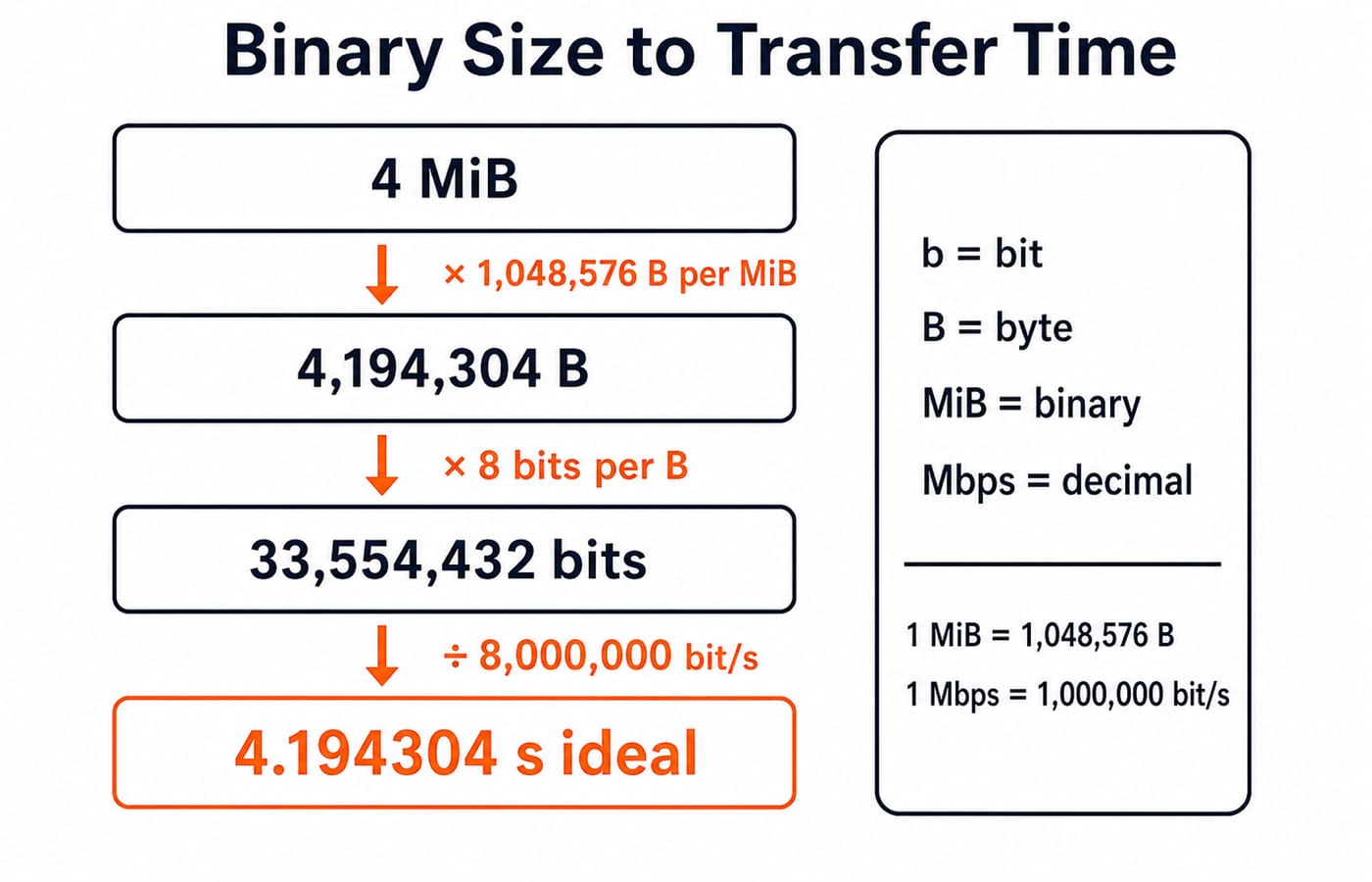
A lowercase b is a bit; an uppercase B is a byte, and 1 B = 8 b. Decimal labels include 1 MB = 1,000,000 B and 1 Mbps = 1,000,000 bit/s. Binary 1 MiB = 1,048,576 B. MB and MiB are not synonyms.
Example 1: transfer a 4 MiB file on an ideal 8 Mbps link.
File size in bytes:
4 x 1,048,576 = 4,194,304 B.File size in bits:
4,194,304 x 8 = 33,554,432 bits.Ideal time:
33,554,432 / 8,000,000 = 4.194304 seconds.
Real transfer time is longer because this ideal calculation excludes protocol overhead, latency, and congestion.
Network and web abbreviations: from the local device to a website
Organise network terms by job. A LAN (Local Area Network) covers a limited site, a WLAN (Wireless Local Area Network) is wireless, and a WAN (Wide Area Network) spans wider areas. A NIC (Network Interface Card) connects a device. A MAC (Media Access Control) address identifies its local-link interface; an IP (Internet Protocol) address supports routing.
DHCP (Dynamic Host Configuration Protocol) supplies network configuration; DNS (Domain Name System) resolves names to IP addresses. TCP (Transmission Control Protocol) and UDP (User Datagram Protocol) provide transport services. TCP offers a connection and reliable ordered delivery; UDP does not.
A URL (Uniform Resource Locator) identifies a resource on the WWW (World Wide Web). HTTP (Hypertext Transfer Protocol) carries web exchanges; HTTPS is HTTP protected by TLS (Transport Layer Security). FTP transfers files, SMTP sends email, and IMAP accesses server-stored mail. Useful defaults are HTTP 80, HTTPS 443, DNS 53, and SMTP 25, although services can be configured differently.
Wi-Fi is a brand name, not the technical full form “Wireless Fidelity”. For network mechanics beyond abbreviation recall, Internet Fundamentals: DNS, URLs and Worked Examples explains architecture, DNS and URL resolution, caching, packetisation, and throughput. Abbreviation questions instead require matching each term to its function and nearest contrast before applying it in one ideal transfer trace.
Worked ICT example: trace one HTTPS download end to end
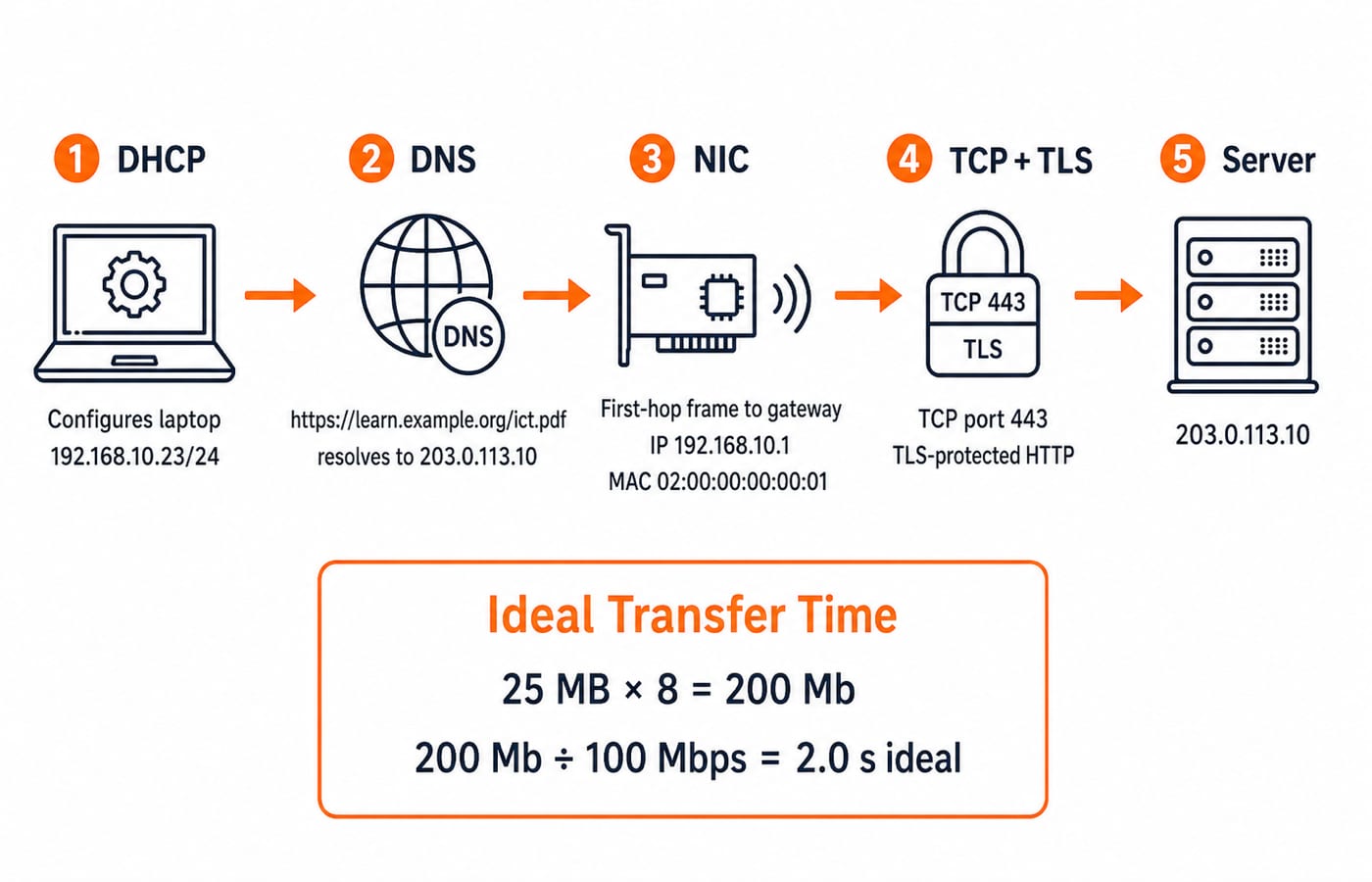
Example 2: download https://learn.example.org/ict.pdf. DHCP assigns the laptop 192.168.10.23/24 and default gateway 192.168.10.1. DNS resolves learn.example.org to the documentation address 203.0.113.10. TCP connects to destination port 443, TLS protects the HTTP exchange, and the NIC sends the first-hop Ethernet frame to the example gateway MAC address 02:00:00:00:00:01.
Each identifier has one job. The URL names the resource; DNS supplies an IP address; IP routes packets; the local MAC address enables first-hop frame delivery; TCP provides the connection; TLS adds confidentiality and integrity; HTTP defines request and response semantics. A role-identification question does not need DNS TTL, TCP sequence numbers, cache state, or packet counts.
For a 25 MB payload on an ideal 100 Mbps LAN:
Convert bytes to bits:
25 MB x 8 = 200 Mb.Divide by the rate:
200 Mb / 100 Mbps = 2.0 seconds.
This is an ideal payload-only time, not a promise of observed download speed.
Software, data, cloud, and security abbreviations
An OS (Operating System) exposes a GUI (Graphical User Interface) or CLI (Command-Line Interface). A client calls an API (Application Programming Interface) to request data, and the response can use JSON (JavaScript Object Notation). A DBMS (Database Management System) stores and manages structured data, while SQL (Structured Query Language) expresses operations on relational data.
HTML structures a page and CSS styles it; XML and JSON represent data. SaaS delivers usable software, PaaS an application platform, and IaaS infrastructure resources. Webmail is SaaS; a virtual machine with 2 vCPU and 8 GiB RAM is an IaaS resource.
Security and emerging terms include OTP (One-Time Password), MFA (Multi-Factor Authentication), VPN (Virtual Private Network), AI (Artificial Intelligence), ML (Machine Learning), and IoT (Internet of Things). An OTP can be one factor. MFA needs factors from different categories, not merely two passwords.
ICT abbreviation traps and how GATE or interviews test them
Confusing pair | Decisive discriminator |
|---|---|
RAM vs ROM | Volatile vs non-volatile |
IP vs MAC | Routing vs local-link identity |
HTTP vs HTTPS | Plain HTTP vs TLS protection |
TCP vs UDP | Reliable ordered delivery vs no such guarantee |
OCR vs OMR vs MICR | Characters vs marks vs magnetic characters |
Mbps vs MB/s | Bits vs bytes, shown by letter case |
MB vs MiB | Decimal vs binary base |
LAN vs WAN | Local vs wider geographic scope |
Questions usually ask you to expand a term, match it to a function, select a technology for a scenario, or compute a unit conversion. In an interview, expect a follow-up: place the term in the Example 2 flow and name its nearest alternative. MCQ, MSQ or NAT? GATE Question Types Explained shows how the same knowledge can appear as recognition, multiple-correct classification, or a numerical answer.
ICT terms and abbreviations: the short revision method
Revise the six buckets with this checklist:
Hardware and I/O: connect every component or reader to its job.
Memory and storage: state volatility, persistence, and role.
Data units: check letter case, unit base, and conversion.
Networks and web: place each term at the correct stage or layer.
Software and data: trace interface, format, and storage roles.
Security and emerging technology: define the purpose and nearest contrast.
For every term, say its full form, function, layer or category, one contrast, and one example. If any of those five fields is blank, the term is not yet revised.
For a broader structured preparation path, continue with GATE Guidance by Sanchit Sir. To check whether abbreviation knowledge survives context-based questions, practise with the GATE Test Series.
Go deeper with the full courseGATE Guidance by Sanchit Sir
Keep learning

Society, Law and Ethics in ICT: Concepts, Cases and Exam Traps
Learn to separate social impact, legal rules, ethical duties and cyber safety in ICT, then apply the framework to a fully worked campus-portal case.
Updated 18 Nov 20266 min readGATE Strategy & Roadmap
Keyboard Shortcuts in Knowledge of ICT: Windows, MS Office and Browser Commands with Worked Examples
Learn to decode keyboard shortcuts by application and focus. Compare Windows, browser and MS Office commands, then check each idea through exact text and Excel traces.
Updated 14 Nov 20266 min readGATE Strategy & Roadmap
Emerging Technology Trends in ICT: AI, Cloud, IoT and Blockchain with Worked Examples
Learn what AI, cloud, IoT, blockchain and related ICT technologies actually do. One smart-classroom case connects the definitions to two worked calculations.
Updated 10 Nov 20265 min readGATE Strategy & Roadmap

Artificial Intelligence for ICT Exams: Concepts, Tools and Worked Examples
Build a clear AI concept ladder, learn the main learning types, calculate classifier metrics step by step, and apply a practical tool-checking routine.
Updated 23 Sep 20266 min readML & Data Science