Python Modules and Packages Tutorial: Imports, Structure and Runnable Examples
Learn what Python imports bind, how a regular package fits together, and why package entry points should run with `python -m`. Build and trace every example yourself.
KnowledgeGate Team
Exam prep & CS education
Updated 26 Sep 20266 min read
Your first two-file Python project may work only when you launch it from one particular directory, or you may know the spelling of import without being able to explain what a module, package or namespace contains. A module is a reusable Python file with its own namespace; a regular package groups modules behind a directory-level interface. import binds names. In the four-file route project, routekit/__init__.py exposes one public function and python -m routekit preserves its package context. The Coding & Skill Development Courses category maps the wider programming path.
Python modules turn one file into reusable code
Create these two files in the same project/ directory.
calculator.py:
TAX_RATE = 0.18

def total_with_tax(price):
return price + price * TAX_RATEapp.py:
import calculator

print(calculator.TAX_RATE)
print(f"{calculator.total_with_tax(250):.2f}")
Run python app.py from project/. The output is:
0.18
295.00
The tax is 250 * 0.18 = 45.00, so the total is 250 + 45.00 = 295.00. The file calculator.py is the module; calculator is the module object bound in app.py. Its namespace holds TAX_RATE and total_with_tax, so qualified access shows each name's source.
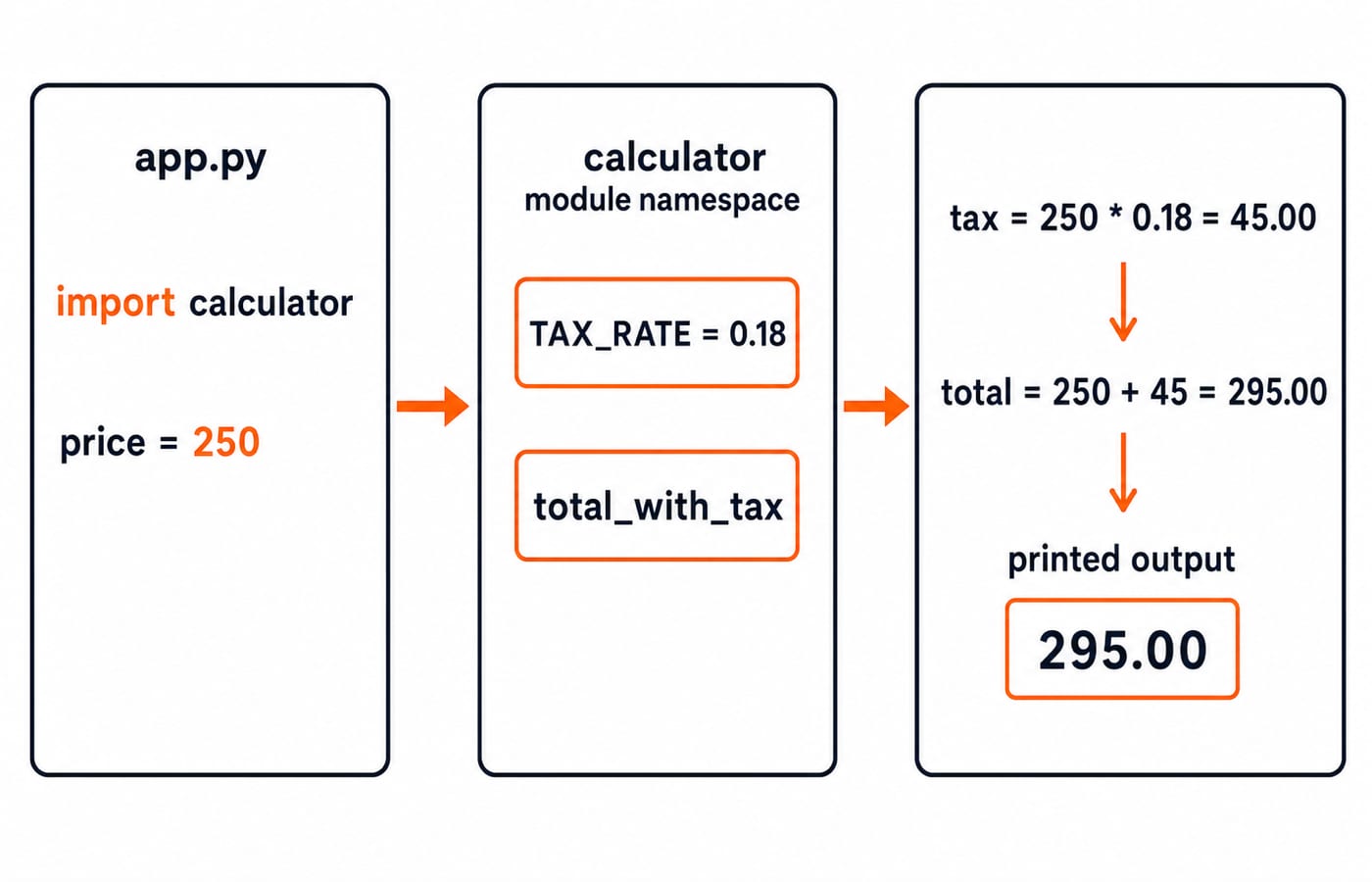
Python import forms bind different names
These three forms calculate the same result but bind different names in the importing file:
import calculator
print(f"{calculator.total_with_tax(250):.2f}")

from calculator import total_with_tax
print(f"{total_with_tax(250):.2f}")

import calculator as calc
print(f"{calc.total_with_tax(250):.2f}")
All three lines print 295.00. The bound names are calculator, total_with_tax and calc, respectively. An ordinary import first reuses a matching module already cached in sys.modules. Otherwise, Python uses its import finders and the locations represented by sys.path to find and load the module, then caches it for that process. A repeated import normally does not rerun the module's top-level code.
Names can still collide. After from math import sqrt, the assignment sqrt = 9 replaces that local name. Calling sqrt(16) then raises TypeError: 'int' object is not callable. Keep the source explicit instead:
import math
print(math.sqrt(16))
This prints 4.0.
__name__ separates reusable imports from direct execution
Add a guarded self-check at the end of calculator.py:
TAX_RATE = 0.18

def total_with_tax(price):
    return price + price * TAX_RATE

if __name__ == "__main__":
    print(f"{total_with_tax(100):.2f}")
Running python calculator.py prints 118.00: tax is 100 * 0.18 = 18.00, and 100 + 18.00 = 118.00. Direct execution sets __name__ to "__main__". Importing the file instead gives calculator.__name__ == "calculator", so the guarded self-check does not print during import calculator.
This guard is the right home for demonstrations, command-line entry logic and small ad hoc tests that should run only when the file is executed directly. That separation keeps imports free of surprising output and side effects when several modules reuse the same file. The Python Course: Concepts, MCQs & Coding is a structured route through the wider language if you want to build beyond this example.
Build a Python package with a small public interface
A regular package is a directory containing __init__.py. Build this exact tree under project/:
project/
├── app.py
└── routekit/
    ├── __init__.py
    ├── metrics.py
└── reports.pyroutekit/metrics.py:
LONG_SEGMENT_KM = 10.0

def total_distance(distances):
    return sum(distances)

def is_long(distance):
    return distance >= LONG_SEGMENT_KM
This calculation expects at least one distance. In routekit/reports.py, the leading dot imports from the current package:
from .metrics import total_distance, is_long

def summary(name, distances):
    total = total_distance(distances)
    long_count = sum(is_long(distance) for distance in distances)
    return f"{name}: total={total:.1f} km, long={long_count}/{len(distances)}"
Expose one intended public name in routekit/__init__.py:
from .reports import summaryThe caller in app.py can now depend on the package interface instead of its internal filenames:
from routekit import summary

print(summary("North Loop", [12.5, 8.0, 9.5]))
print(summary("River Link", [10.0, 10.5, 7.5]))
North Loop totals 12.5 + 8.0 + 9.5 = 30.0 km, and only 12.5 km meets the 10 km threshold. River Link totals 10.0 + 10.5 + 7.5 = 28.0 km; 10.0 km and 10.5 km meet the threshold. The exact output is:
North Loop: total=30.0 km, long=1/3
River Link: total=28.0 km, long=2/3
Importing summary from routekit hides the internal layout from the caller, while the relative imports keep that layout explicit inside the package.
Absolute imports, relative imports and python -m
The caller uses the absolute import from routekit import summary. Inside reports.py, from .metrics import total_distance, is_long is relative, and the dot means the current package. A regular package has __init__.py, which may be empty or may publish a deliberate interface as it does here. Namespace packages can omit that file; a regular package keeps this small project explicit.
Add routekit/__main__.py:
from . import summary

print(summary("Ridge Route", [10.0, 6.5, 12.0]))
From project/, run python -m routekit. The sum is 10.0 + 6.5 + 12.0 = 28.5 km, and 10.0 km and 12.0 km meet the threshold. The output is Ridge Route: total=28.5 km, long=2/3.
Do not run python routekit/__main__.py directly. That loses the package context and can raise ImportError: attempted relative import with no known parent package.
Common module and package errors: diagnose before editing imports
Symptom | Likely cause | Correction |
|---|---|---|
| The command started from the wrong project level | Move to the directory containing |
| A package file was executed directly | From |
| A local | Rename it to |
A circular import has the same partially initialised shape. If routes.py and reports.py import each other, one side sees the other before initialisation finishes. Move shared constants or neutral helpers into config.py, or pass the required data into functions.
For focused diagnostics, inspect sys.executable, review sys.path, and try importlib.util.find_spec("routekit"). These reveal the interpreter, search locations and discoverability, and are better first checks than arbitrary edits to sys.path.
Python module exercises and realistic code-tracing checks
Useful checks ask you to predict a namespace after import, choose a qualified or direct-name import, trace a main guard, repair a package path, or explain why a circular import exposes an unfinished module. Test those skills with three runnable exercises:
Create
temperature.pywithc_to_f(c) = c * 9 / 5 + 32. For 25,25 * 9 / 5 + 32 = 77.0.Create
shop/discount.pywithfinal_price(1000, 15). Compute1000 - 1000 * 15 / 100 = 850.0, then exposefinal_pricethroughshop/__init__.py.Add a
shop/__main__.pycall forfinal_price(800, 12.5). Here800 * 12.5 / 100 = 100.0, so800 - 100.0 = 700.0. Run it withpython -m shop.
After these package exercises, Dynamic Programming Explained: 0/1 Knapsack traces another worked example line by line if you want more code to read.
Python modules and packages: the short version and next step
A module is a Python file. A regular package groups related modules in a directory with __init__.py. Imports load or reuse modules and bind names into namespaces, while python -m preserves package context for runnable entry points. Rebuild the routekit example from an empty directory, predict both output lines, and only then execute it.
For a structured next step across the language, use the Python course linked above. If you can already write functions and want to organise larger problem-solving programs, DSA Using Python is the natural follow-on. Choose the route that matches what you need to practise next.
Keep learning
Python Control Flow and Loops: if, for, while and Worked Traces
Learn to trace Python branches and loops without skipping a state change. Worked examples cover GCD, break and continue, loop else, nested loops, and common mistakes.
Updated 6 Oct 20265 min readPython
Python for GATE: CS vs DA Syllabus, Past-Paper Evidence and a 10-Week Plan
Choose the right Python preparation path for GATE CS or DA, then use two worked traces and three diagnostic gates to test your progress.
Updated 1 Oct 20264 min readPython
Pandas Basics in Python: Build, Clean and Analyse a DataFrame Step by Step
Follow one student dataset from its first DataFrame to a clean city summary, while learning how selection, missing values and vectorised calculations really work.
Updated 24 Sep 20265 min readPython
Python Operators and Expressions: Precedence, Types and Worked Output Traces
Trace Python expressions without guessing. This guide connects operator families, precedence, types, short-circuiting and exact output through worked examples.
Updated 23 Sep 20266 min readPython