File Handling in Python: Read, Write, Append, CSV and Binary Examples
Learn a reliable file-handling workflow through one scores file, then apply it to cursor control, append mode, CSV quoting, binary records and common errors.
KnowledgeGate Team
Exam prep & CS education
Updated 24 Oct 20266 min read
File handling looks like a short list of methods until w erases an existing file, a relative path points somewhere unexpected, or a read returns nothing because the cursor is already at the end. Write, read, parse and append one scores.txt file safely, then apply the same stream model to CSV and binary data. Python 3 and UTF-8 text make every value directly checkable.
The file-handling model: path, mode, stream and cursor
A path identifies a filesystem entry. open() creates a file object in a mode, and I/O happens at the stream's current cursor. Text mode decodes bytes into str; binary mode returns bytes. A file object is a stream, not the whole file loaded into memory.
Use a context manager by default:
from pathlib import Path

path = Path("scores.txt")
with path.open("r", encoding="utf-8") as handle:
    print(handle.closed)  # False

print(handle.closed)      # True
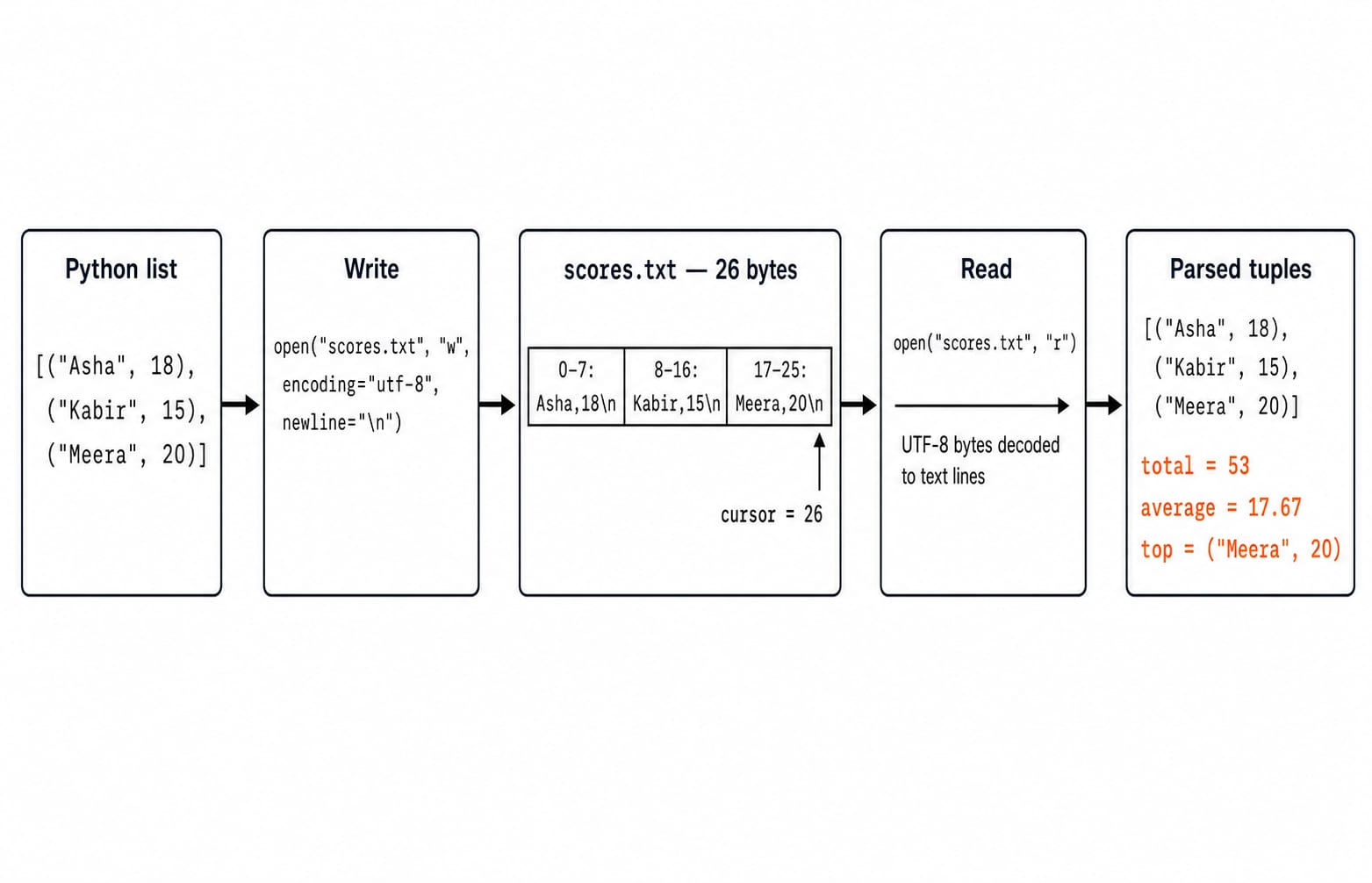
Leaving with closes the handle even after an exception. Identify the path, mode, encoding and operation before opening a file. The running scores.txt file contains Asha,18\nKabir,15\nMeera,20\n, exactly 26 characters and 26 bytes because every character is ASCII in UTF-8. For the layer below this API, see File systems and disk scheduling in OS.
Fully worked text example: write, read, parse and calculate
Write three records. Mode w creates an absent file but truncates an existing one. Here, newline="\n" makes line endings exact.
from pathlib import Path

path = Path("scores.txt")
rows = [("Asha", 18), ("Kabir", 15), ("Meera", 20)]

with path.open("w", encoding="utf-8", newline="\n") as handle:
    for name, score in rows:
        handle.write(f"{name},{score}\n")

parsed = []
with path.open("r", encoding="utf-8") as handle:
    for line in handle:
        name, score_text = line.rstrip("\n").split(",", maxsplit=1)
        parsed.append((name, int(score_text)))

total = sum(score for _, score in parsed)
average = total / len(parsed)
top = max(parsed, key=lambda item: item[1])

print("[" + ", ".join(f'("{name}", {score})' for name, score in parsed) + "]")
print(f"Total: {total}")
print(f"Average: {average:.2f}")
print(f"Top: {top[0]} {top[1]}")
Exact output:
[("Asha", 18), ("Kabir", 15), ("Meera", 20)]
Total: 53
Average: 17.67
Top: Meera 20
The arithmetic is 18 + 15 + 20 = 53, then 53 / 3 = 17.666..., displayed as 17.67. Convert with int() after splitting because the score starts as text. rstrip("\n") removes only the newline; .strip() also removes spaces and tabs.
Choose the right reading method and control the cursor
read() returns the remainder; read(size) limits one call. readline() returns one line, readlines() builds a list, and iteration yields lines. Use iteration for a large line-oriented file, read() for a deliberately small file, and readline() when one record matters. readlines() is reasonable when you need a list and accept its memory cost.
On this three-record scores.txt, read(7) returns 'Asha,18' and tell() is 7. The next readline() returns '\n', moving to 8; another returns 'Kabir,15\n', moving to 17. After seek(0), it returns 'Asha,18\n'. These positions are exact for this forced-newline ASCII file. Generally, treat text tell() as an opaque value for seek(); use binary mode for byte offsets.
File modes without destructive surprises
Mode | Existence and initial position | Destructive behaviour |
|---|---|---|
| Must exist; beginning | None |
| Creates; beginning | Truncates |
| Creates; end | Preserves content |
| Must be absent | Raises |
| Text; base sets position | Encoded |
| Binary; base sets position |
|
| Update; base sets position | Read/write, no insertion |
Restore the three-record file, then append:
with path.open("a+", encoding="utf-8", newline="\n") as handle:
    handle.write("Ravi,17\n")
    print(repr(handle.read()))  # '' because the cursor is at the end
    handle.seek(0)
    four_rows = handle.readlines()
The file grows from 26 to 34 bytes. Its total is 53 + 17 = 70, and 70 / 4 = 17.50. Updating does not insert. If mode_demo.txt is ABCDE, r+, seek(1) and write("xy") produce AxyDE, not AxyBCDE. Opening it in w and writing OK\n leaves 3 bytes. Creating scores_backup.txt with x works once; the second attempt raises FileExistsError.
Paths, encodings and errors beginners actually meet
Relative paths start from the current working directory. If an illustrative Path.cwd() prints /home/student/python-lab, Path("data") / "scores.txt" resolves below it, not beside the last file viewed.
data_dir = Path("data")
data_dir.mkdir(parents=True, exist_ok=True)
data_path = data_dir / "scores.txt"

try:
    with data_path.open("r", encoding="utf-8") as handle:
        print(handle.readline())
except FileNotFoundError:
    print(f"Missing file: {data_path}")
FileNotFoundError means an r path did not resolve. IsADirectoryError means it names a directory. PermissionError signals insufficient access; UnicodeDecodeError signals mismatched decoding. ValueError: I/O operation on closed file means code used a handle after with. Catch narrowly; except Exception: pass hides defects. Python's official open() documentation defines encoding and newlines, while its I/O documentation distinguishes text and binary streams.
Structured CSV and exact binary bytes
CSV needs a CSV parser because fields may contain delimiters or quotes.
import csv

with Path("scores.csv").open("w", encoding="utf-8", newline="") as handle:
    writer = csv.DictWriter(
        handle, fieldnames=["name", "score"], lineterminator="\n"
    )
    writer.writeheader()
    for name, score in rows:
        writer.writerow({"name": name, "score": score})

with Path("scores.csv").open("r", encoding="utf-8", newline="") as handle:
    csv_rows = [
        {"name": row["name"], "score": int(row["score"])}
        for row in csv.DictReader(handle)
    ]
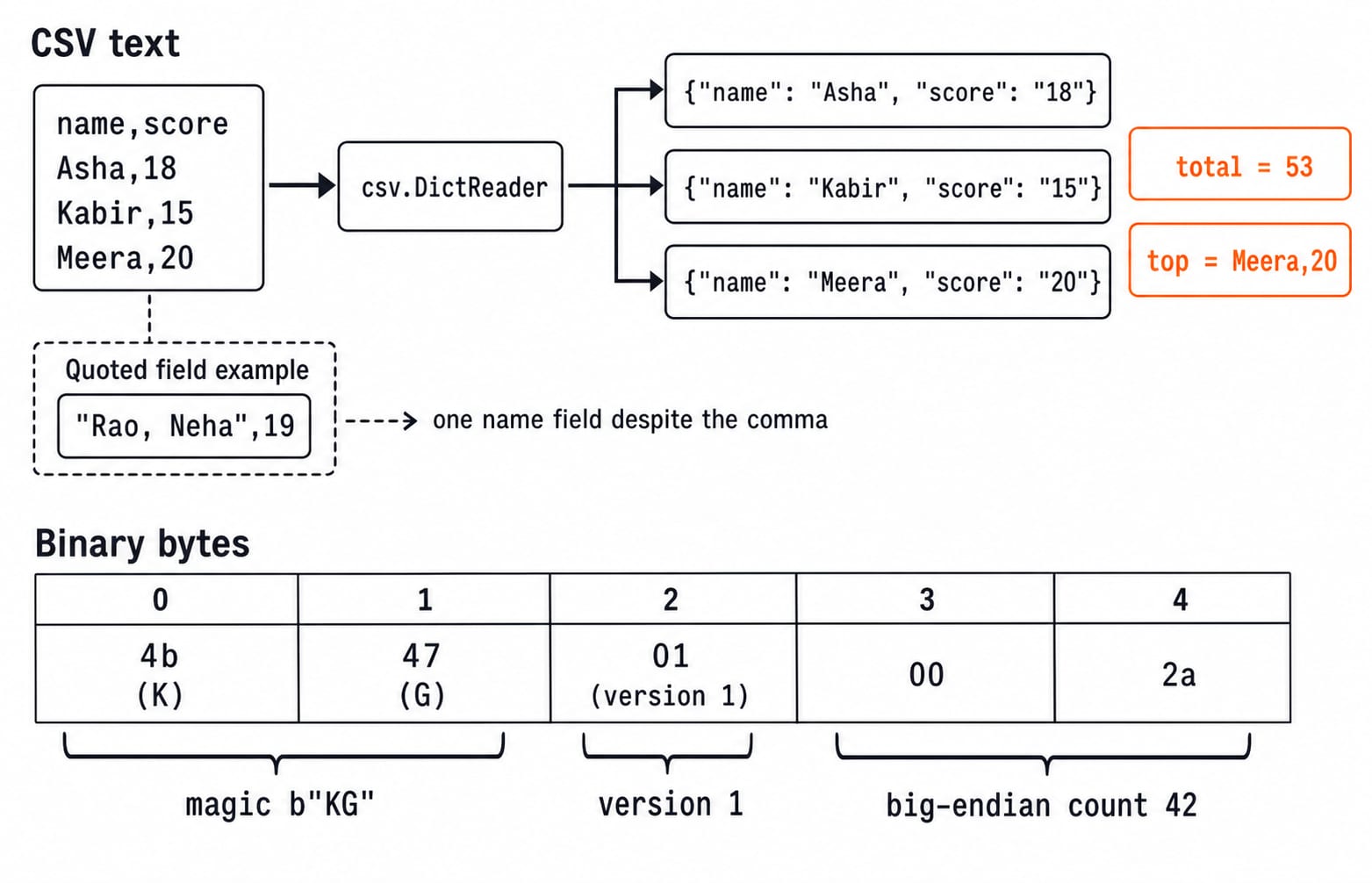
The file is name,score\nAsha,18\nKabir,15\nMeera,20\n, exactly 37 bytes. Its total is 53; its top entry is Meera, 20. Adding {"name": "Rao, Neha", "score": 19} emits "Rao, Neha",19\n. DictReader returns two fields, while .split(",") wrongly returns three fragments. Python's official csv module documentation defines dialects, quoting and newline="".
Binary mode makes every byte explicit:
payload = b"KG" + bytes([1]) + (42).to_bytes(2, "big")
with Path("packet.bin").open("wb") as handle:
    handle.write(payload)

with Path("packet.bin").open("rb") as handle:
    raw = handle.read()

magic = raw[:2]                                  # b"KG"
version = raw[2]                                 # 1
record_count = int.from_bytes(raw[3:5], "big")  # 42
The bytes are 4b 47 01 00 2a, length 5. Writing str to wb, or bytes to text mode, raises TypeError. The Python File Handling and Data Analysis: A Complete Worked Guide owns the end-to-end CSV validation, aggregation and export pipeline. The smaller scores file isolates a different layer: modes, cursor state, text parsing, CSV quoting and exact binary bytes.
Common traps and exercises with checkable answers
Trap | What goes wrong | Correction |
|---|---|---|
Important file in | Content disappears | Choose |
Read after append | End cursor returns |
|
Script-relative assumption | Paths start at the working directory | Inspect |
No text encoding | Environment decides | Pass |
Handle used after | Handle is closed | Keep I/O inside |
Mixed |
| Match data to mode |
CSV parsed with | Quoted commas split | Use |
Every exception hidden | Faults disappear | Catch expected errors with context |
Try these, then compare the checks:
Write scores at least
18tohigh_scores.txt. Sketch: filter, then write. ExpectAsha,18\nMeera,20\n,17bytes, total18 + 20 = 38, average38 / 2 = 19.00.Restore the file, append
Ravi,17\n, then reopen. Sketch: write witha, verify withr. Expect four rows and53 + 17 = 70.Write
[256, 513, 1024]withto_bytes(2, "big"). Sketch: join three pairs and decode two-byte slices. Expect01 00 02 01 04 00, length6, sum256 + 513 + 1024 = 1793.
File-handling questions: the short version and next step
Typical questions ask you to choose a safe mode, predict a seek() overwrite, explain an empty end-of-file read, identify an exception, distinguish text from binary, or handle quoted CSV. Recheck the anchors: ABCDE becomes AxyDE, append total 70, binary count 42. KnowledgeGate Python practice spans File Basics, Text Files, Binary Files and CSV Files.
The recall chain is simple: build the path, choose the mode, specify the text encoding, open with with, read or write at the current cursor, and handle expected failures narrowly. Continue with Python: Concepts, MCQs, Coding Questions, use Coding For Placements: C, C++, Java, Python, Competitive Coding for broader practice, or browse Coding & Skill Development Courses for the wider learning route.
Keep learning

Itertools in Python: Lazy Iterators, Pipelines and Worked Examples
Learn how Python's itertools builds readable, lazy pipelines. Runnable examples cover infinite iterators, filtering, running totals, adjacent pairs, tee, combinations and groupby.
Updated 26 Oct 20266 min readPython
Decorators in Python: @ Syntax, Wrappers and Worked Examples
Understand when decoration happens, what a wrapper receives, and how return values travel back. Runnable examples cover parameters, stacking and built-ins.
Updated 22 Oct 20266 min readPython
Exceptions in Python: Handle Errors with try, except and finally
Learn how Python exceptions change control flow, how to catch expected failures without hiding bugs, and when to use else, finally, raise, and custom exceptions.
Updated 18 Oct 20265 min readPython

Context Managers in Python: with, __enter__, __exit__ and contextlib
Learn how Python's with statement guarantees cleanup, then build and trace class-based and generator-based context managers with runnable examples.
Updated 14 Oct 20266 min readPython