

INSERT, UPDATE and DELETE in SQL: Runnable DML Tutorial with Safe Worked Examples
Follow one table from its first insert through targeted updates and a rolled-back deletion. The runnable lab makes affected rows, defaults and NULL behaviour visible.
KnowledgeGate Team
Exam prep & CS education
Updated 5 Nov 20266 min read

INSERT, UPDATE and DELETE look like three short commands. Yet a missing column list, a broad WHERE condition or an unnoticed NULL can add the wrong row, change many rows or remove data unexpectedly. One learner_scores table starts empty, receives exact inserts and targeted updates, and undergoes a deletion that is inspected and rolled back. Predict the affected rows before executing each change.
INSERT, UPDATE and DELETE are SQL data-changing commands
INSERT adds rows. UPDATE changes columns in rows that already exist. DELETE removes selected rows. These are row-oriented data manipulation operations, unlike SELECT, which reads rows without changing them.
Their core shapes are:
INSERT INTO table_name (column_list) VALUES (value_list);
UPDATE table_name SET column_name = value WHERE condition;
DELETE FROM table_name WHERE condition;
The WHERE clause controls which existing rows an UPDATE or DELETE touches. It does not belong to INSERT. INSERT, UPDATE and DELETE are core topics in CS Fundamentals for Exams & Placements. For a transaction-first introduction built around an employees table and a savepoint, use SQL DML: INSERT, UPDATE, and DELETE with Transaction-Safe Examples. Here, one six-row learner_scores state exposes column defaults, NULL comparison, multi-row predicates, constraint failures and affected-row prediction.
Build the table and INSERT six exact rows
Create a disposable PostgreSQL-compatible table. quiz_score is deliberately nullable, so its check applies when a non-null score is supplied and we can still study the NULL trap later.
CREATE TABLE learner_scores (
    learner_id INTEGER PRIMARY KEY,
    learner_name VARCHAR(30) NOT NULL,
    module_code VARCHAR(10) NOT NULL,
    quiz_score INTEGER CHECK (quiz_score BETWEEN 0 AND 100),
    attempt_count INTEGER NOT NULL DEFAULT 1
        CHECK (attempt_count >= 1),
    status VARCHAR(10) NOT NULL DEFAULT 'ACTIVE'
);
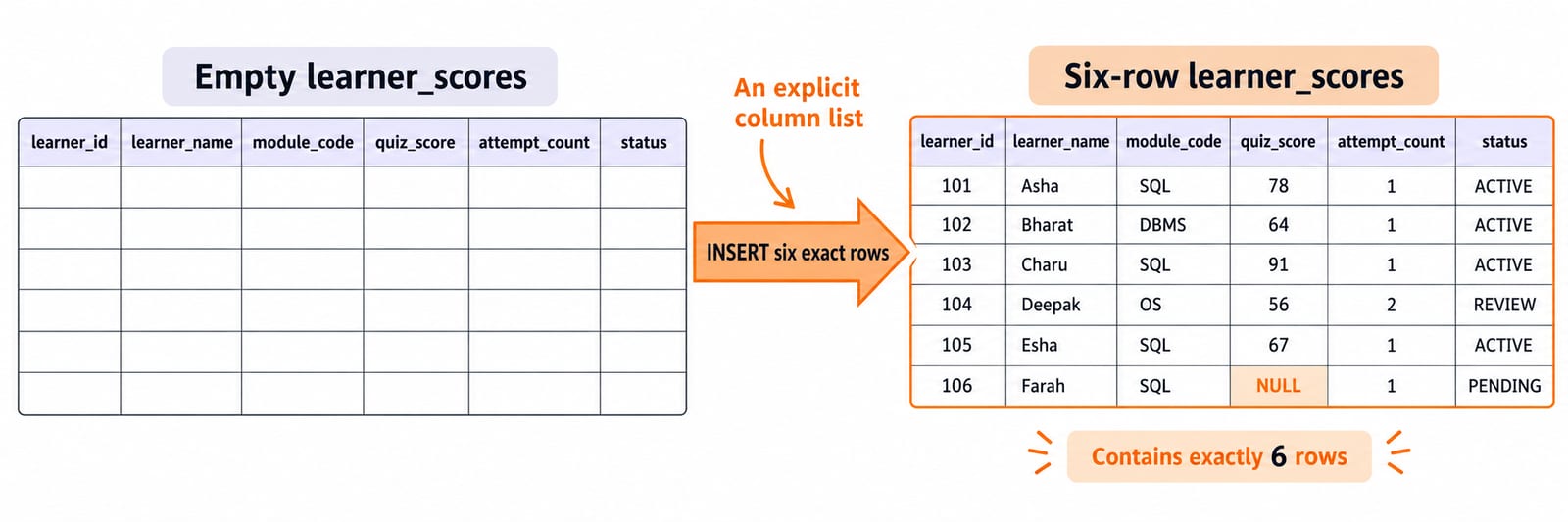
Name the columns in a single-row insert. Because attempt_count and status are omitted, Asha receives their defaults, 1 and ACTIVE.
INSERT INTO learner_scores
    (learner_id, learner_name, module_code, quiz_score)
VALUES
    (101, 'Asha', 'SQL', 78);
Now add five rows in one statement:
INSERT INTO learner_scores
    (learner_id, learner_name, module_code, quiz_score,
     attempt_count, status)
VALUES
    (102, 'Bharat', 'DBMS', 64, 1, 'ACTIVE'),
    (103, 'Charu',  'SQL',  91, 1, 'ACTIVE'),
    (104, 'Deepak', 'OS',   56, 2, 'REVIEW'),
    (105, 'Esha',   'SQL',  67, 1, 'ACTIVE'),
    (106, 'Farah',  'SQL', NULL, 1, 'PENDING');
Run SELECT * FROM learner_scores ORDER BY learner_id;. The exact state is:
ID | Learner | Module | Score | Attempts | Status |
|---|---|---|---|---|---|
101 | Asha | SQL | 78 | 1 | ACTIVE |
102 | Bharat | DBMS | 64 | 1 | ACTIVE |
103 | Charu | SQL | 91 | 1 | ACTIVE |
104 | Deepak | OS | 56 | 2 | REVIEW |
105 | Esha | SQL | 67 | 1 | ACTIVE |
106 | Farah | SQL | NULL | 1 | PENDING |
An explicit column list makes every value-to-column mapping reviewable.
UPDATE one row, then update a filtered set
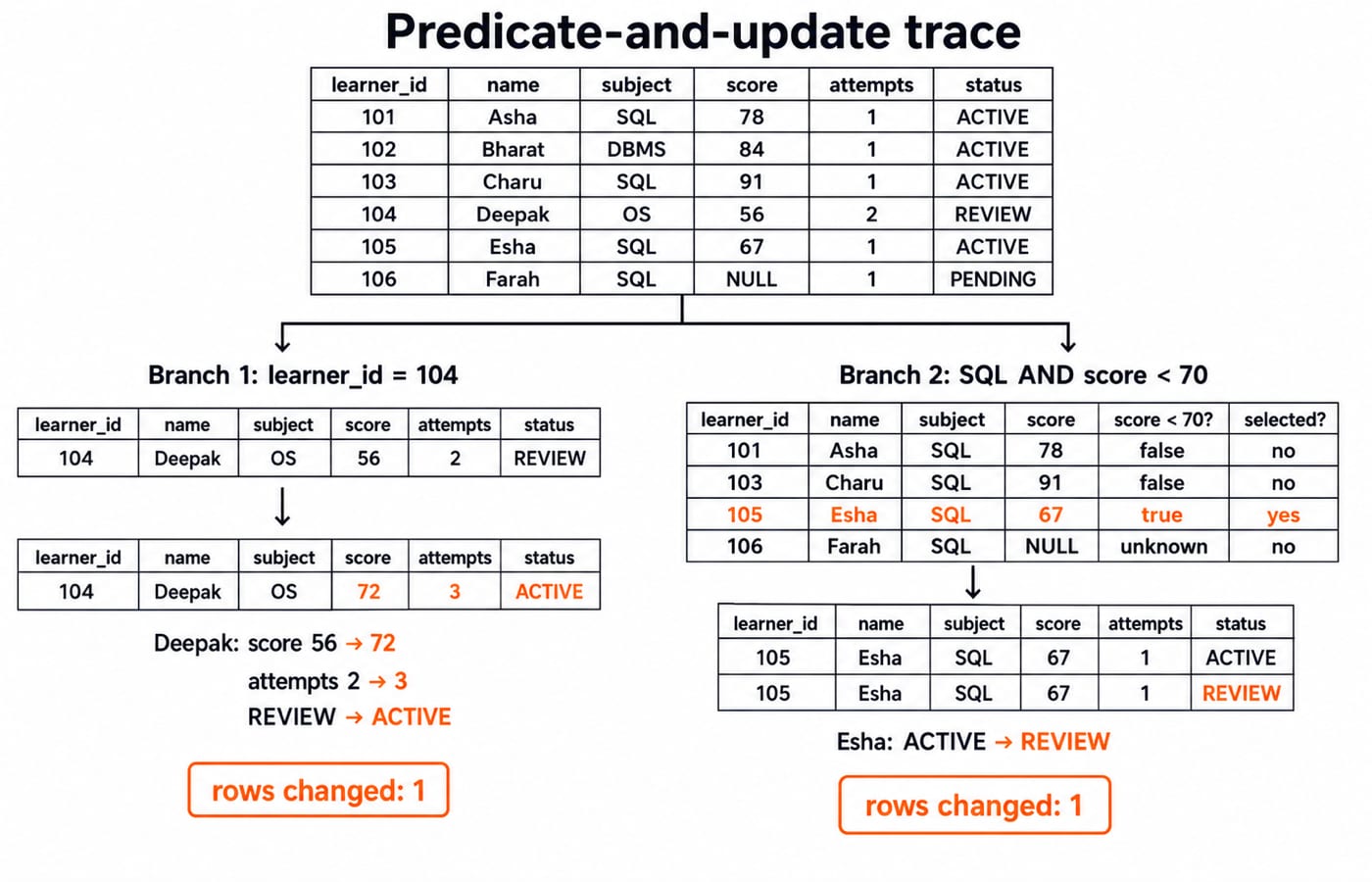
Start from those six rows. A primary-key predicate isolates Deepak while one SET clause changes three values.
UPDATE learner_scores
SET quiz_score = 72,
    attempt_count = attempt_count + 1,
    status = 'ACTIVE'
WHERE learner_id = 104;
For learner 104, the old attempt count is 2, so 2 + 1 = 3. His row changes from 56 | 2 | REVIEW to 72 | 3 | ACTIVE. Exactly one row changes.
Next, use a predicate that could match several rows:
UPDATE learner_scores
SET status = 'REVIEW'
WHERE module_code = 'SQL'
  AND quiz_score < 70;
Among the SQL learners, Asha's 78 and Charu's 91 fail < 70. Esha's 67 passes, so her status becomes REVIEW. Farah's NULL < 70 is unknown, not true, so she remains PENDING. Again, exactly one row changes.
ID | Before | After |
|---|---|---|
104 |
|
|
105 |
|
|
DELETE only the row your predicate identifies
Continue from the post-update state. Preview the deletion with the same predicate that the mutation will use:
SELECT *
FROM learner_scores
WHERE status = 'REVIEW'
  AND quiz_score < 70;
It selects only 105 | Esha | SQL | 67 | 1 | REVIEW. Now test the deletion inside an explicit transaction.
BEGIN;

DELETE FROM learner_scores
WHERE status = 'REVIEW'
  AND quiz_score < 70;

SELECT learner_id FROM learner_scores ORDER BY learner_id;
ROLLBACK;
Before ROLLBACK, the IDs are 101, 102, 103, 104, 106, so one row has been removed. After ROLLBACK, all six IDs from 101 through 106 are present again, and Esha retains SQL | 67 | 1 | REVIEW.
DELETE removes whole rows, not chosen columns. To clear an allowed field instead, use an intentional UPDATE ... SET column_name = NULL.
A safe workflow for UPDATE and DELETE
Use four checks for any important mutation:
Write the predicate as a
SELECT.Inspect both the row identities and the count.
Begin a transaction where the database and task permit it.
Run the mutation, inspect again, then choose
COMMITorROLLBACK.
A constraint can reject an invalid value. It cannot recognise that a valid-looking predicate selected the wrong learners. The missing-WHERE risk is safe to observe only in this disposable lab:
BEGIN;
UPDATE learner_scores SET status = 'REVIEW';
SELECT COUNT(*) FROM learner_scores WHERE status = 'REVIEW';
ROLLBACK;
The count inside the transaction is 6 because every row was updated. After rollback, Asha, Bharat, Charu and Deepak are ACTIVE, Esha is REVIEW, and Farah is PENDING.
PostgreSQL also supports RETURNING learner_id, ... for inspecting changed or deleted rows. RETURNING is dialect-sensitive, so previewing with SELECT and controlling the transaction remain the portable core of this workflow.
Common INSERT, UPDATE and DELETE errors
The earlier SQL WHERE Clause and Filtering: Syntax, Operators, and Worked Examples owns the full filter toolkit: Boolean precedence, BETWEEN, IN, LIKE, dates, parentheses and NULL on an eight-row orders table. Here, each predicate is judged by its mutation effect: which learner rows an UPDATE or DELETE actually changes.
Small syntax changes can produce very different outcomes:
Attempt | Outcome | Correction |
|---|---|---|
Insert | Primary-key failure because ID | Use an unused ID such as |
Insert score | Check-constraint failure because a non-null score must be from | Supply a valid score or an intentional |
| Changes zero rows because the comparison is unknown | Use |
For example, this incorrect predicate changes no rows:
UPDATE learner_scores
SET status = 'REVIEW'
WHERE quiz_score = NULL;
The corrected WHERE quiz_score IS NULL identifies Farah, ID 106, and would change exactly one row. Test it in its own transaction and roll it back if you want to preserve the lab state.
Keep the object effects separate too. DELETE can target rows with WHERE. TRUNCATE clears a whole table through engine-specific behaviour. DROP TABLE removes the table definition. Check your database documentation before relying on rollback, identity-reset or cascade behaviour for TRUNCATE and DROP.
How exams and interviews test DML, with exact exercises
Typical tasks ask you to choose a DML command, count affected rows, predict a table after sequential statements, spot a missing WHERE, explain a constraint failure, or distinguish DELETE, TRUNCATE and DROP. Use SQL Query MCQs: 12 Solved (SELECT, Joins, Subqueries) for trace-style practice and SQL Queries for Placement Interviews, Step by Step for applied query work.
Every exercise starts from the original six-row snapshot in the INSERT section.
UPDATE learner_scores SET quiz_score = quiz_score + 5 WHERE module_code = 'SQL' AND quiz_score IS NOT NULL;changes three rows: Asha78 -> 83, Charu91 -> 96, and Esha67 -> 72. Farah staysNULL.DELETE FROM learner_scores WHERE status = 'PENDING' OR quiz_score < 65;deletes Bharat102(64 < 65), Deepak104(56 < 65), and Farah106(PENDING). Three rows remain, IDs101, 103, 105.Insert
107 | Gita | DBMS | 84while omitting the defaulted columns. The new row is107 | Gita | DBMS | 84 | 1 | ACTIVE, and the table count becomes7.
INSERT, UPDATE and DELETE in SQL: the short version
Remember six rules: name insert columns, respect constraints, preview update and delete predicates with SELECT, reason explicitly about NULL, verify the affected rows, and use transaction control when supported and appropriate. Predicate precision matters more than memorising syntax.
Recreate the six-row lab, predict every intermediate state on paper, then run the statements and compare. To place this practice inside a wider DBMS sequence, continue with GATE Guidance by Sanchit Sir.
Keep learning
String Functions in SQL: Clean, Extract and Combine Text with Examples
Build reliable SQL text expressions from small, checkable examples, then combine them into a complete contact-cleaning query with explicit NULL handling.
Updated 9 Nov 20265 min readDBMS
Stored Procedures in SQL: PostgreSQL Tutorial with Parameters, Transactions and Examples
Build and test a PostgreSQL procedure that validates a transfer, locks accounts, updates balances and writes an audit row. Then trace rollback and INOUT behaviour.
Updated 8 Nov 20266 min readDBMS
Set Operations in SQL: UNION, INTERSECT and EXCEPT with Worked Examples
Learn how SQL combines compatible query results, why duplicates and column order matter, and how to calculate UNION, INTERSECT and EXCEPT outputs by hand.
Updated 7 Nov 20266 min readDBMS

Indexes in SQL: B-Tree, Composite and Partial Indexes with Examples
Build and test SQL indexes on one PostgreSQL dataset. Follow exact results from a single-column B-tree through composite, partial, expression and covering designs.
Updated 4 Nov 20266 min readDBMS