SQL in DBMS: Complete Guide with Queries, Joins and Worked Results
Learn SQL by following one college database from table creation to joins, aggregates, subqueries, and transactions. Every worked query includes the rows you should predict.
KnowledgeGate Team
Exam prep & CS education
Updated 24 Aug 20266 min read
You may know SELECT, WHERE, and JOIN separately, then struggle when one question combines tables, nulls, grouping, and subqueries. A single database with intermediate rows helps you predict a query before running it. For GATE-style problems and interviews, follow the DBMS and core-CS path.
SQL in DBMS: the mental model and running database
SQL declaratively defines, constrains, changes, controls access to, and queries relational data. You state the required result; the DBMS chooses an execution plan. SQL is not a DBMS product or the relational model.
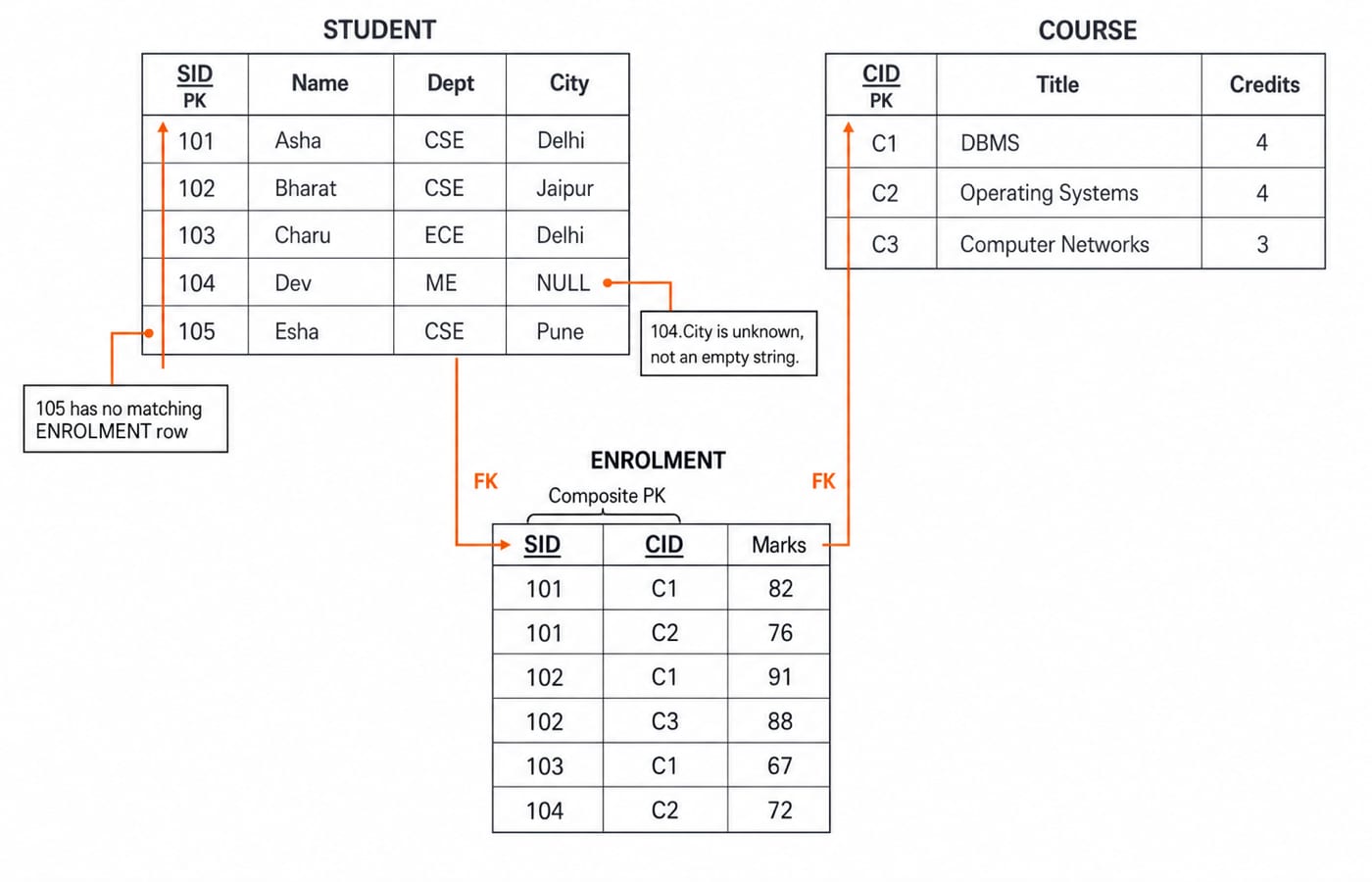
The example database has these rows:
STUDENT(SID, Name, Dept, City):(101,Asha,CSE,Delhi),(102,Bharat,CSE,Jaipur),(103,Charu,ECE,Delhi),(104,Dev,ME,NULL),(105,Esha,CSE,Pune)COURSE(CID, Title, Credits):(C1,DBMS,4),(C2,Operating Systems,4),(C3,Computer Networks,3)ENROLMENT(SID,CID,Marks):(101,C1,82),(101,C2,76),(102,C1,91),(102,C3,88),(103,C1,67),(104,C2,72)
Esha has no enrolment. Dev's city is unknown. The logical reading order is FROM/JOIN, WHERE, GROUP BY, HAVING, SELECT, DISTINCT, ORDER BY, then row limiting (LIMIT, TOP, or FETCH FIRST, depending on the product). This differs from written SQL order.
Define a safe schema with DDL, keys, constraints, and views
Portable definitions make rules explicit:
CREATE TABLE STUDENT (
  SID INT PRIMARY KEY, Name VARCHAR(30) NOT NULL,
  Dept VARCHAR(5) NOT NULL, City VARCHAR(20)
);
CREATE TABLE COURSE (
  CID CHAR(2) PRIMARY KEY, Title VARCHAR(40) UNIQUE NOT NULL,
  Credits INT CHECK (Credits BETWEEN 1 AND 6)
);
CREATE TABLE ENROLMENT (
  SID INT, CID CHAR(2), Marks INT CHECK (Marks BETWEEN 0 AND 100),
  PRIMARY KEY (SID, CID),
  FOREIGN KEY (SID) REFERENCES STUDENT(SID),
  FOREIGN KEY (CID) REFERENCES COURSE(CID)
);CREATE, ALTER, and DROP change objects. TRUNCATE and DELETE both remove rows, but DELETE goes row by row and can be rolled back, while TRUNCATE empties the table wholesale and on most products cannot be. Constraints reject bad state: (106,NULL,CSE,Kota) breaks NOT NULL; (105,C9,85) references a missing course; (105,C3,108) breaks the marks check; another (101,C1,95) duplicates the composite primary key. Application validation does not replace database constraints.
A DBMS_SCORES view joining students to C1 enrolments and exposing SID, Name, and Marks contains (101,Asha,82), (102,Bharat,91), (103,Charu,67). An index may speed access without changing results. For poorly decomposed tables, continue with DBMS normalization explained.
Change data safely with DML, transactions, and access control
DDL defines objects. DML covers SELECT, INSERT, UPDATE, and DELETE. DCL commonly includes GRANT and REVOKE; TCL includes COMMIT, ROLLBACK, and savepoints. Many clients run with autocommit on, so an explicit BEGIN or START TRANSACTION is what makes a later ROLLBACK mean anything.
Consider BEGIN; change Bharat's C1 mark from 91 to 94; savepoint after_mark; insert (105,C3,85); then ROLLBACK TO after_mark. Esha's insert disappears, but 94 remains pending. A final ROLLBACK restores 91. COMMIT would make remaining changes durable.
UPDATE ENROLMENT SET Marks=Marks+5 without WHERE changes all six marks to 87,81,96,93,72,77. A privilege statement is GRANT SELECT ON DBMS_SCORES TO interviewer, although role syntax is product-specific.
Read rows with SELECT, WHERE, DISTINCT, NULL, and ORDER BY
SELECT Name, City
FROM STUDENT
WHERE Dept='CSE'
ORDER BY Name;
This returns (Asha,Delhi), (Bharat,Jaipur), (Esha,Pune). SELECT DISTINCT Dept FROM STUDENT ORDER BY Dept returns CSE, ECE, ME. An alias changes an output label, not the stored column.
Null introduces unknown. City = NULL returns no rows; City IS NULL gets (104,Dev). City <> 'Delhi' returns Bharat and Esha, not Dev. Thus COUNT(City)=4, while COUNT(*)=5.
AND has precedence over OR. Dept='CSE' OR Dept='ECE' AND City='Delhi' returns Asha, Bharat, Charu, and Esha. (Dept='CSE' OR Dept='ECE') AND City='Delhi' returns only Asha and Charu. Parentheses make the intention visible.
Joins and set operations: predict rows first
Predict the rows first, then check. The three-table join for the DBMS high scorers is:
SELECT s.Name, e.Marks
FROM STUDENT s
JOIN ENROLMENT e ON e.SID=s.SID
JOIN COURSE c ON c.CID=e.CID
WHERE c.Title='DBMS' AND e.Marks>=80
ORDER BY e.Marks DESC, s.Name;
Before the filter, the join produces one row per DBMS enrolment: (Asha,82), (Bharat,91), (Charu,67). Applying Marks>=80 then drops Charu, and the sort gives:
Name | Marks |
|---|---|
Bharat | 91 |
Asha | 82 |
Now keep every student, matched or not:
SELECT s.Name, e.CID
FROM STUDENT s
LEFT JOIN ENROLMENT e ON e.SID=s.SID;
That left join keeps every student and yields seven rows: (Asha,C1), (Asha,C2), (Bharat,C1), (Bharat,C3), (Charu,C1), (Dev,C2), (Esha,NULL). Moving e.CID='C1' from ON to WHERE can remove unmatched Esha, changing the result.
For sets, CSE IDs are {101,102,105} and DBMS-enrolled IDs are {101,102,103}. UNION gives {101,102,103,105}, INTERSECT gives {101,102}, and CSE EXCEPT DBMS gives {105}. Oracle spells the difference MINUS, and MySQL only gained INTERSECT and EXCEPT in 8.0.31, so older installs need NOT IN or NOT EXISTS instead. For self joins and the full outer-join family, see SQL queries and joins in DBMS.
Worked GROUP BY, HAVING, aggregates, and subqueries
The grouped query is:
SELECT c.Title, COUNT(*) AS students, AVG(e.Marks) AS average
FROM COURSE c JOIN ENROLMENT e ON e.CID=c.CID
GROUP BY c.CID, c.Title
HAVING AVG(e.Marks)>=75
ORDER BY average DESC;
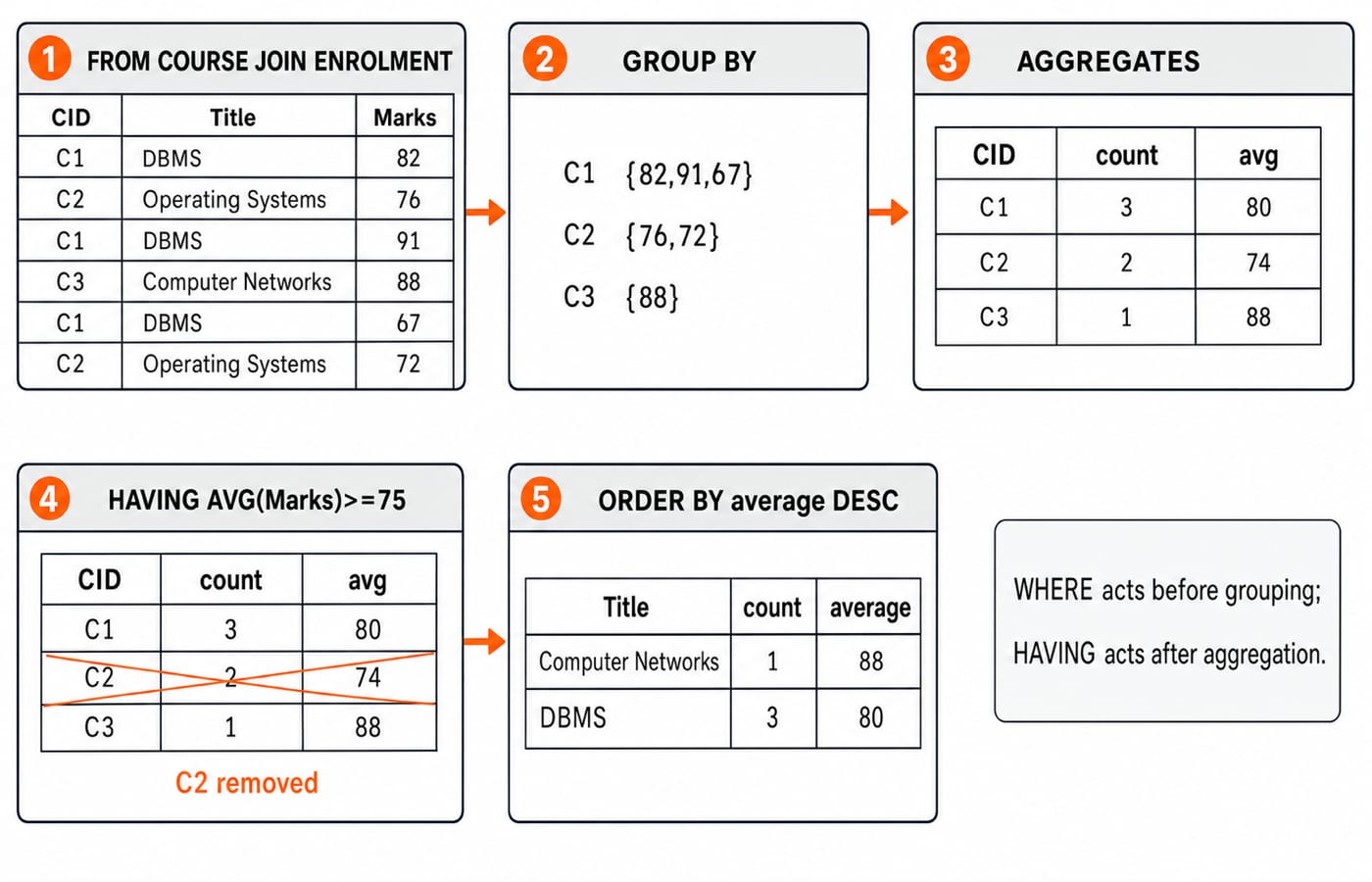
Before HAVING, the groups are:
Course | Marks | Count | Average |
|---|---|---|---|
DBMS | 82, 91, 67 | 3 | 80 |
Operating Systems | 76, 72 | 2 | 74 |
Computer Networks | 88 | 1 | 88 |
The output is (Computer Networks,1,88), then (DBMS,3,80). WHERE Marks>=75 removes rows before grouping. It drops Charu's 67, changing the DBMS average to (82+91)/2 = 86.5. HAVING removes complete groups after averages exist.
A correlated subquery can select DBMS students above its average. The inner average is (82+91+67)/3 = 240/3 = 80, so Asha at 82 and Bharat at 91 pass; Charu at 67 fails. Its inner query refers to the current outer row. A join or window-function solution may also exist, but no form is always faster.
How GATE-style questions and interviews test SQL
Check four answers against the database:
High-scoring DBMS rows: Bharat 91 and Asha 82, because only C1 marks at least 80 qualify.
COUNT(*)=5butCOUNT(City)=4, because the latter ignores Dev's null city.(105,C9,85)fails, becauseC9violates the course foreign key.CSE
EXCEPTDBMS is{105}, because only Esha is CSE without C1.
Recurring traps include WHERE versus HAVING, ON versus WHERE after an outer join, null versus zero or an empty string, UNION versus UNION ALL, and primary versus foreign keys. Separate a subquery's rows from the outer result. NOT IN can misbehave if its subquery contains NULL, so NOT EXISTS is often safer when nullability is possible.
Interviewers can ask: Why did this left join lose Esha? Which constraint rejects C9? Why did filtering before grouping change the average? Give both the result and the reason.
SQL in one minute and the next practice step
Define tables and constraints, learn the six enrolment rows, predict each join, filter with null-aware predicates, group before HAVING, inspect set duplicates, and control changes with transactions. Remember Bharat at 91, the DBMS average of 80, and Esha paired with NULL after the left join.
Practise in three passes: write the expected row count, list the rows, then run the query and explain any mismatch. KnowledgeGate's question bank carries more than 500 SQL questions to run that loop on. For a sequenced DBMS track alongside the rest of core CS, work through GATE Guidance by Sanchit Sir; if interviews are the nearer goal, CS Fundamentals for Placements covers the same SQL ground with placement-style questions.
Finally, rewrite the grouped query so C2 appears. Changing HAVING AVG(Marks)>=75 to >=74 should produce Computer Networks 88, DBMS 80, and Operating Systems 74, in descending order.
Keep learning
SQL Joins Explained: INNER, LEFT, RIGHT, FULL, CROSS and SELF with Runnable Examples
Trace all six SQL join types on one support-agent dataset, with runnable queries, exact outputs, NULL behaviour, row counts and filter-placement traps.
Updated 21 Oct 20265 min readDBMS
GROUP BY and HAVING in SQL: Syntax and Worked Examples
Trace eight sales rows through WHERE, GROUP BY, aggregates, and HAVING, then tackle multiple columns, NULLs, COUNT variants, and common query traps.
Updated 17 Oct 20265 min readDBMS
SQL Aggregate Functions: COUNT, SUM, AVG, MIN and MAX with Examples
Use one runnable sales table to see exactly how SQL aggregates treat rows, NULL values, duplicates and groups. Every result includes the arithmetic behind it.
Updated 13 Oct 20265 min readDBMS
Query Languages in DBMS: Relational Algebra, SQL and a Worked Query
Follow one database request from plain English to relational algebra, intermediate relations, relational calculus and SQL, with every result traced.
Updated 9 Oct 20265 min readDBMS