

WebSockets in Node.js: Build a Real-Time Chat Server Step by Step
Build and run a small Node.js WebSocket chat with two terminal clients. Follow the handshake, room protocol, broadcasts, cleanup, heartbeat, and delivery count.
KnowledgeGate Team
Exam prep & CS education
Updated 25 Nov 20266 min read
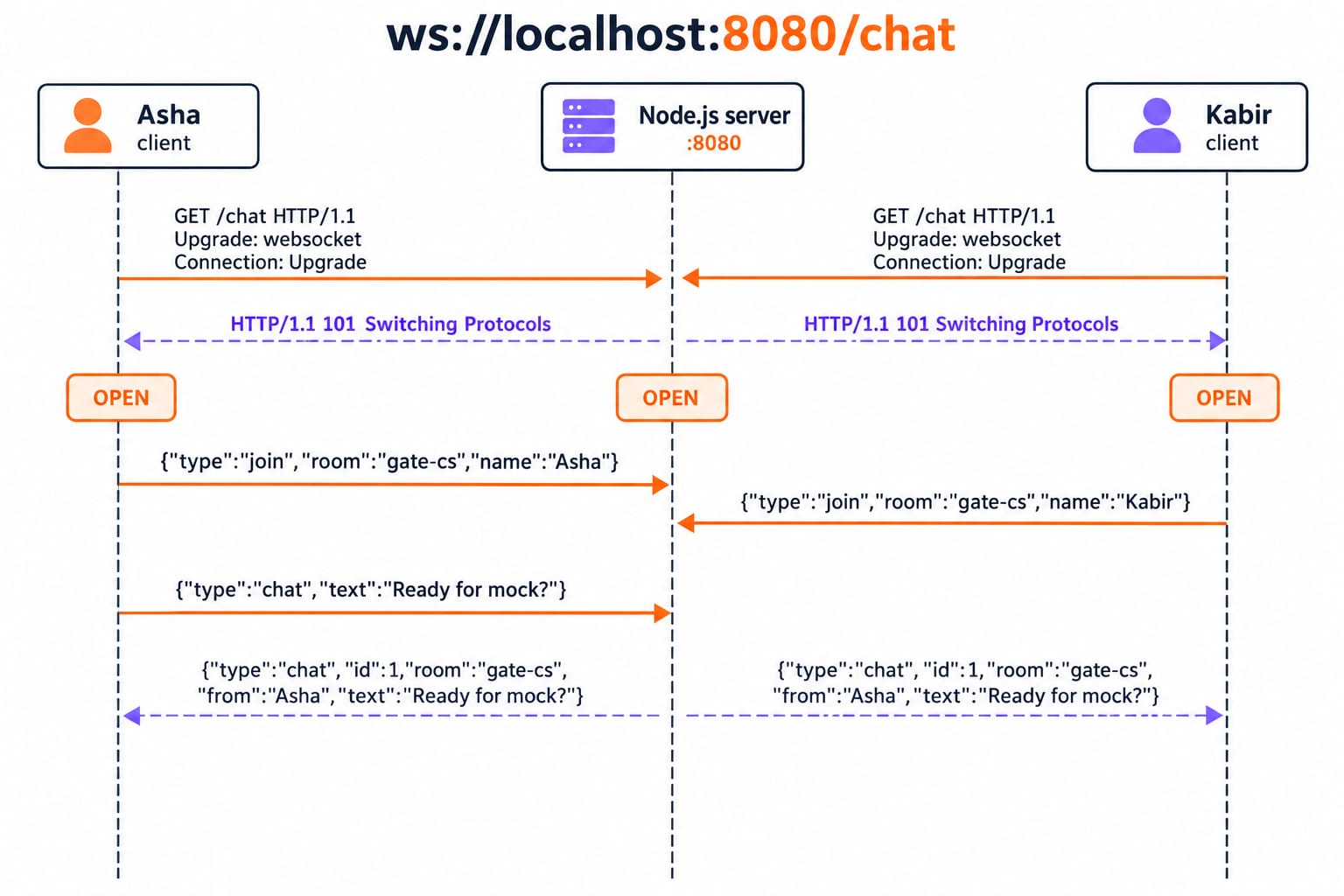
HTTP waits for a client request, but live screens also need immediate server events. Build a Node.js chat with terminal clients Asha and Kabir in room gate-cs at ws://localhost:8080/chat.
The in-memory server has no login or database. It traces the handshake, join, broadcast, cleanup, and heartbeat; production deployments add identity, persistence, TLS, backpressure, and observability.
1. WebSockets in Node.js: from an HTTP Upgrade to two-way messages
A client sends an HTTP/1.1 GET /chat Upgrade request. After 101 Switching Protocols, both sides exchange messages over TCP without new HTTP requests. RFC 6455 defined this lifecycle in December 2011.
Approach | Direction | Connection model | Fitting use case |
|---|---|---|---|
Normal HTTP | Client request, server response | A request for each operation | Loading a profile |
Polling | Client repeatedly asks | Repeated HTTP requests | Infrequent status checks |
Server-Sent Events | Server to client after setup | One long-lived HTTP stream | A live news feed |
WebSocket | Both directions | One upgraded connection | Chat or multiplayer events |
Polling every 2 seconds for 60 seconds makes 60 / 2 = 30 attempts. One upgraded connection carries the two typed chats; the 30-poll comparison does not estimate byte savings. Review DNS and HTTP and TCP vs UDP for the foundations.
2. Set up the Node.js WebSocket server and two CLI clients
Create the project and install the maintained ws package:
mkdir node-websocket-chat
cd node-websocket-chat
npm init -y
npm install ws
Create CommonJS files server.js and client.js. node:http owns HTTP; the non-core ws package supplies WebSocket APIs.
Put this in server.js:
const http = require("node:http");
const WebSocket = require("ws");
const { WebSocketServer } = WebSocket;

const server = http.createServer((request, response) => {
  if (request.method === "GET" && request.url === "/health") {
    response.writeHead(200, { "Content-Type": "application/json" });
    response.end(JSON.stringify({ status: "ok" }));
    return;
  }

  response.writeHead(404, { "Content-Type": "text/plain" });
  response.end("Not found\n");
});

const wss = new WebSocketServer({
  server,
  path: "/chat",
  maxPayload: 16 * 1024,
});

let nextMessageId = 1;

function roomMembers(room) {
  return [...wss.clients].filter(
    (client) =>
      client.readyState === WebSocket.OPEN && client.meta.room === room,
  );
}

function broadcastRoom(room, payload) {
  const encoded = JSON.stringify(payload);
  for (const client of roomMembers(room)) client.send(encoded);
}

function sendError(socket, code) {
  if (socket.readyState === WebSocket.OPEN) {
    socket.send(JSON.stringify({ type: "error", code }));
  }
}

wss.on("connection", (socket) => {
  socket.meta = { name: null, room: null };

  socket.on("error", (error) => {
    console.error("WebSocket connection error:", error.message);
  });

  socket.on("message", (raw) => {
    let message;
    try {
      message = JSON.parse(raw.toString());
    } catch {
      sendError(socket, "BAD_JSON");
      return;
    }

    if (!message || typeof message !== "object" || Array.isArray(message)) {
      sendError(socket, "INVALID_MESSAGE");
      return;
    }

    if (!socket.meta.room) {
      if (message.type === "chat") {
        sendError(socket, "JOIN_REQUIRED");
        return;
      }

      const name = typeof message.name === "string" ? message.name.trim() : "";
      if (
        message.type !== "join" ||
        name.length < 1 ||
        name.length > 20 ||
        message.room !== "gate-cs"
      ) {
        sendError(socket, "INVALID_JOIN");
        return;
      }

      socket.meta = { name, room: message.room };
      const memberCount = roomMembers(message.room).length;
      broadcastRoom(message.room, {
        type: "system",
        text: `${name} joined ${message.room}`,
        memberCount,
      });
      return;
    }

    if (message.type !== "chat" || typeof message.text !== "string") {
      sendError(socket, "INVALID_MESSAGE");
      return;
    }

    const text = message.text.trim();
    if (text.length > 200) {
      sendError(socket, "MESSAGE_TOO_LONG");
      return;
    }
    if (text.length < 1) {
      sendError(socket, "INVALID_MESSAGE");
      return;
    }

    broadcastRoom(socket.meta.room, {
      type: "chat",
      id: nextMessageId++,
      room: socket.meta.room,
      from: socket.meta.name,
      text,
    });
  });

  socket.on("close", () => {
    const { name, room } = socket.meta;
    socket.meta = { name: null, room: null };
    if (!name || !room) return;

    broadcastRoom(room, {
      type: "system",
      text: `${name} left ${room}`,
      memberCount: roomMembers(room).length,
    });
  });
});

server.listen(8080, () => {
  console.log("Listening on http://localhost:8080");
});
Run node server.js, then check HTTP:
curl -i http://localhost:8080/healthExpect 200 with {"status":"ok"}; other paths return 404. Put this in client.js:
const readline = require("node:readline");
const WebSocket = require("ws");

const name = process.argv[2];
if (!name) {
  console.error("Usage: node client.js <name>");
  process.exit(1);
}

const socket = new WebSocket("ws://localhost:8080/chat");
const input = readline.createInterface({ input: process.stdin });

socket.on("open", () => {
  socket.send(JSON.stringify({ type: "join", room: "gate-cs", name }));

  input.on("line", (line) => {
    const text = line.trim();
    if (text && socket.readyState === WebSocket.OPEN) {
      socket.send(JSON.stringify({ type: "chat", text }));
    }
  });
});

socket.on("message", (raw) => {
  try {
    console.log(JSON.stringify(JSON.parse(raw.toString())));
  } catch {
    console.error("Server sent invalid JSON");
  }
});

socket.on("close", (code, reason) => {
  console.log(`Closed: ${code} ${reason.toString()}`);
  input.close();
});

socket.on("error", (error) => console.error(error.message));

process.on("SIGINT", () => {
  input.close();
  if (socket.readyState === WebSocket.OPEN) {
    socket.close(1000, "Client exiting");
  } else {
    process.exit(0);
  }
});
It joins inside open, sends non-empty lines, guards JSON parsing, and reports closure.
3. Build the room join and broadcast logic with a small JSON protocol
Each socket starts empty. Malformed JSON gets BAD_JSON. The first valid message joins gate-cs with a trimmed 1-20 character name; an early chat gets JOIN_REQUIRED. After setting metadata, Asha receives:
{"type":"system","text":"Asha joined gate-cs","memberCount":1}Kabir's join reaches both:
{"type":"system","text":"Kabir joined gate-cs","memberCount":2}Broadcasting serialises once and selects open room sockets. Accepted chats contain 1-200 trimmed characters and alone increment the ID:
{"type":"chat","id":1,"room":"gate-cs","from":"Asha","text":"Ready for mock?"}Kabir gets the next ID:
{"type":"chat","id":2,"room":"gate-cs","from":"Kabir","text":"At 7:30 PM."}Overlong text returns MESSAGE_TOO_LONG to its sender. Close cleanup clears metadata and recounts, so Kabir receives:
{"type":"system","text":"Asha left gate-cs","memberCount":1}Restart clears rooms, history, and IDs.
4. Run the worked chat and account for every message delivery
Run, in order:
Terminal 1:
node server.jsTerminal 2:
node client.js AshaTerminal 3:
node client.js Kabir
Asha types Ready for mock?, Kabir types At 7:30 PM., then Asha exits.
Step | Client-to-server application message | Open room members | Server-to-client delivery | Result |
|---|---|---|---|---|
Asha joins |
| 1 | 1 | Count 1 |
Kabir joins |
| 2 | 2 | Count 2 |
Asha chats |
| 2 | 2 | ID 1 |
Kabir chats |
| 2 | 2 | ID 2 |
Asha disconnects | None | 1 | 1 | Count 1 |
Clients send 2 join + 2 chat = 4 messages. Deliveries are 1 + 2 + 2 + 2 = 7; disconnect adds 1, so 7 + 1 = 8. These are not packet counts.
5. Harden the teaching server: validation, identity, heartbeat and slow clients
The 16 KiB maxPayload is a tutorial limit, not an RFC default; chat text is capped at 200 characters. Real services need authentication, an Origin allowlist, wss://, and secrets kept out of logged queries.
A connection-level error listener prevents protocol and payload violations from terminating Node.js. The ws library then closes the offending peer.
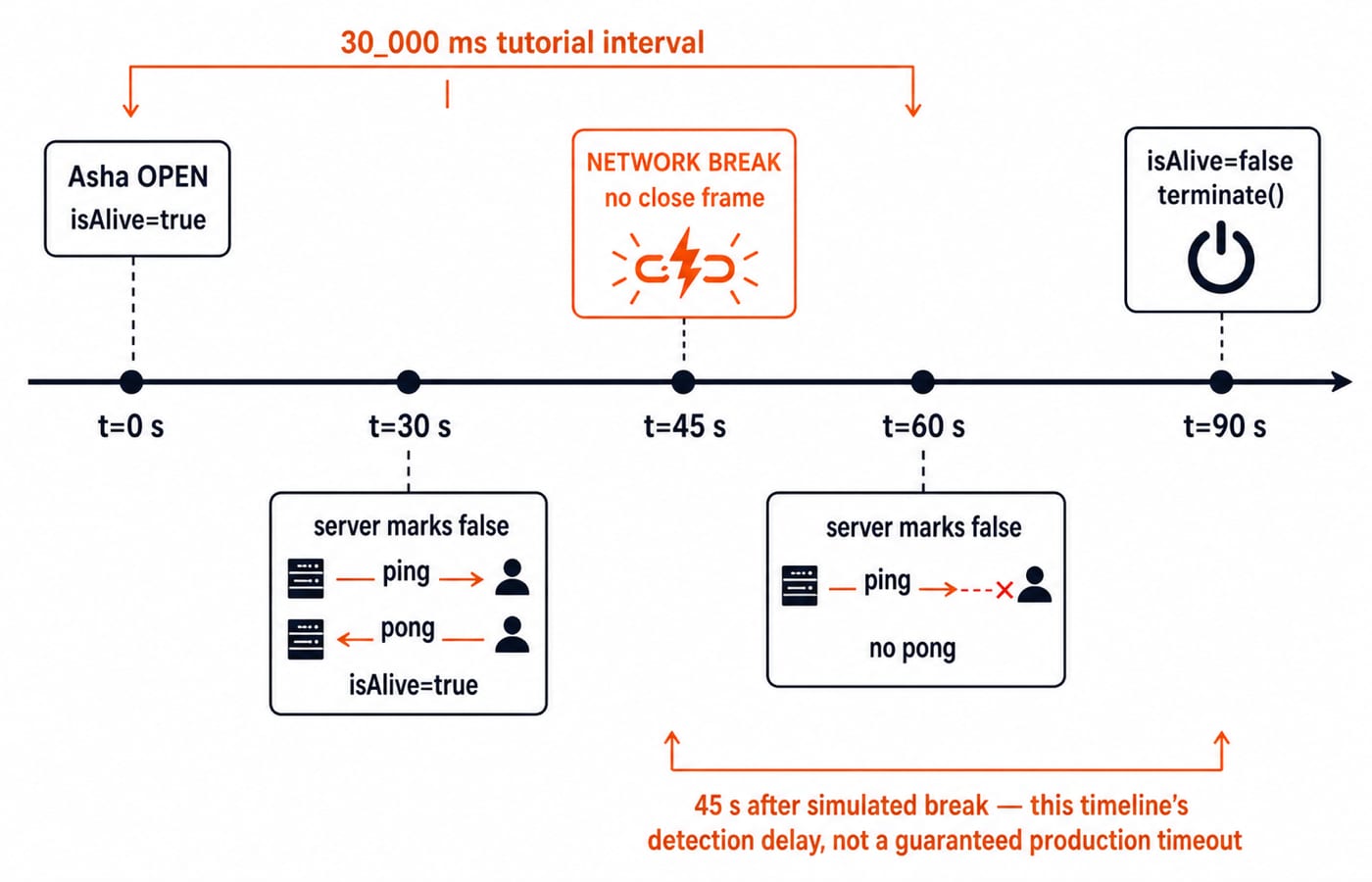
A heartbeat can follow this ws pattern:
wss.on("connection", (socket) => {
  socket.isAlive = true;
  socket.on("pong", () => {
    socket.isAlive = true;
  });
});

const heartbeat = setInterval(() => {
  for (const socket of wss.clients) {
    if (socket.isAlive === false) {
      socket.terminate();
      continue;
    }
    socket.isAlive = false;
    socket.ping();
  }
}, 30_000);

wss.on("close", () => clearInterval(heartbeat));
Choose the interval from proxy idle timeouts and the application's failure-detection target.
For backpressure, bound socket.bufferedAmount, then pause, drop non-critical updates, or close slow clients. Multiple instances need shared events, identity, and room state. Persist shared room state and message history when restarts must preserve them.
6. Common Node.js WebSocket errors: symptom, cause and repair
Symptom | Likely cause | Repair |
|---|---|---|
Response |
| Match both paths |
HTTPS page fails | Client uses | Configure TLS and |
Proxy page or timeout | Upgrade or idle-timeout fault | Verify proxy settings |
|
| Join inside |
Duplicate chat line | Duplicate reconnect listeners | Register once; remove old listeners |
Crash on bad input | Unguarded | Keep |
Server exits on oversized frame | Socket error has no listener | Handle error; keep maxPayload |
A missing close frame leaves dead peers in wss.clients. Use heartbeat, cleanup, and slow-client limits.
7. How interviews and coding assessments test WebSocket understanding
Trace these review prompts:
Why
101first? Upgrade switches protocols; chats use the new channel.30polls versus one connection? Different models, not exact byte savings.Chat before join? Asha gets
JOIN_REQUIRED.Why check room and
OPEN? Exclude wrong-room and unusable sockets.
Add room placements, place Kabir there, and prove Asha's ID 1 chat has one delivery. Then reconnect without duplicating stdin listeners.
8. WebSockets in Node.js: the short version and next step
Remember six checks: HTTP Upgrade; persistent TCP after 101; explicit JSON; join before chat; open-room broadcasts; heartbeat and bounds. In gate-cs, IDs are 1 and 2, with 8 deliveries including disconnect and one member left.
Continue with the Node.js, Express.js & MongoDB course, the broader MERN Stack course, or the Coding & Skills catalogue.
Keep learning
Express Basics in Node.js: Build Your First JSON API
Build a small Express books API and learn how requests move through JSON parsing, middleware, routes, validation, and predictable error responses.
Updated 26 Nov 20266 min readWeb Development
Testing APIs in Node.js: Jest and Supertest Tutorial with Runnable Examples
Build a small Express task API and test its routes, validation, headers, JSON responses and state changes without opening a fixed server port.
Updated 25 Nov 20266 min readWeb Development
Sessions and Cookies in Node.js: A Runnable Express Login Tutorial
Build the complete localhost flow, then trace what the browser sends, what Express stores, and why logout makes the dashboard anonymous again.
Updated 24 Nov 20266 min readWeb Development

Node.js Security Best Practices: Harden an Express API with Runnable Examples
Build and test a small Express transfer API that layers authentication, strict Zod validation, authorisation, rate limiting, safe errors and dependency hygiene.
Updated 23 Nov 20266 min readWeb Development