React Interview Questions for Freshers: Hooks, Reconciliation and the State Choices That Get Tested
Fresh React interviews are won by tracing renders, not reciting definitions. Learn the stale-closure trap, stable keys and a practical state-management decision rule.
KnowledgeGate Team
Exam prep & CS education
Updated 29 Jul 20265 min read

Most freshers can say that React is a library for building user interfaces and name several hooks. Then the interviewer asks why a counter is stuck at 1, or why deleting one list item changes the checkbox below it, and the memorised answer stops helping.
React interviews for freshers test closures, re-renders and the diffing model under the UI. Understand those mechanisms and you can reason through unfamiliar code instead of guessing what it prints.
The three things a React fresher interview actually probes
Most useful React questions fall into three groups:
Hooks and render behaviour: what a hook captures, when an effect runs, and why hooks must be called consistently.
Reconciliation: how React compares element trees, what triggers a re-render, and how keys preserve child identity.
State choices: when state should remain local, move to a common parent, enter Context, or live in Redux.
Framework trivia can still appear, but obscure API names rarely decide the interview. The stronger candidate can trace a render and explain why the result follows. If you are also revising the wider interview syllabus, the guide to technical interview preparation for freshers helps place frontend questions beside OS, DBMS, networks and OOP.
Hooks and the stale-closure trap that catches everyone
Every render of a function component creates a new set of local values. A callback created during that render closes over, or remembers, those particular values. It does not automatically read a newer value just because a later render occurred.
A standard fresher question shows this component and asks what the console prints and what the screen shows:
function Counter() {
  const [count, setCount] = useState(0);

  useEffect(() => {
    const id = setInterval(() => {
      console.log(count);
      setCount(count + 1);
    }, 1000);

    return () => clearInterval(id);
  }, []);

  return <h1>{count}</h1>;
}
Trace it rather than reading it loosely:
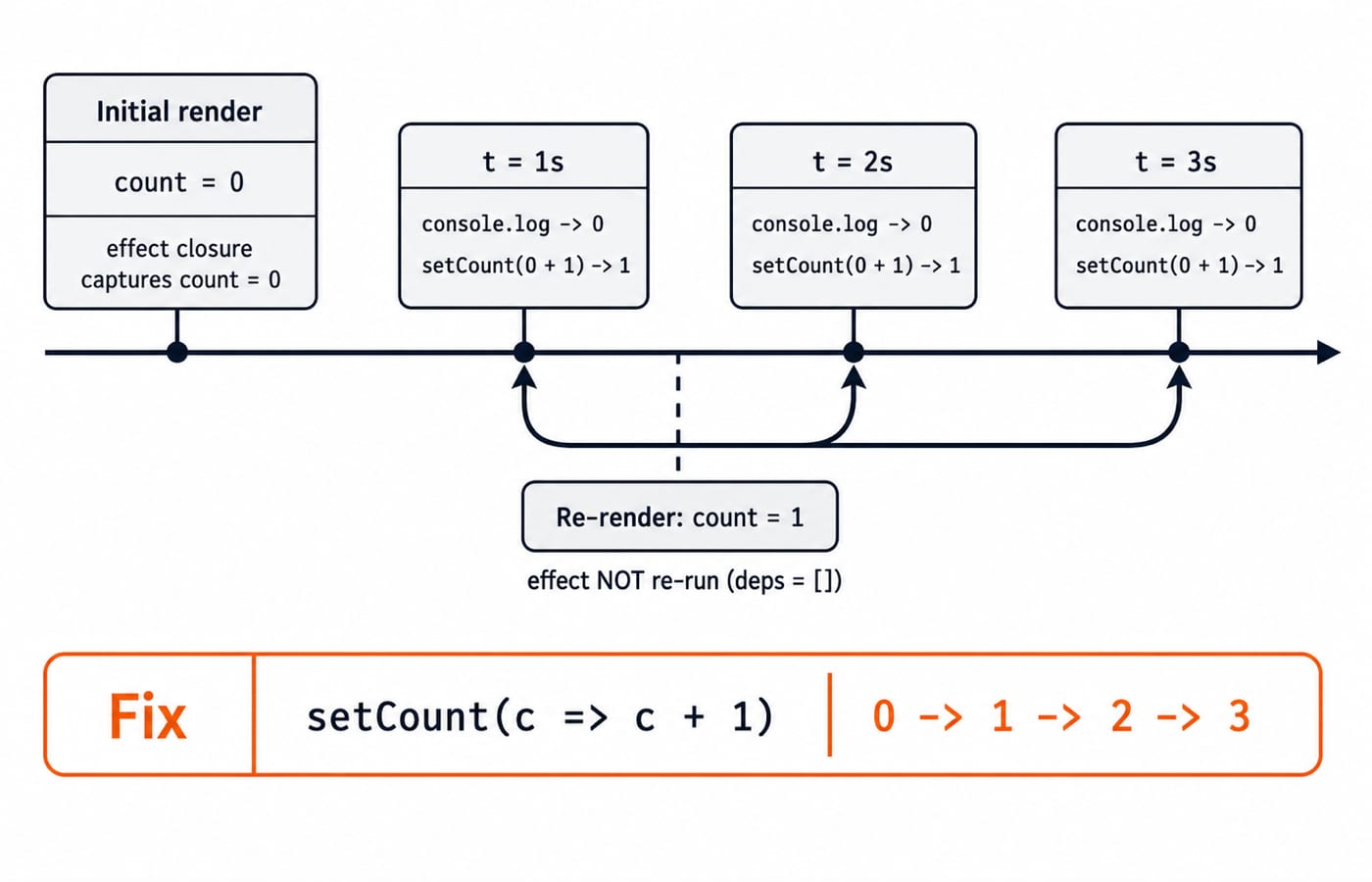
The initial render has
count = 0, so the screen first shows0.The effect runs after mount. Its callback captures
count = 0.At the first tick, it logs
0and callssetCount(0 + 1), which sets the state to1.React renders again with
count = 1, but the effect does not run again because its dependency array is empty.The old interval still owns the original closure. Every later tick logs
0and requests the value1again.
The console therefore shows 0, 0, 0, .... The page shows 0, then 1, and stays at 1.
There are two correct fixes. If the next value depends only on the previous state, use the functional form:
setCount(c => c + 1);That form works with the empty dependency array because React supplies the current state to c. Alternatively, put count in the dependency array. React will then clean up the old interval and create a new one after each changed count. The functional update is usually cleaner for this timer.
The Rules of Hooks follow the same need for consistency. Call hooks at the top level, never inside loops or conditions. React associates hook state with call order. If one render skips a conditional hook, every later hook can be matched with the wrong stored state.
Reconciliation, keys and the checkbox that moves
React builds a new element tree after a state or prop change and compares it with the previous tree. It then updates only the parts that differ. In a list, key tells React which child in the new tree corresponds to which child in the old tree.
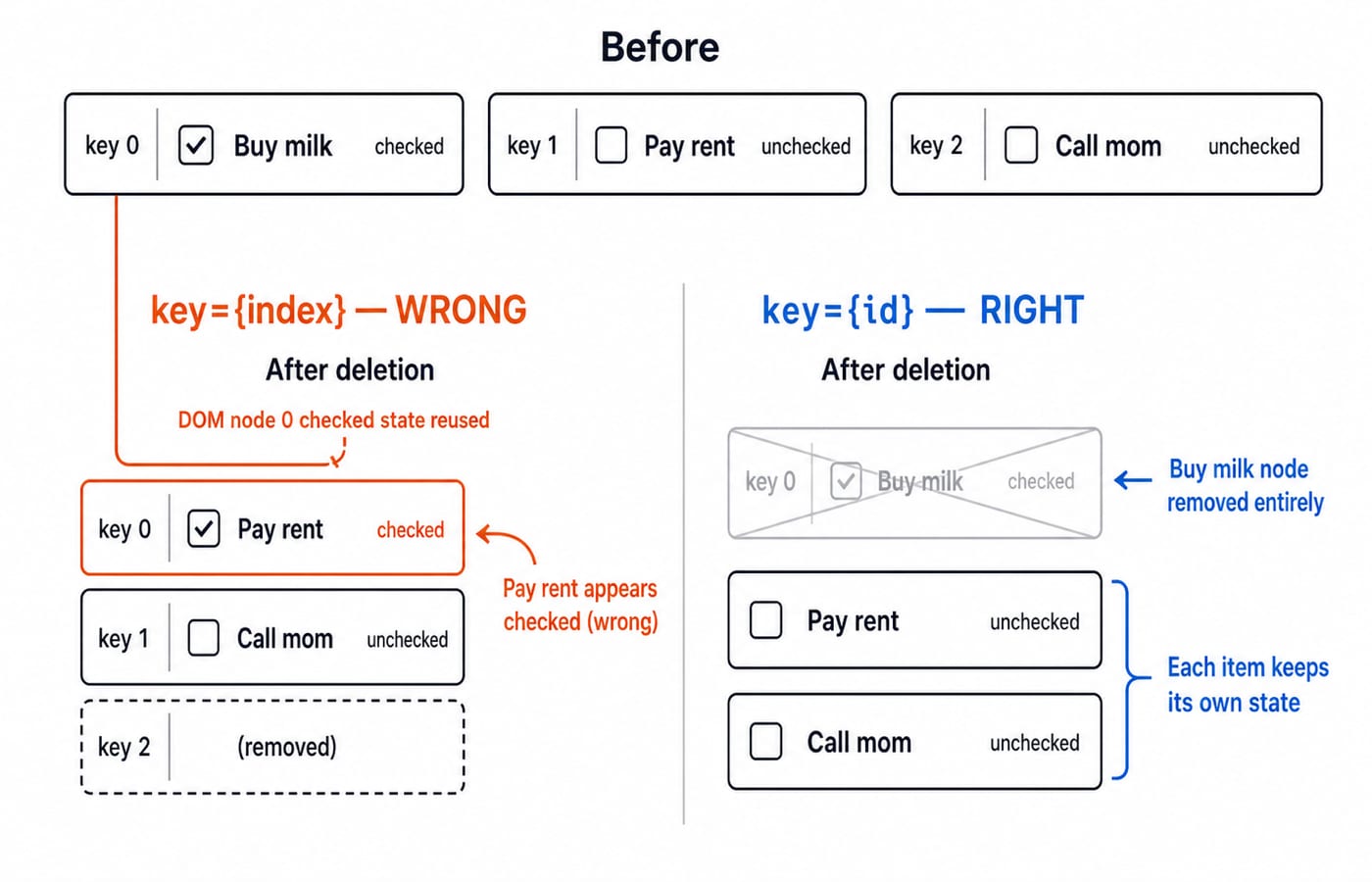
Interviewers pose this as a to-do list and ask why the wrong row stays ticked. Suppose the list is ['Buy milk', 'Pay rent', 'Call mom']. The rows use indices 0, 1 and 2 as keys, and each row owns checkbox state. The current checkbox states are checked, unchecked and unchecked.
Now delete Buy milk. The data shifts, so Pay rent becomes index 0 and Call mom becomes index 1. React sees key 0 again and reuses the child that previously represented Buy milk. Its local checked state survives. The user now sees Pay rent checked even though they never checked it.
With key={item.id}, identity follows the item rather than its position. React removes the Buy milk child, while Pay rent and Call mom retain their own unchecked state. An index key is acceptable only when a list is static or append-only and items will never be inserted, deleted or reordered.
Local state, lifted state, Context or Redux
The right state tool depends on ownership and update flow, not on which library sounds more advanced.
Situation | Best starting choice | Reason |
|---|---|---|
One component owns the value | Local | Ownership and updates stay close to the UI |
Two sibling components must agree | Lift state to their nearest common parent | One source of truth feeds both siblings |
Many components need a low-frequency global value | Context | Good for a theme or current user without repeated prop passing |
Many distant components read and write shared state often | Redux or another store | Predictable updates, central inspection and useful developer tools |
Do not reach for Redux on day one merely because the project might grow. Start with the smallest owner that can express the requirement, then move state when real sharing pressure appears. The Complete React and Redux course connects these choices to the patterns interviewers expect you to explain.
React interview traps that fail freshers
Interviewers often show a short fragment and ask, “What prints?” or “What is wrong here?” Expect follow-ups about the cause, not just the fix.
Stale effect closures: the callback keeps values from the render that created it.
Missing dependencies: an effect reads a value that is absent from its dependency array, so it may run with outdated inputs.
Index keys in a dynamic list: child identity follows position, so local state can attach to the wrong data.
Fresh object or array props on every render: reference equality changes and can trigger avoidable child work.
useMemoanduseCallbackeverywhere: memoisation also has a cost and should solve a measured identity or computation problem.
There is no common company syllabus for a React interview. Read the current documentation, trace small components and practise explaining each render aloud. Pair that with broader problem-solving through DSA interview questions for placements, because many frontend interviews still include a coding round.
The short version and your next step
Know which value a hook callback captured, and know which child a list key identifies. Those two ideas dissolve a large share of React fresher traps. Then choose state according to ownership instead of defaulting to a global store.
Work through the Complete React and Redux course, then use the wider coding-skills catalogue to strengthen the programming base around it. KnowledgeGate also has more than 600 MERN-stack questions across React, Redux, Node, Express and MongoDB, so trace the code before checking each answer.
Keep learning

JavaScript Event Delegation: Bubbling, target and currentTarget with Runnable Examples
Learn how browser events travel through the DOM, then build one delegated listener that handles nested controls and rows added later.
Updated 6 Oct 20265 min readWeb Development
JavaScript Operators: Types, Precedence and Runnable Examples
Learn how JavaScript arithmetic, assignment, comparison, logical and modern operators behave by tracing one score program from inputs to final output.
Updated 2 Oct 20266 min readWeb Development
JavaScript Data Types and Coercion: Beginner Tutorial with Runnable Examples
Learn how JavaScript stores values, copies primitives and objects, converts input, compares values and produces surprising output. Trace each rule in the console.
Updated 27 Sep 20265 min readWeb Development

JavaScript Conditionals and Loops: Beginner Tutorial with Runnable Examples
Learn how JavaScript chooses a branch and repeats work. Build from small syntax examples to a complete score classifier with a traced average.
Updated 25 Sep 20265 min readWeb Development