useEffect Explained: Dependency Arrays, Cleanup Functions and the Bugs Interviewers Probe
Compare all three dependency-array forms, follow teardown before setup, and repair the interval that captures count as zero and freezes the UI at one.
KnowledgeGate Team
Exam prep & CS education
Updated 4 Aug 20265 min read

useEffect looks simple until an interviewer asks why a counter freezes at 1 or why a fetch keeps firing. Both bugs come from the same two facts: dependencies decide when an effect synchronises again, and the effect closes over values from the render that created it.
Trace those two facts and the bug usually explains itself.
What useEffect actually does
An effect runs after React commits a render to the screen, generally after the browser has painted. It is for synchronising a component with something outside React: a network request, subscription, timer, browser API or manually managed DOM system.
These operations should not run while React is calculating JSX. Rendering must remain pure because React may call it more than once or abandon work before committing it.
useEffect(() => {
  document.title = `Results for ${query}`;
}, [query]);
The effect function is created during every render. The dependency array tells React whether the effect from the committed render needs to run. React compares each dependency with its previous value using Object.is.
Think of an effect as a synchronization rule, not a general place to put any code that happens after rendering.
The dependency array in three cases
The syntax changes the schedule:
Form | When the effect runs |
|---|---|
| After every committed render |
| After the initial mount |
| After mount, then when |
An empty array does not mean "run when convenient." It promises that the effect reads no reactive value that can change after the first render.
The exhaustive-deps lint rule checks that promise. If an effect reads a prop, state value or function declared inside the component, that reactive value normally belongs in the dependency list. Omitting it can leave the effect using a value captured from an older render.
Do not silence the rule automatically. First ask why the effect needs the value, whether the effect should be redesigned, or whether a functional state update removes the read.
Cleanup runs before the next setup
An effect can return a cleanup function:
useEffect(() => {
  const id = setInterval(tick, 1000);

  return () => clearInterval(id);
}, [tick]);
React runs cleanup before running the next setup after a relevant dependency change. It also runs the last cleanup when the component unmounts.
For an effect with [query], the order is:
Set up synchronization for the first
query.querychanges.Clean up the synchronization created for the previous
query.Set up synchronization for the new
query.On unmount, clean up the final synchronization.
That teardown-before-setup order prevents duplicate subscriptions and overlapping timers. In development Strict Mode, React may run an extra setup and cleanup cycle to expose missing cleanup. Correct effects tolerate that probe.
The stale-closure counter bug
Consider this interval:
function Counter() {
  const [count, setCount] = useState(0);

  useEffect(() => {
    const id = setInterval(() => {
      setCount(count + 1);
    }, 1000);

    return () => clearInterval(id);
  }, []);

  return <p>{count}</p>;
}
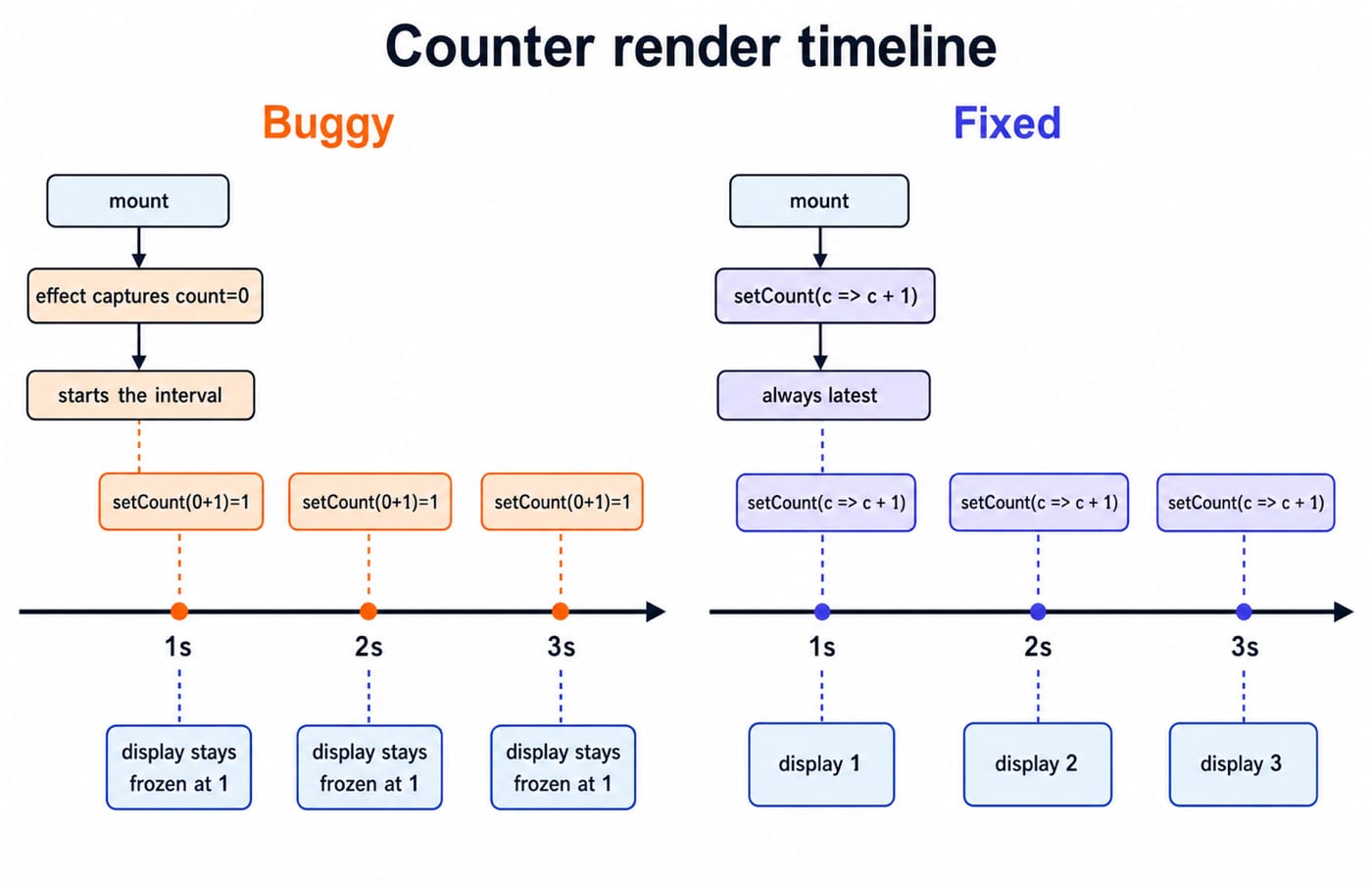
The empty dependency array runs the setup from the mount render. In that render, count is 0. The interval callback closes over that specific value.
Now trace the ticks:
At mount, captured
count = 0.Tick 1 calculates
0 + 1 = 1. React displays 1.Tick 2 still calculates
0 + 1 = 1. The requested value is already 1.Tick 3 again calculates
0 + 1 = 1.
The display freezes at 1. The timer is firing correctly. The callback is repeatedly using stale state.
Another way to see it: the effect never runs again, so no later callback ever captures count 1. Every tick uses the original zero and requests one.
The language mechanism is a closure, not a React-only rule. The Closures in JavaScript guide builds that foundation directly.
Two correct fixes
The clean fix uses a functional state update:
useEffect(() => {
  const id = setInterval(() => {
    setCount(c => c + 1);
  }, 1000);

  return () => clearInterval(id);
}, []);
React supplies the latest committed state as c. The interval no longer reads count from the component scope, so count is not a dependency. Starting from zero, the updater produces 1, then 2, then 3.
The other correct fix is to add count to the dependency array:
useEffect(() => {
  const id = setInterval(() => setCount(count + 1), 1000);
  return () => clearInterval(id);
}, [count]);
Each count change cleans up the old interval and starts another with a fresh captured value. It works, but repeatedly restarting the timer is unnecessary here. Prefer the functional update unless the external synchronization genuinely needs to restart when count changes.
Dependency traps interviewers test
An object or array literal created during rendering has a new reference each time:
const options = { page: 1 };

useEffect(() => {
  fetchData(options);
}, [options]);
options changes by identity on every render. If the effect updates state, that new render can trigger another effect and form a loop. Move object creation inside the effect, depend on the primitive values it needs, or memoize only when memoization is the appropriate design.
Note the block body in that snippet. A concise arrow, () => fetchData(options), returns whatever fetchData returns, and React reads an effect's return value as its cleanup function. Hand it a promise and React warns that an effect must return a function or nothing, and the real teardown never runs.
For fetching, cleanup can abort an obsolete request or mark its response as ignored. Without it, an older response may overwrite newer data after the query changes. Subscriptions must unsubscribe, and timers must clear, or work survives beyond the render that created it.
Interviewers ask you to find the frozen counter, state the cleanup order and explain an accidental fetch loop. Reconciliation, keys and state placement usually come up in the same round, and the React interview questions for freshers guide works through those beside this counter.
The short version and next step
No dependency array means after every render, [] means after mount, and [dep] means after mount and when that dependency changes. Cleanup runs before the next setup and on unmount. A functional updater fixes the frozen counter because it reads the latest state.
Use the React and Redux course for the hooks module and the MERN Stack and DSA bundle for full-stack interview drills. The Coding and DSA course catalog is the wider learning path.
Keep learning

Resume Checklist: What Must Be Included and What Must Be Left Out
3 Oct 20264 min readPlacement Preparation

LDAP Explained: DNs, Bind, Search Filters, and a Developer Login Flow
Build one LDAP mental model from directory tree to login. Trace a service bind, escaped user search, password-verifying user bind, and group-based role check.
Updated 13 Aug 20265 min readPlacement Preparation

Group Discussion Rounds for Placements: How GD Is Scored and How to Prepare Topics
Speaking more is not the same as scoring more in a GD. Learn what panels observe, how to prepare topic notes, and how to practise useful contributions.
11 Aug 20266 min readPlacement Preparation

Off-Campus Placement Strategy for 2026 Graduates: Drives, Portals and Referrals That Work
Turn off-campus hiring into a weekly operating system that keeps drives, portals, referrals, follow-ups, and skill preparation moving together.
9 Aug 20267 min readPlacement Preparation