JavaScript Operators: Types, Precedence and Runnable Examples
Learn how JavaScript arithmetic, assignment, comparison, logical and modern operators behave by tracing one score program from inputs to final output.
KnowledgeGate Team
Exam prep & CS education
Updated 2 Oct 20266 min read
You may recognise +, - and =, yet struggle to predict a JavaScript expression with strings, comparisons, &&, ?? or a ternary. A runnable coding-practice example connects inputs to output, followed by common traps and exercises with worked answers. The core mental model is simple: an operator acts on one, two or three operands and produces or assigns a value. For a broader beginner-programming route, explore Free Courses & Guidance by Prashant Sir.
JavaScript operators and operands: read the expression first
In 17 * 5, 17 and 5 are operands, * is the operator, and the result is 85. Operators may be unary (!isReady), binary (score + bonus), or ternary (passed ? "Level cleared" : "Revise and retry").
Assignment = stores a value. Comparisons such as ===, >, and >= produce booleans.
Family | Example | Result |
|---|---|---|
Arithmetic |
|
|
Assignment |
|
|
Comparison |
|
|
Logical |
|
|
Conditional |
|
|
Nullish |
|
|
Optional chaining |
|
|
Bitwise |
|
|
Bitwise & and | differ from logical && and ||. Arithmetic, assignment, comparison, logical, conditional, nullish and optional-chaining operators drive everyday calculations and decisions.
Arithmetic and assignment in one runnable score calculation
Run this program without changing the values:
const solved = 17;
const attempted = 20;
const pointsPerSolve = 5;
const streakBonus = 12;
const penalty = 7;

let score = solved * pointsPerSolve;
score += streakBonus;
score -= penalty;

const accuracy = (solved / attempted) * 100;

console.log({ score, accuracy });
// { score: 90, accuracy: 85 }
Trace the execution: 17 * 5 = 85; score += 12 means score = score + 12, so 85 + 12 = 97; and score -= 7 gives 97 - 7 = 90. Accuracy is 17 / 20 = 0.85, then 0.85 * 100 = 85.
The arithmetic operators are +, -, *, /, %, and **. For example, 17 % 5 = 2 and 3 ** 4 = 81.
score uses let because it changes. The five inputs and accuracy use const because their bindings are not reassigned. A const binding does not make every nested object immutable.
Operator precedence: why parentheses change the result
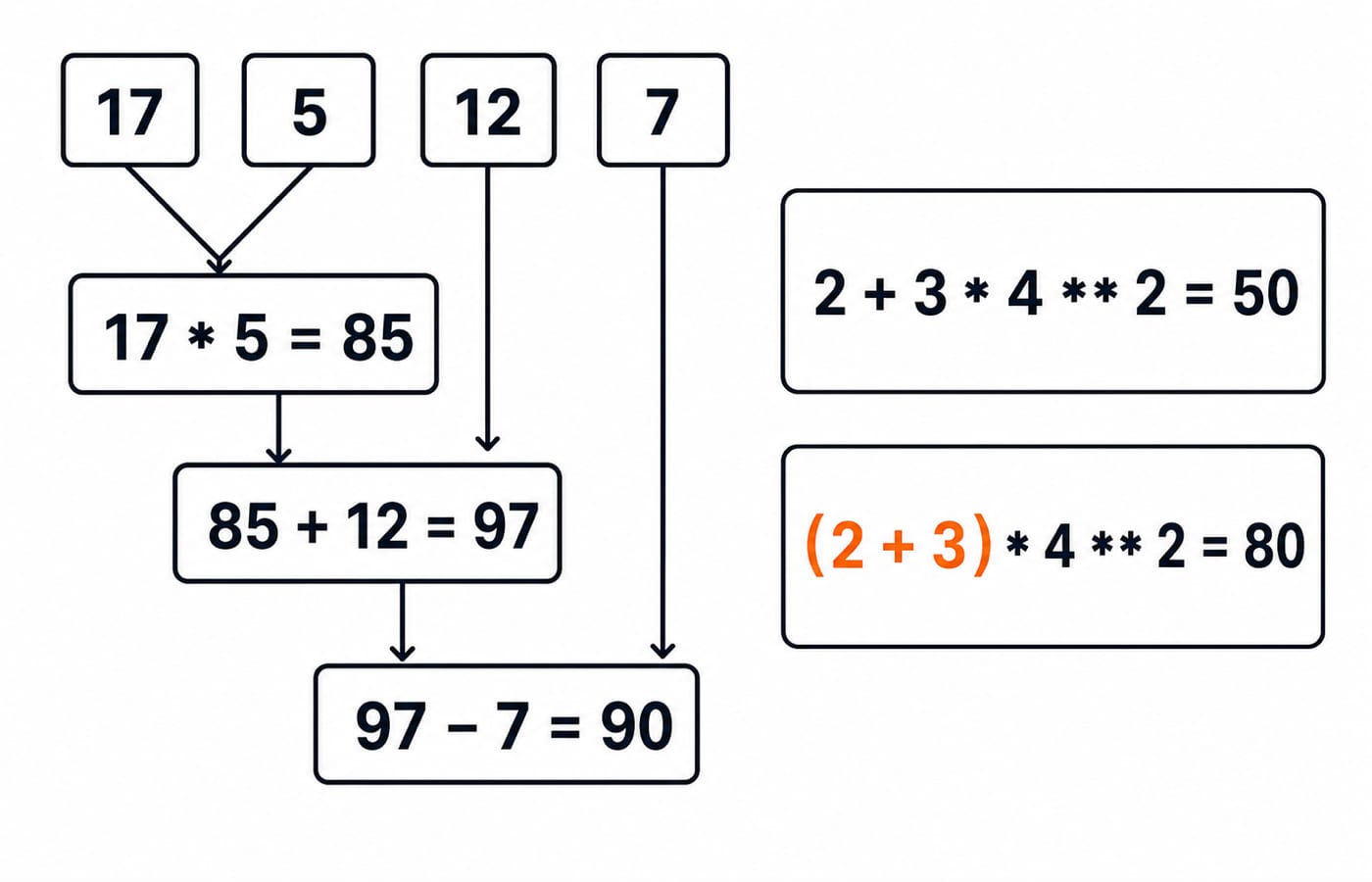
For 2 + 3 * 4 ** 2, exponentiation gives 4 ** 2 = 16, multiplication gives 3 * 16 = 48, then addition gives 2 + 48 = 50. With (2 + 3) * 4 ** 2, parentheses give 5, exponentiation gives 16, then 5 * 16 = 80.
In 17 * 5 + 12 - 7, multiplication produces 85. Equal-precedence addition and subtraction then run left to right: 85 + 12 = 97, then 97 - 7 = 90.
A practical order is parentheses, exponentiation, multiplication/division/remainder, addition/subtraction, comparisons, logical operators, then assignment. Do not memorise an exhaustive table. Use parentheses for intended grouping, even when defaults work. Parenthesise unfamiliar mixtures or check language documentation instead of guessing.
Comparison and logical operators turn values into a decision
Extend the score program:
const hasAttempts = attempted > 0;
const qualifies =
  hasAttempts && score >= 80 && accuracy >= 75;

console.log({ hasAttempts, qualifies });
// { hasAttempts: true, qualifies: true }
Check each part: 20 > 0, 90 >= 80, and 85 >= 75 are all true, so true && true && true is true. Operators >, <, >=, and <= compare order. Strict equality === matches without coercion; !== detects a difference. Thus, 17 === 20 is false, while solved !== attempted is true.
Logical operators short-circuit. hasAttempts && score >= 80 evaluates the right side because hasAttempts is true. If attempted were 0, the first operand would be false and later operands would not run. Also, false || "fallback" selects "fallback".
&& and || return selected operands, not automatic booleans. Use Boolean(...) when a boolean is required.
Ternary, nullish coalescing and optional chaining
Finish the main program with a readable two-way decision:
const message = qualifies ? "Level cleared" : "Revise and retry";
console.log(message);
// Level cleared
The three operands are the condition, truthy result, and falsy result. Because qualifies is true, output is Level cleared. Avoid nested ternaries in beginner code.
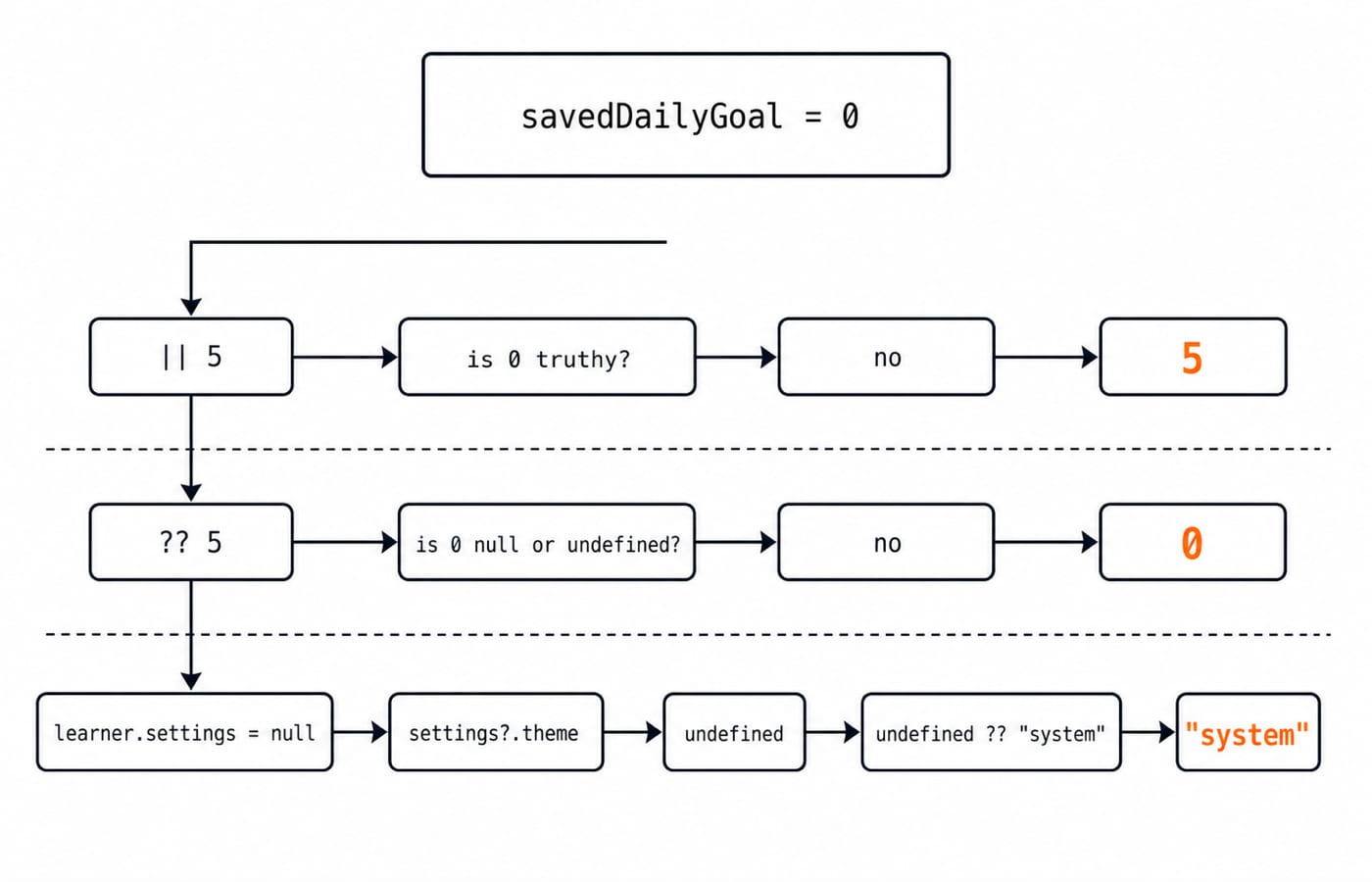
Nullish coalescing matters when zero is valid:
const savedDailyGoal = 0;
const goalWithOr = savedDailyGoal || 5;
const goalWithNullish = savedDailyGoal ?? 5;

console.log(goalWithOr);      // 5
console.log(goalWithNullish); // 0
|| chooses the right side because 0 is falsy. ?? does so only for null or undefined, so it preserves zero.
For const learner = { name: "Asha", settings: null }; const theme = learner.settings?.theme ?? "system";, theme is "system". The ?. lookup stops at nullish settings and yields undefined; ?? supplies "system". Optional chaining does not replace every validation check.
Common JavaScript operator traps and direct fixes
Trap | Actual result | Direct fix |
|---|---|---|
|
| Convert deliberately before arithmetic. |
|
| Do not depend on implicit coercion. |
|
| Prefer strict equality unless coercion is explicitly intended. |
| Assigns | Use |
|
| Use |
After let x = 4; const before = x++;, before is 4 and x is 5. After let y = 4; const after = ++y;, both are 5. Prefer x += 1 when the old-versus-new distinction is unnecessary.
JavaScript Data Types and Coercion: Beginner Tutorial with Runnable Examples traces boundary conversion, primitive-versus-object assignment and loose equality in depth. The operator examples above concentrate on precedence, short-circuiting and selecting the correct operator.
Coding exercises with checked answers
Practise precedence, assignment versus comparison, compound assignment, defaults, and short-circuiting:
8 + 2 * 3 = 14.(8 + 2) * 3 = 30.0 === falseisfalse, while0 == falseistrue.5 & 3is1. By contrast,5 && 3selects the operand3; it does not perform a bitwise calculation.
Change only solved to 14, keeping the other inputs. Score is 14 * 5 + 12 - 7 = 70 + 12 - 7 = 75; accuracy is 14 / 20 * 100 = 0.7 * 100 = 70. Both threshold comparisons are false, so qualifies is false and the message is Revise and retry.
Replace const label = score >= 80 && "ready" || "retry"; with const label = score >= 80 ? "ready" : "retry";. At score = 90, both give "ready", but the ternary states both outcomes. JavaScript Conditionals and Loops: Beginner Tutorial with Runnable Examples develops if/else, switch, for, while, break and continue through a full score-classification program; this exercise only compares two expression-level choices.
JavaScript operators: the short version and next step
Arithmetic turns 17, 5, 12, and 7 into score 90. Division turns 17 / 20 into accuracy 85. Three comparisons produce true; && combines them into qualifies = true; and the ternary selects Level cleared.
Type the program and predict every intermediate value before running it. Then change solved to 14 and confirm score 75, accuracy 70, and the retry message. Finally, compare 0 || 5 with 0 ?? 5.
For structured lessons on variables, functions, loops, and event handling, continue with the Complete JavaScript Course.
Keep learning

JavaScript Event Delegation: Bubbling, target and currentTarget with Runnable Examples
Learn how browser events travel through the DOM, then build one delegated listener that handles nested controls and rows added later.
Updated 6 Oct 20265 min readWeb Development
JavaScript Data Types and Coercion: Beginner Tutorial with Runnable Examples
Learn how JavaScript stores values, copies primitives and objects, converts input, compares values and produces surprising output. Trace each rule in the console.
Updated 27 Sep 20265 min readWeb Development
JavaScript Conditionals and Loops: Beginner Tutorial with Runnable Examples
Learn how JavaScript chooses a branch and repeats work. Build from small syntax examples to a complete score classifier with a traced average.
Updated 25 Sep 20265 min readWeb Development

Mongoose Validation: Enforce Schema Invariants and Avoid Update Traps
Trace one Plan model through saves, query updates and database errors. The worked cases show exactly where Mongoose rules hold and where an update can bypass them.
Updated 23 Sep 20265 min readWeb Development