JavaScript Event Delegation: Bubbling, target and currentTarget with Runnable Examples
Learn how browser events travel through the DOM, then build one delegated listener that handles nested controls and rows added later.
KnowledgeGate Team
Exam prep & CS education
Updated 6 Oct 20265 min read
Making one button respond to a click is easy. Confusion starts when a list has 100 buttons, new rows appear later, or the click lands on an icon inside a button. Event delegation keeps one listener on a stable ancestor; bubbling carries the click upward, target identifies its origin, currentTarget identifies the listener host, and closest recovers the intended control. This pattern is a core skill in Coding & Skill Development Courses.
From a click to an Event object
Start with this HTML:
<button id="study-button">Log study session</button><p id="status">Sessions: 0</p>The browser passes an Event object to the callback, so no global event variable is needed.
const button = document.querySelector("#study-button");
const status = document.querySelector("#status");
let sessions = 0;

function logSession(event) {
  sessions += 1;
  const message = `Sessions: ${sessions}`;
  status.textContent = message;
  console.log(
    `${message}; type=${event.type}; target=${event.target.id}; current=${event.currentTarget.id}`
  );
}

button.addEventListener("click", logSession);
After three clicks, the page says Sessions: 3. The console lines are:
Sessions: 1; type=click; target=study-button; current=study-button
Sessions: 2; type=click; target=study-button; current=study-button
Sessions: 3; type=click; target=study-button; current=study-button
The target is where the interaction began; currentTarget is the node whose listener is running. Here both are the button. addEventListener(type, callback) registers a callback, and removal needs the same reference:
button.addEventListener("click", logSession);
button.removeEventListener("click", logSession);
A new anonymous function would be a different reference. HTML Interview Questions for Freshers covers the semantic HTML beneath such interactions.
Capture, target and bubble: trace the exact path
Click the span text in this DOM, not the button's empty area.
<div id="course-card"><button id="start-button"><span id="button-label">Start JavaScript</span></button></div>const card = document.querySelector("#course-card");
const startButton = document.querySelector("#start-button");
const label = document.querySelector("#button-label");
function printEvent(name, event) {
console.log(
`${name}: phase=${event.eventPhase}, target=${event.target.id}, current=${event.currentTarget.id || "document"}`
);
}
function documentCapture(event) { printEvent("document capture", event); }
function cardCapture(event) { printEvent("card capture", event); }
function labelTarget(event) { printEvent("label target", event); }
function buttonBubble(event) { printEvent("button bubble", event); }
function cardBubble(event) { printEvent("card bubble", event); }
function documentBubble(event) { printEvent("document bubble", event); }
document.addEventListener("click", documentCapture, { capture: true });
card.addEventListener("click", cardCapture, { capture: true });
label.addEventListener("click", labelTarget);
startButton.addEventListener("click", buttonBubble);
card.addEventListener("click", cardBubble);
document.addEventListener("click", documentBubble);The exact trace is:
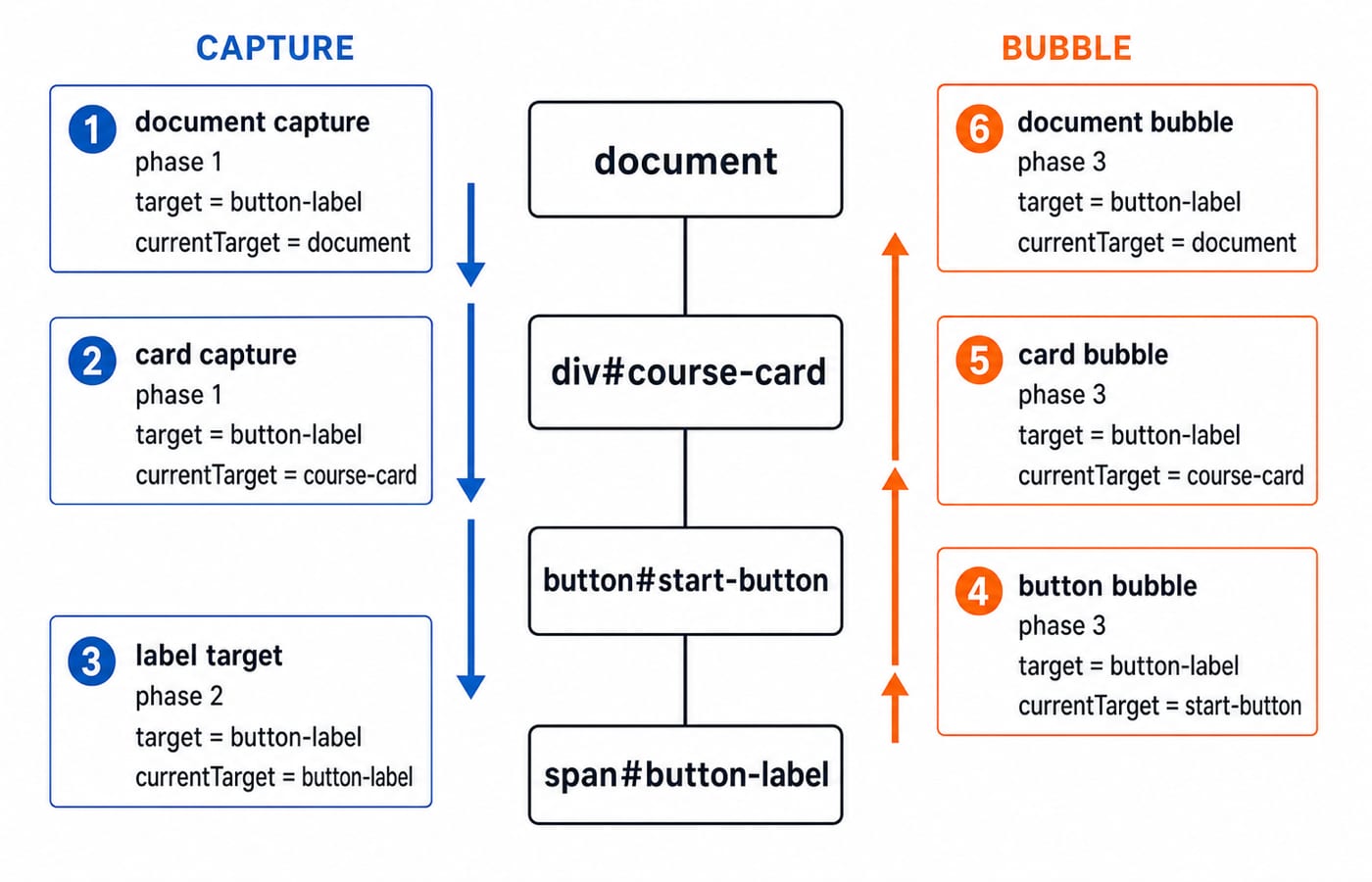
document capture: phase=1, target=button-label, current=document
card capture: phase=1, target=button-label, current=course-card
label target: phase=2, target=button-label, current=button-label
button bubble: phase=3, target=button-label, current=start-button
card bubble: phase=3, target=button-label, current=course-card
document bubble: phase=3, target=button-label, current=document
Capture travels from the document towards the target. Phase 2 is the target. Bubbling returns through ancestors. Ordinary click handlers use bubbling; { capture: true } opts into capture.
Worked example: one delegated listener for a dynamic topic list
Start with three rows and one add button:
<ul id="topic-list">
  <li data-id="JS-101">Variables <button data-action="remove"><span aria-hidden="true">×</span> Remove</button></li>
  <li data-id="JS-102">Functions <button data-action="remove"><span aria-hidden="true">×</span> Remove</button></li>
  <li data-id="JS-103">Arrays <button data-action="remove"><span aria-hidden="true">×</span> Remove</button></li>
</ul>
<button id="add-topic">Add Promises</button>
Put one listener on the list, not one on each remove button:
const list = document.querySelector("#topic-list");
const addTopic = document.querySelector("#add-topic");

list.addEventListener("click", (event) => {
  const removeButton = event.target.closest(
    'button[data-action="remove"]'
  );

  if (!removeButton || !list.contains(removeButton)) return;

  const row = removeButton.closest("li");
  console.log(
    `removed=${row.dataset.id}; target=${event.target.tagName}; current=${event.currentTarget.id}`
  );
  row.remove();
});

addTopic.addEventListener(
  "click",
  () => {
    list.insertAdjacentHTML(
      "beforeend",
      '<li data-id="JS-104">Promises <button data-action="remove"><span aria-hidden="true">×</span> Remove</button></li>'
    );
  },
  { once: true }
);
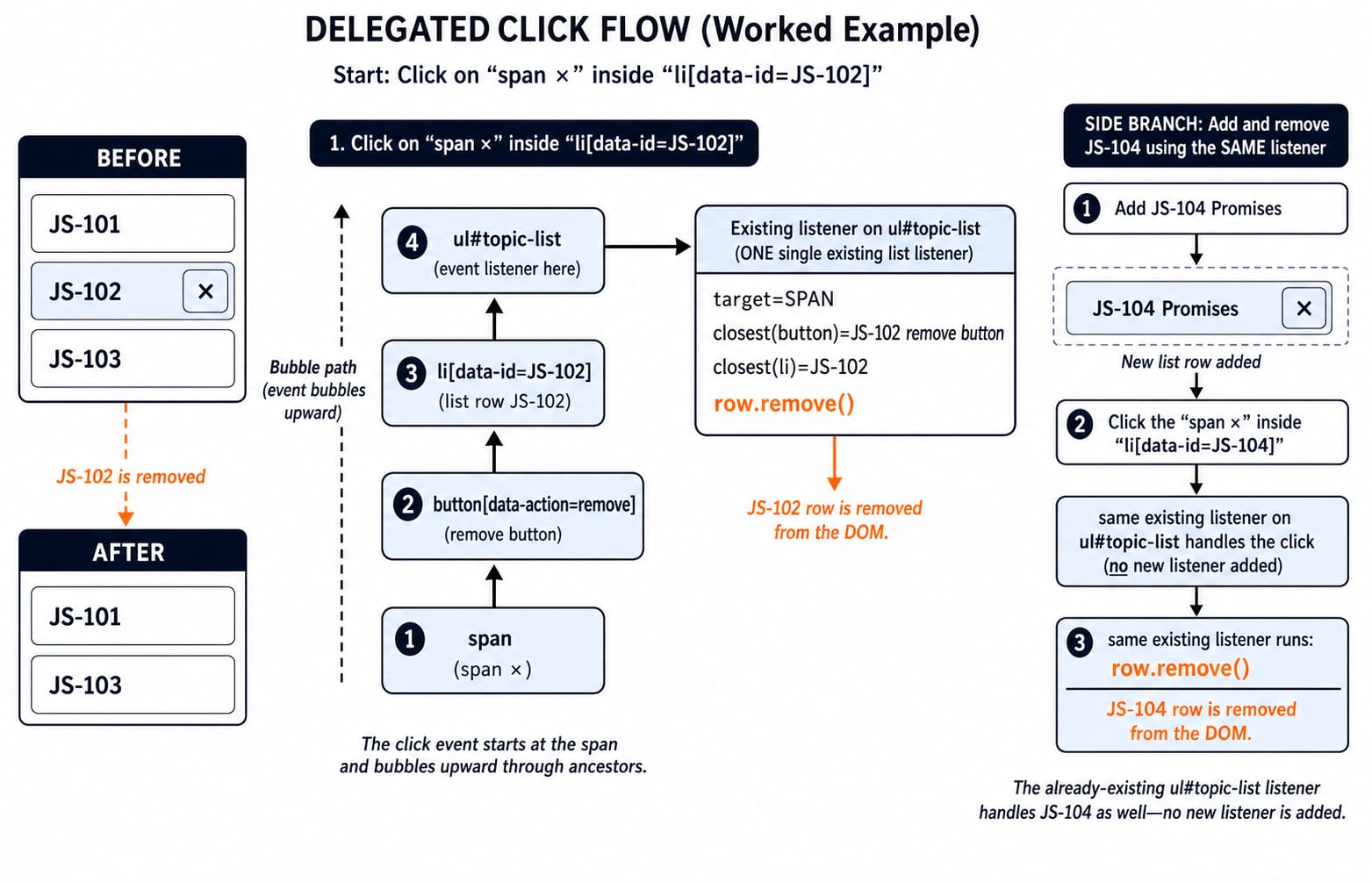
Click JS-102's ×. It logs removed=JS-102; target=SPAN; current=topic-list, leaving JS-101, JS-103. Add Promises once, then click JS-104's ×. It logs removed=JS-104; target=SPAN; current=topic-list and again leaves JS-101, JS-103, with no new listener.
target, currentTarget, matches and closest
For the JS-102 icon click, event.target is the inner SPAN, while event.currentTarget is UL#topic-list. Thus event.target.dataset.action is undefined, and event.target.matches('button[data-action="remove"]') is false.
closest walks upwards from the target. It finds the remove button inside data-id="JS-102"; list.contains(removeButton) keeps the action within the component.
Direct handling needs three listeners, then a fourth for JS-104. Delegation stays at one, simplifying lifecycle management without making a performance guarantee.
When delegation fits and where to put the boundary
Delegate repeated actions that bubble through one stable ancestor, such as remove, select or toggle in a list, table or menu. Prefer the closest stable container, #topic-list, over document.
Suppose JS-101 and JS-103 also have <button data-action="toggle">Toggle</button>. Refactor the existing listener, without retaining the remove-only guard:
list.addEventListener("click", (event) => {
  const actionButton = event.target.closest("button[data-action]");
  if (!actionButton || !list.contains(actionButton)) return;

  const row = actionButton.closest("li");
  if (actionButton.dataset.action === "remove") {
    row.remove();
  } else if (actionButton.dataset.action === "toggle") {
    row.classList.toggle("completed");
  }
});
From neither row completed, click JS-101 twice and JS-103 once. Their transitions are false -> true -> false and false -> true, so JS-101=false, JS-103=true.
Events do not all bubble alike. For focus delegation, use bubbling focusin and focusout, not focus and blur. Check unfamiliar events before delegating them.
Default actions, propagation controls and listener options
preventDefault() cancels a cancelable browser default, not bubbling. stopPropagation() stops ancestor travel, not the default. Use each only for a stated reason.
<form id="search-form"><input id="query" value="event delegation"><button>Search</button></form>const form = document.querySelector("#search-form");
const query = document.querySelector("#query");
form.addEventListener("submit", (event) => {
event.preventDefault();
console.log(`query=${query.value}; defaultPrevented=${event.defaultPrevented}`);
});One submit logs query=event delegation; defaultPrevented=true. An ancestor click listener still sees the button click.
If #start-button calls stopPropagation(), logs 1 through 4 occur, but card bubble and document bubble do not. The once option is separate. Add a hint button, <button id="hint-button">Hint</button>, and register a listener that runs only once:
document.querySelector("#hint-button").addEventListener(
  "click",
  () => console.log("Hint opened"),
  { once: true }
);
Two clicks log Hint opened once. Widespread propagation stopping can break analytics or parent behaviour.
Common delegation errors and assessment-style checks
Mistake | Exact symptom | Direct fix |
|---|---|---|
Listen only to the first three buttons | JS-104 is inactive | Use one parent listener |
Read | It is | Find the button with |
Treat | It is | Separate origin from listener host |
Call | Card and document bubble logs disappear | Stop only at a documented boundary |
Use | The event still bubbles | Separate default cancellation from propagation |
Likely coding tasks ask for the six-line trace, the delegated container, the cause of an inactive dynamic row, or a repaired icon check. The target stays button-label; the list's current target stays topic-list; the removals leave JS-101, JS-103; direct handling reaches four listeners while delegation stays at one.
Extension: starting from the two rows left above, JS-101 and JS-103, with neither completed, insert JS-105 Event Loop, toggle it once, remove JS-101, and print the remaining IDs and states. Reusing the parent listener gives JS-103:false, JS-105:true; adding a dedicated JS-105 listener defeats the point.
JavaScript event delegation: short version and next step
Keep five rules: register listeners explicitly; trace capture, target and bubble; read target as the origin and currentTarget as the listener host; use closest for nested content; delegate at the nearest stable ancestor. One listener removes JS-102 and dynamic JS-104, leaving JS-101 and JS-103.
The Complete JavaScript Course is the immediate route for practising JavaScript and browser event handling. The MERN Stack Course is a later route for applying front-end interactions inside a full-stack project. For a wider connection between the DOM example and HTML, URLs, HTTP and the client-server model, continue with Web Technologies for Teaching Exams: HTML and HTTP.
Keep learning
JavaScript Operators: Types, Precedence and Runnable Examples
Learn how JavaScript arithmetic, assignment, comparison, logical and modern operators behave by tracing one score program from inputs to final output.
Updated 2 Oct 20266 min readWeb Development
JavaScript Data Types and Coercion: Beginner Tutorial with Runnable Examples
Learn how JavaScript stores values, copies primitives and objects, converts input, compares values and produces surprising output. Trace each rule in the console.
Updated 27 Sep 20265 min readWeb Development
JavaScript Conditionals and Loops: Beginner Tutorial with Runnable Examples
Learn how JavaScript chooses a branch and repeats work. Build from small syntax examples to a complete score classifier with a traced average.
Updated 25 Sep 20265 min readWeb Development
Mongoose Validation: Enforce Schema Invariants and Avoid Update Traps
Trace one Plan model through saves, query updates and database errors. The worked cases show exactly where Mongoose rules hold and where an update can bypass them.
Updated 23 Sep 20265 min readWeb Development