

React Context Boundaries: Split State and Actions to Control Rerenders
See why one overloaded Context wakes unrelated consumers, then rebuild it with narrow state contexts and a stable action API. The worked lab compares every render.
KnowledgeGate Team
Exam prep & CS education
Updated 18 Nov 20266 min read

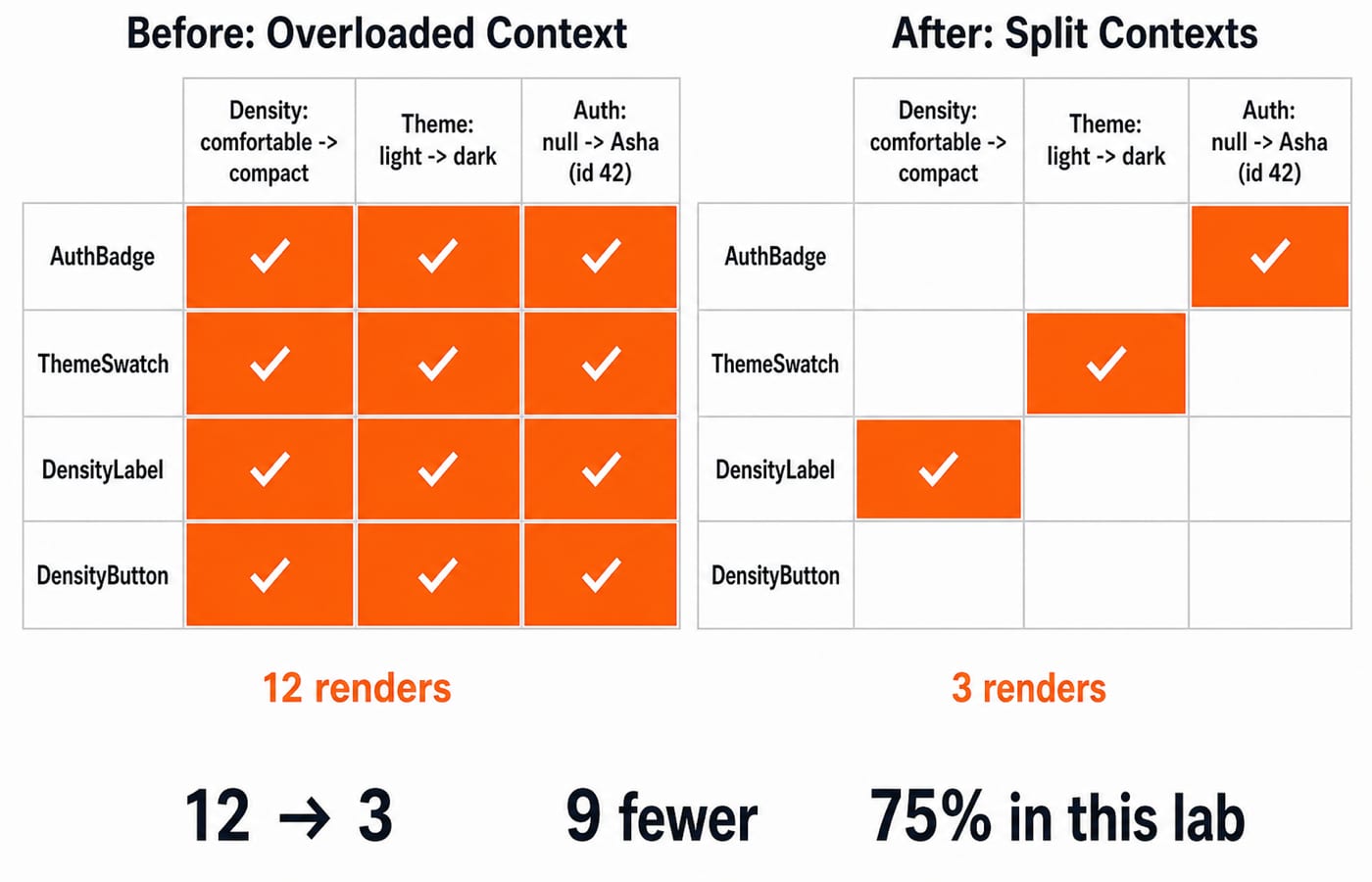
You change density, and suddenly an auth badge, theme preview, and action-only button render again. None reads density. Context is not inherently a global-state performance bug. The fan-out starts when one provider value joins unrelated data and functions. Across three state changes, that overloaded value produces 12 update-triggered renders across four consumers. Separate auth, theme, and density reads from a stable action context, and the same trace falls to 3.
React Context rerenders: the subscription boundary is the whole value
A component calling useContext subscribes to that context's complete value. React's useContext reference says provider values are compared with Object.is. When that value changes, consumers receive it even when wrapped in memo. Not every descendant always rerenders, but every consumer of the changed context is eligible.
The starting state uses the following values:
user: nulltheme: 'light'density: 'comfortable'
The memoised probes are AuthBadge, ThemeSwatch, DensityLabel, and DensityButton. They respectively read user, theme, density, and only setDensity. Each calls useRenderCount(label), which increments useRef(0) during render and displays the count. For the broader learning path, see Web Development.
The overloaded provider invalidates all four consumers
The baseline has one AppContext. Its provider uses useReducer(reducer, initialState) and passes one combined object:
const value = {
  user: state.user,
  theme: state.theme,
  density: state.density,
  login: user => dispatch({ type: 'auth/login', user }),
  setTheme: theme => dispatch({ type: 'theme/set', theme }),
  setDensity: density => dispatch({ type: 'density/set', density })
};

return <AppContext.Provider value={value}>{children}</AppContext.Provider>;
The object literal and its three inline functions have new identities on every provider render. memo(AuthBadge) cannot block an update to the AppContext value it reads. useMemo(() => value, [state]) still creates a new whole-context value whenever any state field changes.
After the initial 1 / 1 / 1 / 1, set density to compact, theme to dark, then user to { id: 42, name: 'Asha' }. Cumulative counts become 2 / 2 / 2 / 2, 3 / 3 / 3 / 3, then 4 / 4 / 4 / 4.
Draw boundaries by change ownership and read needs
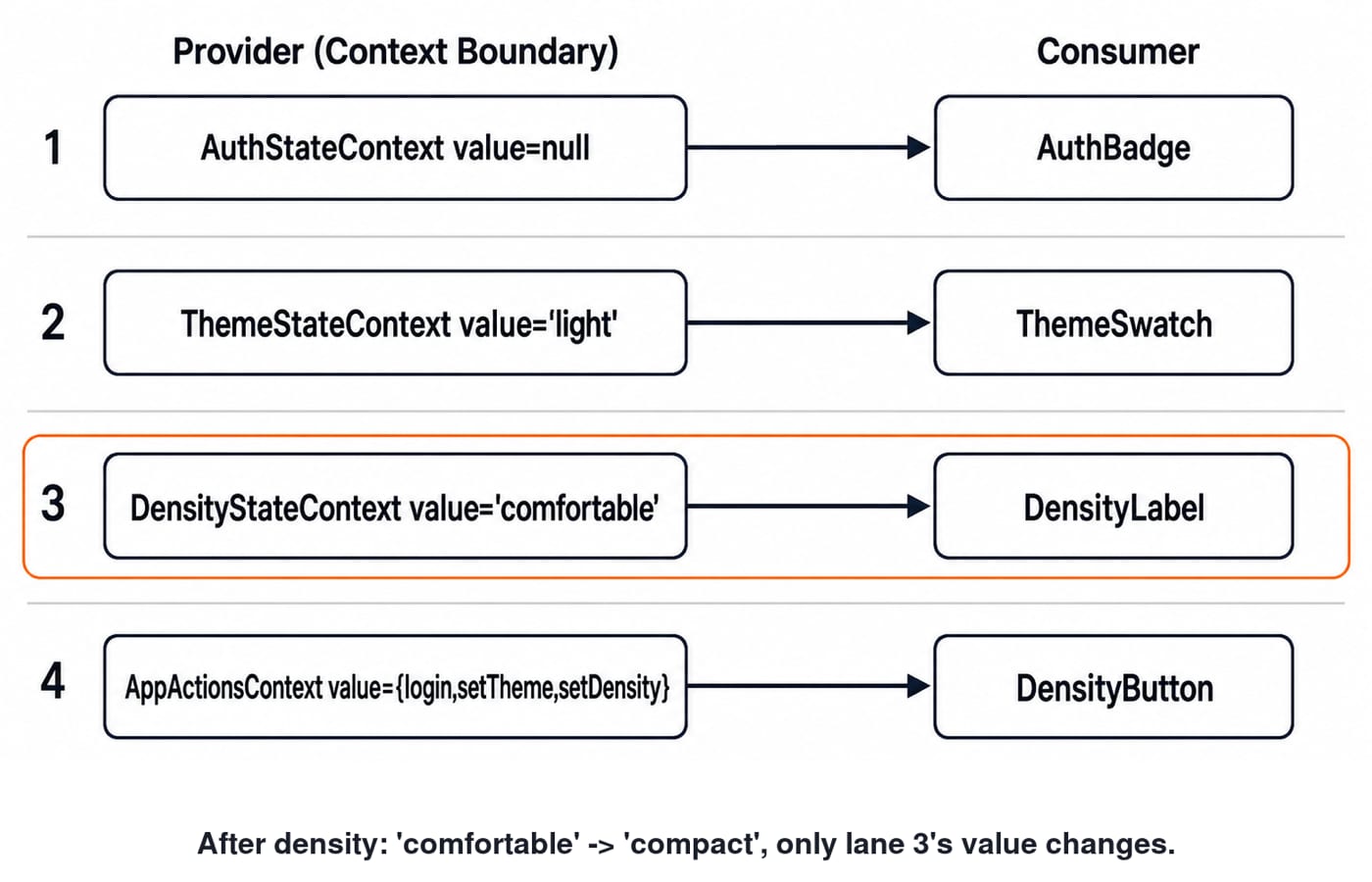
Use four contexts. AuthStateContext provides only state.user, ThemeStateContext only state.theme, and DensityStateContext only state.density. AppActionsContext provides the write API. Boundaries follow independent changes and read-versus-write needs, not a rule to create one context per variable.
The mapping is exact: AuthBadge -> AuthStateContext, ThemeSwatch -> ThemeStateContext, DensityLabel -> DensityStateContext, and DensityButton -> AppActionsContext. A reference-equal value does not broadcast through its context.
The order is AppActionsContext > AuthStateContext > ThemeStateContext > DensityStateContext > children. Order is not the optimisation. Distinct values and narrow subscriptions are. Place providers near the lowest common owner, not automatically at the application root.
Implement stable data and action providers
The reducer preserves the existing object for a no-op and creates a new object only for a real change:
function reducer(state, action) {
  switch (action.type) {
    case 'auth/login':
      return state.user === action.user ? state : { ...state, user: action.user };
    case 'theme/set':
      return state.theme === action.theme ? state : { ...state, theme: action.theme };
    case 'density/set':
      return state.density === action.density
        ? state
        : { ...state, density: action.density };
    default:
      throw new Error(`Unknown action: ${action.type}`);
  }
}
React's react.dev reference for useReducer documents that reducer dispatch has stable identity, so build the action API once from that dependency:
const [state, dispatch] = useReducer(reducer, initialState);

const actions = useMemo(() => ({
  login: user => dispatch({ type: 'auth/login', user }),
  setTheme: theme => dispatch({ type: 'theme/set', theme }),
  setDensity: density => dispatch({ type: 'density/set', density })
}), [dispatch]);

return (
  <AppActionsContext.Provider value={actions}>
    <AuthStateContext.Provider value={state.user}>
      <ThemeStateContext.Provider value={state.theme}>
        <DensityStateContext.Provider value={state.density}>
          {children}
        </DensityStateContext.Provider>
      </ThemeStateContext.Provider>
    </AuthStateContext.Provider>
  </AppActionsContext.Provider>
);
Initialise each context with undefined. Define useAuthState, useThemeState, useDensityState, and useAppActions hooks that read the matching context and throw a clear must be used inside AppProvider error only when the value is undefined. Wrap the probes in memo so parent renders do not pollute the lab. React's react.dev reference for memo confirms that memoisation cannot block a changed context value. General Profiler, memo, useMemo, and useCallback techniques appear in the React Performance Optimization Tutorial. The Context-specific test isolates provider value identity: an unchanged provider does not broadcast, while each changed state context wakes its subscribed consumer.
Measure the same three updates before and after the split
These cumulative component render calls exclude AppProvider and use one action per update:
Checkpoint | Overloaded: Auth / Theme / Density / Button | Split: Auth / Theme / Density / Button |
|---|---|---|
Initial mount | 1 / 1 / 1 / 1 | 1 / 1 / 1 / 1 |
Density | 2 / 2 / 2 / 2 | 1 / 1 / 2 / 1 |
Theme | 3 / 3 / 3 / 3 | 1 / 2 / 2 / 1 |
Login | 4 / 4 / 4 / 4 | 2 / 2 / 2 / 1 |
Exclude the four initial mounts. The overloaded context causes 3 updates x 4 consumers = 12 update-triggered render calls. The split causes 1 + 1 + 1 = 3. Therefore 12 - 3 = 9, and 9 / 12 x 100 = 75%. This is a 75% reduction in this lab, not a universal percentage.
Use React DevTools Profiler commit views, or a profiling-enabled build, one action per commit. React's react.dev reference for StrictMode explains why development render logic may run extra times, so counters can appear doubled. Compare commit membership, or use a small non-StrictMode measurement harness. Keep Strict Mode in the real application.
Common Context boundary mistakes and better fixes
Keeping one whole-state context. Passing { user, theme, density } through one AppStateContext leaves all data readers on one boundary. Split independent slices when profiling shows useful fan-out.
Providing unstable actions. <AppActionsContext.Provider value={{ setDensity }}> creates a new object, while inline setDensity creates a new function. Provide stable dispatch, or memoise the complete action object from [dispatch].
Treating memo as a selector. A memoised component still rerenders when its context changes. Give it narrow ThemeStateContext, or let a thin reader pass primitive theme into a memoised expensive child.
Breaking identity accidentally. Mutating state.user and returning the same object can suppress an update. Recreating { id: 42, name: 'Asha' } without change can broadcast one. Preserve references and update immutably. The official useContext warning also notes that duplicate modules from some symlink or bundling setups can break provider-consumer identity.
When Context is enough, and when selectors fit better
Context suits low-to-medium-frequency values such as user, theme, locale, or preferences when consumers fit clear boundaries. A cursor changing 60 times per second across 300 item consumers is different. Profile it, then consider selectors or useSyncExternalStore.
Review question: after density/set('compact'), what renders? Here, AppProvider and DensityLabel, not AuthBadge, ThemeSwatch, or action-only DensityButton. useMemo around { state, actions } cannot create field-level subscriptions because consumers still subscribe to one object.
React Context boundaries: the short version and next step
Profile first. Keep transient state local, place providers at the lowest common owner, split independent data, separate reads from stable actions, preserve unchanged references, and repeat the trace after refactoring.
For a structured React and Redux path, explore Complete React and Redux. For a wider full-stack and DSA path, see the MERN Stack and DSA bundle. The Skills area offers more routes. First reproduce the exact 12 -> 3 comparison, then adapt the boundary map to your app.
Keep learning

Error Boundaries in React: Tutorial with a Retryable Fallback
Build a class Error Boundary around a crashing ProductCard, preserve the rest of the dashboard, log useful context, and reset the failure safely with Retry.
Updated 1 Nov 20266 min readWeb Development

useReducer in React: Build Predictable State with Runnable Examples
Learn when a reducer makes React state clearer. Build a score reducer and a complete study-task app, then verify every transition and test the reducer without a browser.
Updated 7 Nov 20266 min readWeb Development

React State Management Options: Choose the Right Tool with Runnable Examples
Follow one cart and inventory example to decide where state belongs, trace each update, and choose the smallest React state tool that fits.
Updated 6 Nov 20266 min readWeb Development

React State Updates: Trace Queues, Batching and Functional Setters
Follow one React counter from its captured state through replacement updates, functional updaters and a batched next render, with every queue entry traced.
Updated 21 Sep 20265 min readWeb Development