

Python Text Files: Concepts, Worked Examples and Exam Patterns
Learn how text mode, encoding, file modes and the cursor shape Python file handling. Follow one dataset from reading and validation to summary writing and append-safe recomputation.
KnowledgeGate Team
Exam prep & CS education
Updated 28 Nov 20265 min read

Python's open() becomes predictable when you separate four states: mode, encoding, cursor position and line parsing. Use File Handling in Python: Read, Write, Append, CSV and Binary Examples for the broader workflow across text, CSV and binary files. For text files, the exam-relevant boundary is narrower: UTF-8 decoding, newline-safe parsing, cursor state and exact output prediction. The worked event log starts with validated rows, writes a summary, appends one record and recomputes the counts. Use the broader Coding & DSA Courses collection to connect file handling with other programming topics.
What a Python text file contains
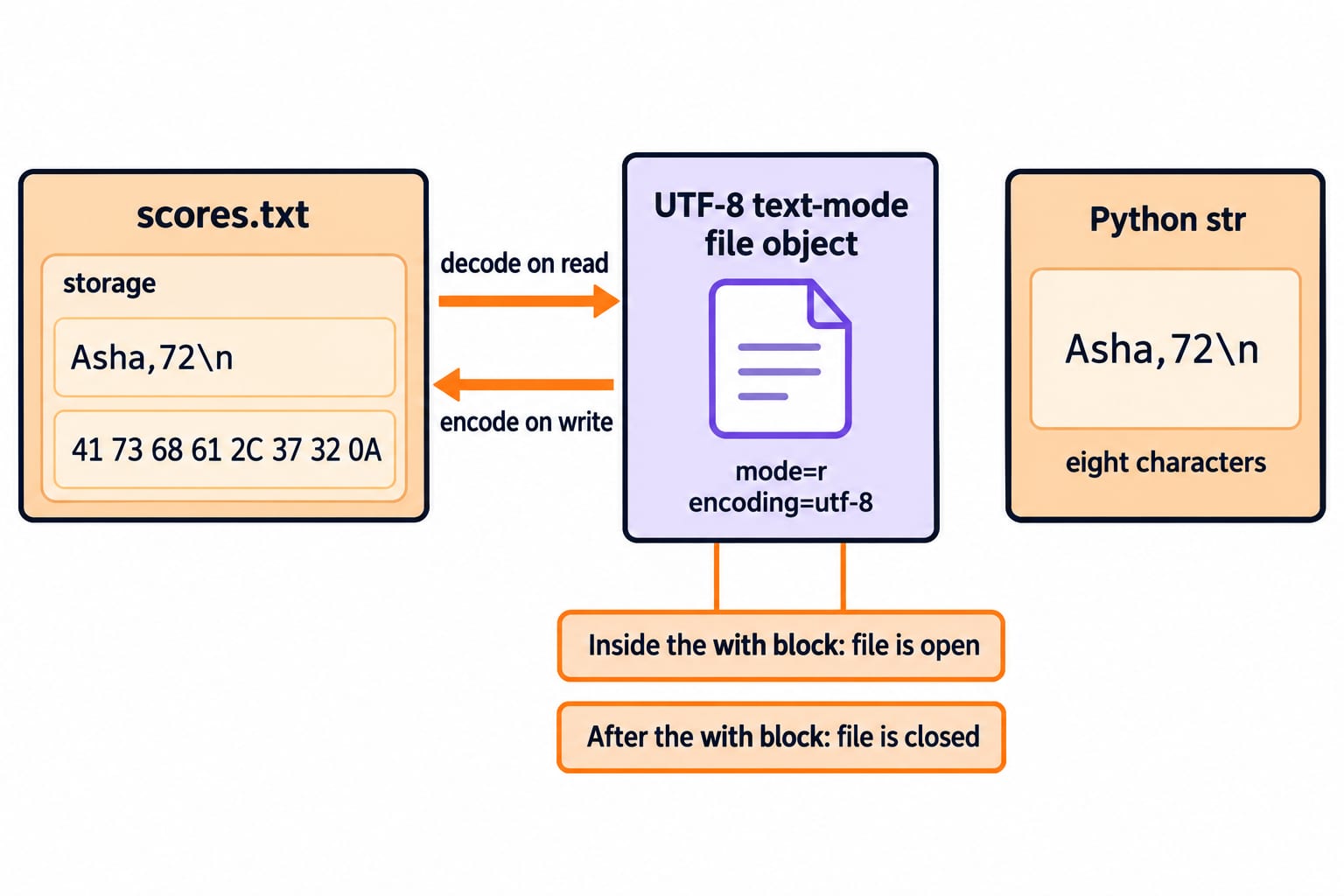
Storage files contain bytes. Text mode with encoding="utf-8" decodes them into str; writing encodes str back to bytes. Binary mode works with bytes.
For the ASCII-only line Asha,72\n, the eight stored bytes are:
41 73 68 61 2C 37 32 0AUTF-8 decoding produces eight characters: four letters, a comma, two digits and a newline. A non-ASCII character can occupy multiple bytes, so byte and character counts can differ.
A file object holds the mode, encoding, current position and state. Use this safe pattern:
with open("events.txt", "r", encoding="utf-8") as file:
    data = file.read()
The context manager closes the file when the block ends, even after an exception.
Choose the mode before touching the data
The mode decides whether old data survives at open(), before write() runs.
Mode | Exact effect |
|---|---|
| Requires an existing file and reads it. |
| Creates or truncates, then writes. |
| Creates if absent; writes go to the end. |
| Creates a new file and fails if the path already exists. |
| Requires an existing file, reads and writes without automatic truncation. |
| Reads and writes, but creates or truncates like |
| Reads and writes, creates if absent, and sends writes to the end. |
Suppose notes.txt contains alpha\nbeta\n, or 11 ASCII bytes. With w, writing gamma\n leaves only those six bytes because truncation happens first. Reset the original, use a, and the result is alpha\nbeta\ngamma\n, or 17 bytes. For a missing path, r raises FileNotFoundError, while w and a create it. r+ is not a safer w: it requires an existing file, begins at its starting position and does not truncate automatically.
Read four event records and trace the counts step by step
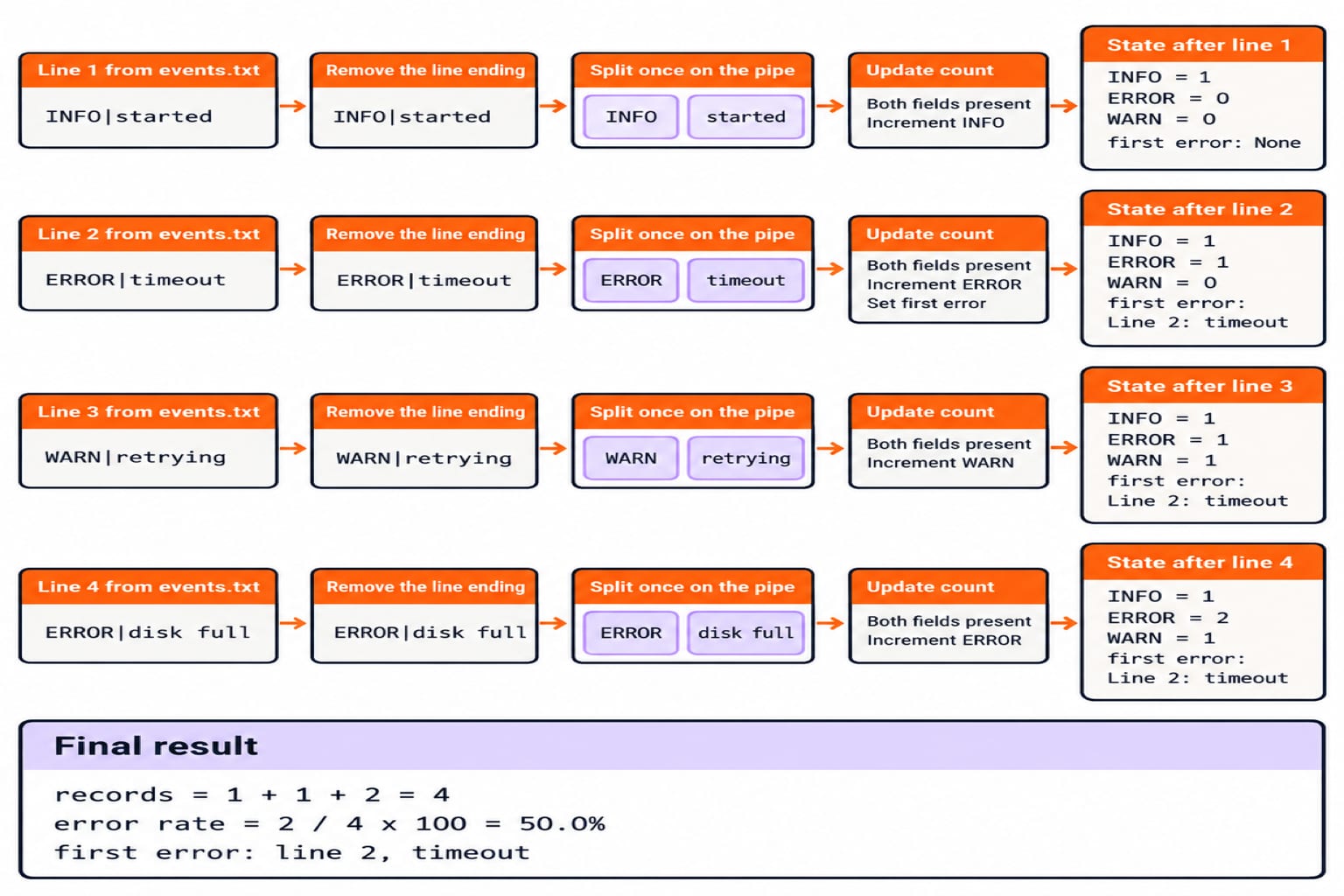
Let events.txt contain four records, each ending in \n:
INFO|started
ERROR|timeout
WARN|retrying
ERROR|disk full
Remove the line ending, split once on the pipe, and update the count only after both fields are present:
counts = {}
first_error = None

with open("events.txt", "r", encoding="utf-8") as file:
    for line_number, raw_line in enumerate(file, start=1):
        level, message = raw_line.rstrip("\n").split("|", 1)
        counts[level] = counts.get(level, 0) + 1
        if level == "ERROR" and first_error is None:
            first_error = (line_number, message)
Splitting once preserves any later pipe inside the message. counts.get(level, 0) also handles a level that has not appeared before.
After record | INFO | WARN | ERROR | First error |
|---|---|---|---|---|
INFO|started | 1 | 0 | 0 | None |
ERROR|timeout | 1 | 0 | 1 | Line 2: timeout |
WARN|retrying | 1 | 1 | 1 | Line 2: timeout |
ERROR|disk full | 1 | 1 | 2 | Line 2: timeout |
The verified results are:
records = 1 + 1 + 2 = 4error rate = 2 / 4 x 100 = 50.0%first error:
line 2, timeout
Next, use Python Output-Based Questions to practise state tracing.
Write a summary, then append one new record
Write the result to summary.txt with w:
summary_lines = [
    "records=4\n",
    "errors=2\n",
    "first_error=2:timeout\n",
    "error_rate=50.0%\n",
]

with open("summary.txt", "w", encoding="utf-8") as file:
    file.writelines(summary_lines)
writelines() invents no separators or newlines. The four explicit \n characters create four lines.
Append exactly INFO|recovered\n to events.txt with a. Reopen and recompute because an exhausted reader does not restart itself. The record count becomes 5; the error count remains 2; and the error rate becomes 2 / 5 x 100 = 40.0%. The first error remains line 2: timeout. Using w would replace all four old records with only INFO|recovered\n.
Trace read(), readline(), iteration and the cursor
In the original four-record file, read(13) first returns "INFO|started\n". From that cursor position, readline() returns "ERROR|timeout\n", then readlines() returns only:
["WARN|retrying\n", "ERROR|disk full\n"]At EOF, another readline() returns "", and a for loop runs zero times. After file.seek(0), file.readline() again returns "INFO|started\n".
Use read() for a deliberately small whole file, readline() for one-record control, iteration for scalable line processing, and readlines() when a list of all remaining lines is useful. Do not assume tell() is a simple character offset for every text encoding.
Handle blank and malformed text records
Consider five lines: INFO|ready\n, broken\n, ERROR|\n, WARN|retry\n, then blank \n. Remove the line ending, skip blanks, require exactly two fields, and reject an empty level or message.
Line 1 is valid. Line 2 has one field instead of two. Line 3 has an empty message. Line 4 is valid, and line 5 is blank and skipped. The accepted records give INFO = 1, WARN = 1, ERROR = 0 and count = 2.
Failure layers matter. A missing input path can raise FileNotFoundError; mismatched encoded bytes can raise UnicodeDecodeError; and a malformed delimiter shape can raise ValueError during unpacking. A with block closes the file but does not validate records or choose whether to skip, report or stop.
How questions test Python text files
Common prompts test mode selection, truncation or append, the next cursor read, str versus bytes, closed, and parsing repairs.
If
log.txtcontainsOLD\n, opening it withwand callingf.write("NEW\n")leaves onlyNEW\n.With
log.txtnow containingNEW\n,first = f.readline()gives"NEW\n"andf.closedisFalseinside thewithblock. After the block,f.closedisTrue.f.write("A\n")returns2because it writes two characters. By contrast,f.writelines(["A", "B"])writesAB, notA\nB\n.
The bug counts[level] += 1 raises KeyError the first time a level appears. Initialise through the lookup instead:
counts[level] = counts.get(level, 0) + 1The first INFO record then produces {"INFO": 1}. For wider adjacent practice, use Python Interview Questions for Freshers 2026.
The short version and the next practice step
Before answering a file-handling question, ask:
Does the path have to exist?
Will the mode truncate or append?
Where is the cursor before this operation?
Does the method return
str,bytes, a list or a character count?Which conversions and validation rules apply to each field?
Final self-check: change only WARN|retrying to ERROR|retrying. The record count stays 4; the counts become INFO = 1 and ERROR = 3; the error rate becomes 3 / 4 x 100 = 75.0%; and the first error remains line 2: timeout.
The Python Course: Concepts, MCQs & Coding offers structured Python practice. Reproduce the event-log trace by hand, run it, then change one mode and predict the contents before executing again.
Keep learning

CSV Files MCQs and Python Practice: 10 Solved Questions with Explanations
Build a reliable CSV mental model through seven exam-style MCQs and three applied Python problems. Each answer traces the exact row object, file setting, or output that decides the result.
Updated 24 Nov 20268 min readPython

Binary Files MCQs and Python Practice: 12 Solved Questions with Explanations
Solve eight Python binary-file MCQs and four output or coding questions. Each answer explains pickle, file modes, sequential objects, EOF and updates.
Updated 23 Nov 20269 min readPython

Python os and pathlib Tutorial: Paths, Files and Directories
Build one small Python workspace from start to finish. Learn portable paths, file operations, directory walks, safe renames, environment variables and deliberate cleanup.
Updated 1 Nov 20265 min readPython

Naive Bayes Text Classification: Classify a Message Word by Word
Classify `free project meeting` with multinomial Naive Bayes. The worked example builds priors and smoothed likelihoods, then verifies the 75% Study result through raw scores, odds, and natural logs.
Updated 22 Nov 20265 min readML & Data Science