

CSV Files MCQs and Python Practice: 10 Solved Questions with Explanations
Build a reliable CSV mental model through seven exam-style MCQs and three applied Python problems. Each answer traces the exact row object, file setting, or output that decides the result.
KnowledgeGate Team
Exam prep & CS education
Updated 24 Nov 20268 min read

A CSV trace starts with the row object, not with a memorised method name. Write the delimiter, the returned row shape, each field's type, and the file mode before evaluating indexes, keys or output.
A comma-delimited record can become a list of strings or a header-keyed dictionary, and that choice controls every later expression. Use the Coding & DSA Courses collection when you want the wider programming sequence.
CSV files in Python: calibrate the row, delimiter and object type
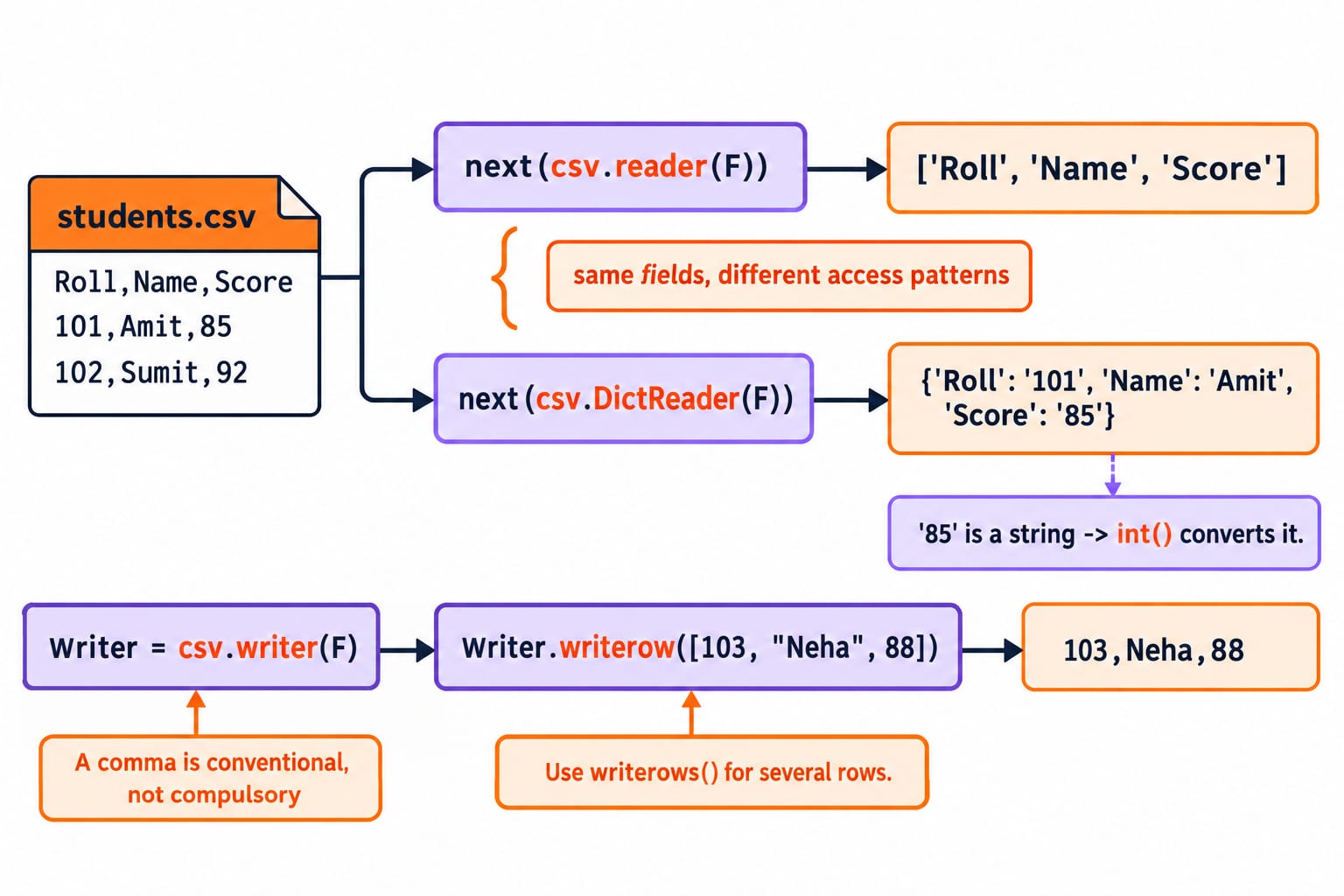
A CSV file is plain text arranged as rows and fields. A comma is conventional, not compulsory. csv.reader() yields lists of strings, csv.DictReader() uses headers as dictionary keys, and a writer object's writerow() method writes one row.
For this file:
Roll,Name,Score
101,Amit,85
102,Sumit,92
next(csv.reader(F)) returns ['Roll', 'Name', 'Score']. With a fresh file handle, next(csv.DictReader(F)) returns {'Roll': '101', 'Name': 'Amit', 'Score': '85'}. Both contain the same fields, but their access patterns differ. The value '85' is a string until int() converts it. That distinction drives several answers below.
After Writer = csv.writer(F), Writer.writerow([103, "Neha", 88]) creates 103,Neha,88. Use writerows() for several rows. The Python Course: Concepts, MCQs & Coding provides a structured route through file handling and related Python concepts.
CSV Files MCQs 1-3: meaning, delimiter and dictionary rows
Question 1 (DSSSB TGT 2024)
_____ files are spreadsheet files in a text format of data when cell contents are separated by a character for example a comma or semi-colon.
A. Comma-Separated Values
B. Semi-colon Separated Values
C. Column and Row Headers
D. CVS
Correct answer: A. Comma-Separated Values.
CSV expands to comma-separated values. It is a plain-text tabular format, not an Excel workbook. A comma is usual, but a configured reader can use another one-character delimiter. Option D reverses the last two letters and is a letter-order trap. This definition explains option A.
Question 2 (EMRS 2026)
The CSV (Comma Separated Values) format typically uses a comma to distinguish between data fields. When using functions like
reader()orwriter()to process a csv file, which parameter is used to specify a custom character (such as a semicolon or tab) to be used instead of the default comma as a separator?
A. split
B. partition
C. separator
D. delimiter
Correct answer: D. delimiter.
The call csv.reader(F, delimiter=';') turns Amit;85 into ['Amit', '85']. split and partition are string operations. separator sounds plausible, but it is not the keyword expected by csv.reader() or csv.writer(). The keyword names the character that separates one field from the next in each CSV record.
Question 3 (KVS 2026)
When using the csv module to read a file, which object allows you to access each row of the CSV file as a dictionary, where the keys are the column headers?
A. csv.reader()
B. csv.DictReader()
C. csv.writer()
D. csv.ListReader()
Correct answer: B. csv.DictReader().
On the calibration file, csv.DictReader() produces {'Roll': '101', 'Name': 'Amit', 'Score': '85'} for the first data row. csv.reader() instead produces ['101', 'Amit', '85']. csv.writer() writes data, while csv.ListReader() is not a standard class. That difference controls access. Next, practise more traces in Python Output-Based Questions.
CSV Files MCQs 4-7: newline handling and writing one row
Question 4 (KVS 2026)
If you are writing data to a CSV file and want to ensure that no extra blank lines are inserted between rows on Windows systems, which parameter should you include in the open() function?
A. newline=''
B. space=False
C. mode='csv'
D. encoding='utf-8'
Correct answer: A. newline=''.
Use with open('scores.csv', 'w', newline='') as F:. The csv module manages row terminators without the text layer translating them again on Windows. This avoids extra blank rows. encoding='utf-8' controls character encoding, not extra rows. File mode remains 'w'; newline handling is a separate concern here.
Question 5 (EMRS 2026)
While writing data to a CSV file in Python on the Windows operating system, the file is often opened using the argument newline=''. What problem does specifying newline=' ' prevent?
A. FileNotFoundError
B. Extra blank lines between rows
C. End-of-file error
D. Data duplication
Correct answer: B. Extra blank lines between rows.
This question is printed with a small typo in its second spelling: the working argument is newline='', an empty string, not newline=' ', a space. It prevents extra blank rows caused by doubled newline handling. It does not create missing files, detect the end of a file or remove duplicate records.
Question 6 (EMRS 2023)
Which method out of the following is used to write a line of content in a CSV file in a Python program?
A. writer
B. writerow
C. write
D. writeline
Correct answer: B. writerow.
Object creation and row writing are separate. Writer = csv.writer(F) creates the object. Then Writer.writerow([103, 'Neha', 88]) writes 103,Neha,88. write() is a general file-object method, while writeline is not the CSV method. writerow() accepts one iterable and serialises its fields in their given order once.
Question 7 (KVS 2023)
The csv module needs to be imported in a Python program to invoke or use the function:
A.
write()B.
writerow()C.
writeline()D.
writelines()
Correct answer: B. writerow().
The tested distinction is the CSV-specific row method. After import csv, csv.writer(F) creates a writer whose writerow() method writes one record. The option does not mean that writerow() is called directly on the csv module. Keep the module, object and method as three distinct levels.
Solved CSV practice 8: complete a record search
Question 8 (EMRS 2026)
The following Python function is designed to search for the marks of a student in a CSV file named result.csv. The file contains records in the format RollNo, Marks. The function Search(RollNo) receives a Roll Number as an argument, traverses the CSV file, and displays the marks if a match is found.
(A)

def Search(RollNo):
    Found = False
    try:
        with open("result.csv", (B), (C)) as File:
            Records = (D)
            for Row in Records:
                if Row[0] == RollNo:
                    print("Roll No:", Row[0])
                    print("Marks:", Row[1])
                    Found = True
                    break
            if not Found:
                print("Record not found.")
    except FileNotFoundError:
        print("The file does not exist.")
(A) Write the statement for Blank (A) to import the built-in Python module used for CSV file operations.
(B) In Blank (B), which argument should be passed to the
open()to specify the primary purpose (mode) of opening the file?
(C) In Blank (C), which argument should be passed to the
open()function to ensure that newline characters are handled correctly across different platforms?
(D) Provide the method call for Blank (D) to create a reader object using the file pointer File.
The fills are A. import csv, B. "r", C. newline="", and D. csv.reader(File). Suppose result.csv contains 101,78 and 102,91. For Search("102"), both fields are strings, so the second row matches and prints:
Roll No: 102
Marks: 91
Search(102) passes an integer, which does not equal the string in Row[0]. Convert one side if integer input must work.
Solved CSV practice 9-10: trace DictReader and a pipe delimiter
Question 9 (KVS 2026)
Find the output of the following Python code. Assume the file students.csv contains the following data:
Roll,Name,Score
1,Amit,85
2,Sumit,92import csv
def AnalyzeCSV():
with open('students.csv', 'r') as F:
Reader = csv.DictReader(F)
R1 = next(Reader)
# Accessing data
V1 = R1[0]; V2 = R1[2]
# Checking types and headers
print(V1)
print(type(V2).__name__)
print(Reader.fieldnames[0])
print(len(R1))
AnalyzeCSV()R1 is {'Roll': '1', 'Name': 'Amit', 'Score': '85'}. It uses header strings as keys, so R1[0] raises KeyError: 0. Execution stops before R1[2] and before every print() call. With V1 = R1['Roll']; V2 = R1['Score'], the output would be:
1
str
Roll
3
Use Python Interview Questions for Freshers 2026 for broader Python practice.
Question 10 (KVS 2026)
Find the output of the following Python Code.
Assume the file data.csv contains the following text exactly:
2026|Feb|Saturday|Sunny
import csv
def CustomReader():
    with open('data.csv', 'r') as F:
        # Using a pipe (|) as a delimiter
        Reader = csv.reader(F, delimiter='|')
        Row = next(Reader)
        # Manipulating the result
        P1 = Row[1]
        P2 = Row[-1]
        # Joining and counting
        print(P1)
        print(P2)
        print("_".join(Row[0:2]))
        print(len(Row))
CustomReader()
The pipe delimiter creates ['2026', 'Feb', 'Saturday', 'Sunny']. Index 1 selects Feb, while index -1 selects Sunny. The slice Row[0:2] is ['2026', 'Feb']; joining it with _ produces 2026_Feb. There are four fields here, so the exact output is:
Feb
Sunny
2026_Feb
4
Common CSV traps
Checkpoint | Write before tracing | Failure it prevents |
|---|---|---|
Delimiter | Configured character and parsed fields | Splitting a pipe-delimited row as though it used commas |
Reader object | List from reader() or dictionary from DictReader() | Using a numeric index on a header-keyed dictionary |
Field type | String until an explicit conversion | Comparing a CSV field directly with an integer |
Writer action | One iterable for writerow(), several for writerows() | Confusing writer creation with row output |
Newline handling | newline='' when the csv module writes the file | Extra blank rows on Windows |
Run the checkpoints from left to right. On 2026|Feb|Saturday|Sunny, delimiter='|' creates a four-string list; on a DictReader row, the valid selectors are header strings rather than numeric indexes.
Before accepting an answer, write the exact in-memory row and then apply the operation. This exposes a shape or type mismatch before it becomes an option-guessing error.
With Row = ['102', 'Sumit', '92'], Row[2] > 90 is invalid because Python cannot compare that string with an integer. After conversion, int(Row[2]) > 90 becomes 92 > 90, which is True.
CSV Files MCQs and practice: the next step
Create a three-row scratch file with a header and a second version that uses |. Predict what reader(), DictReader(), writerow() and int() will do, then run the code and compare each predicted object with the actual one.
Use the Python Course: Concepts, MCQs & Coding for a structured path through CSV and related file-handling concepts. The compact rule is: parse with the configured delimiter, identify list versus dictionary access, convert numeric fields explicitly, and let newline='' plus the csv module handle row endings.
Keep learning
CSV Files Explained: Parsing Rules, Worked Records and Exam Traps
Learn why commas and newlines are not always boundaries, trace a quote-aware parser, validate text fields with a schema, and calculate processing costs.
Updated 30 Oct 20265 min readPython

Binary Files MCQs and Python Practice: 12 Solved Questions with Explanations
Solve eight Python binary-file MCQs and four output or coding questions. Each answer explains pickle, file modes, sequential objects, EOF and updates.
Updated 23 Nov 20269 min readPython

JSON and CSV in Python: Read, Write and Convert Data with Worked Examples
Use Python's standard library to read, update, write and convert JSON and CSV safely. The examples trace types, quoting, calculations and validation.
Updated 9 Nov 20265 min readPython

File Handling in Python: Read, Write, Append, CSV and Binary Examples
Learn a reliable file-handling workflow through one scores file, then apply it to cursor control, append mode, CSV quoting, binary records and common errors.
Updated 24 Oct 20266 min readPython