

Binary Files MCQs and Python Practice: 12 Solved Questions with Explanations
Solve eight Python binary-file MCQs and four output or coding questions. Each answer explains pickle, file modes, sequential objects, EOF and updates.
KnowledgeGate Team
Exam prep & CS education
Updated 23 Nov 20269 min read

Binary-file questions look like syntax checks, but confusing rb, wb, rb+, pickle.dump(), pickle.load() or EOFError changes the result. Practise eight MCQs and four output or coding items on binary files. Attempt each before reading its explanation.
Binary files sit inside the wider file-handling syllabus, which you can browse in Coding & DSA Courses. Most questions link to their own practice page. Questions 2 and 12 do not, so work those two from the Binary Files PYQ Questions hub.
Binary files in Python: the four ideas to fix before solving
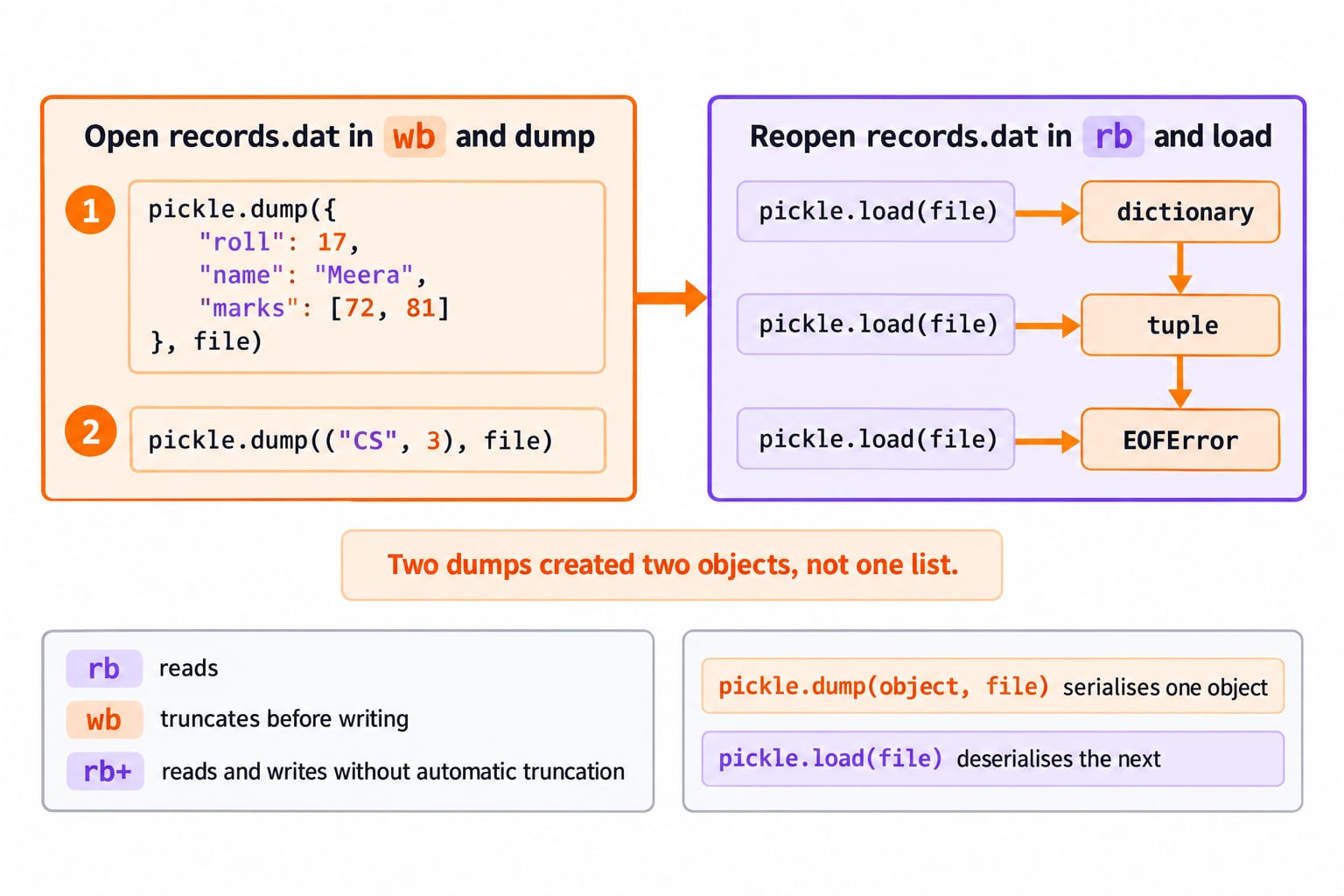
pickle.dump(object, file) serialises one object; pickle.load(file) deserialises the next. Binary modes include b, and loading past the final object raises EOFError.
Open records.dat in wb and dump {"roll": 17, "name": "Meera", "marks": [72, 81]}, then ("CS", 3). Reopened in rb, successive loads return the dictionary, the tuple, then raise EOFError. Two dumps created two objects, not one list.
rb reads, wb truncates before writing, and rb+ reads and writes without automatic truncation. Study the sequence in Python Course: Concepts, MCQs & Coding.
Binary Files MCQs 1-4: pickle purpose, module and object types
Question 1 (RSSB Senior Computer Instructor 2026)
In Python, what is the technical purpose of the pickle module?
(a) To compress text files to take up less disk space.
(b) To convert a Python object hierarchy into a byte stream (Serialization) so it can be saved to a file.
(c) To encrypt sensitive data stored in CSV files.
(d) To convert Python code into a standalone executable file.
Answer: (b) To convert a Python object hierarchy into a byte stream (Serialization) so it can be saved to a file.
Serialisation converts object state into bytes for storage and reconstruction. Pickle provides neither compression nor encryption, ruling out A and C, and it does not create executables, ruling out D. Unreadable-looking bytes are not protection.
Solution (question page unavailable; see the live Binary Files PYQ Questions hub).
Question 2
Which out of the following module is required to be used to create a binary file in Python?
(a) bin
(b) pickle
(c) binfile
(d) Binary
Answer: (b) pickle.
Open in a binary mode such as wb, then use pickle to serialise objects. The other names are not the standard module. pickle supplies conversion functions; wb is the file mode.
Question 3 (RSSB Senior Computer Instructor 2023)
Name the Python module need to be imported to invoke the function?
load()
(a) csv
(b) pickle
(c) sql
(d) binary
Answer: (b) pickle.
The call is pickle.load(file_object): pickle is the module and load its function. csv handles delimited text; sql and binary are irrelevant. Each load reconstructs the next object and advances the file position.
Solution (question page unavailable; see the live Binary Files PYQ Questions hub).
Question 4 (RSSB Senior Computer Instructor 2026)
Which of the following best describes the types of data that can be serialized and stored in a binary file using Python’s pickle module?
(a) Only string data
(b) Only numeric data
(c) Only collection data types
(d) Any common Python object
Answer: (d) Any common Python object.
Pickle handles common objects including 42, "GATE", [3, 5, 8] and {"id": 17}. A to C each impose a false type restriction. Not every runtime object is serialisable, so “common” matters.
Solution (question page unavailable; see the live Binary Files PYQ Questions hub).
Binary Files MCQs 5-8: modes, reading and end of file
Question 5 (RSSB Senior Computer Instructor 2026)
Which of the following is the correct file mode to read data from a binary file that was created using the pickle module?
(a) r
(b) rb
(c) rp
(d) rt
Answer: (b) rb.
In rb, r means read and b means binary: with open("records.dat", "rb") as file:. Modes r and rt read text; rp is invalid. Pickled byte streams require binary mode.
Solution (question page unavailable; see the live Binary Files PYQ Questions hub).
Question 6 (RSSB Senior Computer Instructor 2023)
Which method out of the following will allow the read operation from a Binary file in a Python program?
(a) read
(b) input
(c) accept
(d) load
Answer: (d) load.
pickle.load(file) reconstructs the next serialised object. A general read() returns bytes rather than performing this deserialisation; input and accept do not apply.
Solution (question page unavailable; see the live Binary Files PYQ Questions hub).
Question 7 (RSSB Senior Computer Instructor 2023)
Which out of the following mode is required to be used while opening a binary file to allow read as well as write operations in a Python program?
(a) ab
(b) wb
(c) r+
(d) rb+
Answer: (d) rb+.
In rb+, r reads, + adds writing and b selects binary mode. ab appends, wb truncates, and r+ is text mode. rb+ expects an existing file and does not alter it automatically.
Solution (question page unavailable; see the live Binary Files PYQ Questions hub).
Question 8 (RSSB Senior Computer Instructor 2026)
What is the behavior of the pickle.load() function when it is executed while the file pointer is at the End Of File (EOF)?
(a) It returns None and automatically closes the file.
(b) It returns NULL and automatically closes the file.
(c) It raises an EOFError exception.
(d) It automatically closes the file.
Answer: (c) It raises an EOFError exception.
A sequential reader calls pickle.load(file) in while True and exits on EOFError. EOF returns neither None nor NULL, and load() does not close the file; the surrounding with block does.
Solution (question page unavailable; see the live Binary Files PYQ Questions hub).
Solved Binary Files practice 9-10: trace multiple objects and truncation
Question 9 (HPSC PGT Computer Science 2026)
Find the output of the following Python Code:
Assume records.dat contains three pickled integers: 10, 20 and 30.
import pickle

def UpdateBinary():
    # Read all into a list
    Data = []
    with open("records.dat", "rb") as F:
        try:
            while True:
                Data.append(pickle.load(F))
        except EOFError:
            pass
    # Update logic
    Data[1] = Data[1] * 5
    with open("records.dat", "wb") as F:
        pickle.dump(Data[1], F)
    with open("records.dat", "rb") as F:
        FinalVal = pickle.load(F)
        F.seek(0, 2)
        Size = F.tell()
    print(Data[0])
    print(FinalVal)
    print(len(Data))
print(Size > 0)UpdateBinary()Expected output:
10
100
3
True
The loop creates Data = [10, 20, 30]; then Data[1] = 20 * 5 = 100, while Data[0] stays 10. Mode wb truncates the file and dumps only 100. The list still has three items, and the file has bytes, so Size > 0 is true.
Solution (question page unavailable; see the live Binary Files PYQ Questions hub).
Question 10 (HPSC PGT Computer Science 2026)
Find the output of the following Python code. Assume data.bin does not exist initially.
import pickle

def BinaryMysteryIn():
    Info = {"A": 100, "B": 200}
    Colors = ["Red", "Green"]
    # First Write
    with open("data.bin", "wb") as F:
        pickle.dump(Info, F)
        pickle.dump(Colors, F)

def BinaryMysteryOut():
    with open("data.bin", "rb") as F:
        Obj1 = pickle.load(F)
        Obj2 = pickle.load(F)
        print(type(Obj1).__name__)
        print(Obj2[0])
        print(len(Obj1))
        try:
            pickle.load(F)
        except EOFError:
            print("EndReached")

BinaryMysteryIn()
BinaryMysteryOut()
Expected output:
dict
Red
2
EndReached
Two dumps store sequential objects. The first load returns the dictionary (dict); the second returns the list, starting with Red. The dictionary has two keys. A third load reaches EOF, so the handler prints EndReached.
Solution (question page unavailable; see the live Binary Files PYQ Questions hub).
Solved Binary Files practice 11-12: update and filter records
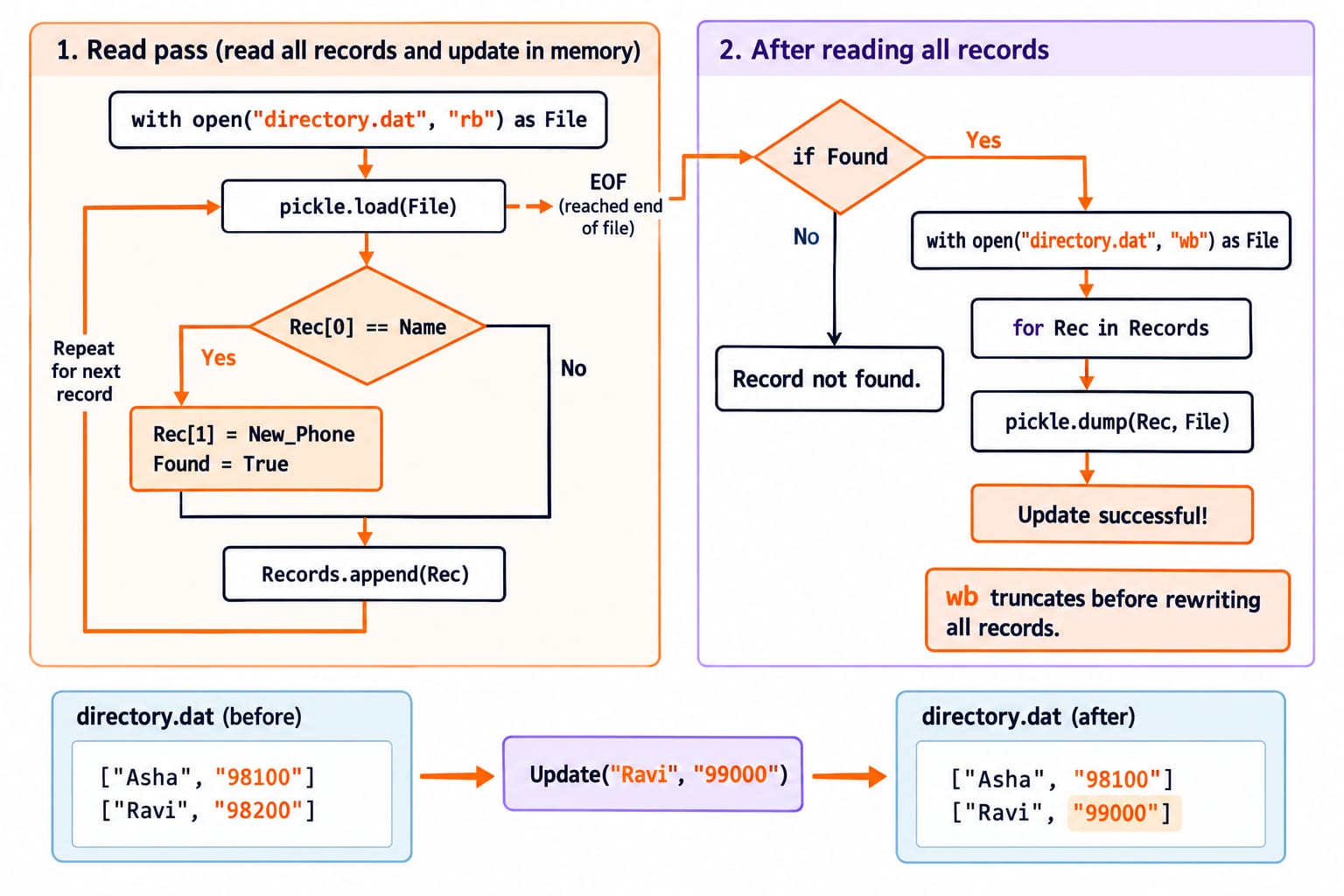
Question 11 (HPSC PGT Computer Science 2026)
The following Python program is designed to update the phone number of a specific person in a binary file named
directory.dat. The file stores records as lists in the format [Name, Phone]. The function searches for a record matching Name. If found, it updates the phone number and saves the changes back to the file.
import pickle

def Update(Name, New_Phone):
    Found = False
    Records = []
    try:
        ______ (A) ______ as File:
            while True:
                try:
                    Rec = ______ (B) ______
                    if Rec[0] == Name:
                        Rec[1] = New_Phone
                        Found = True
                    Records.append(Rec)
                except EOFError:
                    break

        if Found:
            ______ (C) ______ as File:
                for Rec in Records:
                    ______ (D) ______
            print("Update successful!")
        else:
            print("Record not found.")

    except FileNotFoundError:
        print("File not found.")
Questions:
(A) Write the complete
openstatement with appropriate file mode for Blank (A) that allows reading a binary file.(B) Provide the method call for Blank (B) to read and deserialize a single record from the file object
File.(C) Write the complete 'open' statement with appropriate file mode for Blank (C) that allows writing the updated data into the binary file.
(D) Write the code for Blank (D) to write the updated record Rec into the file object File.
Correct fills:
A.
with open("directory.dat", "rb")B.
pickle.load(File)C.
with open("directory.dat", "wb")D.
pickle.dump(Rec, File)
The read pass finishes before rewriting because pickled records are not safely edited in place. Mode rb loads them, the match changes in memory, and wb truncates before rewriting all records. Given ["Asha", "98100"] and ["Ravi", "98200"], Update("Ravi", "99000") preserves Asha and changes Ravi to ["Ravi", "99000"].
Solution (question page unavailable; see the live Binary Files PYQ Questions hub).
Question 12
A binary file "INVENTORY.DAT" stores product information as tuples in the format:
(ProductID, ProductName, Quantity, Price).
Write a Python function expensiveProducts() that reads the contents of INVENTORY.DAT and displays the Product IDs of those products whose price is greater than 1000. The function should also calculate and display the total number of such expensive products.
Example: If the file contains the following records in binary form:
(1, 'ABC', 100, 5000)
(2, 'DEF', 250, 1000)
(3, 'GHI', 300, 2000)
The function should display:
Product ID: 1
Product ID: 3
Total expensive products: 2
import pickle

def expensiveProducts():
    count = 0
    with open("INVENTORY.DAT", "rb") as file:
        while True:
            try:
                product_id, product_name, quantity, price = pickle.load(file)
                if price > 1000:
                    print("Product ID:", product_id)
                    count += 1
            except EOFError:
                break
    print("Total expensive products:", count)
The function loads one tuple per loop. Product 1 qualifies because 5000 > 1000. Product 2 fails because 1000 > 1000 is false: equality does not pass a strict comparison. Product 3 qualifies because 2000 > 1000. The function prints IDs 1 and 3 and reports a count of 2.
Binary Files traps these 12 questions expose
Trap | Questions to revisit |
|---|---|
Module versus method | 1-3 |
What can be serialised | 4 |
| 5, 7, 9 and 11 |
Sequential | 6, 8, 10 and 12 |
Mark the mode, count dumps, track the pointer across loads, check whether wb truncates, and test strict boundaries. In Question 12, price > 1000 excludes 1000.
For more tracing practice, work through Python Output-Based Questions. To widen the revision beyond file handling, try Python Interview Questions for Freshers 2026.
Binary Files MCQs and practice: the next step
Redo Questions 5, 7, 8, 9, 10 and 12 unseen. Revise reading, updating, EOF, truncation, sequential objects, and filtering. If a trace fails, annotate every operation with the mode and pointer position.
Continue with the linked Python course. Remember: dump() writes the next object, load() reads it, the mode controls the file, and EOFError ends sequential loading.
Keep learning

CSV Files MCQs and Python Practice: 10 Solved Questions with Explanations
Build a reliable CSV mental model through seven exam-style MCQs and three applied Python problems. Each answer traces the exact row object, file setting, or output that decides the result.
Updated 24 Nov 20268 min readPython

Files, Formats & Multimedia MCQs: 12 Solved Questions with Explanations
Classify image, audio, video and document formats, then use concise explanations and recall cues to separate valid extensions from plausible distractors.
Updated 2 Nov 20266 min readUGC NET Computer Science

Binary Tree Properties MCQs: 12 Solved Questions with Explanations
Work through 12 binary tree MCQs from GATE and campus papers, then use the explanations and one worked tree to fix mistakes in shape, degree and recursion.
Updated 30 Oct 20268 min read64 viewsData Structures MCQs
Binary, Octal & Hexadecimal MCQs: 12 Solved Questions with Explanations
Solve 12 previous-year MCQs step by step, from binary, octal and hexadecimal conversions to fractional values, arithmetic, bit counts and bitwise AND.
Updated 14 Aug 20268 min read80 viewsDigital Electronics MCQs