

Python File Basics MCQs and Practice: 10 Solved Questions with Explanations
Solve nine Python file-basics MCQs and one seek()/tell() pointer trace covering modes, missing files, exceptions, append behaviour and closed state.
KnowledgeGate Team
Exam prep & CS education
Updated 28 Nov 20267 min read
Python file-mode questions often hinge on four details: whether a missing file is created, whether existing bytes are truncated, where the pointer starts, and when closed is inspected. Commit to an option, or write the pointer trace for Question 10, before reading each explanation. Treat each stem as a state transition: choose the mode, record whether the path exists, track the pointer, and then predict the result. When a question has no single-question page, its practice link opens the File Basics question set.
Python file basics to fix before solving the questions
Start with what each mode does to an existing or missing file.
Mode | Exact behaviour |
|---|---|
| Requires an existing file and reads |
| Creates or truncates and writes |
| Creates if missing and writes at the end |
| Requires an existing file and allows reading plus writing without automatic truncation |
| Creates or truncates and allows reading plus writing |
| Creates if missing, allows reading, and sends writes to the end |
The b flag changes text mode to binary mode, as in rb or ab.
Now trace an ASCII-only file. Suppose notes.txt contains the 9 bytes red\nblue\n. Open it with r+. The first tell() returns 0. Calling read(4) returns "red\n", so tell() becomes 4. Next, seek(0) returns the pointer to 0. Writing "RED" replaces the first three bytes, producing RED\nblue\n; it does not truncate the remaining 6 bytes. Reopen the file with a and write "green\n". The final content is RED\nblue\ngreen\n, which is 15 bytes: the existing 9 plus 6 appended bytes. These offsets are predictable because every character here is single-byte ASCII.
For a structured route through the underlying language concepts and more practice, use Python Course: Concepts, MCQs & Coding.
File Basics MCQs 1-2: read mode and missing files
Question 1 (RSSB Senior Computer Instructor 2023)
If a file is opened in mode
r, we can only ______ its contents.
(a) read
(b) write
(c) delete
(d) overwrite
Correct answer: (a) read.
Mode r retrieves content but cannot write or overwrite through that file object. Deletion is a separate filesystem operation, not a permission supplied by r. Review the solved read-mode question.
Question 2 (RSSB Senior Computer Instructor 2023)
Which file mode raises an error if the file does not exist when Python opens it?
(a)
a+(b)
r+(c)
w+(d)
a
Correct answer: (b) r+.
Mode r+ requires the file to exist, so a missing path raises FileNotFoundError. Modes a+, a and w+ create a missing file; w+ also truncates an existing one. The decisive split is existing file required versus create if missing. Review the solved missing-file question.
File Basics MCQs 3-4: append mode and preserving content
Question 3 (RSSB Senior Computer Instructor 2023)
Consider the following Python command:
File = open('Myfile', 'a')Which option cannot be true?
(a) 'Myfile' can be a text file
(b) 'Myfile' can be a CSV file
(c) The file object is opened as a binary stream
(d) 'Myfile' will be created if it does not exist
Correct answer: (c) The file object is opened as a binary stream.
Mode a opens a text stream for appending. Myfile needs no extension, and CSV is normally text, so (a) and (b) can fit. Append mode creates an absent file, making (d) true. A binary stream needs the b flag, such as ab, so (c) cannot fit this command. Review the solved append-mode question.
Question 4 (IBPS SO IT Mains 2024)
Which file mode in Python appends new content without deleting the previous data?
(a)
r(b)
w(c)
x(d)
a
Correct answer: (d) a.
Mode a sends writes to the end and preserves existing data. Mode w truncates, r reads, and x fails if the path already exists. If log.txt contains A\n, appending B\n leaves A\nB\n, not only B\n. Review the solved content-preservation question.
File Basics MCQs 5-6: exceptions and read-write access
Question 5
Which exception is raised when Python tries to open a missing file for reading?
(a) ValueError
(b) FileNotFoundError
(c) IndexError
(d) TypeError
Correct answer: (b) FileNotFoundError.
When Python opens a missing path in r or r+, it raises FileNotFoundError. An existing path can fail for other reasons, such as permissions or a directory/file mismatch, so the missing-path condition matters. Open the File Basics practice set for the related items.
Question 6
Which of the following opens a file for both reading and writing?
(a)
r(b)
w(c)
a(d)
r+
Correct answer: (d) r+.
The + flag adds the second access direction, so r+ reads and writes an existing file without erasing it automatically. Here, r only reads, while w and a write under different preservation rules. Modes w+ and a+ also support both operations, but their creation, truncation and pointer rules differ. Continue in the File Basics practice set.
File Basics MCQs 7-8: closed state and a+
Question 7
What will be the output?
f = open("test.txt","w")
print(f.closed)
f.close()
(a) True
(b) False
(c) Error
(d) None
Correct answer: (b) False.
Trace the lines in order. open("test.txt", "w") returns an open file object, so f.closed is False when printed. f.close() runs afterwards; printing the property after that call would give True. Try more execution-order traps in Python Output-Based Questions, or return to the File Basics practice set.
Question 8 (RSSB Senior Computer Instructor 2023)
Which statement is not true for this command?
File = open('story.txt', 'a+')(a) More text can be written to 'story.txt'.
(b) The content of 'story.txt' can be read.
(c) The content of 'story.txt' can be modified by appending.
(d) The command raises an error if 'story.txt' does not exist.
Correct answer: (d) The command raises an error if 'story.txt' does not exist.
Mode a+ permits reading and append-only writing, and it creates an absent story.txt, making (d) false. Text can be appended, and existing content can be read after repositioning the pointer, commonly with seek(0). Appending modifies the content but does not provide ordinary in-place overwriting because each write goes to the end. Review the solved a+ question.
File-pointer practice 9-10: seek() and tell()
Question 9
seek() is a method of which object or module?
(a) csv module
(b) pickle module
(c) text module
(d) file object
Correct answer: (d) file object.
The built-in open() returns a file object, and seek() is called on it, as in f.seek(0). The csv and pickle modules handle structured data, but pointer movement belongs to the open stream. No standard text module supplies this method. Use the File Basics practice set for more pointer questions.
Question 10
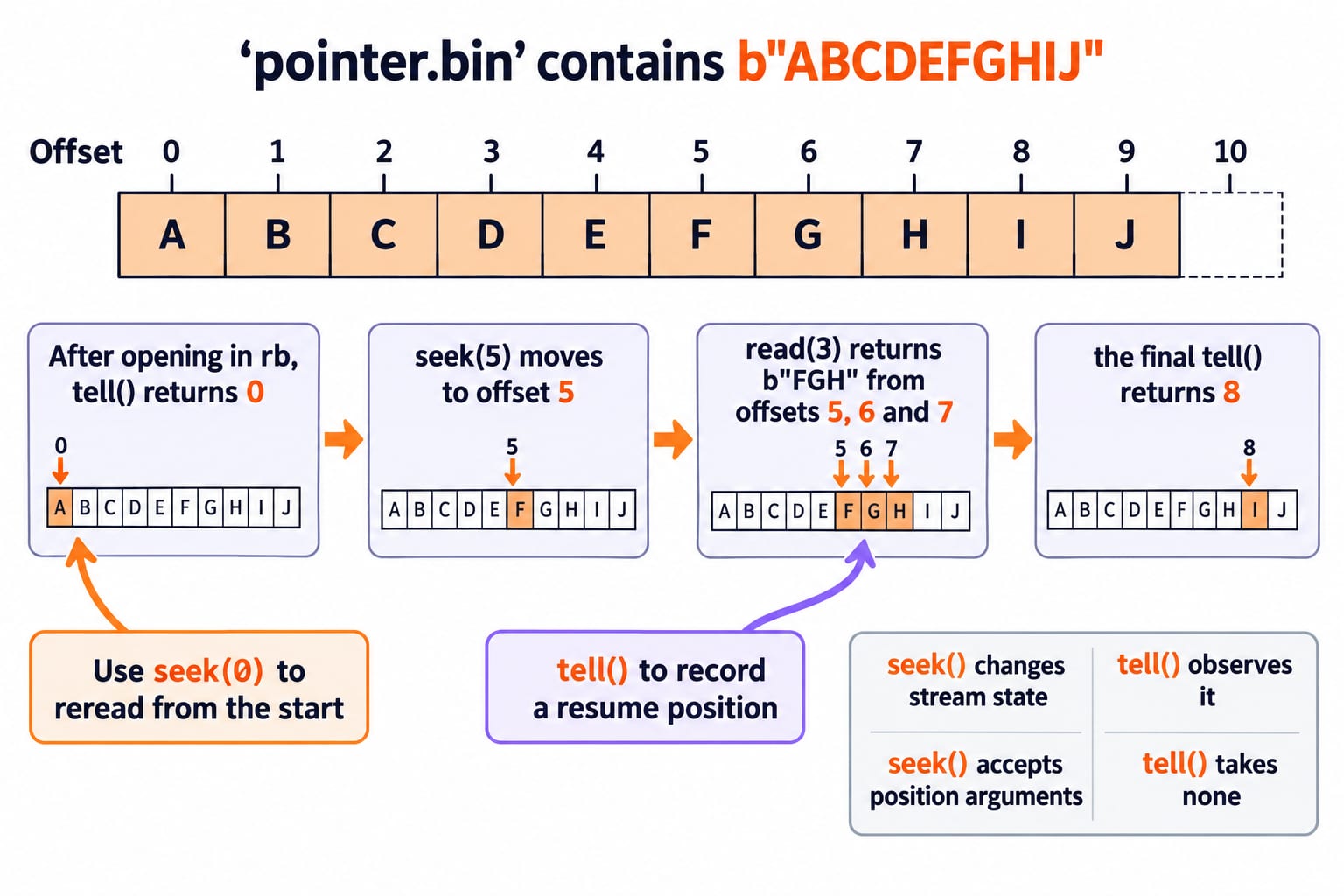
Explain the file handling functions seek() and tell() in Python. State any two differences between them. Also mention one situation where each function is used.
A complete response should distinguish the state-changing method from the reporting method and give one use for each.
Worked response: seek(offset, whence) moves the file pointer, while tell() reports its current position. First, seek() changes stream state while tell() observes it. Second, seek() accepts position arguments while tell() takes none.
Let pointer.bin contain b"ABCDEFGHIJ". After opening in rb, tell() returns 0. Then seek(5) moves to offset 5; read(3) returns b"FGH" from offsets 5, 6 and 7; the final tell() returns 8. Use seek(0) to reread from the start, and tell() to record a resume position. Text-mode positions may be opaque cookies, so byte arithmetic is safest in this binary example. The File Basics practice set carries related practice.
File-mode trap checklist and the next practice step
Before choosing an answer, run these five checks:
A missing file plus
rorr+means an error.Mode
worw+means create or truncate.Mode
aora+means create if missing and append on every write.closedreports state at the exact line where it is read.seek()moves the pointer, whiletell()reports it.
Retest without options. Let data.txt start with the three ASCII bytes AB\n. Open it with a+, write CD\n, call seek(0), and then read. The result is AB\nCD\n, and the final tell() is 6 in this ASCII example. If your trace differs, identify whether the mistake concerns creation, truncation, access or pointer position.
The short version is: first identify create versus existing, then truncate versus preserve, then read/write permission, and finally pointer position. Apply that decision sequence before looking at the options. Browse Coding & DSA Courses for Placements when you want a wider programming route.
Keep learning

File Allocation Methods MCQs: 10 Solved Questions with Explanations
Practise ten questions on contiguous, linked and indexed allocation. Each answer includes the reasoning, arithmetic and a useful boundary check.
Updated 29 Oct 20268 min readOperating System MCQs

Python Data Types MCQs: 10 Solved Questions with Explanations
Test your Python fundamentals with 10 solved MCQs covering types, mutability, scope, string methods, conversions and precise code tracing.
Updated 27 Nov 20267 min readPython

While Loop MCQs in Python: 10 Solved Questions with Explanations
Test your Python while-loop tracing with 10 solved MCQs. Each answer explains the condition, state change and stopping point without skipping iterations.
Updated 25 Nov 20268 min readPython

CSV Files MCQs and Python Practice: 10 Solved Questions with Explanations
Build a reliable CSV mental model through seven exam-style MCQs and three applied Python problems. Each answer traces the exact row object, file setting, or output that decides the result.
Updated 24 Nov 20268 min readPython