PHP Tutorial for Beginners: Build a Form-to-Database Request Flow
Follow Asha's registration from an HTML form through PHP validation and a safe MySQL insert, then display the saved row after a redirect.
KnowledgeGate Team
Exam prep & CS education
Updated 20 Aug 20266 min read

Syntax lessons often teach variables and loops separately. A useful PHP program must receive an HTTP request, validate untrusted form values, save them safely, remember a result across a redirect, and render a response. One registration flow, from a browser form through PHP validation into a MySQL row and back onto the screen, exercises all five in order. The code below needs PHP 8.0 or newer with the PDO MySQL driver enabled.
1. Follow one PHP request from browser to response
The browser sends GET /register.php and receives a form, then sends POST /register.php with fields. PHP builds key-value superglobal arrays, including $_SERVER, $_POST, and $_SESSION. $_POST['name'] reads the name value.
Code validates values, calls the database, and returns a response. A function is reusable behaviour: clean(' Asha ') returns Asha. HTTP carries requests and responses; PHP runs on the server and produces HTML or a redirect. Read Application Layer Protocols: DNS and HTTP for more application-layer context.
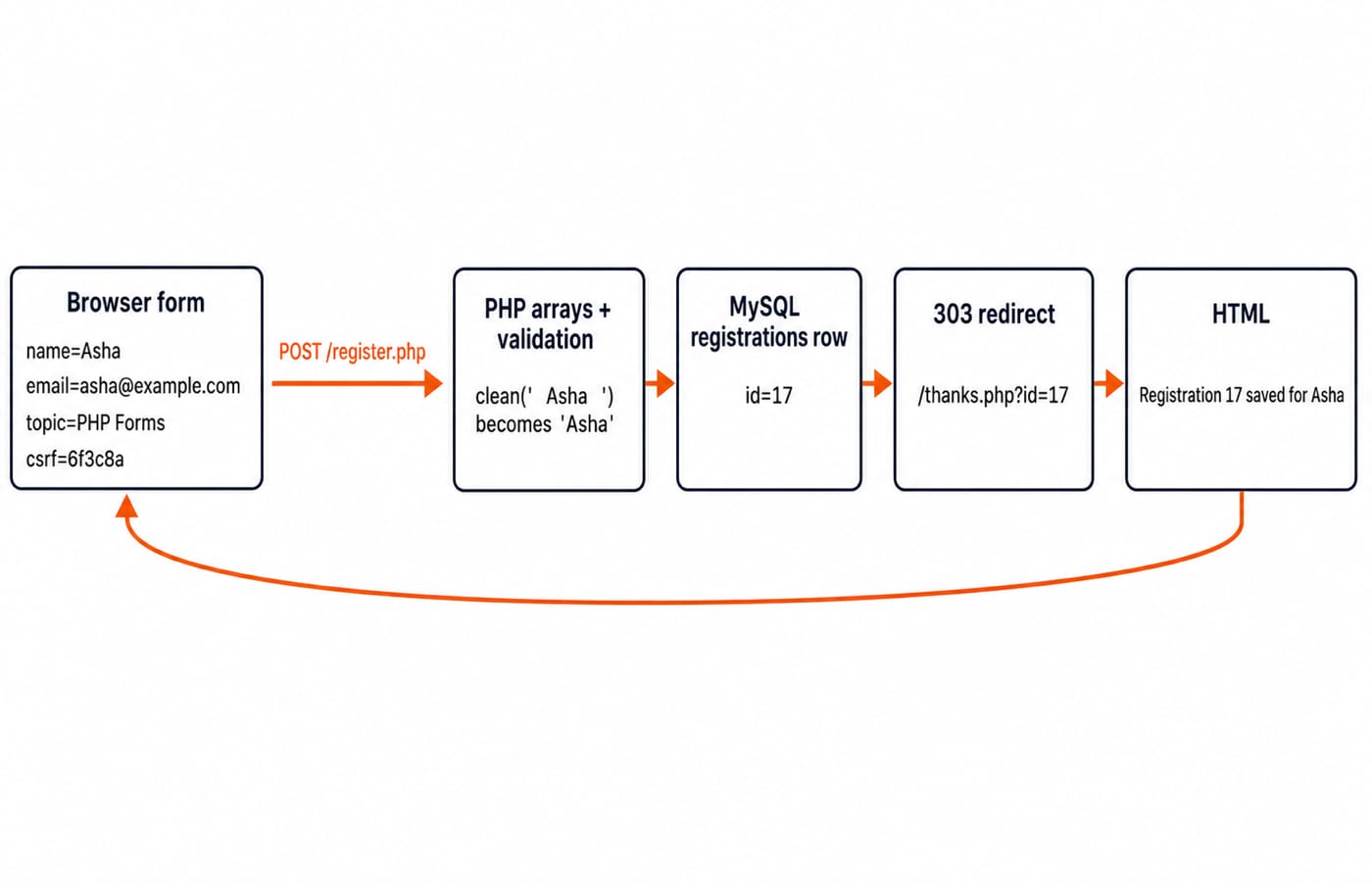
2. Create the form, session, and database contract
Use three files. db.php returns a PDO; register.php displays and processes the form; thanks.php reads the row. Start both request pages with declare(strict_types=1); and session_start();. Variables start with $, statements end with ;, arrays use [], and . concatenates strings.
Create the table:
CREATE TABLE registrations (
  id INT UNSIGNED AUTO_INCREMENT PRIMARY KEY,
  name VARCHAR(80) NOT NULL,
  email VARCHAR(120) NOT NULL UNIQUE,
  topic VARCHAR(80) NOT NULL,
  created_at TIMESTAMP NOT NULL DEFAULT CURRENT_TIMESTAMP
);
db.php contains:
<?php
return new PDO(
    'mysql:host=127.0.0.1;dbname=php_beginner;charset=utf8mb4',
    'app_user',
    'LOCAL_ONLY_PASSWORD', // Local-only placeholder, never commit a real secret.
    [
        PDO::ATTR_ERRMODE => PDO::ERRMODE_EXCEPTION,
        PDO::ATTR_DEFAULT_FETCH_MODE => PDO::FETCH_ASSOC,
    ]
);
This trace fixes $_SESSION['csrf'] at 6f3c8a. Real applications must generate an unpredictable per-session token, for example bin2hex(random_bytes(32)). The fixed six-character value here only keeps the traced request values short.
<?php
declare(strict_types=1);
session_start();
if ($_SERVER['REQUEST_METHOD'] === 'GET') {
    $_SESSION['csrf'] = '6f3c8a';
}
?>
<form method="post" action="/register.php">
  <input type="text" name="name" required>
  <input type="email" name="email" required>
  <select name="topic">
    <option value="PHP Forms">PHP Forms</option>
  </select>
  <input type="hidden" name="csrf" value="<?= htmlspecialchars(
      $_SESSION['csrf'], ENT_QUOTES, 'UTF-8'
  ) ?>">
  <button type="submit">Register</button>
</form>
3. Read and validate the submitted values
A GET displays the form. Only a POST may insert:
if ($_SERVER['REQUEST_METHOD'] !== 'POST') {
    // Render the form above and stop before any INSERT.
    return;
}

function clean(string $value): string { return trim($value); }

$input = [
    'name' => clean((string)($_POST['name'] ?? '')),
    'email' => clean((string)($_POST['email'] ?? '')),
    'topic' => clean((string)($_POST['topic'] ?? '')),
];
$errors = [];

if (!hash_equals((string)($_SESSION['csrf'] ?? ''),
                 (string)($_POST['csrf'] ?? ''))) {
    $errors[] = 'Invalid form token.';
}
$nameLength = mb_strlen($input['name'], 'UTF-8');
if ($nameLength < 2 || $nameLength > 80) {
    $errors[] = 'Name must contain 2 to 80 characters.';
}
if (!filter_var($input['email'], FILTER_VALIDATE_EMAIL)) {
    $errors[] = 'Enter a valid email address.';
}
$allowedTopics = ['PHP Forms', 'PHP Sessions', 'PHP Database'];
if (!in_array($input['topic'], $allowedTopics, true)) {
    $errors[] = 'Choose a valid topic.';
}
Posting name=' Asha ', email='asha@example.com', and topic='PHP Forms' produces Asha, asha@example.com, and PHP Forms. In contrast, name='Q', email='asha@', the same topic, and the correct token produce exactly two messages: Name must contain 2 to 80 characters. and Enter a valid email address. No SQL runs while $errors is non-empty. Re-render values with htmlspecialchars(..., ENT_QUOTES, 'UTF-8'); validation decides acceptability, while escaping makes output safe.
4. Insert the row with a parameterised PDO statement
With no errors, use placeholders:
if ($errors !== []) {
    // Re-render the form with $errors and stop before any INSERT.
    return;
}

$pdo = require __DIR__ . '/db.php';
$statement = $pdo->prepare(
    'INSERT INTO registrations (name, email, topic) VALUES (:name, :email, :topic)'
);
$statement->execute([
    'name'  => $input['name'],   // 'Asha'
    'email' => $input['email'],  // 'asha@example.com'
    'topic' => $input['topic'],  // 'PHP Forms'
]);
$id = (int)$pdo->lastInsertId(); // 17 on this request.
$_SESSION['flash'] = 'Saved registration #' . $id . ' for ' . $input['name'];
header('Location: /thanks.php?id=' . $id, true, 303);
exit;
Placeholders prevent data from becoming SQL syntax. SQL Queries and Joins in DBMS develops SELECT, INSERT, and joins. exit stops code after the redirect. The 303 makes refresh repeat the GET, not the POST.
The UNIQUE constraint may reject another asha@example.com. Catch PDOException, log the technical exception on the server, and show That email is already registered. only when the driver reports the relevant unique-constraint violation, such as MySQL error 1062. Other database failures need a general safe response and separate investigation. Never expose credentials or exception details in HTML.
5. Read the saved row and render the final response
In thanks.php, parse and query the identifier:
<?php
declare(strict_types=1);
session_start();

$id = filter_input(INPUT_GET, 'id', FILTER_VALIDATE_INT);
if (!$id || $id <= 0) { http_response_code(400); exit('Invalid registration.'); }

$pdo = require __DIR__ . '/db.php';
$statement = $pdo->prepare(
    'SELECT id, name, email, topic, created_at FROM registrations WHERE id = :id'
);
$statement->execute(['id' => $id]); // 17 on this request.
$row = $statement->fetch();
if (!$row) { http_response_code(404); exit('Registration not found.'); }

$flash = (string)($_SESSION['flash'] ?? '');
unset($_SESSION['flash']);
$escape = fn(string $value): string => htmlspecialchars(
    $value, ENT_QUOTES, 'UTF-8'
);
echo '<p>' . $escape($flash) . '</p>';
echo '<h1>Registration ' . (int)$row['id'] . ' saved for ' .
     $escape($row['name']) . '</h1>';
echo '<p>' . $escape($row['topic']) . ': ' . $escape($row['email']) . '</p>';
The row contains id=17, name=Asha, email=asha@example.com, and topic=PHP Forms. The flash is read once and removed. Every database-derived string is escaped.
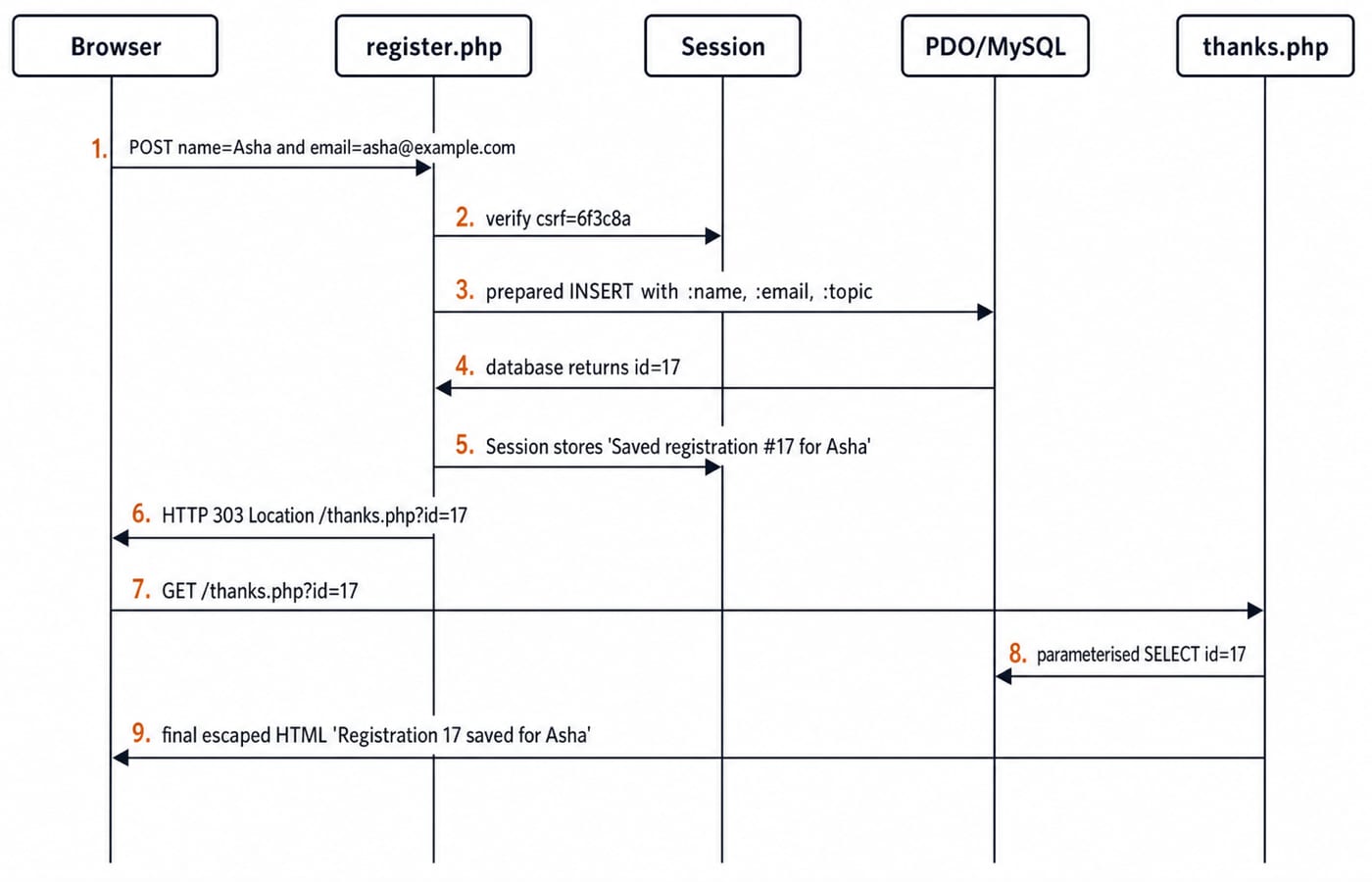
6. Avoid the beginner traps that break this flow
Trap | Why it fails and the fix |
|---|---|
Read | A missing key raises an undefined-array-key warning on PHP 8. Use |
Accept every method | Display and mutation get mixed. Insert only on POST. |
Concatenate email into SQL | Input can become SQL syntax. Bind a placeholder. |
Omit | CSRF and flash state disappear. Start the session first. |
Print HTML before | PHP cannot send the redirect header. Redirect before output. |
Print raw values | Untrusted HTML can cause cross-site scripting. Escape output. |
Browser-side required and type="email" help usability but never replace server validation. A duplicate lookup also never replaces the database UNIQUE constraint. Validation, parameterisation, constraints, and output escaping are four separate protections.
Debug in request order. Confirm the network request is POST with email=asha@example.com. Log the normalised array without secrets. Confirm the row has id=17 before checking the 303 and GET /thanks.php?id=17. Do not put var_dump() into a production response.
7. How practical tests and interviews probe the same ideas
Practical tests and vivas probe this flow by asking for a returned value, a status code, or a repair, not for a definition. Four that recur, with their answers:
What does
$_POST['name'] ?? ''return when the key is absent? The empty string, with no warning, which is why every field is read through??beforeclean()trims it.Why should a 303 follow the insert? It sends the browser to fetch
/thanks.phpwith GET, so a refresh repeats the read and never a second INSERT.How would you repair SQL built by concatenation? Replace each interpolated value with a named placeholder and pass it in
execute(), so the value reaches MySQL as data and can never be parsed as syntax.Why must output be escaped even after a parameterised insert? Placeholders protect the SQL parser, not the HTML parser. A stored
<script>is still executable markup untilhtmlspecialchars()turns it into visible characters.
Then change the topic to PHP Sessions and submit name=Ravi with email=ravi@example.com. The array entries, bound values, flash message, and final HTML change to Ravi's data. The control flow and SQL text stay exactly the same.
8. The short version and the next build
Display the form.
Accept only POST for mutation.
Normalise and validate into an array.
Execute parameterised SQL.
Save one-time session feedback.
Redirect, read the row, and escape the result.
Asha remains data at every boundary. It is never executable SQL or trusted HTML.
To apply the same request, routing, and database ideas in JavaScript, continue with the Node.js + Express.js + MongoDB course. The MERN Stack course is the broader full-stack path. Browse Coding & Skills if you are comparing programming routes.
Now implement the three files and submit the exact Asha example. Confirm the row your database generates, id=17 on this trace, then retry the duplicate email and the invalid asha@ cases before adding edit or delete features.
Keep learning

Classes and Objects MCQs: 12 Solved OOP Questions with Explanations
Solve 12 classes and objects MCQs, check each explanation, and use a worked Java trace to separate instance state, constructors, overloading and nested classes.
20 Oct 20267 min readProgramming Languages Survey

Programming Language Syntax MCQs: 12 Solved Questions on Grammar, Tokens and Semantics
Solve 12 MCQs on syntax, tokens, pseudocode, C grammar and runtime behaviour. Each explanation identifies the rule and applies it.
Updated 16 Oct 20268 min readProgramming Languages Survey
Imperative Programming Structure and Flow Control MCQs: 12 Solved Questions
Test whether you can trace changing state, choose the right loop, read a flowchart, and follow event-driven or exceptional control paths through 12 solved MCQs.
12 Oct 20267 min readProgramming Languages Survey
Static vs Dynamic Binding MCQs: 11 Solved Questions on Scope, Aliasing and Dispatch
Solve 11 binding questions from GATE and UGC NET papers by tracing lexical scope, runtime call chains, declared types and shared storage cells. Each answer shows why the tempting shortcuts fail.
Updated 8 Oct 20267 min readProgramming Languages Survey